
Business automation often starts innocently.
Someone creates:
New lead
    ↓
Add to CRM
    ↓
Send Slack message
Then another team adds:
New order
    ↓
Validate payment
    ↓
Update ERP
    ↓
Create invoice
    ↓
Notify customer
A few months later the organization has hundreds of workflows moving business-critical data between:
Salesforce
HubSpot
Google Workspace
Slack
Microsoft 365
ServiceNow
Jira
Snowflake
PostgreSQL
ERP systems
AI models
internal APIs
At that point, automation is no longer a collection of convenience scripts.
It has become integration infrastructure.
And the architecture question changes from:
Which automation tool is easiest to use?
to:
Who should operate our automation platform, where should our data flow, and how much control do we need?
Three platforms regularly appear in that decision:
Zapier

Make

n8n
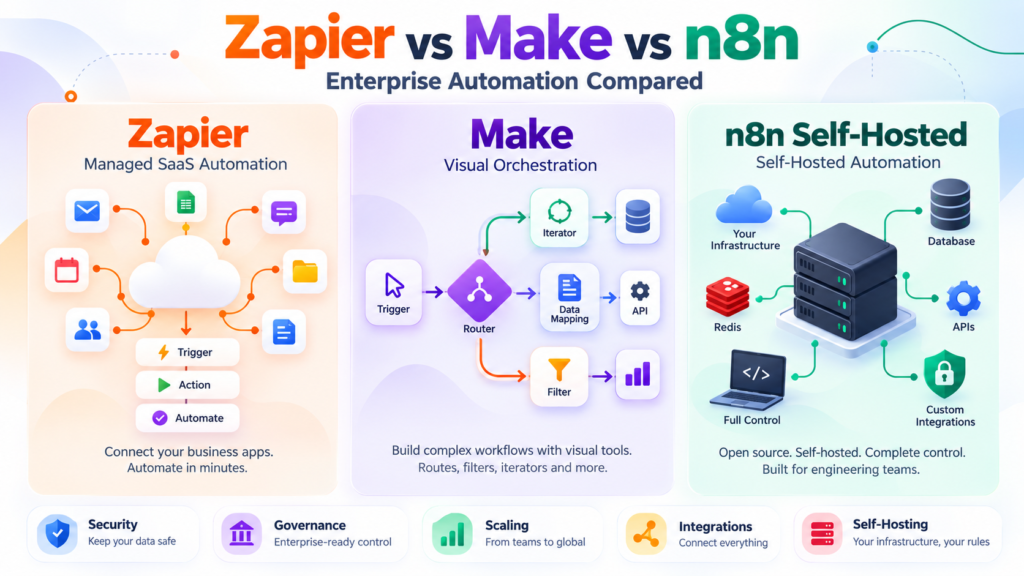
Zapier and Make are primarily managed SaaS automation platforms.
n8n offers a managed cloud service too, but its major architectural differentiator is the ability to run the platform on infrastructure you control.
That creates two very different operating models:
Managed iPaaS
─────────────────────────
Vendor runs platform
Vendor scales infrastructure
Vendor patches software
Vendor operates availability

vs.

Self-hosted automation
─────────────────────────
You run platform
You scale infrastructure
You patch software
You operate availability
Neither model is automatically better.
The correct choice depends on:
governance

data sensitivity

workflow complexity

developer involvement

execution volume

integration requirements

operational maturity

cost structure
Before comparing them, however, there is one terminology issue worth correcting.
Table of Contents
Is n8n Really Open Source?
n8n is frequently called an open-source automation platform.
That description is convenient, but technically imprecise.
The self-hosted Community Edition currently runs under n8n’s Sustainable Use License.
That means its source code is available and organizations can self-host it for many internal business uses.
However, it is not the same licensing model as software released under conventional OSI-approved licenses such as:
Apache 2.0

MIT

BSD
n8n describes its licensing philosophy as:
fair-coderather than traditional open source.
This distinction matters for enterprise architects.
What the n8n Community License Generally Allows
According to n8n’s current licensing guidance, the Community Edition can generally be used freely when people inside your organization create and edit the workflows.
For example:
Your employees
      ↓
Self-hosted n8n
      ↓
CRM
ERP
Database
Internal APIs
is a normal internal automation use case.
Consultants can also build workflows for clients under certain conditions.
When You May Need a Commercial n8n License
The licensing boundary changes when n8n itself becomes part of the service you expose externally.
For example:
Your SaaS customers
      ↓
Create or configure automations
      ↓
n8n
may require a commercial arrangement.
Similarly, scenarios involving:
white-labeling n8n

hosting n8n as a service

allowing external customers to edit workflows

embedding workflow configuration into your product
should be reviewed against n8n’s current commercial licensing terms.
This is important because:
Self-hostable does not automatically mean unrestricted redistribution.
For internal enterprise automation, the licensing question is usually much simpler.
What Is an iPaaS?
iPaaS stands for:
Integration Platform as a ServiceThe basic goal is to connect systems without writing and operating every integration from scratch.
Instead of:
Custom Node.js service
      ↓
OAuth integration
      ↓
Retry logic
      ↓
Queue
      ↓
API client
      ↓
Logging
      ↓
Deployment
you build:
Trigger
   ↓
Action
   ↓
Transformation
   ↓
Action
inside a managed automation platform.
For a broader introduction to the concept, see:
Zapier vs. Make vs. n8n: Quick Comparison
| Area | Zapier | Make | n8n Self-Hosted |
|---|---|---|---|
| Primary model | Managed SaaS | Managed SaaS | Self-hosted automation |
| Infrastructure ownership | Zapier | Make | Your organization |
| Visual workflow builder | Yes | Yes | Yes |
| No-code friendliness | Excellent | Excellent | Good |
| Developer flexibility | Good | Very good | Excellent |
| Custom HTTP/API work | Yes | Yes | Yes |
| Custom code | Yes | Yes | Yes |
| Data location control | Limited to vendor options | Limited to vendor options | Excellent |
| Server access | No | No | Yes |
| Database access | Through integrations/API | Through integrations/API | Native nodes/custom networking |
| Internal/private APIs | Enterprise options | Enterprise/private connectivity options | Full network control |
| SSO | Enterprise | Enterprise | Business/Enterprise self-hosted |
| RBAC | Strong enterprise controls | Strong enterprise controls | Projects/RBAC depending on plan |
| Audit logs | Yes | Enterprise | Enterprise features available |
| Log streaming | Enterprise | Event/audit integrations | Enterprise log streaming |
| Git-based workflow promotion | Limited platform workflow lifecycle | Platform-managed | Native source-control environments on Business/Enterprise |
| Horizontal execution scaling | Vendor managed | Vendor managed | You design/manage it |
| Credential storage | Vendor managed | Vendor managed | Your infrastructure |
| Execution billing | Tasks | Credits | Workflow executions on paid plans + infrastructure |
| Infrastructure maintenance | Vendor | Vendor | You |
| Best for | Broad business automation | Complex visual orchestration | Engineering-heavy/private automation |
The important difference is not whether all three can:
receive webhook
→ call API
→ transform JSON
→ write database record
They can.
The question is who owns everything around that workflow.
Zapier: Automation With Maximum Abstraction
Zapier is probably the easiest of the three platforms to explain to a non-engineering team.
The core model is:
Trigger
   ↓
Action
   ↓
Action
For example:
New HubSpot Lead
      ↓
Create Salesforce Contact
      ↓
Send Slack Notification
Zapier calls these workflows:
ZapsThe platform handles:
authentication

execution infrastructure

scheduling

retry behavior

integration maintenance

workflow history

platform upgrades
without the customer operating servers.
That abstraction is its biggest advantage.
Zapier’s Integration Catalog Is a Serious Advantage
Zapier currently connects to thousands of SaaS applications.
For organizations where automation means:
Salesforce

Slack

HubSpot

Google Sheets

Microsoft Teams

Jira

ServiceNow

Gmail

Notion
the integration catalog can eliminate a large amount of custom engineering.
Instead of implementing:
OAuth flow

token refresh

API pagination

API endpoint wrapper
your workflow builder selects an existing action.
This is particularly valuable for:
operations teams

sales operations

marketing

HR

finance

customer support
where the people automating the process may not be software engineers.
Zapier’s Enterprise Story Is Governance
The difference between a personal automation account and enterprise automation is governance.
Zapier Enterprise currently provides controls including:
SAML SSO

SCIM provisioning

role-based permissions

app restrictions

action restrictions

managed connections

workflow approvals

audit logging

log streaming

analytics

data-retention controls
This changes the operating model.
Without governance:
Employee
   ↓
Connect anything
   ↓
Automate anything
With governance:
IT policy
   ↓
Approved applications
   ↓
Approved actions
   ↓
Managed credentials
   ↓
Controlled workflow publishing
That is what makes managed automation viable in larger enterprises.
App Restrictions Matter More Than They Sound
Suppose employees can connect:
CRM
↓
personal Dropbox account
An automation platform can accidentally become a data-exfiltration path.
Enterprise controls can restrict:
which apps can connect

which actions are allowed

which domains can authenticate

which connections teams may use
That is often more important than the workflow builder itself.
Managed Connections Reduce Credential Sharing
A poor automation practice is:
"Here is the Salesforce password.
Put it into the workflow."
A better architecture is:
Company-managed connection
        ↓
Authorized workflow
        ↓
Salesforce
Workflow builders can use the connection without receiving the underlying credential.
This reduces secret duplication.
How Zapier Bills Automation
Zapier generally measures workflow usage in:
tasksA successful action step usually consumes a task.
The trigger itself does not normally consume a task.
Filters and Paths also do not generally count as tasks.
Consider:
Webhook
   ↓
Find customer
   ↓
Update CRM
   ↓
Send email
   ↓
Post Slack message
If all four action steps count as tasks, one business event may consume roughly:
4 tasksAt:
100,000 events/monththat could mean approximately:
100,000 × 4

=

400,000 tasks
before considering variations in product-specific task accounting.
This becomes important when comparing Zapier with execution-based platforms.
Zapier Works Best When the Workflow Is Mostly SaaS-to-SaaS
A classic strong fit is:
New lead
   ↓
Enrich lead
   ↓
CRM
   ↓
Email platform
   ↓
Slack
Most of the business value comes from connecting systems.
Infrastructure engineering is not the objective.
That is where Zapier’s abstraction is extremely valuable.
Where Zapier Becomes Less Natural
The platform becomes less attractive when workflows require extensive:
custom code

complex loops

large binary files

private networking

custom libraries

heavy data transformation

high-frequency event processing

specialized queue behavior
You can often implement those requirements.
The question becomes whether you should.
At some point the workflow starts looking more like:
an applicationthan:
an automationand a different architecture may be more appropriate.
Make: Visual Automation With More Explicit Data Flow
Make occupies an interesting middle ground.
It is still a managed SaaS automation platform.
But its workflow builder exposes more of the execution graph visually.
Make calls workflows:
scenariosA scenario might look like:
Webhook
   ↓
Parse payload
   ↓
Router
   ├── EU customer
   │      ↓
   │   Salesforce
   │
   └── US customer
          ↓
       HubSpot
This makes complicated branching workflows easier to visualize than a purely linear automation model.
Make’s Data Mapping Is One of Its Strengths
Suppose an API returns:
{
  "customer": {
    "name": "Mahesh",
    "region": "APAC"
  },
  "orders": [
    {
      "id": "ORD-101",
      "amount": 450
    },
    {
      "id": "ORD-102",
      "amount": 620
    }
  ]
}
A Make scenario can visually:
parse customer
      ↓
iterate orders
      ↓
filter region
      ↓
transform fields
      ↓
send each order elsewhere
using modules such as:
routers

filters

iterators

aggregators
This is one reason Make is popular for workflows that require more data manipulation than a simple:
trigger → actionpattern.
Make Webhooks Are First-Class Workflow Triggers
Make provides custom HTTPS webhooks.
The pattern is:
Application
     ↓
POST webhook
     ↓
Make scenario
     ↓
Processing
For example:
curl -X POST \
  https://hook.example.make.com/... \
  -H "Content-Type: application/json" \
  -d '{
    "order_id": "ORD-101",
    "status": "created"
  }'
The real Make webhook URL would be generated by the platform.
Webhooks can trigger scenarios immediately or queue incoming data for scheduled processing.
For secure production webhook design, see:
Setting Up Webhook Listeners in Express.js: Handling Real-Time Payloads Securely
Make Provides Explicit Error-Handling Paths
Imagine:
Create CRM Recordfails because the CRM temporarily returns:
503 Service UnavailableInstead of simply stopping the workflow, Make can route the failure through error-handling logic.
Conceptually:
CRM Action
   │
   ├── success
   │      ↓
   │    continue
   │
   └── error
          ↓
        retry
          ↓
        fallback
Make also supports incomplete executions, allowing failed processing to be preserved and recovered depending on scenario configuration.
This is useful for operational workflows where:
losing an eventis worse than:
processing it laterMake Enterprise Governance
Make’s Enterprise offering currently includes capabilities around:
SSO

role-based access

custom roles

audit logs

enterprise integrations

analytics

security controls
Single sign-on currently supports:
SAML 2.0

OpenID Connect
and can integrate with common identity providers.
Custom enterprise roles can be scoped across both:
organization permissions

team permissions
which is useful in larger environments where:
Finance Automation Teamshould not necessarily administer:
HR Automation Teamor enterprise billing settings.
Make Audit Logs
Enterprise audit logs can capture administrative and workflow-related activity such as:
scenario changes

connection changes

role changes

team changes

SSO configuration changes
This answers an important incident question:
Who changed the automation before it broke?
The audit trail is separate from the execution history.
Both are useful.
How Make Bills Automation
Make currently uses:
creditsas its billing unit.
Most ordinary module actions consume one credit.
Some advanced capabilities can use credits differently.
Consider:
Webhook
   ↓
Search CRM
   ↓
Transform
   ↓
Update CRM
   ↓
Send Slack
If four billable modules execute for every business event:
100,000 events
×
4 credits

≈
400,000 credits
for those module executions.
This is conceptually similar to Zapier’s step-based usage economics, although the exact billing mechanics differ.
Make Is Often Stronger for Visually Complex Workflows
If a process contains:
many branches

iterators

aggregations

filters

multiple API calls

complex mappings
Make’s canvas can make the process easier to understand visually.
That is useful for workflows like:
Order received
      ↓
Validate
      ↓
Split line items
      ↓
Inventory checks
      ↓
Aggregate results
      ↓
Branch by region
      ↓
ERP
CRM
Email
Analytics
The workflow diagram becomes documentation.
n8n Self-Hosted: Automation as Infrastructure
Self-hosted n8n changes the responsibility boundary completely.
The architecture becomes:
Your infrastructure
       │
       ├── n8n
       ├── database
       ├── network
       ├── TLS
       ├── backups
       ├── monitoring
       └── upgrades
That creates more work.
It also creates much more control.
A Basic n8n Architecture
A simple installation may look like:
Users
  ↓
Reverse Proxy
  ↓
n8n
  ↓
PostgreSQL
Workflows then call:
SaaS APIs

internal APIs

databases

AI models

message systems
Because n8n runs inside your own infrastructure, it can potentially access systems that you deliberately do not expose publicly.
Credential Encryption in n8n
n8n encrypts stored credentials before they are persisted in its database.
It uses an encryption key for this purpose.
A self-hosted deployment can explicitly configure:
export N8N_ENCRYPTION_KEY="<strong-random-secret>"The actual key should come from your secret-management system rather than being written into shell history or source control.
The important implication is:
Lose database
+
keep encryption key secret

≠
immediately expose plaintext credentials
but:
Lose database
+
lose encryption key

=
credentials may become unusable
Therefore the key needs:
secure storage

backup

restricted access

rotation planning
just like any other production secret.
Self-Hosting Gives You Network-Level Control
Imagine the workflow needs to access:
10.10.4.22:5432which is an internal PostgreSQL database not exposed to the internet.
With self-hosted n8n:
n8n
inside private network
      ↓
PostgreSQL
can be straightforward.
You can control:
VPC

firewall

private DNS

VPN

service identity

egress policy
This is one of the most compelling reasons for self-hosting integration infrastructure.
n8n Can Behave More Like a Low-Code Backend
n8n workflows can contain:
HTTP calls

database operations

JavaScript/Python code

branching

loops

sub-workflows

webhooks

AI agents

MCP tools
This makes the platform useful for engineering-heavy automation.
A workflow might be:
Webhook
   ↓
Validate payload
   ↓
Query PostgreSQL
   ↓
Run custom transformation
   ↓
Call internal API
   ↓
Call external CRM
   ↓
Write audit result
That is closer to application orchestration than simple SaaS automation.
n8n Queue Mode Changes the Scaling Architecture
For larger deployments, n8n supports a distributed queue architecture.
The design is roughly:
                  ┌──────────────┐
Webhook / Timer → │ Main n8n     │
                  └──────┬───────┘
                         │
                         ▼
                      Redis
                         │
              ┌──────────┼──────────┐
              ▼          ▼          ▼
           Worker 1   Worker 2   Worker 3
              │          │          │
              └──────────┼──────────┘
                         ▼
                     PostgreSQL
The main process handles triggers and creates executions.
Redis acts as the queue/message broker.
Worker processes pick up executions and perform the workflow.
Results are persisted to the database.
This allows execution capacity to be increased by adding workers.
Typical Queue-Mode Configuration
A simplified configuration might include:
EXECUTIONS_MODE=queue

DB_TYPE=postgresdb
DB_POSTGRESDB_HOST=postgres
DB_POSTGRESDB_PORT=5432

QUEUE_BULL_REDIS_HOST=redis
QUEUE_BULL_REDIS_PORT=6379

N8N_ENCRYPTION_KEY=<shared-secret>
Workers must use the same encryption key so they can decrypt credentials stored by the main instance.
A worker process is then started separately.
Conceptually:
n8n workerProduction infrastructure should additionally address:
TLS

authentication

Redis security

PostgreSQL HA

backups

monitoring

load balancing

secret management
This is why:
n8n self-hosted
and:
one n8n Docker container
are not the same architectural proposition.
Queue Mode Introduces Real Infrastructure
A reliable distributed n8n installation may require:
load balancer

main process

webhook processors

worker pool

Redis

PostgreSQL

external object storage

monitoring
At that point the architecture is no longer “free automation.”
It is an application platform your team operates.
Binary Files Need Special Attention
Automation workflows often process:
PDFs

images

CSV files

audio

video
Keeping large binary payloads in process memory or local container filesystems creates problems in distributed systems.
In n8n queue mode, filesystem binary storage is not suitable as a simple per-worker local solution because workers need consistent access to the data.
n8n supports external storage patterns for larger distributed deployments.
The architectural idea is similar to:
Workflow
   ↓
object reference

rather than

Workflow
   ↓
huge binary blob everywhere
For broader object-storage architecture, see:
Cloud Storage Architecture: Managing File Uploads and Signed URLs via Cloud Buckets
n8n SSO and Enterprise Controls
Current self-hosted Business and Enterprise offerings add governance capabilities beyond the basic Community Edition.
For example, n8n supports:
SAML

OIDC
for SSO on applicable plans.
Other enterprise features can include:
projects

role-based access

external secret stores

log streaming

source control

multiple environments

longer insight/history windows
depending on the plan.
This is important because an enterprise automation system needs more than:
username
+
password
for every workflow builder.
n8n Source Control Is a Major Difference for Engineering Teams
On current Business and Enterprise plans, n8n can connect workflow environments to Git.
A workflow lifecycle can therefore look like:
Development n8n
      ↓
Push workflow
      ↓
Git development branch
      ↓
Pull request
      ↓
Production branch
      ↓
Production n8n
This is much closer to a normal software delivery process.
It allows:
version review

change history

branch protection

pull-request approval

environment separation
to participate in automation delivery.
Automation Should Have Development and Production Environments
One of the most common automation mistakes is:
edit production workflow directlyIf the workflow controls:
payments

customer records

billing

employee data

ERP transactions
that is essentially editing production code live.
A mature process should resemble:
Development
     ↓
Test
     ↓
Review
     ↓
Production
regardless of which automation platform you choose.
Scheduled Automation Is Not the Same as Workflow Automation
All three platforms can execute workflows on schedules.
But sometimes the requirement is simply:
Run this API call every day at 02:00.In that case you may not need an iPaaS.
A scheduler such as:
CRON

GitHub Actions

Cloud Scheduler
may be more appropriate.
See:
CRON vs GitHub Actions vs Google Cloud Scheduler
Use an automation platform when the job involves orchestration.
Use a scheduler when the main requirement is scheduling.
Webhook Reliability Is More Important Than the Workflow Diagram
Consider:
Stripe
   ↓
Webhook
   ↓
Automation
   ↓
Create order
What happens if the sender retries?
Without idempotency:
Webhook delivery 1
→ create order

Webhook delivery 2
→ create duplicate order
A visual automation tool does not eliminate distributed-systems problems.
Use Idempotency for Important Events
Store a stable event identifier.
Conceptually:
CREATE TABLE processed_events (
    event_id TEXT PRIMARY KEY,
    processed_at TIMESTAMPTZ
        NOT NULL DEFAULT now()
);
Before performing a destructive or duplicate-sensitive action:
Has event ID already been processed?

Yes
→ return success without repeating work

No
→ process
→ record event ID
This logic matters whether the workflow runs in:
Zapier

Make

n8n

custom code
Retry Behavior Must Match the Operation
Retrying:
GET customeris generally safer than blindly retrying:
charge credit cardor:
send payrollunless the receiving API supports idempotency.
An automation platform may offer:
retries

error handlers

replay

incomplete executions
but you still need to understand whether the underlying operation itself is safe to repeat.
For API retry fundamentals, see:
REST API Rate Limiting and Exponential Backoff in Python
Managed iPaaS Does Not Remove Integration Failure Modes
Suppose:
HubSpot APIreturns:
429 Too Many RequestsThe workflow still needs to deal with:
rate limits

retry delays

API outages

token expiration

schema changes

partial success
The platform can help manage those failures.
It cannot make external services perfectly reliable.
Observability Becomes Critical at Scale
When an employee has five workflows, debugging manually is manageable.
When the organization has:
1,000 active workflowsyou need answers to:
Which workflow failed?

When?

Which step?

What input caused it?

Was it retried?

Who modified the workflow?

Which credential was involved?

Is the failure recurring?

How many records were affected?
That is observability.
For the wider principles, see:
Structured Logging and Monitoring: How to Debug Production Services in Cloud Environments
Zapier Observability
Current enterprise capabilities include:
workflow history

analytics

audit logging

alerts

log streaming
Log streaming can send automation activity into external tools such as enterprise logging/SIEM platforms.
That helps organizations avoid creating an isolated observability island.
Make Observability
Make provides:
scenario execution history

incomplete executions

audit logs

analytics

event subscriptions
depending on plan and feature.
Event subscriptions can also notify external systems when platform events occur.
That allows patterns such as:
Make scenario failure
      ↓
event subscription
      ↓
incident system
n8n Observability
With self-hosted n8n, you control the infrastructure and can integrate it into your own monitoring stack.
Depending on configuration and plan, this may include:
application logs

Prometheus metrics

OpenTelemetry

log streaming

execution history

security auditing
But you must operate those systems.
This is a recurring self-hosting trade-off:
more observability control

=

more observability responsibility
Data Residency Is a Major Architectural Difference
Suppose a workflow processes:
employee records

customer addresses

support messages

financial data
With a managed iPaaS:
Your system
   ↓
Vendor automation infrastructure
   ↓
Destination
the automation platform is part of the data-processing path.
With self-hosted n8n:
Your system
   ↓
Your n8n infrastructure
   ↓
Destination
you control the runtime environment.
This can matter for:
regulated industries

internal-only systems

regional requirements

strict network segmentation

data-sovereignty policies
However, self-hosting does not automatically make the architecture compliant.
You still need:
encryption

IAM

audit logging

retention policy

backups

patching

incident response
Secret Management Is Often the Real Security Problem
Every integration needs credentials.
That may include:
OAuth refresh tokens

API keys

database credentials

service accounts

webhook secrets
An automation platform can become a concentrated credential repository.
That makes access to it highly sensitive.
Do not think of the workflow builder as:
just another productivity toolif it contains credentials capable of:
reading customer data

changing CRM records

sending email

creating payments

accessing databases
Treat it like production infrastructure.
For broader credential-management principles, see:
Securing API Endpoints with JWT, CORS & Environment Variables
Self-Hosted n8n Does Not Mean “Put Every Secret in Environment Variables”
For small deployments:
environment variablesmay be sufficient for infrastructure configuration.
For enterprise deployments, secrets should ideally come from controlled secret-management systems.
Current n8n Enterprise functionality includes external-secret-store integrations.
The principle is:
workflow references secret

rather than

workflow contains plaintext secret
Cost Comparison Is More Complicated Than Subscription Price
Suppose you process:
100,000 orders/monthand each order requires:
1 trigger

8 actions
A step-based platform may conceptually see roughly:
100,000 × 8

=

800,000 billable action executions
depending on exactly which modules/actions count under the vendor’s current billing rules.
An execution-based platform might instead count approximately:
100,000 workflow executionseven if each workflow contains many internal steps.
That can create major cost differences for complex workflows.
But n8n Infrastructure Is Not Free
Assume self-hosted n8n needs:
application instances

PostgreSQL

Redis

load balancer

object storage

backups

monitoring
The monthly cost is not merely:
$0 softwareIt is:
Infrastructure
+
commercial license if needed
+
engineering operations
+
on-call cost
+
backup/recovery
+
upgrades
+
security maintenance
This is the real Total Cost of Ownership.
A Better TCO Formula
Think of managed automation cost as:
Managed TCO
=
Subscription
+
usage
+
premium features
+
administration
Self-hosting is closer to:
Self-Hosted TCO
=
License
+
compute
+
database
+
Redis
+
storage
+
network
+
monitoring
+
backups
+
engineering time
+
incident response
If your engineering team already operates Kubernetes, PostgreSQL and observability infrastructure, those marginal costs may be modest.
If not, managed SaaS may be dramatically cheaper even when its task price looks high.
Cost Per Business Process Is the Better Metric
Do not compare:
task pricewith:
server pricedirectly.
Measure:
Total automation cost
──────────────────────
successful business transactions
For example:
$4,000 automation cost/month

200,000 successfully automated orders

=

$0.02 per automated order
Now compare that against:
manual labor cost

engineering cost

failure cost
That produces a useful business decision.
Zapier Is Strongest for Citizen Automation
If you want:
Sales team

HR team

Marketing team

Operations team
to build workflows without depending on developers, Zapier is difficult to ignore.
Its abstraction minimizes infrastructure concepts.
Users think in:
app

trigger

action
instead of:
HTTP methods

Redis

Docker

PostgreSQL

network policy
That is not a limitation.
For many organizations it is the entire point.
Make Is Strongest When Business Workflows Become Complex
Make becomes especially attractive when the workflow builder needs:
branching

iterators

aggregations

rich mappings

multiple conditions

visual data flow
while still avoiding infrastructure management.
Its visual scenario model often gives power users more control over complex orchestration without requiring them to become backend engineers.
n8n Is Strongest When Engineering Wants Control
n8n becomes attractive when requirements include:
private network access

custom APIs

custom code

self-hosting

internal databases

Git-based workflow promotion

developer ownership

AI workflows

infrastructure control
It fits particularly well when the people building workflows are comfortable with:
APIs

JSON

SQL

Docker

Git

authentication
because those skills unlock more of the platform.
When You Should Not Use Any of Them
Some workflows should simply be applications.
Suppose the requirement is:
10,000 events/sec

strict ordering

complex state machine

exactly-once financial semantics

multi-hour distributed transaction

sub-millisecond latency
A visual automation platform may be the wrong abstraction.
You may instead need:
Kafka

Pub/Sub

SQS

application workers

workflow engines

databases
designed specifically for that workload.
Automation platforms are powerful.
They are not replacements for all backend architecture.
Workflow Complexity Is a Useful Boundary
A healthy automation might look like:
Trigger
   ↓
Validate
   ↓
Transform
   ↓
Call API
   ↓
Notify
A warning sign is:
Trigger
   ↓
60 nodes
   ↓
12 nested branches
   ↓
custom state machine
   ↓
multiple databases
   ↓
complex retry semantics
At some point the visual canvas becomes harder to maintain than code.
That boundary differs by team.
A Hybrid Architecture Is Often Best
Enterprises do not need to choose:
Everything in Zapieror:
Everything in n8nA better architecture can separate workflow classes.
For example:
Business SaaS automation
          ↓
        Zapier

Complex operations workflows
          ↓
         Make

Private engineering integrations
          ↓
     self-hosted n8n

High-throughput backend systems
          ↓
       custom code
That is often more realistic.
You Can Also Put an Internal API Layer Between Automation and Core Systems
Instead of allowing dozens of automations direct access to:
production databasecreate:
Automation platform
      ↓
Internal API
      ↓
Business logic
      ↓
Database
This provides:
authorization

validation

rate limiting

auditability

stable contracts
and reduces how much business logic lives inside visual workflows.
This is usually a healthier long-term architecture.
AI Is Changing All Three Platforms
Automation increasingly includes:
LLM calls

AI agents

MCP tools

document processing

classification

summarization
The workflow becomes:
Incoming email
      ↓
LLM classification
      ↓
retrieve customer data
      ↓
agent decision
      ↓
CRM action
That introduces a new category of failure.
The workflow can execute successfully while the AI decision is wrong.
For that reason, AI-heavy automation should also consider LLM-specific observability.
See:
Langfuse vs Arize Phoenix vs Weave: LLM Observability Compared
AI Agents Increase the Importance of Governance
A normal automation executes logic explicitly created by a human.
An agent can decide:
which tool to call

which record to modify

which workflow to invoke
at runtime.
That creates a new risk model.
Instead of:
Workflow has Salesforce permissionyou now have:
AI agent
     ↓
can invoke workflow
     ↓
workflow can modify Salesforce
The authorization boundary must therefore include the agent.
Zapier, Make and n8n are all evolving toward this model.
Enterprise governance will increasingly mean controlling:
humans
+
automations
+
agents
rather than humans alone.
Development Governance Matters More as Automation Scales
Consider two models.
Model A
Anyone edits anything
directly in production.
Model B
Owner
  ↓
Development
  ↓
Review
  ↓
Approval
  ↓
Production
The second approach becomes essential as workflows become business-critical.
Zapier provides enterprise approval and administrative controls.
Make provides team/organization governance and auditability.
n8n Business/Enterprise can use Git-backed environment workflows.
The implementation differs.
The principle is the same.
Backup and Disaster Recovery
Managed platforms generally own the availability of their underlying platform.
You still need procedures for:
workflow export

configuration recovery

credential recovery

business continuity
where supported.
With self-hosted n8n, the responsibility is much larger.
You need to protect:
PostgreSQL

encryption key

workflow definitions

credentials

binary storage

configuration

license information where applicable
A database backup without the associated encryption material may not constitute a useful recovery plan.
Test restores.
Do not merely assume backups work.
Patching Is a Hidden Self-Hosting Cost
Managed SaaS customers usually do not decide:
when should we patch the automation server?Self-hosted teams do.
You need a process:
New n8n release
      ↓
Review release notes
      ↓
Test in non-production
      ↓
Backup
      ↓
Upgrade
      ↓
Run regression workflows
      ↓
Monitor
The freedom to control upgrades is useful.
The obligation to perform them is work.
Community Nodes Increase Flexibility and Risk
n8n supports community-developed nodes.
This is powerful.
A community node can provide functionality that does not exist in the official catalog.
But remember:
workflow node
=
code running inside your automation environment
Third-party nodes therefore deserve the same scrutiny as third-party application dependencies.
Review:
maintainer

source code

permissions

dependency security

update history
before installing them into sensitive environments.
SaaS Integrations Also Carry Supply-Chain Risk
Managed integrations are not immune to risk.
An integration platform may hold OAuth permissions to many critical systems.
That makes governance important regardless of hosting model.
The right security question is not:
Is it SaaS?

or

Is it self-hosted?
It is:
What can this platform access,
and how tightly is that access controlled?
Enterprise Selection Matrix
| Requirement | Zapier | Make | n8n Self-Hosted |
|---|---|---|---|
| Fastest adoption for business teams | Excellent | Excellent | Moderate |
| Visual complex data flows | Good | Excellent | Excellent |
| Developer customization | Good | Very good | Excellent |
| SaaS integration catalog | Excellent | Excellent | Very good |
| Private network access | Enterprise-dependent | Enterprise-dependent | Excellent |
| Full infrastructure control | No | No | Excellent |
| No infrastructure operations | Excellent | Excellent | Poor |
| Data-location control | Moderate | Moderate | Excellent |
| Git-centric deployments | Limited | Limited | Excellent on supported plans |
| Custom code/API orchestration | Good | Very good | Excellent |
| Citizen developers | Excellent | Excellent | Moderate |
| Engineering teams | Good | Very good | Excellent |
| Enterprise governance | Excellent | Excellent | Strong on commercial plans |
| Self-hosting | No | Not the default model | Yes |
| Predictable complex-workflow step cost | Depends on tasks | Depends on credits | Often favorable with execution billing |
| Operational responsibility | Low | Low | High |
My Practical Decision Framework
The decision becomes easier if you answer several architectural questions.
Choose Zapier When Business Teams Should Own Automation
Zapier is the strongest starting point when:
non-engineering teams build workflows

SaaS applications dominate the stack

speed matters more than infrastructure control

IT wants centralized governance

the company does not want to run automation infrastructure
The main value proposition is:
business automation
without becoming an infrastructure team
Choose Make When Workflow Logic Is More Complex
Make is particularly compelling when:
visual branching matters

data transformation is significant

operations teams need more control

workflows contain iterators and aggregations

you still want a fully managed platform
Its visual execution model can make complicated integrations easier to reason about.
Choose Self-Hosted n8n When Control Is the Requirement
n8n deserves serious consideration when:
workflows must reach private systems

engineering owns the automation platform

self-hosting is required

custom code is common

data residency matters

workflow infrastructure must integrate with your cloud stack
But the trade is explicit:
Control
↑

Operational responsibility
↑
You get both.
The Real Difference Is Who Owns the Undifferentiated Work
With Zapier:
Zapier owns platform operations.With Make:
Make owns platform operations.With self-hosted n8n:
you own platform operations.That sounds obvious.
But it drives almost every downstream difference:
availability

patching

scaling

backups

networking

credential security

observability

disaster recovery

incident response
The feature comparison is secondary.
Final Verdict
Zapier, Make and n8n can all automate modern business processes.
But they represent different architectural philosophies.
Zapier
Think:
Automation as a managed business service.Its biggest strengths are:
ease of use

integration breadth

enterprise governance

low operational burden
It is an excellent choice when business teams need to automate quickly while IT retains policy control.
Make
Think:
Visual orchestration as a managed service.Its strengths are:
rich visual workflows

data mapping

branching

error handling

strong SaaS integrations

enterprise governance
It sits comfortably between simple no-code automation and developer-oriented orchestration.
n8n Self-Hosted
Think:
Automation as infrastructure you control.Its strengths are:
self-hosting

private networking

custom code

database access

developer flexibility

Git-oriented workflow promotion

infrastructure control
But those advantages come with:
servers

databases

Redis

backups

patching

monitoring

security

on-call ownership
and enterprise capabilities may require commercial licensing.
The important question is therefore not:
Which automation tool has the most features?
It is:
Which parts of the automation platform do we actually want to own?
If your organization wants automation without infrastructure responsibility:
Zapier or Makewill usually be easier.
If your organization treats automation as part of its engineering platform and needs control over:
network

data

runtime

deployment

custom logic
self-hosted n8n becomes much more compelling.
For many enterprises, the eventual architecture will not be one platform.
It will be:
Managed SaaS automation
for business workflows

+

Self-hosted orchestration
for sensitive engineering workflows

+

Custom services
for high-scale transactional systems
The goal is not to standardize every business process on one automation tool.
The goal is to put each workflow on the simplest platform that can run it reliably, securely, and economically.
Official Documentation and Technical References
Zapier
Zapier Audit Logs and Log Streams