
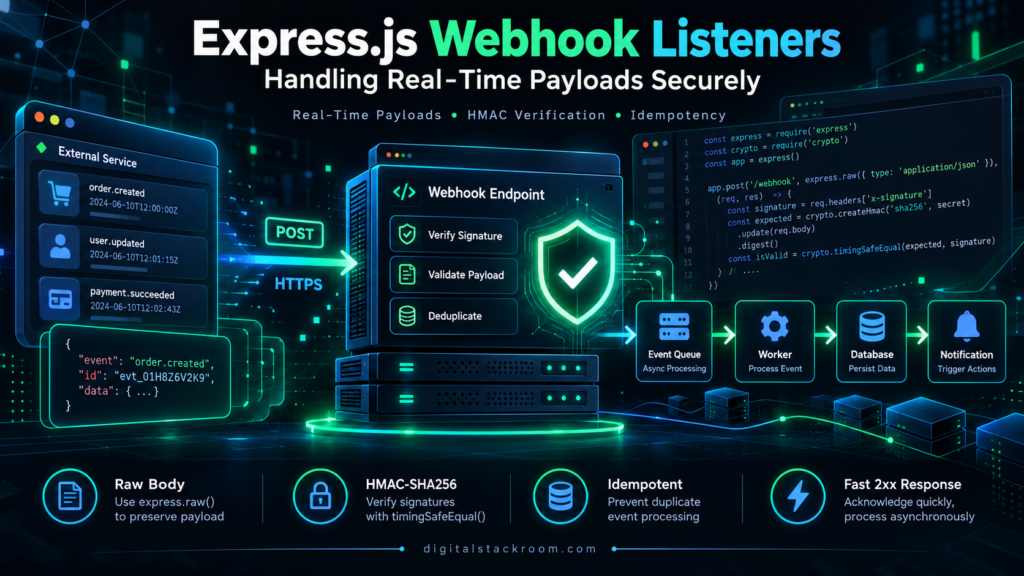
Webhooks look simple at first.
Create a POST endpoint, wait for another service to send JSON, read the payload, and do something with it.
A first implementation might take ten lines of Express.js.
The production version usually needs considerably more thought.
A webhook endpoint is publicly reachable by design. It may receive payment events, order updates, GitHub activity, CRM changes, deployment notifications, or events from another internal system. If the listener accepts whatever reaches the URL without verifying it, anyone who discovers the endpoint may be able to send fake events.
There is another complication: legitimate webhook deliveries are not guaranteed to arrive exactly once.
Providers retry deliveries. Networks fail. Your server may process an event but lose the response. The same payload may therefore arrive more than once.
A reliable webhook listener has to solve several problems at the same time:
Receive request
        ↓
Preserve original payload
        ↓
Verify sender/signature
        ↓
Validate event
        ↓
Detect duplicate
        ↓
Persist or enqueue
        ↓
Return 2xx quickly
        ↓
Process business logic
This guide builds that flow using Express.js and Node.js, while explaining the security decisions that matter once a webhook moves into production.
Table of Contents
What Is a Webhook?
A webhook is an HTTP callback sent by one system to another when an event happens.
Suppose an application needs to know when a payment succeeds.
Without webhooks, it might repeatedly ask:
Has the payment succeeded?
Has the payment succeeded?
Has the payment succeeded?
That is polling.
With a webhook, the payment platform sends the receiving application an HTTP request when the state changes.
Payment succeeds
      ↓
Provider sends HTTP POST
      ↓
Your webhook endpoint receives event
      ↓
Your application reacts
That event might trigger an order update, notification, database change, analytics event, or another workflow.
This fits naturally into event-driven automation. If you want a broader explanation of triggers, conditions, actions, and automated workflows, see DigitalStackRoom’s guide to What Is Workflow Automation?.
Webhooks vs. Polling
Both techniques can synchronize systems, but they operate differently.
| Area | Webhook | Polling |
|---|---|---|
| Trigger | Provider pushes an event | Client repeatedly checks |
| Typical latency | Near real time | Depends on polling interval |
| API requests | Usually event-driven | Repeated even when nothing changed |
| Receiver requirement | Public/reachable endpoint | Outbound API access |
| Failure handling | Retries and deduplication | Client controls retry schedule |
| Security | Signature/authentication required | API authentication required |
| Best suited for | Event notifications | State checks or APIs without webhooks |
Polling is not inherently bad.
It is useful when an API does not support webhooks or when exact current state matters more than individual events.
But when a service already provides reliable event delivery, webhooks can eliminate a large amount of unnecessary polling.
Creating a Basic Express.js Webhook Listener
Start with a simple Node.js project.
mkdir express-webhook-demo
cd express-webhook-demo

npm init -y
npm install express
Create:
server.jsThen add a basic Express application.
const express = require("express");

const app = express();

const PORT = process.env.PORT || 3000;

app.use(express.json({ limit: "256kb" }));

app.post("/webhooks/orders", (req, res) => {
  console.log("Webhook received:", req.body);

  res.sendStatus(204);
});

app.listen(PORT, () => {
  console.log(`Webhook listener running on port ${PORT}`);
});
Start it with:
node server.jsThe endpoint now accepts:
POST /webhooks/orderswith a JSON body.
For example:
{
  "id": "evt_12345",
  "type": "order.completed",
  "data": {
    "orderId": "ORD-1001",
    "status": "completed"
  }
}
This is enough to demonstrate how webhook delivery works.
It is not yet a secure production webhook listener.
The Most Important Rule: Do Not Trust the Payload Just Because It Reached Your URL
Consider this endpoint:
app.post("/webhooks/payment", (req, res) => {
  if (req.body.type === "payment.completed") {
    markOrderAsPaid(req.body.orderId);
  }

  res.sendStatus(200);
});
If there is no sender verification, an attacker could potentially send:
{
  "type": "payment.completed",
  "orderId": "ORD-5000"
}
directly to your endpoint.
The application cannot tell whether that request actually came from the payment provider.
This is why serious webhook providers normally supply some form of request authentication or cryptographic signature.
GitHub, for example, signs webhook payloads using a webhook secret and recommends validating the X-Hub-Signature-256 value before processing the delivery.
Stripe similarly requires webhook signature verification using the exact raw request body, the Stripe-Signature header, and the endpoint signing secret.
The exact verification algorithm is provider-specific.
Always follow that provider’s documentation rather than inventing your own signature format.
Why the Raw Request Body Matters
This is one of the most common webhook implementation mistakes in Express.
Normally, an Express API might use:
app.use(express.json());After that middleware runs:
req.bodycontains a parsed JavaScript object.
For normal REST APIs, that is exactly what you want.
For many webhook signature schemes, it can be a problem.
The sender typically calculates a cryptographic signature from the exact bytes it transmitted.
Imagine the provider sends:
{"id":"evt_123","status":"complete"}After parsing and serializing it again, your application might produce:
{
  "id": "evt_123",
  "status": "complete"
}
Those objects represent the same JSON data.
But the byte sequences are different.
A cryptographic signature is calculated over bytes, not over the semantic meaning of the JSON object.
Stripe explicitly warns that modifying, parsing, reordering, or otherwise changing the original request body before verification can cause signature validation to fail. Its Express guidance also states that express.json() should come after a webhook route that requires the original body.
express.raw() vs. express.json()
Express provides both body parsers directly.
express.json()returns parsed JSON.
express.raw()provides the request body as a Buffer.
For signed webhooks, the raw form is often exactly what is needed.
A useful middleware arrangement is:
const express = require("express");

const app = express();

app.post(
  "/webhooks/provider",
  express.raw({
    type: "application/json",
    limit: "256kb"
  }),
  webhookHandler
);

// Normal JSON parsing for the rest of the API
app.use(
  express.json({
    limit: "1mb"
  })
);
Notice the order.
The webhook route is registered before the global JSON parser.
That distinction is easy to miss and can save hours of debugging signature failures.
Building HMAC-SHA256 Signature Verification
A common webhook signing pattern uses HMAC.
Conceptually:
Webhook secret
       +
Exact request body
       ↓
    HMAC-SHA256
       ↓
Expected signature
Your server independently calculates the signature.
It then compares:
Provider signature

vs.

Locally calculated signature
If they match, the request was created by someone who knows the shared secret and the signed body has not been altered.
GitHub’s current webhook mechanism uses HMAC-SHA256 and sends the result in:
X-Hub-Signature-256with the prefix:
sha256=Secure HMAC Verification in Node.js
Node.js already includes the required cryptographic functions.
You do not need a third-party HMAC package.
const crypto = require("node:crypto");

function verifyHmacSha256(rawBody, signatureHeader, secret) {
  if (!Buffer.isBuffer(rawBody)) {
    return false;
  }

  if (
    typeof signatureHeader !== "string" ||
    !signatureHeader.startsWith("sha256=")
  ) {
    return false;
  }

  const suppliedHex = signatureHeader.slice("sha256=".length);

  if (!/^[0-9a-fA-F]{64}$/.test(suppliedHex)) {
    return false;
  }

  const suppliedSignature = Buffer.from(
    suppliedHex,
    "hex"
  );

  const expectedSignature = crypto
    .createHmac("sha256", secret)
    .update(rawBody)
    .digest();

  if (
    suppliedSignature.length !==
    expectedSignature.length
  ) {
    return false;
  }

  return crypto.timingSafeEqual(
    suppliedSignature,
    expectedSignature
  );
}
There are several deliberate choices here.
First, the function accepts a Buffer so it operates on the original request body.
Second, it verifies the expected signature format.
Third, it checks the length before calling:
crypto.timingSafeEqual()because both inputs must have the same byte length.
Finally, it uses constant-time comparison rather than:
expected === receivedNode’s documentation specifically describes crypto.timingSafeEqual() as suitable for comparing HMAC digests and other secret values because it performs the underlying byte comparison using a constant-time algorithm.
GitHub also recommends constant-time comparison when validating webhook signatures.
A Secure GitHub-Style Express Webhook Endpoint
Now we can combine the pieces.
const crypto = require("node:crypto");
const express = require("express");

const app = express();

const PORT = process.env.PORT || 3000;

function verifyHmacSha256(
  rawBody,
  signatureHeader,
  secret
) {
  if (!Buffer.isBuffer(rawBody)) {
    return false;
  }

  if (
    typeof signatureHeader !== "string" ||
    !signatureHeader.startsWith("sha256=")
  ) {
    return false;
  }

  const suppliedHex =
    signatureHeader.slice("sha256=".length);

  if (!/^[0-9a-fA-F]{64}$/.test(suppliedHex)) {
    return false;
  }

  const suppliedSignature =
    Buffer.from(suppliedHex, "hex");

  const expectedSignature = crypto
    .createHmac("sha256", secret)
    .update(rawBody)
    .digest();

  if (
    suppliedSignature.length !==
    expectedSignature.length
  ) {
    return false;
  }

  return crypto.timingSafeEqual(
    suppliedSignature,
    expectedSignature
  );
}

app.post(
  "/webhooks/github",

  express.raw({
    type: "application/json",
    limit: "256kb"
  }),

  (req, res) => {
    const secret =
      process.env.GITHUB_WEBHOOK_SECRET;

    if (!secret) {
      console.error(
        "GITHUB_WEBHOOK_SECRET is not configured"
      );

      return res.sendStatus(500);
    }

    const signature =
      req.get("X-Hub-Signature-256");

    const valid = verifyHmacSha256(
      req.body,
      signature,
      secret
    );

    if (!valid) {
      return res
        .status(401)
        .json({
          error: "Invalid webhook signature"
        });
    }

    let payload;

    try {
      payload = JSON.parse(
        req.body.toString("utf8")
      );
    } catch {
      return res
        .status(400)
        .json({
          error: "Invalid JSON payload"
        });
    }

    const deliveryId =
      req.get("X-GitHub-Delivery");

    const eventType =
      req.get("X-GitHub-Event");

    console.log({
      deliveryId,
      eventType,
      repository: payload.repository?.full_name
    });

    return res.sendStatus(204);
  }
);

// JSON parser for normal application routes
app.use(
  express.json({
    limit: "1mb"
  })
);

app.listen(PORT, () => {
  console.log(
    `Server listening on port ${PORT}`
  );
});
This example deliberately verifies the signature before parsing the JSON.
That ordering is important.
Do Not Reuse One Provider’s Signature Logic for Another
The HMAC example above matches GitHub’s documented signature structure.
It should not be copied blindly for every webhook provider.
For example, Stripe’s:
Stripe-Signatureheader has its own format and includes timestamped signature information.
Stripe recommends using its official SDK’s webhook verification function rather than manually reproducing its parsing rules.
The general pattern is reusable:
Preserve raw body
        ↓
Read signature header
        ↓
Apply provider's verification algorithm
        ↓
Only then trust the event
The actual signature implementation is not universal.
Keep Webhook Secrets Out of the Source Code
Never write:
const secret = "my-production-webhook-secret";inside committed source code.
Use an environment variable or a managed secret store.
const secret =
  process.env.WEBHOOK_SECRET;
For local development:
WEBHOOK_SECRET=your-secret node server.jsIn production, secrets may come from services such as:
AWS Secrets Manager
Google Cloud Secret Manager
Azure Key Vault
Kubernetes Secrets
HashiCorp Vault
The important point is separation:
Application code ≠ Production secretGitHub’s webhook security guidance similarly recommends storing the webhook secret securely and not hardcoding or committing it to a repository.
HTTPS Is Still Required
Signature verification does not make transport security unnecessary.
Public production webhook endpoints should use HTTPS.
TLS protects the request while it travels between systems.
Express’s own production security guidance recommends TLS for applications transmitting sensitive information.
In many deployments, Express itself will not terminate TLS.
The architecture may instead be:
Webhook Provider
       ↓
     HTTPS
       ↓
Load Balancer / API Gateway / Nginx
       ↓
Express Application
That is perfectly normal.
The important requirement is that the public transport path is secured.
Limit the Size of Incoming Payloads
A webhook endpoint should not accept arbitrarily large request bodies unless there is a genuine reason to do so.
For example:
express.raw({
  type: "application/json",
  limit: "256kb"
})
places an upper bound on the parsed request body.
The correct size depends on the provider’s documented maximum payload size and your application’s expected events.
Do not choose:
256 KBjust because this article uses it.
It is an example.
Check the provider’s real payload limits and set an appropriate ceiling.
This also matters for denial-of-service resilience.
In July 2026, the Express project published fixes for a body-parser issue where invalid limit configuration values could silently disable request-size enforcement in affected versions. The patched versions listed by Express are >=1.20.6 for the 1.x line and >=2.3.0 for the 2.x line.
The practical lesson is straightforward:
keep Express/body-parsing dependencies current and make payload limits explicit and valid.
Validate the Event After Verifying the Signature
A valid signature proves something important:
the event was signed using the expected secret.
It does not prove that every field in the event is appropriate for your business logic.
Suppose the webhook contains:
{
  "id": "evt_123",
  "type": "order.completed",
  "data": {
    "orderId": null
  }
}
The signature may be perfectly valid.
The business payload is still unusable.
Validation should happen before processing.
function validateOrderEvent(payload) {
  if (
    !payload ||
    typeof payload !== "object"
  ) {
    return false;
  }

  if (
    typeof payload.id !== "string" ||
    typeof payload.type !== "string"
  ) {
    return false;
  }

  if (
    payload.type === "order.completed" &&
    typeof payload.data?.orderId !== "string"
  ) {
    return false;
  }

  return true;
}
For larger integrations, a schema-validation library can make this easier to maintain.
The important distinction is:
Signature verification
        ≠
Payload validation
You normally need both.
Only Process the Event Types You Actually Need
A webhook endpoint may receive many event types.
Do not automatically treat every event as actionable.
A simple pattern is:
switch (event.type) {
  case "order.created":
    handleOrderCreated(event);
    break;

  case "order.completed":
    handleOrderCompleted(event);
    break;

  case "order.cancelled":
    handleOrderCancelled(event);
    break;

  default:
    console.log(
      `Ignoring event type: ${event.type}`
    );
}
If an event is valid but intentionally ignored, returning a successful response is often preferable to returning an error and causing unnecessary provider retries.
The provider’s documentation should ultimately determine the expected behavior.
GitHub similarly recommends checking the webhook event type and action before processing the delivery.
Webhook Deliveries Can Happen More Than Once
This is one of the most important production realities.
Suppose your server receives:
evt_123It updates the database successfully.
Then, before your response reaches the provider, the network connection breaks.
From the provider’s perspective:
Did the application process the event?

Unknown.
A sensible provider may retry.
Your application now receives:
evt_123again.
If the handler performs:
Create invoicetwice, you may get two invoices.
If it performs:
Send emailtwice, the customer receives duplicates.
If it performs:
Add account credittwice, the financial impact may be worse.
Webhook consumers therefore need idempotency or duplicate detection.
Use Delivery IDs for Deduplication
Many providers include an event or delivery identifier.
For GitHub:
X-GitHub-Deliveryis available specifically as a delivery identifier, and GitHub’s best-practice guidance recommends using it.
For another provider, the identifier may live inside the JSON payload.
A simplistic implementation might use:
const processedEvents = new Set();

function alreadyProcessed(id) {
  if (processedEvents.has(id)) {
    return true;
  }

  processedEvents.add(id);

  return false;
}
That is useful for demonstrating the idea.
It is not suitable for production.
If the application restarts:
Set disappears.If you run three application instances:
Each instance has a different Set.A production implementation normally needs durable shared storage.
A Better Webhook Inbox Pattern
For important events, I prefer thinking about the webhook endpoint as an inbox rather than immediately as a business-logic handler.
For example:
Webhook arrives
      ↓
Verify signature
      ↓
Validate payload
      ↓
Write event to durable inbox
      ↓
Return 2xx
      ↓
Worker processes pending event
      ↓
Mark completed
A simplified PostgreSQL table could look like this:
CREATE TABLE webhook_events (
    provider VARCHAR(50) NOT NULL,
    delivery_id VARCHAR(255) NOT NULL,
    event_type VARCHAR(255),
    payload JSONB NOT NULL,
    received_at TIMESTAMPTZ NOT NULL DEFAULT NOW(),
    processed_at TIMESTAMPTZ,
    status VARCHAR(30) NOT NULL DEFAULT 'pending',

    PRIMARY KEY (provider, delivery_id)
);
The primary key prevents two rows with the same:
provider + delivery_idfrom being inserted.
That gives duplicate detection at the database level instead of relying on application memory.
Why Atomic Duplicate Handling Matters
Avoid logic like:
if (!(await eventExists(id))) {
  await insertEvent(id);
}
when multiple workers may process requests concurrently.
Two requests can potentially execute:
eventExists(id) → falseat nearly the same time.
Both then attempt to insert.
A database uniqueness constraint provides a much stronger final guard.
The application can treat the duplicate-key result as:
Already received.
Acknowledge without processing twice.
This becomes increasingly important as the webhook service scales horizontally.
Signature Verification Does Not Automatically Prevent Replay Attacks
Suppose an attacker captures a legitimate signed webhook request and sends exactly the same request again.
The signature may still be valid because the payload has not changed.
Signature verification answers:
Was this payload signed using the expected secret?It does not necessarily answer:
Has this exact delivery already been processed?Replay protection is provider-specific.
Possible controls include:
Delivery/event IDs
Timestamp verification
Provider SDK verification
Deduplication windows
Durable processed-event storage
Some providers include timestamps in their signature scheme.
Others provide unique delivery identifiers.
Use the controls supported by the provider rather than inventing assumptions about its protocol.
Return a Successful Response Quickly
The webhook endpoint should not become a long-running application workflow.
Imagine this handler:
app.post("/webhook", async (req, res) => {
  await generateReport();
  await updateCRM();
  await sendEmail();
  await callAccountingSystem();
  await refreshAnalytics();

  res.sendStatus(200);
});
That can take a long time.
While all of that work is happening, the webhook provider is waiting.
The provider may eventually assume the request failed and retry it.
Stripe explicitly recommends quickly returning a successful 2xx response before running complex logic that may cause a timeout.
GitHub also recommends responding to webhook deliveries promptly and currently documents a 10-second response target for its webhooks.
A better design separates ingestion from processing.
Use a Queue or Durable Inbox for Longer Processing
A more scalable architecture is:
Webhook Provider
       ↓
Express Listener
       ↓
Verify Signature
       ↓
Validate Event
       ↓
Durable Queue / Inbox
       ↓
Return 2xx
       ↓
Background Worker
       ↓
Business Logic
The queue might be:
Amazon SQS
Google Cloud Pub/Sub
RabbitMQ
Apache Kafka
Azure Service Bus
Redis-backed queue
or the database-backed inbox pattern shown earlier.
The listener’s responsibility becomes narrow:
Authenticate.
Validate.
Persist.
Acknowledge.
The worker can then handle slower operations independently.
Do Not Acknowledge Before the Event Is Durable
There is a subtle failure mode here.
Suppose the application does this:
Receive webhook
      ↓
Return 200
      ↓
Add event to queue
If the server crashes immediately after returning 200 but before the queue write succeeds, the provider believes the event was accepted.
Your application has lost it.
A safer ordering is:
Receive
  ↓
Verify
  ↓
Persist/enqueue successfully
  ↓
Return 2xx
Only acknowledge the delivery after responsibility for the event has safely moved into your system.
Understanding Webhook HTTP Status Codes
Exact provider behavior varies, but this is a useful general model.
| Status | Typical Meaning |
|---|---|
200 OK | Event accepted successfully |
202 Accepted | Event accepted for asynchronous processing |
204 No Content | Successfully accepted; no response body |
400 Bad Request | Invalid payload |
401 Unauthorized | Authentication/signature failed |
403 Forbidden | Authenticated request not allowed |
413 Payload Too Large | Request exceeded configured body limit |
429 Too Many Requests | Receiver is rate limiting |
500 / 503 | Temporary server-side failure |
Do not assume every webhook provider interprets all these responses identically.
Read the provider’s delivery and retry documentation.
Expect Retries
Webhook retry behavior is normal.
It should not be treated as an edge case.
For example, Stripe currently documents automatic retries for failed webhook deliveries and also advises consumers to guard against processing the same event more than once.
That means your design should assume:
At-least-once style deliveryrather than:
Exactly once foreverunless the provider explicitly guarantees something stronger.
Idempotent processing is therefore a core webhook design requirement.
Be Careful With Rate Limiting
A public endpoint still needs protection against abusive traffic.
But blindly applying strict per-IP rate limits to webhooks can cause problems.
A legitimate provider may send many events from a relatively small set of outbound addresses.
A rule such as:
10 requests per IP per minutecould accidentally block valid webhook traffic during a busy period.
Better protection often combines:
Signature verification
Payload-size limits
API gateway/WAF controls
Provider-specific IP allowlists where supported
Capacity controls
Queues
Monitoring
Provider-aware rate policies
IP allowlisting should also not be treated as a replacement for signature verification.
Provider IP ranges can change.
GitHub, for example, recommends webhook secrets and HTTPS and separately documents IP allowlisting as an additional control.
If your webhook worker calls downstream APIs, those outbound requests may also encounter rate limits. The retry concepts in DigitalStackRoom’s REST API Rate Limiting and Exponential Backoff in Python apply conceptually even when the webhook service itself is written in Node.js.
Avoid Logging Entire Webhook Payloads by Default
This looks convenient:
console.log(req.body);It can also become a security and privacy problem.
Webhook payloads may contain:
Email addresses
Names
Order details
Account identifiers
Billing information
Internal IDs
Authentication-related metadata
Personal information
Production logs should normally capture useful operational metadata instead.
For example:
console.log({
  deliveryId,
  eventType,
  receivedAt: new Date().toISOString()
});
Good observability does not require dumping every payload into a log system.
If complete payloads must be retained for audit or replay, store them deliberately in an appropriately secured data store with retention and access controls.
Useful Webhook Metrics
A production listener should make failures visible.
Useful metrics include:
| Metric | Why It Matters |
|---|---|
| Events received | Overall webhook traffic |
| Signature failures | Possible configuration or attack issue |
| Invalid payloads | Schema/provider changes |
| Duplicate deliveries | Retry behavior |
| Processing success rate | Reliability |
| Processing failures | Operational health |
| Queue depth | Backlog |
| Event processing latency | End-to-end delay |
| HTTP response latency | Provider-facing performance |
| Events by type | Traffic distribution |
A dashboard that only reports:
Server is upis not enough.
A webhook server can be alive while every event is failing signature validation.
Handle Secret Rotation
Webhook secrets should eventually be rotated.
That creates an operational question:
What happens while the sender and receiver move from old secret to new secret?Some providers support overlapping secrets or structured rotation procedures.
If you implement your own webhook system, consider supporting a transition period in which:
Current secret
+
Previous secret
can both verify deliveries.
Do not improvise rotation rules for a third-party provider. Follow its official process.
The larger lesson is that webhook secrets are operational credentials, not permanent constants.
Middleware Order Matters in Express
Express middleware runs in registration order.
That makes this potentially wrong for a raw-body signed webhook:
app.use(express.json());

app.post(
  "/webhooks/provider",
  express.raw({
    type: "application/json"
  }),
  handler
);
By the time the request reaches express.raw(), the body may already have been consumed and parsed.
Instead:
app.post(
  "/webhooks/provider",
  express.raw({
    type: "application/json"
  }),
  handler
);

app.use(express.json());
Stripe’s current Express guidance specifically calls out this middleware ordering requirement for raw-body signature verification.
This small detail is one of the most common causes of webhook signature errors in Express applications.
A Cleaner Router-Based Structure
As the application grows, keeping everything in server.js becomes messy.
A better layout might be:
src/
├── server.js
├── routes/
│   └── webhooks.js
├── middleware/
│   └── verifyWebhook.js
├── services/
│   ├── webhookStore.js
│   └── webhookProcessor.js
└── workers/
    └── webhookWorker.js
The webhook router can stay focused on transport concerns:
HTTP
Signature
Validation
Acknowledgement
while business logic stays elsewhere.
That separation makes the endpoint easier to test and reduces the chance of accidental security changes.
Testing a Signed Webhook Locally
A useful test should verify both positive and negative cases.
Valid signature
Create:
const crypto = require("node:crypto");

const secret = "local-test-secret";

const payload = Buffer.from(
  JSON.stringify({
    id: "evt_test_123",
    type: "order.completed"
  }),
  "utf8"
);

const signature = crypto
  .createHmac("sha256", secret)
  .update(payload)
  .digest("hex");

console.log(
  `sha256=${signature}`
);

console.log(
  payload.toString()
);
Run it:
node generate-signature.jsThen send the exact same payload bytes to the webhook endpoint.
Invalid signature
Change one character in the payload while keeping the old signature.
The server should reject it.
Missing signature
Send the request without the signature header.
The server should reject it.
Duplicate event
Send the same delivery ID twice.
The second delivery should not execute the business action twice.
Oversized payload
Send a body larger than the configured limit.
The application should reject it instead of attempting unlimited parsing.
These tests catch much more than checking whether the route returns 200.
Test Failure Paths, Not Just Success Paths
Webhook systems become interesting when something goes wrong.
Useful tests include:
Invalid JSON
Invalid signature
Expired/replayed event
Unknown event type
Duplicate delivery
Database unavailable
Queue unavailable
Worker failure
Downstream API timeout
Downstream API rate limit
Application restart during processing
You want to know what happens before those failures occur in production.
End-to-End Validation After a Webhook
Sometimes a webhook changes visible application behavior.
For example:
Payment webhook
      ↓
Order becomes paid
      ↓
Customer portal changes status
A browser test can verify the final user-facing state after the webhook workflow completes.
For this type of validation, see:
Playwright vs Selenium for Headless Browser Automation
That creates a useful separation:
Webhook test
→ Was the event received correctly?

Data test
→ Was the backend state updated correctly?

Browser test
→ Did the user-facing application reflect that state?
Those are related but different validations.
Storing Webhook Payloads for Later Processing
Some systems archive incoming events before transforming them.
A pipeline may look like:
Webhook
   ↓
Raw JSON archive
   ↓
Validation
   ↓
Transformation
   ↓
Database / Analytics
When payloads become deeply nested or need to be flattened into analytical files, the concepts covered in:
Automating File Processing with Python: Parsing Complex JSON and Nested CSVs at Scale
become useful for the downstream data-processing side of the architecture.
The webhook receiver and the analytical pipeline do not have to use the same programming language.
A Production Webhook Architecture
For a business-critical integration, I would normally design around something similar to this:
Webhook Provider
        │
        │ HTTPS
        ▼
API Gateway / Load Balancer
        │
        ▼
Express Webhook Listener
        │
        ├── Request size validation
        ├── Raw-body preservation
        ├── Signature verification
        ├── Event validation
        └── Delivery ID extraction
        │
        ▼
Durable Inbox / Queue
        │
        ▼
Return 2xx
        │
        ▼
Webhook Worker
        │
        ├── Duplicate protection
        ├── Business logic
        ├── Downstream API calls
        ├── Retry handling
        └── Error handling
        │
        ▼
Database / CRM / Notifications / Analytics
This architecture separates:
accepting the eventfrom:
executing the workflowThat separation is one of the biggest improvements you can make to a webhook system.
Webhook Security Checklist
Before exposing an Express webhook endpoint to production, verify the following:
| Area | Check |
|---|---|
| Transport | Public endpoint uses HTTPS |
| Secret | Stored outside source code |
| Raw body | Preserved when provider requires it |
| Signature | Verified before trusting payload |
| Comparison | Constant-time where applicable |
| Payload size | Explicit request limit configured |
| Schema | Required event fields validated |
| Event types | Only expected events processed |
| Duplicates | Delivery/event IDs handled idempotently |
| Replay protection | Provider-supported controls applied |
| Processing | Slow work moved out of request path |
| Persistence | Event durable before success response |
| Logging | Sensitive payload fields not dumped casually |
| Dependencies | Express/body parser kept patched |
| Monitoring | Failures, duplicates and latency observable |
| Testing | Invalid and duplicate deliveries tested |
Common Mistakes to Avoid
One of the easiest mistakes is parsing the request before verifying a signature that depends on the raw body.
Another is placing business logic directly inside the HTTP handler and holding the connection open while several external systems are updated.
Hardcoding the webhook secret is another obvious risk.
Less obvious—but equally important—is assuming every delivery arrives only once.
A production listener should be designed around the possibility that the same legitimate event will be delivered more than once.
Finally, do not write a custom webhook signature implementation when the provider already supplies an official SDK designed to perform the verification correctly.
Security code is one of the worst places to be unnecessarily creative.
Final Thoughts
Creating an Express webhook route is easy.
Creating one that can be trusted with real business events requires a different mindset.
The endpoint is not simply:
POST JSON → Run functionA better model is:
Receive
   ↓
Authenticate
   ↓
Validate
   ↓
Deduplicate
   ↓
Persist
   ↓
Acknowledge
   ↓
Process
   ↓
Observe
The raw request body matters because signatures are often calculated from the exact bytes that were sent.
Signature verification matters because a publicly reachable URL is not proof of identity.
Idempotency matters because webhook retries are normal.
Fast acknowledgement matters because the provider should not wait while your application performs a long workflow.
And durable storage or queuing matters because returning 200 means your system has accepted responsibility for the event.
Once those pieces are in place, Express.js works very well as the receiving layer for payment events, CI/CD notifications, SaaS integrations, workflow automation, data pipelines, and other real-time systems.
The code for the endpoint itself may remain small.
The reliability comes from the architecture around it.
Official Documentation and Technical References
The implementation details in this guide were checked against the current official documentation.
Express.js
Express.js — Writing Middleware
Express.js — Production Security Best Practices
Express.js — July 2026 Security Releases
Node.js
Node.js Crypto Documentation — HMAC and timingSafeEqual
GitHub Webhooks
GitHub — Validating Webhook Deliveries
GitHub — Best Practices for Using Webhooks