
A file-processing script usually starts innocently.
There is a folder.
Some JSON files arrive.
Python reads them.
A few fields are extracted.
The result is written to CSV.
For a small file, this can be ten lines of code.
Then production happens.
One JSON file becomes 4 GB.
A field that used to be a string becomes an object.
A nested items array contains hundreds of records.
One CSV column contains serialized JSON.
Another source delivers separate parent and child CSV files.
A malformed record appears halfway through a batch.
A process crashes after writing 70% of an output file.
The next scheduled run processes the same source again.
Suddenly the difficult part is no longer:
json.load(file)The difficult part is building a pipeline that can answer:
Which files were processed, which records failed, which outputs are complete, and can the job safely restart without duplicating data?
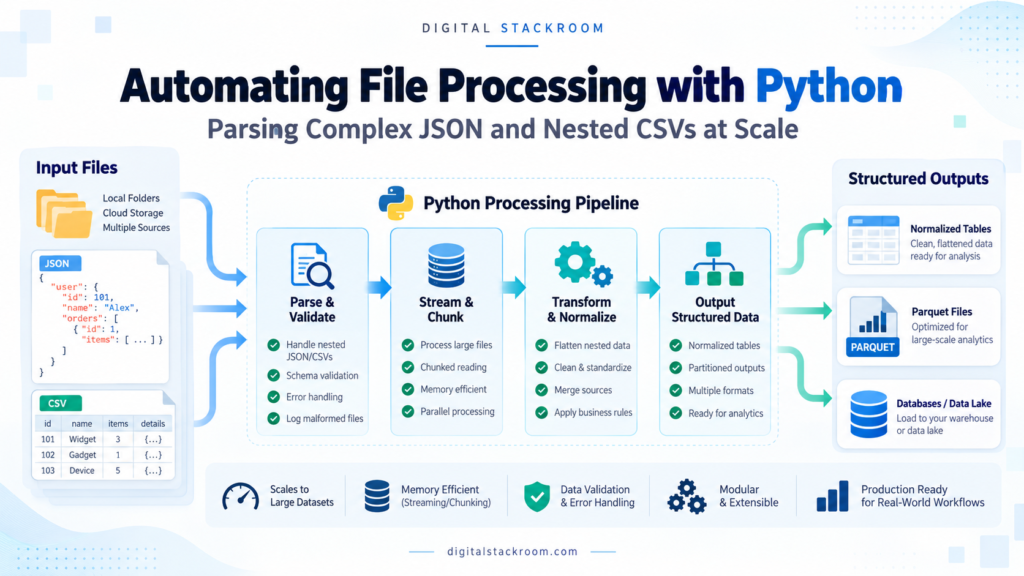
This guide builds that kind of pipeline.
We will cover:
- recursive file discovery
- JSON arrays
- wrapped JSON documents
- newline-delimited JSON
- deeply nested objects
- one-to-many arrays
- JSON embedded inside CSV columns
- parent/child CSV structures
- schema validation
- decimal precision
- streaming large JSON files
- chunked CSV processing
- Parquet output
- file fingerprints
- idempotent reruns
- partial-output recovery
- quarantine handling
- observability
- and the point where a Python file processor should become a distributed data pipeline
The central design principle is:
Parse incrementally, normalize intentionally, validate before trusting, and make every file-level operation restartable.
Table of Contents
“Nested CSV” Is Not Actually a Native CSV Structure
Before writing code, it helps to clarify terminology.
JSON is hierarchical.
CSV is not.
A CSV file is fundamentally a table of rows and columns.
When teams say they have a “nested CSV,” they usually mean one of three things.
| Pattern | Example | Correct Approach |
|---|---|---|
| JSON stored inside a CSV cell | items_json='[{"sku":"A1"}]' | Parse that specific field as JSON |
| Parent and child CSV files | orders.csv + order_items.csv | Preserve the relational keys |
| Complex quoted fields | commas/newlines inside quoted text | Use a real CSV parser |
For example:
order_id,customer,items_json
ORD-1001,Asha,"[{""sku"":""SKU-1"",""quantity"":2}]"
The CSV itself is still flat.
The items_json column contains another serialization format.
Treating these cases separately makes the pipeline much easier to reason about.
The Example Data Model
Suppose an order arrives as JSON:
{
  "order_id": "ORD-1001",
  "created_at": "2026-10-24T07:30:00Z",
  "customer": {
    "customer_id": "C-501",
    "name": "Asha",
    "region": "South"
  },
  "order_total": 1499.50,
  "items": [
    {
      "sku": "SKU-A",
      "quantity": 2,
      "unit_price": 499.75
    },
    {
      "sku": "SKU-B",
      "quantity": 1,
      "unit_price": 500.00
    }
  ]
}
There are two different structures here.
One-to-one data
order
    ↓
customer
can reasonably become columns in the order table.
One-to-many data
order
    ↓
items[]
should usually become another table.
Trying to flatten the entire object into:
items.0.sku
items.1.sku
items.2.sku
...
creates a schema whose number of columns depends on the number of items.
That is rarely a useful analytical model.
Instead we will create:
ordersand:
order_itemslinked by:
order_idTarget Tables
Orders
| Column | Type |
|---|---|
| source_file_sha256 | string |
| source_record_number | integer |
| order_id | string |
| created_at | string |
| customer_id | string |
| customer_name | string |
| region | string |
| order_total | decimal |
Order Items
| Column | Type |
|---|---|
| source_file_sha256 | string |
| source_record_number | integer |
| order_id | string |
| line_number | integer |
| sku | string |
| quantity | integer |
| unit_price | decimal |
That model preserves the one-to-many relationship without inventing arbitrary columns.
Architecture of the File Processor
The processing flow will look like this:
Incoming Files
      ↓
Discover
      ↓
Fingerprint
      ↓
Check Completion State
      ↓
Stream / Parse
      ↓
Validate
      ↓
Normalize
      ↓
Batch
      ↓
Write Parquet
      ↓
Manifest
      ↓
_SUCCESS
Failures follow a separate path:
Parse / Validation Failure
          ↓
Structured Error Record
          ↓
Quarantine Metadata
The critical idea is that downstream systems never consider an output complete unless:
_SUCCESSexists.
Why Not Just Load Everything Into pandas?
For a 5 MB file, this may be perfectly reasonable:
import pandas as pd

df = pd.read_csv("orders.csv")
For a 20 GB file, it may not be.
Likewise:
import json

with open("orders.json") as file:
    data = json.load(file)
constructs the parsed JSON structure in memory.
If the source is huge, the Python process may need considerably more memory than the raw file size because strings, dictionaries, lists, integers, and other Python objects all have runtime overhead.
The answer is not:
Never use pandasor:
Never use json.load()It is:
Choose the parser based on the size and structure of the data.
Install the Libraries
The standard library handles most of the fundamentals.
For streaming JSON and Parquet output we will also use ijson and PyArrow.
python -m pip install ijson pyarrow pandasThe main production pipeline will use:
Python standard library
ijson
PyArrow
pandas will be shown later as a convenient chunk-processing option.
Suggested Directory Layout
A local development structure might look like:
file_pipeline/
│
├── incoming/
│   ├── orders_001.json
│   ├── orders_002.jsonl
│   └── orders_003.csv
│
├── processed/
│
├── quarantine/
│
└── pipeline.py
Processed outputs will be organized by file content hash:
processed/
│
└── 6c7f...
    ├── orders.parquet
    ├── order_items.parquet
    ├── manifest.json
    └── _SUCCESS
This gives each distinct source payload its own output namespace.
Step 1: Discover Files Safely
Use pathlib.
from pathlib import Path


SUPPORTED_SUFFIXES = {
    ".json",
    ".jsonl",
    ".ndjson",
    ".csv",
}


def discover_files(root: Path):
    for path in sorted(root.rglob("*")):
        if not path.is_file():
            continue

        if path.suffix.lower() not in SUPPORTED_SUFFIXES:
            continue

        yield path
Usage:
incoming = Path("incoming")

for path in discover_files(incoming):
    print(path)
Using:
Path.rglob()also allows nested source folders without string-based path manipulation.
Do Not Process Temporary Files Accidentally
Some systems create temporary files such as:
orders.csv.tmp
orders.csv.partial
~orders.csv
Filter these before processing.
def is_ready_file(path: Path) -> bool:
    name = path.name.lower()

    blocked_suffixes = (
        ".tmp",
        ".partial",
        ".download",
    )

    if name.startswith("~"):
        return False

    if name.endswith(blocked_suffixes):
        return False

    return True
Then:
for path in discover_files(incoming):
    if not is_ready_file(path):
        continue
For an upstream system you control, an even stronger pattern is:
write temporary file
      ↓
finish upload
      ↓
rename to final filename
and process only final names.
Step 2: Fingerprint Every File
A filename is not a reliable file identity.
These can both exist:
orders.json
orders.json
at different times with different content.
A content digest gives us a deterministic identifier for the actual bytes.
import hashlib
from pathlib import Path


def sha256_file(
    path: Path,
    chunk_size: int = 1024 * 1024,
) -> str:

    digest = hashlib.sha256()

    with path.open("rb") as handle:
        while True:
            chunk = handle.read(chunk_size)

            if not chunk:
                break

            digest.update(chunk)

    return digest.hexdigest()
Usage:
digest = sha256_file(
    Path("incoming/orders.json")
)

print(digest)
The file is read incrementally rather than loaded into one giant byte string.
Why Calculate a Hash?
Suppose:
orders.jsonwas already processed yesterday.
Today another file with the same name arrives.
If the content differs:
SHA256 yesterday
≠
SHA256 today
the pipeline recognizes it as a different payload.
Likewise, if the exact same file is delivered twice:
SHA256 A
=
SHA256 B
the second copy can be skipped once the first output is confirmed complete.
A Hash Is Not Free
Calculating SHA-256 requires reading the entire file.
For a 50 GB source, that is additional I/O.
In some high-throughput environments, file identity may instead come from:
- object-store generation/version ID
- upstream event ID
- immutable object key
- provider checksum
- ingestion manifest
Do not calculate another digest if the storage platform already gives you an immutable trustworthy identifier that meets the same requirement.
For a generic filesystem workflow, SHA-256 is a straightforward option.
Step 3: Know Which Kind of JSON You Have
These formats look similar but require different processing.
One JSON object
{
  "order_id": "ORD-1001"
}
One JSON array
[
  {"order_id": "ORD-1001"},
  {"order_id": "ORD-1002"}
]
Wrapped array
{
  "generated_at": "2026-10-24T07:00:00Z",
  "orders": [
    {"order_id": "ORD-1001"},
    {"order_id": "ORD-1002"}
  ]
}
NDJSON / JSON Lines
{"order_id":"ORD-1001"}
{"order_id":"ORD-1002"}
{"order_id":"ORD-1003"}
The last example is not one ordinary JSON document containing three top-level objects.
It is a sequence of JSON values separated by line boundaries.
The pipeline should know the source contract instead of attempting clever format guessing after deployment.
Small JSON Files: Use the Standard Library
For manageable files:
import json
from pathlib import Path


def load_json(
    path: Path,
):
    with path.open(
        "r",
        encoding="utf-8",
    ) as handle:
        return json.load(handle)
This is simple and correct when the complete document comfortably fits in memory.
Do not replace clear code with a streaming parser when the file is tiny.
Large JSON Arrays: Stream With ijson
Consider:
[
  {...},
  {...},
  {...}
]
Instead of loading the entire list, stream one element at a time.
import ijson
from pathlib import Path


def iter_json_array(
    path: Path,
):
    with path.open("rb") as handle:
        for record in ijson.items(
            handle,
            "item",
        ):
            yield record
Usage:
for order in iter_json_array(
    Path("orders.json")
):
    process(order)
Only the current objects being constructed need to be retained by the application.
Wrapped JSON Arrays Need the Correct Prefix
Suppose the document is:
{
  "metadata": {
    "source": "order-system"
  },
  "orders": [
    {"order_id": "ORD-1001"},
    {"order_id": "ORD-1002"}
  ]
}
Use:
def iter_wrapped_orders(
    path: Path,
):
    with path.open("rb") as handle:
        yield from ijson.items(
            handle,
            "orders.item",
        )
The prefix tells ijson which repeated objects to construct.
NDJSON Can Be Processed One Line at a Time
For newline-delimited JSON, the standard library is enough.
import json
from decimal import Decimal
from pathlib import Path


def iter_ndjson(
    path: Path,
):
    with path.open(
        "r",
        encoding="utf-8",
    ) as handle:

        for line_number, line in enumerate(
            handle,
            start=1,
        ):
            line = line.strip()

            if not line:
                continue

            try:
                record = json.loads(
                    line,
                    parse_float=Decimal,
                )

            except json.JSONDecodeError as exc:
                raise ValueError(
                    f"Invalid JSON on line "
                    f"{line_number}: {exc}"
                ) from exc

            yield line_number, record
This has a useful operational advantage:
bad record
→ line number known
which makes troubleshooting easier.
Why Use Decimal for Money?
JSON numbers are not inherently monetary values.
If:
1499.50represents currency, binary floating-point may not be the representation you want for exact financial transformations.
Python’s JSON parser supports:
parse_float=Decimalfor standard-library parsing.
For data such as:
coordinates
temperatures
ML features
a normal float may be entirely appropriate.
The choice depends on what the number means.
Validate Before Normalizing
A parser answers:
Is this syntactically valid JSON?
It does not answer:
Is this a valid order?
For example, this is perfectly valid JSON:
{
  "order_id": null,
  "items": "banana"
}
but it violates our business schema.
Create explicit validation.
Basic Validation Helpers
from decimal import Decimal, InvalidOperation
from datetime import datetime, timezone


def require_string(
    value,
    field_name: str,
) -> str:

    if not isinstance(value, str):
        raise ValueError(
            f"{field_name} must be a string."
        )

    value = value.strip()

    if not value:
        raise ValueError(
            f"{field_name} cannot be empty."
        )

    return value
Validate integers:
def require_positive_int(
    value,
    field_name: str,
) -> int:

    if isinstance(value, bool):
        raise ValueError(
            f"{field_name} must be an integer."
        )

    if not isinstance(value, int):
        raise ValueError(
            f"{field_name} must be an integer."
        )

    if value <= 0:
        raise ValueError(
            f"{field_name} must be positive."
        )

    return value
The explicit bool check matters because in Python:
isinstance(True, int)is True.
Validate Money Without Silently Rounding It
Suppose the source contract allows at most two decimal places.
from decimal import Decimal, InvalidOperation


CENT = Decimal("0.01")


def require_money(
    value,
    field_name: str,
) -> Decimal:

    try:
        amount = Decimal(
            str(value)
        )

    except (
        InvalidOperation,
        ValueError,
        TypeError,
    ) as exc:

        raise ValueError(
            f"{field_name} must be numeric."
        ) from exc

    if not amount.is_finite():
        raise ValueError(
            f"{field_name} must be finite."
        )

    if amount != amount.quantize(CENT):
        raise ValueError(
            f"{field_name} cannot have "
            f"more than two decimal places."
        )

    return amount
Notice that the code does not automatically round:
12.345to:
12.35That would silently change source data.
If rounding is part of the actual business contract, implement it deliberately and document the required rounding mode.
Validate ISO Timestamps
def require_utc_timestamp(
    value,
    field_name: str,
) -> str:

    text = require_string(
        value,
        field_name,
    )

    try:
        parsed = datetime.fromisoformat(
            text.replace(
                "Z",
                "+00:00",
            )
        )

    except ValueError as exc:
        raise ValueError(
            f"{field_name} must be a valid "
            f"ISO-8601 timestamp."
        ) from exc

    if parsed.tzinfo is None:
        raise ValueError(
            f"{field_name} must include "
            f"a timezone."
        )

    normalized = parsed.astimezone(
        timezone.utc
    )

    return (
        normalized
        .isoformat()
        .replace(
            "+00:00",
            "Z",
        )
    )
This ensures that:
2026-10-24T13:00:00+05:30and:
2026-10-24T07:30:00Zcan be normalized to the same UTC representation.
Step 4: Normalize the Order
Now convert one nested order into:
one order row
+
zero or more item rows
def normalize_order(
raw: dict,
*,
source_file_sha256: str,
source_record_number: int,
):
if not isinstance(raw, dict):
raise ValueError(
"Order must be a JSON object."
)
customer = raw.get("customer")
if not isinstance(customer, dict):
raise ValueError(
"customer must be an object."
)
items = raw.get("items")
if not isinstance(items, list):
raise ValueError(
"items must be an array."
)
order_id = require_string(
raw.get("order_id"),
"order_id",
)
order_row = {
"source_file_sha256":
source_file_sha256,
"source_record_number":
source_record_number,
"order_id":
order_id,
"created_at":
require_utc_timestamp(
raw.get("created_at"),
"created_at",
),
"customer_id":
require_string(
customer.get(
"customer_id"
),
"customer.customer_id",
),
"customer_name":
require_string(
customer.get("name"),
"customer.name",
),
"region":
require_string(
customer.get("region"),
"customer.region",
),
"order_total":
require_money(
raw.get("order_total"),
"order_total",
),
}
item_rows = []
for line_number, item in enumerate(
items,
start=1,
):
if not isinstance(item, dict):
raise ValueError(
f"items[{line_number - 1}] "
f"must be an object."
)
item_rows.append({
"source_file_sha256":
source_file_sha256,
"source_record_number":
source_record_number,
"order_id":
order_id,
"line_number":
line_number,
"sku":
require_string(
item.get("sku"),
f"items[{line_number - 1}].sku",
),
"quantity":
require_positive_int(
item.get("quantity"),
f"items[{line_number - 1}].quantity",
),
"unit_price":
require_money(
item.get("unit_price"),
f"items[{line_number - 1}].unit_price",
),
})
return order_row, item_rowsThis normalization is deterministic.
One input order always becomes:
1 order row
N item rows
Should the Order Total Be Recalculated?
You might be tempted to overwrite:
order_totalusing:
SUM(quantity × unit_price)That may or may not be correct.
The source system’s total could also include:
- taxes
- shipping
- discounts
- fees
- credits
Instead of silently replacing it, validation can compare calculated values against the business definition.
That distinction belongs in the data-quality layer.
For deeper validation patterns, see Digital Stackroom — Automating Data Validation Pipelines.
Step 5: Process JSON Embedded Inside CSV
Suppose the CSV looks like:
order_id,created_at,customer_json,order_total,items_json
ORD-1001,2026-10-24T07:30:00Z,"{""customer_id"":""C-501"",""name"":""Asha"",""region"":""South""}",1499.50,"[{""sku"":""SKU-A"",""quantity"":2,""unit_price"":499.75},{""sku"":""SKU-B"",""quantity"":1,""unit_price"":500.00}]"
Do not split the row with:
line.split(",")Quoted fields are allowed to contain commas.
Use Python’s CSV parser.
Open CSV Files With newline=""
Python’s CSV documentation explicitly recommends opening CSV file objects with:
newline=""so the CSV module can handle embedded newline semantics correctly.
import csv
import json
from decimal import Decimal
from pathlib import Path
Create:
def iter_nested_csv(
    path: Path,
):

    with path.open(
        "r",
        encoding="utf-8-sig",
        newline="",
    ) as handle:

        reader = csv.DictReader(
            handle,
            strict=True,
        )

        required = {
            "order_id",
            "created_at",
            "customer_json",
            "order_total",
            "items_json",
        }

        if reader.fieldnames is None:
            raise ValueError(
                "CSV has no header."
            )

        missing = (
            required
            - set(reader.fieldnames)
        )

        if missing:
            raise ValueError(
                "CSV is missing columns: "
                + ", ".join(
                    sorted(missing)
                )
            )

        for row_number, row in enumerate(
            reader,
            start=2,
        ):

            if None in row:
                raise ValueError(
                    f"CSV row {row_number} "
                    f"contains extra fields."
                )

            if any(
                row[column] is None
                for column in required
            ):
                raise ValueError(
                    f"CSV row {row_number} "
                    f"contains missing fields."
                )

            try:
                customer = json.loads(
                    row["customer_json"]
                )

                items = json.loads(
                    row["items_json"],
                    parse_float=Decimal,
                )

            except json.JSONDecodeError as exc:
                raise ValueError(
                    f"Invalid embedded JSON "
                    f"on CSV row {row_number}: "
                    f"{exc}"
                ) from exc

            yield row_number, {
                "order_id":
                    row["order_id"],

                "created_at":
                    row["created_at"],

                "customer":
                    customer,

                "order_total":
                    Decimal(
                        row["order_total"]
                    ),

                "items":
                    items,
            }
Using:
utf-8-sigalso accepts ordinary UTF-8 while removing a UTF-8 BOM if one exists at the beginning of the file.
Large JSON Fields in CSV Need Deliberate Limits
A CSV cell containing embedded JSON can become very large.
Python exposes:
csv.field_size_limit()if the application’s expected field size exceeds the parser’s current configured maximum.
For example:
csv.field_size_limit(
    10 * 1024 * 1024
)
sets a 10 MiB parser field limit.
Do not automatically set it to an enormous value for untrusted files.
Limits are useful defenses.
If a supposedly small metadata field suddenly contains 2 GB of text, failing the file may be better than attempting to consume it.
Parent/Child CSVs Should Usually Stay Relational
Another common structure is:
orders.csvorder_id,customer_id,total
ORD-1001,C-501,1499.50
ORD-1002,C-502,820.00and:
order_items.csvorder_id,line_number,sku,quantity
ORD-1001,1,SKU-A,2
ORD-1001,2,SKU-B,1
ORD-1002,1,SKU-X,4Do not necessarily rebuild this into:
{
  "order": {...},
  "items": [...]
}
only to flatten it again.
The source already gives you a normalized relationship:
orders.order_id
        ↓
order_items.order_id
Preserve that structure.
Validate Referential Integrity
The child file should not contain:
ORD-9999if no corresponding parent exists.
For moderate data, a set is sufficient:
parent_ids = {
    "ORD-1001",
    "ORD-1002",
}
Then:
if child_order_id not in parent_ids:
    raise ValueError(
        "Unknown parent order."
    )
For hundreds of millions of parent IDs, holding the entire set in Python memory is not appropriate.
Use:
- a database
- warehouse table
- disk-backed index
- distributed engine
and validate the relationship there.
The scale of the key index matters just as much as the scale of the source file.
Step 6: Write Typed Parquet Instead of Giant CSV Outputs
CSV is excellent for interchange.
It is not always the best intermediate storage format for analytical processing.
Parquet provides:
- columnar storage
- typed columns
- compression
- selective column reads
- integration with warehouses and analytical engines
We will use explicit Arrow schemas instead of inferring them from every batch.
Define the Arrow Schemas
import pyarrow as pa


ORDER_SCHEMA = pa.schema([
    pa.field(
        "source_file_sha256",
        pa.string(),
        nullable=False,
    ),
    pa.field(
        "source_record_number",
        pa.int64(),
        nullable=False,
    ),
    pa.field(
        "order_id",
        pa.string(),
        nullable=False,
    ),
    pa.field(
        "created_at",
        pa.string(),
        nullable=False,
    ),
    pa.field(
        "customer_id",
        pa.string(),
        nullable=False,
    ),
    pa.field(
        "customer_name",
        pa.string(),
        nullable=False,
    ),
    pa.field(
        "region",
        pa.string(),
        nullable=False,
    ),
    pa.field(
        "order_total",
        pa.decimal128(
            18,
            2,
        ),
        nullable=False,
    ),
])


ITEM_SCHEMA = pa.schema([
    pa.field(
        "source_file_sha256",
        pa.string(),
        nullable=False,
    ),
    pa.field(
        "source_record_number",
        pa.int64(),
        nullable=False,
    ),
    pa.field(
        "order_id",
        pa.string(),
        nullable=False,
    ),
    pa.field(
        "line_number",
        pa.int64(),
        nullable=False,
    ),
    pa.field(
        "sku",
        pa.string(),
        nullable=False,
    ),
    pa.field(
        "quantity",
        pa.int64(),
        nullable=False,
    ),
    pa.field(
        "unit_price",
        pa.decimal128(
            18,
            2,
        ),
        nullable=False,
    ),
])
Using an explicit schema prevents one batch from deciding:
quantity = integerwhile another unexpectedly infers:
quantity = stringBatch the Writes
import pyarrow as pa
import pyarrow.parquet as pq
from pathlib import Path


def write_normalized_records(
    records,
    *,
    source_file_sha256: str,
    output_dir: Path,
    batch_size: int = 5000,
):

    output_dir.mkdir(
        parents=True,
        exist_ok=True,
    )

    order_writer = pq.ParquetWriter(
        output_dir / "orders.parquet",
        ORDER_SCHEMA,
        compression="snappy",
    )

    item_writer = pq.ParquetWriter(
        output_dir / "order_items.parquet",
        ITEM_SCHEMA,
        compression="snappy",
    )

    order_buffer = []
    item_buffer = []

    order_count = 0
    item_count = 0

    def flush_orders():
        nonlocal order_buffer

        if not order_buffer:
            return

        table = pa.Table.from_pylist(
            order_buffer,
            schema=ORDER_SCHEMA,
        )

        order_writer.write_table(
            table
        )

        order_buffer = []

    def flush_items():
        nonlocal item_buffer

        if not item_buffer:
            return

        table = pa.Table.from_pylist(
            item_buffer,
            schema=ITEM_SCHEMA,
        )

        item_writer.write_table(
            table
        )

        item_buffer = []

    try:

        for record_number, raw in records:

            order_row, item_rows = (
                normalize_order(
                    raw,
                    source_file_sha256=
                        source_file_sha256,
                    source_record_number=
                        record_number,
                )
            )

            order_buffer.append(
                order_row
            )

            item_buffer.extend(
                item_rows
            )

            order_count += 1
            item_count += len(
                item_rows
            )

            if (
                len(order_buffer)
                >= batch_size
            ):
                flush_orders()

            if (
                len(item_buffer)
                >= batch_size
            ):
                flush_items()

        flush_orders()
        flush_items()

    finally:

        order_writer.close()
        item_writer.close()

    return {
        "orders":
            order_count,

        "items":
            item_count,
    }
This does not retain the complete source dataset in memory.
At most, the application intentionally accumulates a bounded number of normalized rows in the current buffers.
batch_size=5000 Is Not a Universal Number
The right batch size depends on:
- row width
- nested expansion
- available memory
- output compression
- filesystem throughput
- downstream reader behavior
Measure it.
A batch of 5,000 tiny rows and 5,000 extremely wide rows are completely different memory workloads.
The important design is:
bounded buffernot:
exactly 5,000 everywhereWhat If One Order Contains 100,000 Items?
Notice something subtle.
Even if:
order_bufferis small, one call to:
normalize_order()currently constructs all child rows for that single order.
For ordinary commerce-style orders this is reasonable.
If your domain allows individual objects with enormous nested arrays, change the normalizer itself into a generator so child rows are yielded incrementally.
Streaming the outer file does not automatically guarantee that every individual record is small.
Step 7: Make the File Processing Restartable
Now we need to handle crashes safely.
Suppose Python writes:
orders.parquetand crashes before:
order_items.parquetfinishes.
The output directory exists.
But it is not valid.
The presence of the directory alone must therefore not mean:
processed successfullyWe will use:
_SUCCESSas the completion marker.
Build a File-Level Processing Wrapper
import json
import shutil
import traceback
from datetime import datetime, timezone
from pathlib import Path


def utc_now_iso() -> str:
    return (
        datetime.now(
            timezone.utc
        )
        .isoformat()
        .replace(
            "+00:00",
            "Z",
        )
    )
Quarantine error metadata:
def write_quarantine_record(
    *,
    quarantine_dir: Path,
    source_path: Path,
    digest: str,
    error: Exception,
):

    quarantine_dir.mkdir(
        parents=True,
        exist_ok=True,
    )

    payload = {
        "source_path":
            str(source_path),

        "sha256":
            digest,

        "failed_at":
            utc_now_iso(),

        "error_type":
            type(error).__name__,

        "error_message":
            str(error),

        "traceback":
            traceback.format_exc(),
    }

    target = (
        quarantine_dir
        / f"{digest}.error.json"
    )

    target.write_text(
        json.dumps(
            payload,
            indent=2,
            ensure_ascii=False,
        ),
        encoding="utf-8",
    )
Determine the Record Iterator
def records_for_file(
    path: Path,
):

    suffix = path.suffix.lower()

    if suffix == ".json":

        for index, record in enumerate(
            iter_json_array(path),
            start=1,
        ):
            yield index, record

        return

    if suffix in {
        ".jsonl",
        ".ndjson",
    }:

        yield from iter_ndjson(
            path
        )

        return

    if suffix == ".csv":

        yield from iter_nested_csv(
            path
        )

        return

    raise ValueError(
        f"Unsupported file type: "
        f"{suffix}"
    )
This example deliberately defines:
.json
=
top-level JSON array
as the source contract.
If your .json files use:
{"orders": [...]}configure the parser to use the wrapped-array iterator instead.
Do not make file-format semantics depend on guesswork.
Process One File
def process_file(
    path: Path,
    *,
    processed_root: Path,
    quarantine_root: Path,
):

    digest = sha256_file(
        path
    )

    output_dir = (
        processed_root
        / digest
    )

    success_marker = (
        output_dir
        / "_SUCCESS"
    )

    if success_marker.exists():

        return {
            "status":
                "SKIPPED",

            "sha256":
                digest,

            "reason":
                "already processed",
        }

    if output_dir.exists():

        shutil.rmtree(
            output_dir
        )

    output_dir.mkdir(
        parents=True,
        exist_ok=False,
    )

    started_at = utc_now_iso()

    try:

        counts = (
            write_normalized_records(
                records_for_file(
                    path
                ),
                source_file_sha256=
                    digest,
                output_dir=
                    output_dir,
            )
        )

        manifest = {
            "source_path":
                str(path),

            "source_size_bytes":
                path.stat().st_size,

            "sha256":
                digest,

            "started_at":
                started_at,

            "completed_at":
                utc_now_iso(),

            "orders":
                counts["orders"],

            "items":
                counts["items"],
        }

        (
            output_dir
            / "manifest.json"
        ).write_text(
            json.dumps(
                manifest,
                indent=2,
            ),
            encoding="utf-8",
        )

        success_marker.write_text(
            "",
            encoding="utf-8",
        )

        return {
            "status":
                "DONE",

            "sha256":
                digest,

            **counts,
        }

    except Exception as exc:

        write_quarantine_record(
            quarantine_dir=
                quarantine_root,
            source_path=
                path,
            digest=
                digest,
            error=
                exc,
        )

        raise
The critical ordering is:
write data
↓
write manifest
↓
write _SUCCESS LAST
Why _SUCCESS Is Useful
Suppose the Python process crashes after:
2.4 million rowsThe output directory remains.
But:
_SUCCESSdoes not exist.
On the next run:
if output_dir.exists():
    shutil.rmtree(output_dir)
clears the incomplete output and rebuilds that deterministic file namespace.
This is safe because:
- the output directory belongs only to this source hash
- downstream readers are required to consume only successful directories
- no external side effect is committed record by record
That is a much stronger restart model than blindly appending into one shared output file.
_SUCCESS Is a Pipeline Convention, Not a Python Feature
Nothing in Python gives _SUCCESS special meaning.
Your downstream processes must explicitly follow the rule:
No _SUCCESS
=
do not consume
If another application ignores that convention and reads partial output directories, the protection disappears.
Data-contract rules only work when every participant follows them.
Run the Whole Directory
def run_pipeline():

    incoming = Path(
        "incoming"
    )

    processed = Path(
        "processed"
    )

    quarantine = Path(
        "quarantine"
    )

    for path in discover_files(
        incoming
    ):

        if not is_ready_file(
            path
        ):
            continue

        try:

            result = process_file(
                path,
                processed_root=
                    processed,
                quarantine_root=
                    quarantine,
            )

            print(
                path,
                result,
            )

        except Exception as exc:

            print(
                f"FAILED: {path}: "
                f"{exc}"
            )
Then:
if __name__ == "__main__":
    run_pipeline()
One bad file does not prevent the next independent file from being attempted.
Keep the Original Input
Do not delete the raw source immediately after transformation.
A useful data architecture normally separates:
rawfrom:
normalizedThe original file provides evidence for:
- debugging
- replay
- schema investigation
- validation disputes
- pipeline upgrades
Retention still needs to follow your organization’s privacy and data-governance policies.
“Keep raw forever” is not a universal recommendation.
When Should a File Be Moved to an Archive Folder?
Only after:
_SUCCESS existsand any required persistence step has completed.
A safe ordering is:
Input
 ↓
Parse
 ↓
Validate
 ↓
Write
 ↓
Manifest
 ↓
_SUCCESS
 ↓
Archive source
Do not archive or delete the source first and then discover that output generation failed.
This same principle appears in the Drive-to-Sheets workflow described in Digital Stackroom — Google Apps Script for Drive-to-Sheets Automation.
pandas Is Still Useful for Chunked Flat CSV Processing
For a conventional large CSV:
customer_id
region
amount
status
pandas can iterate through chunks.
import pandas as pd


for chunk in pd.read_csv(
    "large_orders.csv",
    chunksize=100_000,
    dtype={
        "order_id":
            "string",

        "customer_id":
            "string",

        "region":
            "string",

        "status":
            "string",
    },
    on_bad_lines="error",
):

    process_chunk(
        chunk
    )
Passing:
chunksize=returns an iterator-like TextFileReader instead of creating one DataFrame containing the entire CSV.
Explicit Dtypes Matter
Suppose the first chunk contains:
customer_id
001
002
003
and automatic inference treats them as integers.
You may lose:
001and receive:
1instead.
Identifiers are often strings even when they contain only digits.
Define their type deliberately.
The same applies to:
- postal codes
- account IDs
- UUID-like values
- phone numbers
- product codes
Type inference cannot know business semantics.
low_memory=True Does Not Mean the Final DataFrame Is Chunked
This is an easy pandas misconception.
read_csv() may internally process a file in pieces while inferring types, but if you call:
pd.read_csv(
    "huge.csv"
)
without:
chunksizeor:
iteratoryou still receive one resulting DataFrame.
Use chunksize when actual chunk iteration is required.
Where pandas.json_normalize() Fits
pandas provides:
pandas.json_normalize()for turning semi-structured dictionaries into tabular columns.
For example:
import pandas as pd


records = [
    {
        "order_id":
            "ORD-1001",

        "customer": {
            "customer_id":
                "C-501",

            "region":
                "South",
        },
    }
]


df = pd.json_normalize(
    records,
    sep=".",
)
This can produce columns such as:
order_id
customer.customer_id
customer.region
That is convenient for moderate in-memory batches.
But:
json_normalize()is a normalization function, not a streaming JSON parser.
If you first load a 20 GB JSON document into memory and then call json_normalize(), normalization has not solved the memory problem.
Stream first.
Normalize each bounded batch afterward.
Arrays Require More Thought Than Nested Dictionaries
This:
{
  "customer": {
    "name": "Asha"
  }
}
can naturally become:
customer.nameThis:
{
  "items": [
    {"sku": "A"},
    {"sku": "B"},
    {"sku": "C"}
  ]
}
is different.
You must choose whether to:
- create child rows
- aggregate the list
- preserve it as a nested Parquet list
- serialize it as JSON text
There is no universally correct flattening strategy.
The downstream use case determines the model.
For relational analytics, child rows are often the clearest representation.
Avoid Generic Recursive Flattening Without a Data Contract
A helper such as:
flatten_everything(
    record
)
looks attractive.
But it can produce unexpected schemas:
items.0.sku
items.1.sku
items.2.sku
or silently stringify lists.
That creates schema drift based on data shape.
For production ingestion, I prefer explicit normalization for important entities:
order
customer
item
The code is longer.
The schema is much easier to govern.
Schema Drift Needs a Policy
Suppose yesterday’s source contained:
{
  "region": "South"
}
and today it contains:
{
  "region": {
    "code": "SOUTH",
    "name": "South"
  }
}
The parser should not simply “do its best.”
Choose a policy.
Strict
Unexpected schema
→ reject file
Compatible evolution
Known optional field added
→ accept
Versioned
schema_version = 1
→ parser_v1

schema_version = 2
→ parser_v2
For production data contracts, versioned or explicitly compatible schemas are safer than opportunistic inference.
Unknown Fields May Be Acceptable
There is a distinction between:
missing required fieldand:
new unused fieldAn upstream team may add:
{
  "sales_channel": "mobile"
}
without breaking anything you currently consume.
Whether that should fail ingestion is a governance choice.
A reasonable contract can say:
Required known fields
→ must exist

Unknown additional fields
→ allowed
while still failing structural changes to fields you actively depend on.
Record-Level Failure vs File-Level Failure
Suppose a million-record file contains one invalid record.
Should the entire file fail?
Possible policies include:
Strict atomic file
1 invalid record
→ reject complete file
Appropriate when completeness is critical.
Record quarantine
valid records
→ output

invalid records
→ quarantine
Appropriate for some telemetry or event pipelines.
Threshold-based
failure rate < 0.1%
→ continue

failure rate ≥ 0.1%
→ fail batch
There is no universal answer.
The business must define whether a partial file is meaningful.
The example implementation above intentionally uses:
strict file failurebecause that provides simple deterministic file-level recovery.
Do Not Silently Skip Bad CSV Lines
pandas supports options for bad lines.
For production ingestion, this:
on_bad_lines="skip"can be dangerous if nobody measures what was discarded.
Prefer:
on_bad_lines="error"unless your pipeline explicitly captures rejected records and reports them.
Silent data loss is usually worse than a visible failed batch.
Encoding Problems Need an Explicit Strategy
UTF-8 is a good default for modern data exchange.
But older source systems may deliver:
Windows-1252
Latin-1
UTF-16
Do not casually solve decoding errors with:
errors="ignore"That can silently delete characters.
Instead:
- define the source encoding contract
- reject unexpected encoding
- or transcode explicitly
A corrupted customer name should not become “valid” merely because undecodable bytes disappeared.
Compressed Files Change the Resource Model
A:
200 MB .gzfile may expand into:
several GBof data.
Do not make resource decisions based only on compressed file size.
Python can stream gzip content:
import gzip


with gzip.open(
    "orders.jsonl.gz",
    "rt",
    encoding="utf-8",
) as handle:

    for line in handle:
        ...
but you should still enforce:
- record limits
- runtime limits
- expected compression ratios
- storage limits
when processing untrusted sources.
Untrusted JSON Can Be a Resource-Exhaustion Risk
A syntactically valid JSON document can still be malicious or pathological.
Examples include:
- extreme nesting
- enormous strings
- huge arrays
- unexpectedly large numeric values
- gigantic documents
The Python standard-library documentation explicitly warns that parsing untrusted JSON can consume considerable CPU and memory.
Practical controls include:
maximum source file size
maximum records
maximum nested payload size
maximum CSV field size
execution timeout
container memory limit
Parsing successfully is not the same as being safe to process.
Do Not Build Output Paths Directly From Untrusted Fields
Avoid:
output = (
    Path("processed")
    / record["customer_name"]
)
if that value came from an external file.
Values containing:
../or unusual path characters can create unsafe or unintended paths.
Use controlled identifiers.
Our design uses:
SHA-256as the output directory name, which avoids that issue.
At Scale, Separate File Identity From Record Identity
The file hash tells us:
Which source payload?The business key tells us:
Which order?They solve different problems.
Keep both.
Example:
source_file_sha256
=
6c7f...

order_id
=
ORD-1001
Then you can answer:
Which file produced this order row?
and:
Did ORD-1001 appear in more than one source file?
That lineage becomes extremely useful during backfills and incident investigations.
Duplicate Business Records Need a Separate Policy
A file hash prevents reprocessing the same file.
It does not prevent this:
file_A
contains ORD-1001

file_B
contains ORD-1001
with different hashes.
Business-level deduplication must use:
- order ID
- event ID
- source version
- timestamp
- business-specific uniqueness constraints
Do not confuse:
file deduplicationwith:
record deduplicationThink Carefully Before Parallelizing
The obvious scaling idea is:
more files
→ more Python processes
Sometimes that works.
Sometimes it makes the pipeline slower.
Potential bottlenecks include:
- disk throughput
- network storage
- decompression
- JSON parsing
- Parquet compression
- downstream database limits
If eight workers all read from the same slow disk, adding CPU may provide little benefit.
Profile first.
Parallelism is an optimization after the processing model is correct.
File-Level Parallelism Is Usually Easier Than Record-Level Parallelism
If files are independent:
file A
file B
file C
they are natural units of parallel work.
That preserves:
- file-level recovery
- file-level manifests
- file-level lineage
Splitting one file across arbitrary byte boundaries is more complicated because:
- CSV rows can contain quoted newlines
- JSON objects can span many bytes
- UTF-8 characters can cross byte chunks
Do not manually chop structured text files into byte ranges unless the file format and parser support that processing model.
Logging Should Be Structured
Instead of:
print(
    "processing file"
)
capture information such as:
event
file_path
sha256
rows_processed
rows_failed
duration_ms
output_path
For example:
import json
import logging


logger = logging.getLogger(
    "file_pipeline"
)


logger.info(
    json.dumps({
        "event":
            "file_completed",

        "source":
            str(path),

        "sha256":
            digest,

        "orders":
            250_000,

        "items":
            641_203,
    })
)
The exact logging platform may vary.
The useful part is preserving enough context to reconstruct what happened.
Metrics Worth Tracking
A production file processor should usually expose:
files_discovered
files_completed
files_failed
files_skipped

records_processed
records_rejected

bytes_processed

processing_duration

oldest_unprocessed_file_age
You may also want:
rows_per_secondbut avoid treating raw throughput as the only health metric.
A pipeline processing:
0 filesvery quickly is not healthy if 200 files are stuck upstream.
Freshness Is Part of Pipeline Health
Suppose you expect:
1 file every hourbut no file has arrived for six hours.
The parser has not failed.
Yet the data pipeline has.
Monitor:
time since last successful source filealong with processing errors.
This is the same reason data-quality systems need freshness and volume checks in addition to schema validation.
See Digital Stackroom — Automating Data Validation Pipelines for the downstream validation side of this problem.
A Practical Error Taxonomy
Not every failure should be handled identically.
| Failure | Example | Typical Response |
|---|---|---|
| File format | malformed JSON | Quarantine file |
| Schema | required field missing | Quarantine/reject |
| Data type | "quantity":"banana" | Reject record/file |
| Encoding | invalid UTF-8 | Reject/transcode according to contract |
| Resource | file too large | Route to larger platform |
| Storage | output filesystem unavailable | Retry infrastructure step |
| Duplicate file | same content hash | Skip |
| Partial previous output | no _SUCCESS | Delete isolated output and rebuild |
| Schema evolution | object replaces scalar | Version/update parser |
This separation prevents every exception from being treated as:
retryor:
skipTesting Should Include Ugly Files
Do not test the parser only with one clean example.
A useful test set includes:
| Test | Expected Result |
|---|---|
| Small valid JSON array | Process |
| Large streamed JSON | Process without whole-file load |
| Valid NDJSON | Process |
| Blank NDJSON lines | Ignore |
| Broken NDJSON record | Fail with line number |
| Missing required JSON field | Reject |
Empty items array | Valid if business allows |
Wrong items type | Reject |
| CSV quoted comma | Parse correctly |
| CSV quoted newline | Parse correctly |
| Embedded JSON in CSV | Parse correctly |
| Malformed embedded JSON | Reject |
| Extra CSV fields | Reject |
| UTF-8 BOM | Parse |
| Duplicate file hash | Skip completed file |
Crash before _SUCCESS | Rebuild next run |
| More than two currency decimals | Reject |
| NaN/Infinity monetary value | Reject |
These are the tests that tell you whether the pipeline is resilient.
Test Partial-Output Recovery Deliberately
Simulate a crash after:
orders.parquetis created but before:
_SUCCESSis written.
Then rerun the same file.
The expected result is:
incomplete output removed
↓
file rebuilt
↓
_SUCCESS created
Do not wait for an actual production crash to discover whether restart logic works.
Output Validation Should Happen Too
Parsing input successfully does not prove that output is correct.
After writing, you can validate:
number of order rows
number of item rows
required columns
Parquet schema
nullability
duplicate business keys
For example:
import pyarrow.parquet as pq


table = pq.read_table(
    "orders.parquet",
    columns=[
        "order_id"
    ],
)

print(
    table.num_rows
)
For very large datasets, use metadata or batched validation rather than loading the entire output only to verify it.
Parquet Readers Can Process Batches Too
PyArrow’s ParquetFile supports batch iteration.
For example:
import pyarrow.parquet as pq


parquet_file = pq.ParquetFile(
    "orders.parquet"
)


for batch in parquet_file.iter_batches(
    batch_size=50_000,
    columns=[
        "order_id",
        "region",
    ],
):

    process_batch(
        batch
    )
That allows downstream processing to remain memory-bounded as well.
Streaming ingestion is much less useful if the very next stage loads the entire result back into RAM.
Do Not Convert Everything Back to CSV Automatically
If the destination is:
- BigQuery
- Spark
- DuckDB
- pandas analytics
- data lake
- warehouse staging
Parquet may preserve:
- data types
- decimal values
- compression
- columnar access
better than another round of CSV.
Use CSV when interoperability requires CSV.
Do not use it as an automatic default merely because the source was CSV.
BigQuery Changes the Architecture
For a large analytical pipeline, the mature architecture may become:
Raw Files
    ↓
Object Storage
    ↓
Python / Managed Processing
    ↓
Parquet
    ↓
BigQuery
    ↓
Curated Models
At that point:
- partitioning
- clustering
- schema design
- query pruning
- storage lifecycle
become part of the system.
For that layer, see Digital Stackroom — Designing Scalable Data Models in Google BigQuery.
When a File Processor Needs an Operations Console
A scheduled Python process may eventually need human operations such as:
View failed files

Inspect validation errors

Retry after correction

Mark file ignored

Download quarantine record

Review throughput

Manage source configuration
At that point, do not keep adding interactive behavior to a command-line script.
Use a proper operational interface.
The architecture in Digital Stackroom — Building Internal Automation Consoles with Streamlit and Python covers that next layer.
When Files Come From an API
Sometimes the “incoming folder” is actually populated by an API integration.
Then the complete pipeline becomes:
API
 ↓
Download
 ↓
Raw Storage
 ↓
File Processor
 ↓
Normalized Storage
The HTTP layer needs its own handling for:
- rate limits
- timeouts
- retry semantics
- idempotency
- partial downloads
Those concerns are covered in Digital Stackroom — REST API Rate Limiting & Exponential Backoff in Python.
Do not mix transport retry logic and file-schema logic into one giant function.
Apps Script vs Python File Processing
Google Apps Script works well for small Google Workspace-centric workflows.
Python is usually a better fit when you need:
- larger files
- complex nested transformations
- custom libraries
- Parquet
- streaming parsers
- container deployment
- more control over memory and runtime
For smaller Drive-to-Sheets workflows, see Digital Stackroom — Google Apps Script for Data Workflows.
Choose the runtime based on the workload rather than forcing every file-processing problem into the same platform.
When This Python Architecture Stops Being Enough
Move to a larger processing platform when:
- files routinely exceed single-machine capacity
- aggregate daily volume becomes very large
- processing must be distributed
- workloads need autoscaling
- many workers require coordinated state
- source files arrive continuously
- processing SLAs become strict
- shuffle-heavy joins dominate the workload
- complex event-time semantics appear
Possible next-stage technologies include:
Dataflow / Apache Beam
Spark
managed ETL platforms
warehouse-native transformations
containerized worker fleets
The exact choice depends on infrastructure and data volume.
Do not turn a single-machine Python script into a homemade distributed-computing framework.
Production Checklist
Before deploying an automated Python file processor, verify that:
- supported file types are explicit
- temporary uploads are excluded
- file identity is deterministic
- repeat deliveries are handled
- JSON format contracts are documented
- large JSON arrays are streamed
- NDJSON is processed record by record
- CSV is parsed with the CSV parser rather than
split(',') - CSV files are opened with
newline="" - embedded JSON fields are parsed separately
- required columns are validated
- numeric business fields are validated explicitly
- monetary values do not silently lose precision
- timestamps require the expected timezone semantics
- nested arrays have a deliberate relational or nested model
- output schemas are explicit
- buffers are bounded
- partial outputs are distinguishable from complete outputs
_SUCCESSor an equivalent commit marker is enforced- retries do not consume incomplete output
- failed inputs have quarantine metadata
- raw files remain available according to retention policy
- record lineage includes the source file
- file deduplication is not confused with business-record deduplication
- logging is structured
- freshness is monitored
- output row counts are validated
- real failure scenarios are tested
- processing can be migrated when one machine is no longer appropriate
Common Mistakes to Avoid
Loading Every JSON File With json.load()
Perfectly reasonable for small documents.
Risky when file size becomes much larger than available memory.
Calling CSV “Nested” Without Defining What That Means
Determine whether you actually have:
JSON in a fieldor:
related CSV tablesbefore writing transformation logic.
Flattening Arrays Into Numbered Columns
items.0
items.1
items.2
creates a data-dependent schema.
Use child rows when the relationship is one-to-many.
Using split(',')
Quoted CSV fields can contain commas and line breaks.
Use the CSV parser.
Silently Skipping Malformed Rows
If bad rows are allowed, capture and measure them.
Do not lose data invisibly.
Treating the Filename as File Identity
File names can be reused.
Use a stronger identity mechanism.
Writing Into One Shared Output During Processing
A crash can leave an ambiguous partial result.
Use isolated file-level outputs and an explicit completion marker.
Confusing File Deduplication With Record Deduplication
Two different source files can contain the same business record.
These require separate controls.
Assuming Streaming Solves Every Memory Problem
One individual record can itself contain an enormous nested array.
Boundaries must exist at both the file and record levels.
Parallelizing Before Measuring
If storage bandwidth is already saturated, eight workers may simply compete for the same bottleneck.
Final Takeaway
A small file-processing script looks like:
Open
↓
Parse
↓
Write
A production file-processing pipeline looks more like:
Discover
↓
Identify
↓
Stream
↓
Validate
↓
Normalize
↓
Batch
↓
Write Typed Output
↓
Validate Output
↓
Commit
↓
Observe
The important engineering decisions are not hidden inside:
json.loads()or:
pd.read_csv()They are decisions about:
- memory boundaries
- schema contracts
- one-to-many relationships
- precision
- duplicate handling
- recovery
- lineage
- and completion semantics
Use normal json.load() when the input is genuinely small.
Use streaming parsing when large JSON cannot fit comfortably in memory.
Use the CSV module for structured CSV syntax.
Use pandas chunks when DataFrame operations are useful but whole-file loading is not.
Model nested arrays intentionally.
Write typed columnar output when analytics is the destination.
Keep raw inputs long enough to troubleshoot according to your retention policy.
And make sure a crashed job can restart without forcing an operator to guess how much of the previous run actually succeeded.
That is what turns a parser into a data pipeline.
Related Digital Stackroom Guides
Automating Data Validation Pipelines
Read the Digital Stackroom guide
Useful for adding schema, null, uniqueness, referential-integrity, freshness, and volume assertions after file normalization.
Designing Scalable Data Models in Google BigQuery
Read the Digital Stackroom guide
Useful when normalized files move into BigQuery and require partitioning, clustering, and cost-aware modeling.
Building Internal Automation Consoles with Streamlit and Python
Read the Digital Stackroom guide
Useful when operations teams need a UI for failed-file review, retries, configuration, audit history, and workflow monitoring.
Google Apps Script for Data Workflows
Read the Digital Stackroom guide
Useful for smaller Google Workspace-centric file workflows where Apps Script is sufficient.
REST API Rate Limiting & Exponential Backoff
Read the Digital Stackroom guide
Useful when the raw files are downloaded from external APIs and the transport layer needs bounded retries, timeouts, rate-limit handling, and idempotency.
Official Sources and Further Reading
Python — json Encoder and Decoder
Official Python documentation for json.load(), json.loads(), custom numeric parsing, encoder/decoder behavior, and the resource-risk warning for untrusted JSON.
Python — CSV File Reading and Writing
Official documentation for csv.reader, DictReader, CSV quoting, dialects, newline="", parser errors, and field-size configuration.
Python — pathlib
Official reference for object-oriented filesystem paths, directory traversal, path inspection, and file operations.
ijson — Iterative JSON Parser
Project documentation for iterative JSON parsing, items() prefixes, backends, streaming sources, multiple top-level values, buffer configuration, and performance considerations.
pandas — read_csv()
Official reference for CSV parsing, explicit dtypes, chunksize, iterators, bad-line handling, encoding, and parsing options.
pandas — json_normalize()
pandas json_normalize documentation
Official reference for normalizing semi-structured dictionaries and nested object fields into tabular DataFrames.
Apache Arrow — Reading and Writing Parquet
Official documentation for Parquet files, ParquetWriter, row groups, compression, batch iteration, selective column reads, and memory-efficient Parquet access.
Apache Arrow — write_table()
Official API reference for writing Arrow tables to Parquet with explicit schemas, compression, row-group settings, statistics, and additional file options.
Implementation note: The example 5,000-row write buffer, 10 MiB CSV field limit, SHA-256 content identity, strict file-level failure behavior, output table design, and _SUCCESS convention are pipeline design choices for this tutorial rather than universal Python requirements. Production values and recovery semantics should be based on source-file sizes, storage architecture, privacy requirements, acceptable partial-processing behavior, schema contracts, and downstream consistency requirements.