
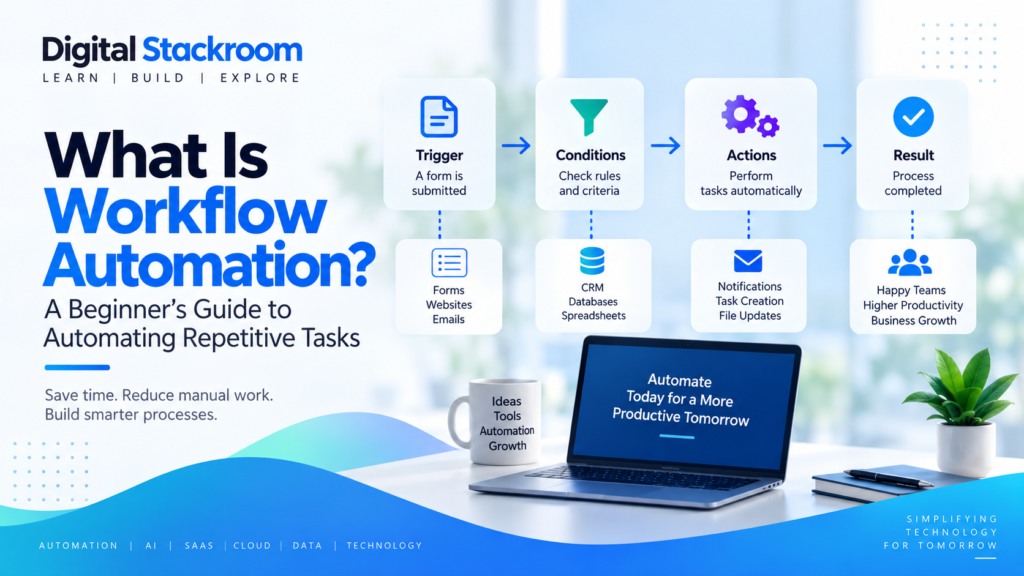
Workflow automation is the use of software to automatically complete repetitive tasks, move information between systems, trigger actions, and guide business processes with less manual effort.
If you are wondering what is workflow automation, how it works, what kinds of tasks can be automated, and whether it can help your business, this guide explains the concept in simple terms.
From automatically sending emails and updating spreadsheets to processing approvals, routing customer requests, generating reports, and connecting business applications, workflow automation can help teams spend less time on repetitive work and more time on higher-value activities.
Table of Contents
What Is Workflow Automation?
Workflow automation means using technology to perform defined steps in a process automatically.
A workflow is simply a sequence of activities used to complete a task or business process.
IBM describes workflow automation as using software to execute all or part of a process, helping replace repetitive manual work with automated steps.
For example, imagine a customer submits a contact form on a website. Without automation, an employee might have to:
- Check the form submission.
- Copy the customer information into a CRM.
- Notify the sales team.
- Send a confirmation email.
- Create a follow-up task.
With workflow automation, software can perform many or all of these actions automatically.
Understanding what is workflow automation becomes easier when you think of it as creating rules that tell software:
When something happens, automatically perform the next required actions.
How Does Workflow Automation Work?
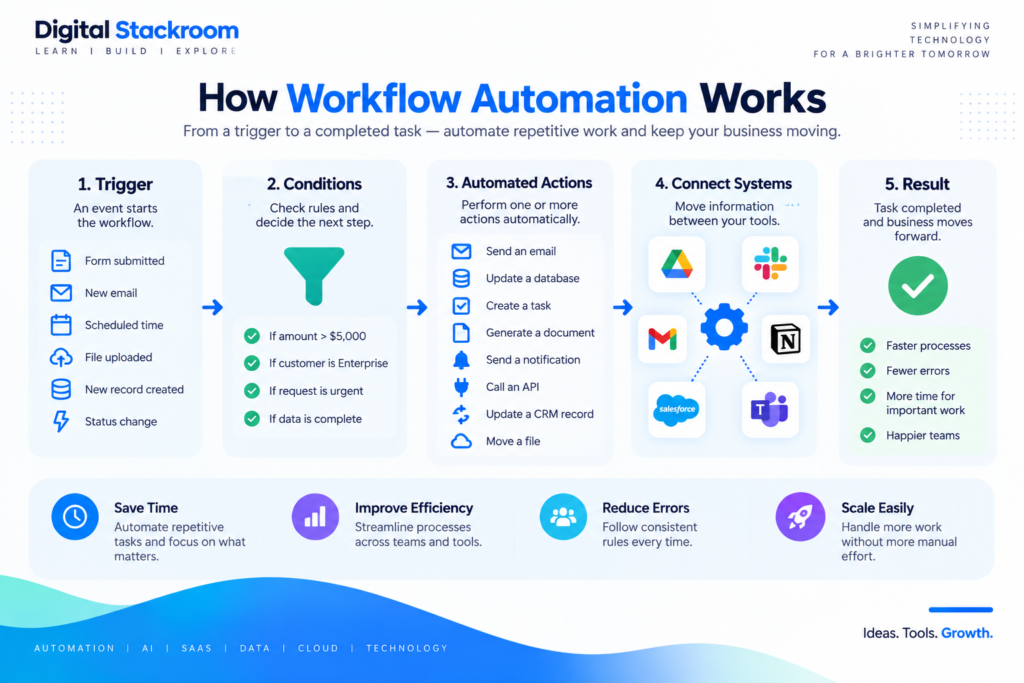
Most workflow automation systems follow a simple structure:
To understand what is workflow automation in practice, it helps to see how a trigger starts a process and how software handles the following steps automatically.
Trigger → Conditions → Actions → Result
1. A Trigger Starts the Workflow
A trigger is the event that starts an automated process.
Examples include:
- a form being submitted
- a new email arriving
- a file being uploaded
- a new customer being created
- an invoice becoming overdue
- a task changing status
- a scheduled time being reached
2. The System Evaluates Conditions
Some workflows need rules before deciding what happens next.
For example:
If invoice amount is greater than $5,000 → request manager approval.
If customer type is Enterprise → assign to enterprise sales team.
Conditions allow workflows to handle different scenarios automatically.
3. Automated Actions Are Performed
Once the trigger and conditions are satisfied, the workflow performs one or more actions.
Actions might include:
- sending an email
- updating a database
- creating a task
- moving a file
- generating a document
- sending a notification
- calling an API
- updating a CRM record
- adding information to a spreadsheet
4. Information Moves Between Systems
Modern businesses often use many applications.
Workflow automation can connect those tools so information moves automatically instead of employees repeatedly copying and pasting data.
5. The Workflow Continues Until Completion
Complex workflows may contain multiple stages, approvals, branches, retries, and notifications before the process is complete.
Common Examples of Workflow Automation
Workflow automation can be used across almost every department.
Email Automation
A workflow can automatically send emails when specific events occur.
Examples include:
- welcome messages
- order confirmations
- payment reminders
- status updates
- follow-up emails
Form Processing
When someone submits a form, automation can:
- capture the information
- validate required fields
- store the data
- notify the appropriate team
- create a task
- send a confirmation
Approval Workflows
Businesses often automate processes requiring approval.
Examples include:
- expense approvals
- leave requests
- purchase requests
- document reviews
- access requests
The workflow can automatically send the request to the correct reviewer and continue once approval is received.
Customer Support
Support workflows can automatically:
- classify incoming tickets
- assign tickets to teams
- prioritize urgent requests
- send acknowledgements
- escalate overdue cases
- notify managers
Sales Processes
Sales teams can automate:
- lead capture
- lead assignment
- follow-up reminders
- CRM updates
- proposal notifications
- pipeline stage changes
Employee Onboarding
When a new employee joins, automation can help coordinate:
- account creation
- equipment requests
- training assignments
- document collection
- access approvals
- manager notifications
Reporting
Automated workflows can gather data from multiple systems and generate recurring reports without someone manually preparing the same report every day or week.
Workflow Automation vs Manual Processes
| Aspect | Manual Process | Automated Workflow |
|---|---|---|
| Task execution | Completed by employees | Software performs defined steps |
| Speed | Depends on availability | Often runs immediately |
| Repetition | Requires repeated manual work | Repeats automatically |
| Data entry | Often copied manually | Can move between systems automatically |
| Errors | More exposed to human mistakes | Can reduce repetitive errors |
| Scalability | Requires more manual effort | Can handle larger volumes more efficiently |
Automation does not mean every business process should operate without people.
The strongest workflows usually automate repetitive steps while allowing humans to handle exceptions, judgment, creativity, and important decisions.
Benefits of Workflow Automation
Saves Time
Repetitive tasks can consume significant amounts of employee time.
Automation allows software to perform predictable activities in the background.
Reduces Manual Data Entry
Moving information manually between systems can be slow and error-prone.
Automated integrations can transfer information between applications without repeatedly re-entering the same data.
Improves Consistency
A defined workflow follows the same process each time.
This can reduce variation between employees and help teams follow standardized procedures.
Reduces Human Error
Automation can reduce mistakes caused by:
- forgetting steps
- copying incorrect information
- missing notifications
- entering data into the wrong system
Human review is still important for high-impact processes.
Faster Response Times
Automated workflows can respond immediately when events occur.
For example, a customer can receive confirmation seconds after submitting a request.
Better Visibility
Workflow systems often record:
- when a task started
- which step it reached
- who approved it
- when it completed
- where delays occurred
This creates useful operational visibility.
Easier Scaling
As transaction volumes grow, automated processes can often handle additional work without requiring the same proportional increase in manual effort.
What Tasks Should Be Automated?
Not every task is a good candidate for automation.
The best opportunities usually share several characteristics.
Repetitive Tasks
Tasks performed frequently in the same way are strong candidates.
Rule-Based Processes
Automation works well when clear rules determine what should happen next.
High-Volume Activities
Even a small time saving can create significant value when a task is performed thousands of times.
Manual Data Transfer
Processes that require employees to copy information between applications are often good automation opportunities.
Notification-Based Processes
Tasks involving routine reminders, alerts, and status updates are relatively straightforward to automate.
Approval Processes
Structured approval workflows can often be automated while keeping humans responsible for the actual approval decision.
What Should Not Be Fully Automated?
Automation should not be applied simply because it is technically possible.
Some activities still require significant human involvement.
Complex Judgment
Situations involving ambiguous information or major consequences often require human evaluation.
Sensitive Decisions
Hiring, financial, legal, safety, and other high-impact decisions should include appropriate human oversight.
Creative Work
Automation can assist creative tasks, but human direction and judgment remain valuable.
Unstable Processes
If a business process changes every week, automating it immediately may create additional maintenance work.
It is often better to improve and stabilize the process before automating it.
Types of Workflow Automation
Rule-Based Automation
Rule-based systems follow predefined logic.
For example:
If payment status = overdue, send reminder email.
Application Integration Automation
These workflows connect multiple applications.
For example:
New website lead → create CRM record → notify salesperson → create follow-up task.
Many workflow automation platforms connect SaaS applications so information can move automatically between different tools.
Business Process Automation
Business Process Automation, or BPA, focuses on larger organizational processes that may involve several teams and systems.
Robotic Process Automation
Robotic Process Automation, commonly called RPA, uses software bots to perform tasks that users would normally complete through computer interfaces.
This can be useful when applications do not provide convenient APIs or integrations.
AI-Powered Automation
Artificial intelligence can add capabilities such as:
- document classification
- text summarization
- sentiment analysis
- information extraction
- content generation
- intelligent routing
AI can make workflows more flexible, but outputs may require validation.
To understand the AI side in more detail, read our beginner’s guide to generative AI.
Workflow Automation vs RPA
Workflow automation and RPA are related but not identical.
Workflow automation usually connects systems through integrations, APIs, databases, forms, and business logic.
RPA often mimics human interactions with software interfaces.
For example:
A workflow automation platform might use an API to create a customer record directly.
An RPA bot might open the application, click fields, type customer information, and press Save.
Both approaches can be useful depending on the systems involved.
Workflow Automation vs Business Process Automation
Workflow automation usually focuses on automating specific sequences of tasks.
Business Process Automation often addresses broader end-to-end processes involving multiple workflows, departments, and systems.
For example:
Workflow automation: Automatically approve a standard expense below a threshold.
Business process automation: Manage the entire expense process from submission through approval, reimbursement, reporting, and audit tracking.
Workflow Automation vs AI Automation
Traditional workflow automation depends primarily on predefined rules.
AI automation introduces models capable of interpreting less-structured information.
For example:
A traditional workflow might route a support ticket based on a dropdown selected by the customer.
An AI-assisted workflow might analyze the customer’s written message and determine the likely category automatically.
Combining automation with AI can create more capable systems, but organizations should still consider accuracy, security, privacy, and human oversight.
Popular Categories of Workflow Automation Tools
Different platforms are designed for different levels of complexity.
No-Code Automation Platforms
These tools allow users to build workflows through visual interfaces instead of writing extensive code.
They are useful for connecting common business applications.
Low-Code Automation Platforms
Low-code platforms provide visual workflow builders while allowing developers to add custom logic when necessary.
Enterprise Automation Platforms
Large organizations may use workflow systems offering:
- access controls
- audit logs
- approvals
- complex routing
- integrations
- compliance features
- monitoring
RPA Platforms
RPA tools automate interactions with desktop and web applications.
Custom Automation
Engineering teams may build workflows using:
- APIs
- Python
- JavaScript
- cloud functions
- databases
- queues
- scheduled jobs
Custom development provides more flexibility but requires more technical expertise and maintenance.
How to Choose a Workflow Automation Tool
Identify the Process First
Do not begin by choosing software.
Start by understanding the process you want to improve.
Document:
- trigger
- inputs
- steps
- decisions
- outputs
- exceptions
Check Application Integrations
Make sure the automation platform works with the applications your organization uses.
Consider Workflow Complexity
Simple personal automations and enterprise approval systems have very different requirements.
Evaluate Security
Review:
- authentication
- permissions
- encryption
- audit logs
- credential storage
- data handling
Review Reliability
Business-critical workflows require monitoring and error handling.
Understand Pricing
Automation platforms may charge based on:
- users
- workflows
- tasks
- executions
- API calls
- premium connectors
Consider Scalability
A workflow that processes 50 records per month may eventually need to handle millions.
Understand platform limits before depending on automation for critical systems.
How to Build Your First Automated Workflow
Step 1: Choose a Repetitive Task
Start with something simple and low-risk.
For example:
When someone submits a contact form, automatically send the information to the sales team.
Step 2: Identify the Trigger
Determine exactly what starts the workflow.
Example:
New form submission
Step 3: Define the Actions
Write down what should happen next.
Example:
- Store submission.
- Create CRM lead.
- Notify salesperson.
- Send confirmation email.
Step 4: Identify Conditions
Add rules where necessary.
Example:
If country = India → assign to APAC sales team.
Step 5: Build the Workflow
Configure the steps inside the automation platform.
Step 6: Test With Sample Data
Always test before enabling automation for real users.
Check:
- valid inputs
- missing information
- duplicates
- system failures
- unexpected values
Step 7: Add Error Handling
Decide what happens if an automated step fails.
A strong workflow should not silently lose information.
Step 8: Monitor the Workflow
Review execution logs and failures after launch.
Automation still requires maintenance.
Real-World Workflow Automation Example
Imagine an organization receives customer support requests through an online form.
A workflow could operate like this:
Step 1: Customer submits support request.
Step 2: System creates a support ticket.
Step 3: The request is classified by product.
Step 4: High-priority requests are flagged.
Step 5: Ticket is assigned to the appropriate team.
Step 6: Customer receives confirmation.
Step 7: Team receives notification.
Step 8: If the ticket is not updated within a defined period, the workflow escalates it.
Without automation, employees might perform several of these steps manually.
How AI Is Changing Workflow Automation
Artificial intelligence is expanding what automated workflows can handle.
Traditional workflows perform best when data is structured and rules are clear.
AI can help workflows interpret less-structured information.
Examples include:
Document Processing
AI can extract information from documents and pass the results into an automated process.
Email Classification
AI can analyze incoming messages and determine the appropriate category or team.
Summarization
Long documents, conversations, or support interactions can be summarized automatically.
Intelligent Routing
AI models can help determine where a request should be sent based on its content.
Content Generation
Automated workflows can generate draft emails, reports, summaries, or responses.
Natural-Language Interfaces
Users may increasingly create or interact with workflows through normal language rather than complex configuration screens.
Risks and Challenges of Workflow Automation
Automating a Bad Process
Automation does not automatically fix an inefficient workflow.
It can simply make a bad process operate faster.
Improve the process before automating it.
Integration Failures
APIs and applications change.
Workflows should be monitored for broken integrations.
Incorrect Rules
A mistake in automation logic can affect many records quickly.
Testing is essential.
Security Risks
Automation tools may have access to sensitive business applications and credentials.
Use proper permissions and credential management.
Lack of Human Oversight
Some processes should include manual review or approval stages.
Maintenance
Automated workflows need ongoing monitoring as systems and business requirements change.
Best Practices for Workflow Automation
Start Small
Begin with simple, low-risk workflows before automating mission-critical processes.
Keep Workflows Understandable
Avoid unnecessary complexity.
A workflow should be understandable by people who need to maintain it later.
Document the Logic
Document:
- triggers
- conditions
- actions
- integrations
- owners
- error handling
Use Least-Privilege Access
Automation should only have the permissions required to perform its tasks.
Build Error Handling
Create alerts when important workflows fail.
Track Performance
Measure whether automation actually saves time or improves outcomes.
Maintain Human Review Where Needed
Automation should support human judgment rather than remove it indiscriminately.
How to Measure Workflow Automation Success
Useful metrics may include:
Time Saved
Compare manual processing time before and after automation.
Processing Speed
Measure how quickly requests move through the workflow.
Error Rate
Track whether automation reduces repetitive data-entry errors.
Completion Rate
Monitor how many workflow runs finish successfully.
Cost Per Transaction
Automation can reduce the cost associated with repetitive operations.
Employee Experience
Reducing repetitive administrative work can allow employees to focus on more meaningful tasks.
Customer Experience
Faster responses and fewer errors can improve customer interactions.
Frequently Asked Questions About Workflow Automation
What is workflow automation in simple terms?
Workflow automation is using software to automatically perform repetitive steps in a process according to predefined triggers and rules.
What is an example of workflow automation?
A simple example is automatically creating a CRM lead and notifying a salesperson when someone submits a contact form.
Does workflow automation require coding?
Not always.
Many platforms provide no-code or low-code visual workflow builders. More complex automation may require APIs or programming.
What is the difference between workflow automation and RPA?
Workflow automation often connects systems directly through integrations and APIs, while RPA frequently automates actions performed through user interfaces.
Can small businesses use workflow automation?
Yes.
Small businesses can automate activities such as email notifications, lead capture, invoicing, scheduling, reporting, and customer follow-ups.
Can workflow automation use AI?
Yes.
AI can help workflows interpret documents, classify text, generate content, summarize information, and make routing decisions.
Can workflow automation replace employees?
Workflow automation usually replaces repetitive tasks rather than complete jobs.
People remain important for judgment, exceptions, creativity, relationship management, and decision-making.
Is workflow automation secure?
It can be secure when appropriately designed.
Organizations should consider authentication, permissions, encryption, credentials, integrations, data access, and monitoring.
What processes should I automate first?
Start with repetitive, rule-based, high-volume tasks that are easy to test and have relatively low risk.
Final Thoughts
Workflow automation can help individuals and organizations reduce repetitive work, improve consistency, accelerate processes, and connect different software systems.
The goal is not to automate everything.
Effective automation begins by identifying a clear problem, simplifying the process, and deciding which steps software can reliably perform.
If you are asking what is workflow automation, the simplest explanation is:
Workflow automation uses software to automatically perform predefined steps in a process when specific events or conditions occur.
If you are still asking what is workflow automation, think of it as software coordinating repetitive process steps according to predefined triggers, rules, and actions.
As businesses adopt more cloud applications, APIs, artificial intelligence, and connected systems, workflow automation will continue to become an important part of modern digital operations.
Continue exploring Digital Stackroom for practical guides on automation, AI, SaaS, data, cloud computing, and modern technology.