
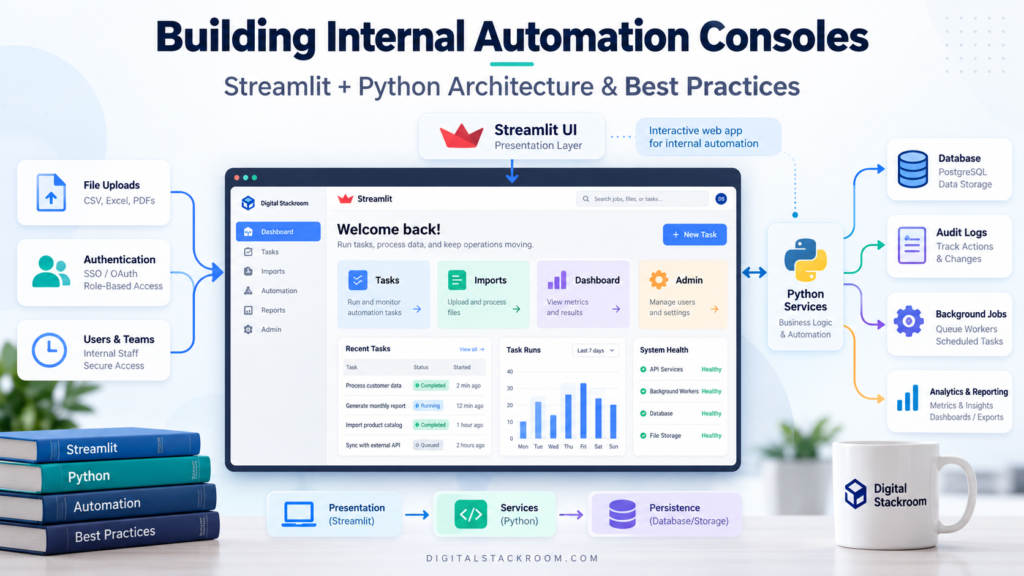
Streamlit is one of the fastest ways to turn Python code into an internal web application.
That speed is its biggest advantage.
It can also become its biggest architectural trap.
A first version of an internal tool often starts like this:
import streamlit as st
import pandas as pd

st.title("Operations Console")

df = pd.read_sql("SELECT * FROM tasks", connection)

st.dataframe(df)
It works.
A few days later the application needs:
- authentication
- several pages
- database writes
- approvals
- file uploads
- user-specific permissions
- audit logs
- background jobs
- dashboards
- caching
- API integrations
The original 100-line script becomes 2,000 lines.
Database queries sit beside UI widgets.
Authorization rules are repeated on several pages.
Clicking one dropdown reruns an expensive query.
Two users accidentally work on the same record.
A long-running Python function blocks the page.
And suddenly the “quick internal tool” has become a production system without a production architecture.
The answer is not to stop using Streamlit.
The answer is to use it for the part it is particularly good at:
building interactive Python user interfaces while keeping business logic, persistence, authorization, and durable work outside the presentation layer.
In this guide, we will build the architecture of a realistic internal automation console and cover:
- Streamlit’s execution model
- project structure
- multipage navigation
- Session State
- forms
- database access
- caching
- write operations
- concurrency
- authentication
- authorization
- secrets
- audit logging
- file uploads
- background processing
- testing
- deployment
- observability
- scaling
- and when Streamlit stops being the right framework
The goal is not to build another Streamlit dashboard.
The goal is to design an internal operations console that can survive real users.
Table of Contents
What Kind of Applications Is Streamlit Good At?
Streamlit works particularly well when the application is primarily driven by Python and used by internal teams.
Examples include:
- operations consoles
- data-quality tools
- annotation interfaces
- model-evaluation consoles
- workflow-review tools
- administrative interfaces
- internal dashboards
- ML experimentation applications
- audit utilities
- data-upload and validation tools
- support operations tools
A typical application might allow an operations analyst to:
Sign in
   ↓
Select Workstream
   ↓
Claim Task
   ↓
Review Data
   ↓
Enter Decision
   ↓
Submit
   ↓
Write Audit Event
   ↓
Update Dashboard
That is much closer to a business application than a traditional dashboard.
The architecture should reflect that.
Streamlit’s Execution Model Changes How You Design Applications
The first thing to understand is that Streamlit does not behave like a traditional request-handler framework.
A Streamlit script is normally executed from top to bottom.
When a user interacts with a widget, Streamlit usually reruns the script and reconstructs the interface using the new widget state.
Conceptually:
User Opens Page
      ↓
Run Python Script
      ↓
Render UI
      ↓
User Changes Widget
      ↓
Rerun Python Script
      ↓
Render Updated UI
This makes simple applications very easy to build.
It also means this is dangerous:
df = run_30_second_database_query()

st.selectbox(
    "Choose status",
    ["Open", "Closed"]
)
If the database call is not cached appropriately, UI interactions can cause repeated expensive work.
This is why production Streamlit applications need to understand three concepts early:
Rerun
State
Cache
They solve different problems.
Session State Is Not a Database
Streamlit’s st.session_state allows information to survive reruns within a user’s session.
Example:
import streamlit as st


if "selected_task_id" not in st.session_state:
    st.session_state.selected_task_id = None
Later:
st.session_state.selected_task_id = "TASK-1042"This is useful for UI state such as:
- selected task
- temporary filters
- wizard step
- unsaved form state
- user interface preferences
But Session State should not become your persistence layer.
This would be a bad design:
Approved Workflow
       ↓
Store in session_state
       ↓
Assume it is permanent
Session State belongs to the browser session and can disappear when that session ends or the underlying connection/state is lost.
Business-critical information belongs in a durable store:
PostgreSQL
BigQuery
Firestore
Cloud SQL
Object Storage
Another Persistent Database
A useful rule is:
Session State remembers the UI. The database remembers the business.
The Architecture I Would Use
For a serious internal console, I would separate the application into layers.
                    USER

                      ↓

             STREAMLIT UI LAYER

         Pages / Forms / Tables / Widgets

                      ↓

               SERVICE LAYER

      Validation / Business Rules / Workflow

                      ↓

             REPOSITORY LAYER

        SQL / APIs / Storage Operations

                      ↓

          PERSISTENT INFRASTRUCTURE

 Database / Warehouse / Object Storage / Queue
The Streamlit page should not know every detail about the database.
Instead of:
if st.button("Approve"):
    conn.execute(
        """
        UPDATE tasks
        SET status='approved'
        WHERE task_id=...
        """
    )
prefer:
if st.button("Approve"):
    approve_task(
        task_id=task_id,
        reviewer=current_user,
    )
The UI says what should happen.
The service layer decides how it happens safely.
Recommended Project Structure
A useful starting structure is:
automation_console/
│
├── streamlit_app.py
│
├── requirements.txt
│
├── Dockerfile
│
│
├── ui/
│   ├── __init__.py
│   ├── dashboard.py
│   ├── tasks.py
│   ├── imports.py
│   └── admin.py
│
├── services/
│   ├── __init__.py
│   ├── task_service.py
│   ├── import_service.py
│   └── authorization.py
│
├── repositories/
│   ├── __init__.py
│   ├── task_repository.py
│   ├── audit_repository.py
│   └── user_repository.py
│
├── domain/
│   ├── __init__.py
│   ├── models.py
│   └── exceptions.py
│
├── jobs/
│   └── client.py
│
├── tests/
│   ├── test_tasks.py
│   ├── test_services.py
│   └── test_app.py
│
└── .streamlit/
    ├── config.toml
    └── secrets.toml
Do not commit the real secrets.toml file.
Use an example file such as:
secrets.toml.examplefor documentation.
Build Multipage Apps With st.Page and st.navigation
Streamlit supports several approaches to multipage applications.
For a new structured application, st.Page and st.navigation provide the most control over routing and available pages.
Your entrypoint can act as the application shell.
import streamlit as st

from ui.admin import render_admin
from ui.dashboard import render_dashboard
from ui.imports import render_imports
from ui.tasks import render_tasks


st.set_page_config(
    page_title="Automation Console",
    page_icon="⚙️",
    layout="wide",
)


pages = {
    "Operations": [
        st.Page(
            render_dashboard,
            title="Dashboard",
        ),
        st.Page(
            render_tasks,
            title="Tasks",
        ),
    ],
    "Data": [
        st.Page(
            render_imports,
            title="Imports",
        ),
    ],
    "Administration": [
        st.Page(
            render_admin,
            title="Admin",
        ),
    ],
}


page = st.navigation(pages)

page.run()
This gives you one location for:
- page registration
- global authentication
- navigation
- shared layout
- global configuration
It also makes permission-based navigation easier.
Do Not Put Every Role on Every Page
An internal application often grows into something like:
Operator
Reviewer
Manager
Admin
Viewer
Do not simply display every page and hide a few buttons.
Build navigation based on authorization.
For example:
def build_pages(user_roles: set[str]):

    pages = {
        "Operations": [
            st.Page(
                render_dashboard,
                title="Dashboard",
            )
        ]
    }

    if "operator" in user_roles:
        pages["Operations"].append(
            st.Page(
                render_tasks,
                title="Tasks",
            )
        )

    if "admin" in user_roles:
        pages["Administration"] = [
            st.Page(
                render_admin,
                title="Admin",
            )
        ]

    return pages
But hiding a page is only a usability control.
It is not sufficient authorization.
The service layer must still verify that the user is allowed to perform the requested action.
Authentication and Authorization Are Different
This distinction becomes important very quickly.
Authentication asks:
Who is this user?Authorization asks:
What is this user allowed to do?Streamlit currently includes native OpenID Connect authentication through:
st.login()
st.user
st.logout()
For example:
import streamlit as st


if not st.user.is_logged_in:

    st.title("Automation Console")

    st.button(
        "Sign in",
        on_click=st.login,
        args=["microsoft"],
    )

    st.stop()
After authentication:
user_claims = st.user.to_dict()

email = user_claims.get("email")

st.write(
    f"Signed in as {email}"
)
Streamlit can work with OIDC identity providers such as:
- Microsoft
- Okta
- other standards-compatible OIDC providers
Authentication tells you who the user is.
Your application should still determine permissions separately.
Build Authorization in the Service Layer
Imagine an operator calls:
approve_task(...)Do not trust the fact that the button appeared on an admin page.
Check permission again.
class AuthorizationError(Exception):
    pass
def require_role(
user_email: str,
allowed_roles: set[str],
role_repository,
):
roles = set(
role_repository.get_roles(
user_email
)
)
if not roles.intersection(
allowed_roles
):
raise AuthorizationError(
"User is not authorized "
"for this operation."
)Then:
def approve_task(
    task_id: str,
    user_email: str,
    repositories,
):

    require_role(
        user_email=user_email,
        allowed_roles={
            "reviewer",
            "admin",
        },
        role_repository=
            repositories.users,
    )

    repositories.tasks.approve(
        task_id=task_id,
        reviewed_by=user_email,
    )
This is genuine authorization.
Removing an item from the sidebar is not.
Be Careful With Authentication Session Lifetime
Streamlit exposes the authenticated identity through st.user.
There is an important production detail: identity tokens contain issuance and expiration claims, but Streamlit does not automatically force logout solely because those token timestamps have passed.
If your organization requires strict authentication-session expiry, enforce that requirement according to your identity and security design rather than assuming the UI session automatically implements your organization’s policy.
Use Forms for Business Transactions
Widgets normally cause reruns as users interact with them.
That can be undesirable when editing several fields before submitting a transaction.
Use st.form.
import streamlit as st


with st.form(
    "task_review_form"
):

    decision = st.selectbox(
        "Decision",
        [
            "Approve",
            "Reject",
            "Escalate",
        ],
    )

    notes = st.text_area(
        "Reviewer notes"
    )

    submitted = (
        st.form_submit_button(
            "Submit review",
            type="primary",
        )
    )
Then:
if submitted:

    submit_review(
        task_id=task_id,
        decision=decision,
        notes=notes,
        reviewer=current_user,
    )

    st.success(
        "Review submitted."
    )
Widgets inside the form are sent to the Python backend together when the form is submitted.
This is particularly useful for:
- review workflows
- admin configuration
- uploads with metadata
- search filters
- data-entry screens
Validate on the Server Even If the UI Restricts Input
Suppose the UI provides:
st.selectbox(
    "Priority",
    [
        "Low",
        "Medium",
        "High",
    ],
)
Do not assume the value reaching the service layer is automatically valid forever.
Validate again.
ALLOWED_PRIORITIES = {
    "Low",
    "Medium",
    "High",
}


def validate_priority(
    priority: str
):

    if priority not in (
        ALLOWED_PRIORITIES
    ):
        raise ValueError(
            "Invalid priority."
        )
The same applies to:
- uploaded files
- IDs
- dates
- amounts
- statuses
- workflow transitions
- free-text fields
UI constraints improve experience.
Server-side validation protects the application.
Keep Database Access Out of Page Code
A repository layer creates a clear boundary.
Example using SQLAlchemy:
from sqlalchemy import (
    create_engine,
    text,
)

import streamlit as st
Create the database engine once.
@st.cache_resource
def get_engine():

    return create_engine(
        st.secrets[
            "database"
        ]["url"],
        pool_pre_ping=True,
    )
A SQLAlchemy Engine is designed to manage database connections and pooling.
Now create a repository function.
def get_open_tasks():

    query = text("""
        SELECT
            task_id,
            status,
            priority,
            assigned_to,
            version
        FROM workflow_tasks
        WHERE status = :status
        ORDER BY task_id
        LIMIT 500
    """)

    with get_engine().connect() as conn:

        result = conn.execute(
            query,
            {
                "status": "OPEN"
            },
        )

        return result.mappings().all()
Your UI can now simply call:
tasks = get_open_tasks()

st.dataframe(tasks)
Always Parameterize SQL
Avoid building SQL with user-supplied strings.
Bad:
query = f"""
SELECT *
FROM workflow_tasks
WHERE task_id = '{task_id}'
"""
Better:
query = text("""
    SELECT *
    FROM workflow_tasks
    WHERE task_id = :task_id
""")
Then:
conn.execute(
    query,
    {
        "task_id": task_id
    },
)
Parameterization is basic database hygiene and should be applied even in internal tools.
“Internal” does not mean “trusted input.”
Use st.cache_data for Data, Not Business State
Streamlit provides st.cache_data for functions that return data-like values.
Typical examples include:
- DataFrames
- query results
- API responses
- transformed datasets
- computed summaries
Example:
@st.cache_data(
    ttl="30s"
)
def load_dashboard_metrics():

    query = text("""
        SELECT
            status,
            COUNT(*) AS tasks
        FROM workflow_tasks
        GROUP BY status
    """)

    with get_engine().connect() as conn:

        return pd.read_sql(
            query,
            conn,
        )
Then:
metrics = (
    load_dashboard_metrics()
)
This prevents the same query from being executed unnecessarily on every rerun.
Cached Data Can Be Shared Across Users
This is an important production detail.
A global st.cache_data result may be reused across sessions.
That is convenient for shared dashboard data.
It can be dangerous for user-specific information.
Suppose:
@st.cache_data
def get_customer_records():
    ...
returns information based on the current authenticated user but the user identity is not part of the cache key.
That design can create data-isolation problems.
For access-sensitive results, either:
- include authorization-relevant parameters in the cached function
- use an appropriate session-scoped cache
- or avoid caching the result
For example:
@st.cache_data(
    ttl="30s",
    scope="session",
)
def get_my_tasks(
    user_email: str,
):
    ...
Caching should never bypass access control.
Use st.cache_resource for Shared Resources
Some objects should not be recreated on every rerun.
Examples include:
- database engines
- ML models
- expensive client objects
- other reusable resources
Use:
@st.cache_resource
def load_model():

    return load_my_ml_model()
Then:
model = load_model()Unlike st.cache_data, cached resources are shared objects rather than copied data results.
That means globally cached resources must be safe for concurrent use.
Do not put mutable per-user information inside a globally cached resource.
Cache Invalidation Matters After Writes
Suppose the dashboard query is cached for 60 seconds.
An operator approves a task.
The database changes immediately.
The dashboard could continue showing the previous value until its cache entry expires.
After a write, clear relevant caches.
def submit_review(
    task_id,
    decision,
    reviewer,
):

    update_task(
        task_id=task_id,
        decision=decision,
        reviewer=reviewer,
    )

    load_dashboard_metrics.clear()
Do not necessarily clear every cache in the entire application.
Invalidate the smallest relevant cache where practical.
Protect Workflow Updates From Concurrent Users
Internal workflow tools often have multiple users editing the same records.
Imagine:
10:01:00  Reviewer A opens TASK-1001
10:01:03  Reviewer B opens TASK-1001
10:05:00  Reviewer A approves it
10:06:00  Reviewer B rejects it
Without concurrency control, the second write may silently overwrite the first.
One useful approach is optimistic concurrency.
Add a version column:
task_id
status
version
When the task is read:
TASK-1001
OPEN
version = 7
When writing:
UPDATE workflow_tasks
SET
    status = :status,
    version = version + 1
WHERE
    task_id = :task_id
    AND version = :expected_version
Python:
def update_task(
    task_id: str,
    status: str,
    expected_version: int,
):

    statement = text("""
        UPDATE workflow_tasks

        SET
            status = :status,
            version = version + 1

        WHERE
            task_id = :task_id
            AND version =
                :expected_version
    """)

    with get_engine().begin() as conn:

        result = conn.execute(
            statement,
            {
                "task_id":
                    task_id,

                "status":
                    status,

                "expected_version":
                    expected_version,
            },
        )

        if result.rowcount != 1:

            raise RuntimeError(
                "The task was modified "
                "by another user. "
                "Refresh before retrying."
            )
This is far safer than blindly updating the latest row.
Task Reservation Requires Server-Side Atomicity
A more demanding workflow may allow operators to “claim” the next available task.
This is unsafe:
SELECT available task
       ↓
Return to Python
       ↓
UPDATE task to claimed
Two users can select the same row between those operations.
The reservation should happen atomically in the database or workflow service.
Conceptually:
Find Available Task
        +
Reserve It
        +
Return It

as one protected operation
The exact implementation depends on your database.
Possible mechanisms include:
- row locking
- conditional updates
- leases
- transactional reservation tables
- compare-and-set semantics
This is a backend concern.
Streamlit should display the reservation result, not implement distributed locking in UI code.
Add Lease Expiration for Claimed Tasks
If tasks can be reserved, consider what happens when someone:
- closes the browser
- loses network connectivity
- goes to lunch
- crashes mid-review
A durable reservation model might contain:
task_id
reserved_by
reserved_at
lease_expires_at
heartbeat_at
The backend determines whether the lease remains valid.
The browser should not be the authoritative source of reservation ownership.
Keep Audit Logging Separate From Current State
Suppose an admin changes:
Status:
OPEN → DISABLED
The main table should store the current state.
An audit table should preserve the event.
Example:
event_id
event_type
entity_type
entity_id
actor_email
event_timestamp
before_state
after_state
request_id
This enables questions such as:
Who deactivated this task?
When was this assignment cancelled?
Which status existed before the change?
Audit logs should be append-oriented.
Do not overwrite history every time the current row changes.
Never Trust the Browser to Tell You Who Performed an Action
Avoid:
reviewer = st.text_input(
    "Enter your email"
)
and then:
audit_log(
    actor=reviewer
)
The user can type anything.
Use authenticated identity:
user = st.user.to_dict()

reviewer = user.get(
    "email"
)
or another trusted identity claim supplied through your approved authentication architecture.
Manage Secrets Correctly
Local Streamlit development supports:
.streamlit/secrets.tomlExample:
[database]
url = "postgresql+psycopg://user:password@host/database"
Read it with:
database_url = (
    st.secrets[
        "database"
    ]["url"]
)
Do not commit the real secrets file.
Your repository should contain:
.gitignorewith:
.streamlit/secrets.tomlFor production deployments, prefer the secret-management capability provided by your hosting platform, orchestration system, or cloud environment and inject secrets securely.
Do not place production secrets:
- in Git
- in Docker images
- in frontend HTML
- in query parameters
- in logs
Streamlit Authentication Configuration Also Uses Secrets
If you use Streamlit’s native OIDC authentication, provider configuration belongs under the authentication section in secrets configuration.
Conceptually:
[auth]
redirect_uri = "https://console.example.com/oauth2callback"
cookie_secret = "strong-random-secret"
[auth.microsoft]
client_id = “…” client_secret = “…” server_metadata_url = “…”
Do not expose authentication client secrets in source code.
Build Data Validation Into Import Workflows
Many internal consoles eventually accept:
CSV
JSON
Excel
Parquet
The upload is only the beginning of the workflow.
A safer architecture is:
Upload
   ↓
Validate File Type
   ↓
Validate Schema
   ↓
Validate Required Columns
   ↓
Validate Row Count
   ↓
Validate Business Rules
   ↓
Preview
   ↓
Explicit Confirmation
   ↓
Persist
For example:
uploaded_file = st.file_uploader(
    "Upload CSV",
    type=["csv"],
)
Then:
if uploaded_file is not None:

    df = pd.read_csv(
        uploaded_file
    )

    required = {
        "task_id",
        "prompt",
        "priority",
    }

    missing = (
        required
        - set(df.columns)
    )

    if missing:

        st.error(
            "Missing columns: "
            + ", ".join(
                sorted(missing)
            )
        )

        st.stop()
Then validate the actual values.
Do not assume a correct header means the data is safe to import.
For deeper pipeline validation patterns, see Automating Data Validation Pipelines: Writing SQL Assertion Checks Before Running Production Reports.
Uploaded Files Are Not Durable Storage
An uploaded file exists for the application to process.
Do not treat that in-memory upload object as permanent storage.
If the file must survive:
- application restart
- user disconnect
- container replacement
- redeployment
write it to durable storage.
For example:
Browser Upload
      ↓
Streamlit
      ↓
Validate
      ↓
Object Storage
      ↓
Store Object URI in Database
Large or business-critical uploads are generally better stored in:
- cloud object storage
- an approved document store
- another durable backend
rather than the local container filesystem.
Avoid Using the Container Filesystem as Shared State
This becomes especially important when the application runs on multiple replicas.
Writing:
with open(
    "/tmp/current_tasks.json",
    "w",
) as file:
    ...
may work on one server.
With multiple instances:
Instance A
/tmp/current_tasks.json

Instance B
No file
Users may hit either instance.
Use shared durable storage instead.
Long-Running Work Should Leave the Streamlit Process
This is one of the most important boundaries in an internal automation console.
Suppose a button starts:
Process 500,000 recordsor:
Run 45-minute ML inference jobDo not make the user’s Streamlit session own the entire lifetime of that work.
A better architecture is:
Streamlit
    ↓
Create Job
    ↓
Queue / Job Service
    ↓
Worker
    ↓
Database / Storage
The UI receives:
job_idand displays status.
A Simple Durable Job Model
A database table could look like:
job_id
job_type
requested_by
created_at
started_at
completed_at
status
progress
result_uri
error_message
When the user clicks:
Start ProcessingStreamlit writes:
status = QUEUEDand returns immediately.
A worker later changes:
QUEUED
→ RUNNING
→ COMPLETED
or:
RUNNING
→ FAILED
The application merely displays the current durable state.
Why Not Just Start a Python Thread?
A background thread inside the Streamlit server may appear convenient.
But it is not a durable job system.
If the container:
- restarts
- is replaced
- crashes
- scales down
the thread disappears.
Use in-process work only when losing that work is acceptable.
For business-critical or long-running tasks, use durable infrastructure.
Keep AI Integrations Behind a Service Layer Too
Internal consoles increasingly include:
- classification
- summarization
- RAG
- LLM evaluation
- AI-assisted review
Do not scatter API calls across Streamlit pages.
Bad:
if st.button("Generate"):

    response = llm_client.generate(
        prompt
    )
Better:
if st.button("Generate"):

    result = (
        ai_service.generate_summary(
            task_id=task_id,
            requested_by=current_user,
        )
    )
The service can enforce:
- model selection
- token limits
- retries
- logging
- guardrails
- evaluation
- authorization
For a production Python AI-service pattern, see Integrating the Gemini API in Python: Production Error Handling, Token Limits, and Streaming Architectures.
For AI output governance, see Prompt Evaluation Frameworks: How to Test LLM Outputs Against Enterprise Compliance Guidelines.
Separate Operational UI From Analytical Reporting
Streamlit can display charts.
That does not automatically mean it should become the organization’s entire BI platform.
There are two different workloads.
Operational application
Questions like:
Which task should I review now?

Can I approve this row?

Which import failed?

Who owns this assignment?
Analytical reporting
Questions like:
What was monthly throughput?

How has quality changed?

Which region has the highest rejection rate?

What is the 12-month trend?
The first is transactional.
The second is analytical.
A healthy architecture often uses:
Streamlit
→ Operational workflow

Warehouse
→ Analytics data

BI tool
→ Long-term reporting
If your reporting layer is BigQuery-based, the Digital Stackroom guide Designing Scalable Data Models in Google BigQuery: Partitioning, Clustering, and Cost Controls covers the warehouse side of that architecture.
For dashboard design itself, see How to Build Actionable Executive Dashboards: Layout Principles and Metric Design.
Do Not Query the Warehouse Carelessly on Every Rerun
Suppose your page performs:
SELECT *
FROM billion_row_table
each time a widget changes.
Streamlit makes it easy to create that mistake because code looks like a normal Python script.
Use:
- filtered queries
- partition pruning
- aggregations
- cached results
- precomputed reporting tables
- limits
where appropriate.
The UI framework does not remove the need for database engineering.
Put Expensive Dashboard Queries Behind Caching
Example:
@st.cache_data(
    ttl="5m",
)
def get_daily_metrics(
    workstream_id: str,
):

    query = text("""
        SELECT
            DATE(created_at)
                AS event_date,

            COUNT(*)
                AS submissions

        FROM ops_submissions

        WHERE
            workstream_id =
                :workstream_id

        GROUP BY
            DATE(created_at)

        ORDER BY
            event_date
    """)

    with get_engine().connect() as conn:

        return pd.read_sql(
            query,
            conn,
            params={
                "workstream_id":
                    workstream_id
            },
        )
The cache key now includes:
workstream_idso unrelated workstreams do not incorrectly share the same result.
Avoid Caching Authorization Decisions Indefinitely
Authorization data is different from dashboard data.
Suppose an administrator removes someone’s access.
If:
@st.cache_data
def get_roles(email):
    ...
has no expiration, the user may continue using cached permissions longer than intended.
For access decisions:
- query the authoritative source
- or use a short cache with a consciously accepted revocation delay
Security-sensitive caching should be designed differently from performance caching.
Error Messages Need Two Audiences
Users need:
Unable to complete the update.
Please refresh and retry.
Engineers need:
task_id=ABC-123
expected_version=8
actual_version=9
request_id=...
SQLSTATE=...
Do not display raw stack traces, SQL, secrets, or backend details to normal users.
Use structured logging.
import logging


logger = logging.getLogger(
    "automation_console"
)
Example:
try:

    approve_task(
        task_id=task_id,
        reviewer=current_user,
    )

except Exception:

    logger.exception(
        "task_approval_failed",
        extra={
            "task_id":
                task_id,

            "reviewer":
                current_user,
        },
    )

    st.error(
        "The task could not "
        "be approved."
    )
The browser gets a safe message.
Logs retain diagnostic detail.
Give Every Business Transaction a Request ID
A useful pattern is:
import uuid


request_id = str(
    uuid.uuid4()
)
Pass that ID through:
UI
Service
Database Write
Audit Event
Job
Logs
Then an incident can be reconstructed.
Example:
request_id =
38db6b0e-...
appears in:
- application log
- audit event
- workflow table
- job record
This is much easier to investigate than matching timestamps manually.
Design Idempotent Actions Where Possible
Users double-click buttons.
Browsers retry requests.
Networks disconnect.
Workers retry jobs.
If clicking:
Create Assignmenttwice creates two assignments, the operation is fragile.
Use idempotency controls.
For example:
request_idcan have a unique constraint.
Or use a business key such as:
task_id + stagethat may only exist once.
Retry safety becomes extremely important when background jobs and external APIs are involved.
Destructive Actions Need Confirmation
Actions such as:
- deleting imports
- cancelling assignments
- deactivating workflows
- publishing configuration
- bulk updates
should not fire from an accidental single click without context.
A useful pattern is:
Select Action
      ↓
Show Impact
      ↓
Explicit Confirmation
      ↓
Execute
      ↓
Audit
For example:
confirm = st.checkbox(
    "I understand this will "
    "deactivate the assignment."
)

if st.button(
    "Deactivate assignment",
    disabled=not confirm,
):

    deactivate_assignment(...)
For highly consequential actions, a dedicated confirmation step may be preferable.
Use Transactions for Multi-Step Writes
Suppose submitting a review requires:
Update Task
+
Insert Submission
+
Write Audit Event
Those operations belong in one transaction when they must succeed or fail together.
Example:
def complete_review(
    task_id,
    submission,
    actor,
):

    with get_engine().begin() as conn:

        update_task_status(
            conn,
            task_id=task_id,
        )

        insert_submission(
            conn,
            submission=submission,
        )

        insert_audit_event(
            conn,
            task_id=task_id,
            actor=actor,
        )
If the third operation fails, the transaction can roll back instead of leaving half-completed business state.
Do Not Hide Backend Failures With a Success Message
This sounds obvious, but UI code can accidentally do this:
try:
    save_record()
except Exception:
    logger.exception(
        "save_failed"
    )

st.success(
    "Saved successfully."
)
The success message executes regardless.
Instead:
try:

    save_record()

except Exception:

    logger.exception(
        "save_failed"
    )

    st.error(
        "Save failed."
    )

else:

    st.success(
        "Saved successfully."
    )
The interface should reflect the committed backend state.
Test Business Logic Without Streamlit First
Because business rules live in services, they can be tested normally.
Example:
def test_operator_cannot_approve():

    roles = FakeRoleRepository(
        roles=["operator"]
    )

    with pytest.raises(
        AuthorizationError
    ):

        require_role(
            user_email=
                "user@example.com",

            allowed_roles={
                "reviewer"
            },

            role_repository=
                roles,
        )
This test does not need a browser.
That is one of the main benefits of separating UI from application logic.
Use Streamlit’s AppTest for UI Behavior
Streamlit also provides a native testing framework.
Example:
from streamlit.testing.v1 import (
    AppTest
)
A simple test:
def test_app_loads():

    app = (
        AppTest
        .from_file(
            "streamlit_app.py"
        )
        .run()
    )

    assert not app.exception
You can also interact with widgets and rerun the simulated application.
Use Streamlit tests for:
- navigation
- form behavior
- UI states
- warnings
- validation messages
- rendered elements
Use ordinary unit/integration tests for:
- business rules
- repositories
- SQL
- authorization
- APIs
Do not force every piece of logic through a UI test.
Treat Streamlit Deployment as a Real Web Deployment
Locally, you may run:
streamlit run streamlit_app.pyA production deployment needs more.
Typical architecture:
Users
  ↓
HTTPS
  ↓
Load Balancer / Reverse Proxy
  ↓
Streamlit Container
  ↓
Service Layer
  ↓
Database / Storage / Jobs
Terminate production TLS at an appropriate reverse proxy, gateway, or load balancer rather than treating Streamlit’s development-oriented server configuration as the entire security perimeter.
Containerize the Application
A simple Dockerfile:
FROM python:3.12-slim

WORKDIR /app

RUN apt-get update \
    && apt-get install -y \
        --no-install-recommends \
        curl \
    && rm -rf \
        /var/lib/apt/lists/*

COPY requirements.txt .

RUN pip install \
    --no-cache-dir \
    -r requirements.txt

COPY . .

EXPOSE 8501

HEALTHCHECK \
    CMD curl --fail \
    http://localhost:8501/_stcore/health \
    || exit 1

ENTRYPOINT [
    "streamlit",
    "run",
    "streamlit_app.py",
    "--server.port=8501",
    "--server.address=0.0.0.0"
]
Streamlit documents:
/_stcore/healthas the health endpoint used in its Docker deployment example.
Configure the Server Explicitly
Example:
# .streamlit/config.toml[server]
headless = true maxUploadSize = 100
If your deployment has a known hostname, current Streamlit configuration also provides host allow-listing controls.
Do not disable security protections such as CORS or XSRF simply to make an initial proxy configuration work.
If a reverse proxy causes connection problems, fix the proxy configuration instead of weakening production security without understanding the tradeoff.
Streamlit Uses WebSockets
The Streamlit frontend maintains a persistent WebSocket connection to the Python server.
That matters when deploying behind:
- Nginx
- Apache
- cloud load balancers
- Kubernetes ingress
- other proxies
Your proxy must support WebSocket traffic correctly.
Ordinary HTTP forwarding alone is not sufficient for a production configuration.
Multiple Replicas Need Special Attention
Each browser tab creates its own Streamlit session.
Some Streamlit state and generated media can be local to the server instance serving that session.
If the application is deployed across multiple replicas, Streamlit’s current architecture documentation recommends session affinity for features that depend on reconnecting to the same server-side session.
Conceptually:
User Session
     ↓
Load Balancer
     ↓
Instance B
and subsequent related requests should not randomly move to:
Instance Dwhen the feature depends on instance-local session state.
At the same time, durable business data should still live outside the instance.
Session affinity is not a replacement for shared persistence.
Externalize Generated Files When Scaling
Imagine Instance A creates:
report.csvon its local disk.
The next HTTP request hits Instance B.
Instance B does not have the file.
For replicated environments, store generated artifacts in shared object storage when they need to persist or be consistently accessible.
Streamlit Instance
       ↓
Generate Report
       ↓
Object Storage
       ↓
Return Stable Reference
This also makes container replacement much safer.
Build Observability From the Start
At minimum, monitor:
Infrastructure
CPU
Memory
Restart count
Request health
Active connections
Application
Login failures
Page errors
Database failures
Job failures
Write latency
Business
Tasks claimed
Tasks completed
Review time
Queue depth
Failed imports
Cancelled assignments
A healthy container does not necessarily mean a healthy business process.
Separate Audit Events From Technical Logs
Technical log:
Database timeout while updating task.Audit event:
User alice@example.com
attempted to approve TASK-1234
at 14:07:31 UTC.
They serve different purposes.
Do not attempt to use one system as a substitute for the other.
Performance Problems Usually Come From Architecture, Not Streamlit Alone
When an internal console feels slow, look at:
Database queries
Large datasets
Repeated API calls
Uncached transformations
Slow external services
Huge tables rendered in browser
Blocking jobs
before assuming the framework itself is the only bottleneck.
Measure.
For each expensive operation, log:
duration_ms
rows_returned
cache_hit/miss
query_name
request_id
Performance engineering becomes much easier when the slow stage is visible.
Avoid Loading Millions of Rows Into a DataFrame
This pattern is rarely appropriate for an operations console:
SELECT *
FROM events
followed by:
st.dataframe(
    five_million_rows
)
Instead:
Filter
Paginate
Aggregate
Limit
at the data layer.
Streamlit is a UI.
It should not become the transport mechanism for an entire warehouse table.
Streamlit Is Not Your API Layer
Another common evolution is:
Streamlit UI
+
mobile client
+
another internal application
+
scheduled automation
all needing the same business operation.
If the business logic exists only inside Streamlit:
if st.button(...):other clients cannot reuse it cleanly.
At that point, consider:
Streamlit
   ↓
Backend API / Service
   ↓
Business Logic
Streamlit becomes one client of the service rather than the entire application architecture.
When Streamlit Is the Right Choice
Streamlit remains an excellent choice when:
- users are internal
- Python dominates the stack
- workflows are data-centric
- UI requirements are moderate
- development speed matters
- dashboards and forms coexist
- teams need rapid iteration
A good example might be:
Operations team
50–500 users
Internal authentication
Task workflow
Data review
Admin configuration
Metrics
Streamlit can be very effective here.
When I Would Consider a Different Frontend Architecture
Consider a conventional backend/frontend architecture when the application requires:
- highly customized UI behavior
- complex client-side state
- offline support
- rich drag-and-drop interactions
- large public traffic
- strict frontend performance requirements
- sophisticated real-time collaboration
- complex browser routing
- independent mobile/web clients
- extensive frontend accessibility customization
A possible architecture becomes:
React / Next.js
      ↓
FastAPI / Django
      ↓
Services
      ↓
Database
The decision should be driven by product requirements, not by the idea that one framework is inherently “more professional.”
A Production-Ready Internal Console Architecture
Putting the pieces together:
                         USERS
                           │
                           ▼
                  Identity Provider
                           │
                           ▼
              Reverse Proxy / Load Balancer
                           │
                           ▼
                  Streamlit Application
            ┌──────────────┼──────────────┐
            │              │              │
            ▼              ▼              ▼
        Dashboard        Tasks          Admin
            │              │              │
            └──────────────┼──────────────┘
                           ▼
                     Service Layer
            ┌──────────────┼──────────────┐
            │              │              │
            ▼              ▼              ▼
      Authorization     Validation     Workflows
            │              │              │
            └──────────────┼──────────────┘
                           ▼
                    Repository Layer
             ┌─────────────┼─────────────┐
             │             │             │
             ▼             ▼             ▼
         Database      Object Store    Job Queue
             │                           │
             │                           ▼
             │                         Worker
             │                           │
             └─────────────┬─────────────┘
                           ▼
                    Audit / Analytics
There is an important architectural pattern here.
Streamlit sits near the top.
It does not own everything underneath it.
A Practical Production Checklist
Before deploying an internal Streamlit automation console, I would verify that:
- pages are separated cleanly
st.Page/st.navigationare used deliberately- Session State stores only session-oriented information
- durable state lives outside Streamlit
- forms batch multi-field transactions
- business validation occurs server-side
- database SQL is parameterized
- database access is isolated in repositories
- business logic is isolated in services
st.cache_datais used for appropriate data results- user-specific data is not leaked through global caches
st.cache_resourceis limited to safe shared resources- caches are invalidated after relevant writes
- writes use transactions where required
- concurrent edits cannot silently overwrite each other
- reservation workflows use atomic backend logic
- authentication and authorization are separate
- authorization is enforced in the service layer
- secrets are not committed to Git
- uploaded files are validated
- durable uploads go to durable storage
- critical jobs do not rely on browser sessions
- business actions are audited
- technical failures are logged
- request IDs connect related events
- destructive actions require deliberate confirmation
- idempotency is considered for retried operations
- unit tests cover services
- Streamlit
AppTestcovers important UI paths - Docker health checks are configured
- reverse proxies support WebSockets
- scaled deployments consider session affinity
- local filesystem state is not treated as shared persistence
- application metrics and business metrics are monitored separately
Common Mistakes I Would Avoid
Building Everything in One File
A 200-line prototype can become a 5,000-line maintenance problem quickly.
Separate responsibilities early enough that growth remains manageable.
Using Session State as the Database
It disappears with the session.
Use it for user-interface state.
Caching Sensitive Data Globally
Global caching can cross user sessions.
Make authorization context part of the cache design.
Hiding Pages Instead of Enforcing Authorization
Navigation is not a security boundary.
Starting Critical Background Jobs in Threads
The server process can disappear.
Use durable job infrastructure.
Writing Uploaded Files Only to Local Disk
Containers are disposable.
Use durable storage when files matter.
Running Heavy Queries on Every Widget Change
Understand reruns and cache intentionally.
Putting Raw SQL Directly Into Every Page
Create repositories.
Your future self will thank you.
Retrying Non-Idempotent Writes Blindly
A network timeout does not always mean the write failed.
Design operations so retries cannot accidentally create duplicate business events.
Turning an Operations Console Into a BI Warehouse
Use the right layer for the right workload.
Operational workflow and analytical reporting often deserve different systems.
Final Takeaway
Streamlit is often introduced as:
Python
+
Widgets
=
Web App
That is true.
It is not enough for a production internal system.
A durable internal automation console needs a clearer separation:
Streamlit
      ↓
Presentation

Services
      ↓
Business Logic

Repositories
      ↓
Persistence

Database / Storage / Queue
      ↓
Durable State
The most important lesson is not about a particular widget.
It is about boundaries.
Use Session State for session state.
Use caches for performance.
Use databases for durable state.
Use transactions for business consistency.
Use an identity provider for authentication.
Use backend rules for authorization.
Use job systems for durable long-running work.
Use audit logs for traceability.
Use Streamlit for what it does especially well: giving Python teams a fast, productive interface for interacting with those systems.
If those boundaries are maintained, Streamlit can support far more than simple dashboards.
It can become the operational interface for a serious internal automation platform without turning the entire backend into one increasingly fragile Python script.
Related Digital Stackroom Guides
Automating Data Validation Pipelines: Writing SQL Assertion Checks Before Running Production Reports
Useful when an internal console accepts imported data or triggers pipelines that require schema, null, freshness, volume, and business-rule validation before processing.
Designing Scalable Data Models in Google BigQuery: Partitioning, Clustering, and Cost Controls
Useful when Streamlit is the operational interface while BigQuery provides the analytical backend.
How to Build Actionable Executive Dashboards: Layout Principles and Metric Design
Useful when deciding which metrics should remain inside an operational console and which belong in a dedicated analytical dashboard.
Useful when adding AI capabilities to an internal console without scattering model API calls throughout Streamlit pages.
Prompt Evaluation Frameworks: How to Test LLM Outputs Against Enterprise Compliance Guidelines
Useful when an internal automation tool includes generative AI outputs that need structured evaluation, release gates, and compliance controls.
Official Sources and Further Reading
Streamlit — Understanding Streamlit’s Client-Server Architecture
Explains Streamlit’s Python server, browser client, WebSocket sessions, replication considerations, local media behavior, and session affinity.
Streamlit — App Model and Execution
Explains Streamlit’s top-to-bottom script execution, reruns after widget interactions, caching, and session behavior.
Streamlit — Multipage Applications
Official guidance on multipage applications and the preferred st.Page and st.navigation architecture.
API reference for defining dynamic multipage navigation and executing selected st.Page objects.
Explains per-session state, reruns, callbacks, limitations, WebSocket lifetime, and serialization considerations.
Official guidance for batching multiple widget inputs and processing them in one form submission.
Explains when to use st.cache_data versus st.cache_resource, including mutation and concurrency considerations.
API reference for caching data results, TTLs, cache scopes, entry limits, and invalidation.
API reference for caching shared resource objects such as models and database connections.
Streamlit — User Authentication and Information
Official guidance for OpenID Connect authentication with st.login, st.user, and st.logout.
Documents authenticated-user claims, token exposure, and authentication-session considerations.
Streamlit — Secrets Management
Documents .streamlit/secrets.toml, supported configuration structure, and local/project secret locations.
Streamlit — Native App Testing
Official documentation for Streamlit’s AppTest framework and automated testing with tools such as pytest.
Streamlit — Deploy With Docker
Official Docker deployment example, including port 8501 and the /_stcore/health health endpoint.
Implementation note: The database schemas, roles, queue architecture, cache TTLs, upload limits, reservation model, and workflow examples in this guide are illustrative design patterns rather than universal Streamlit requirements. Production choices should be based on the application’s security model, concurrency requirements, infrastructure, expected workload, data sensitivity, and recovery requirements.