
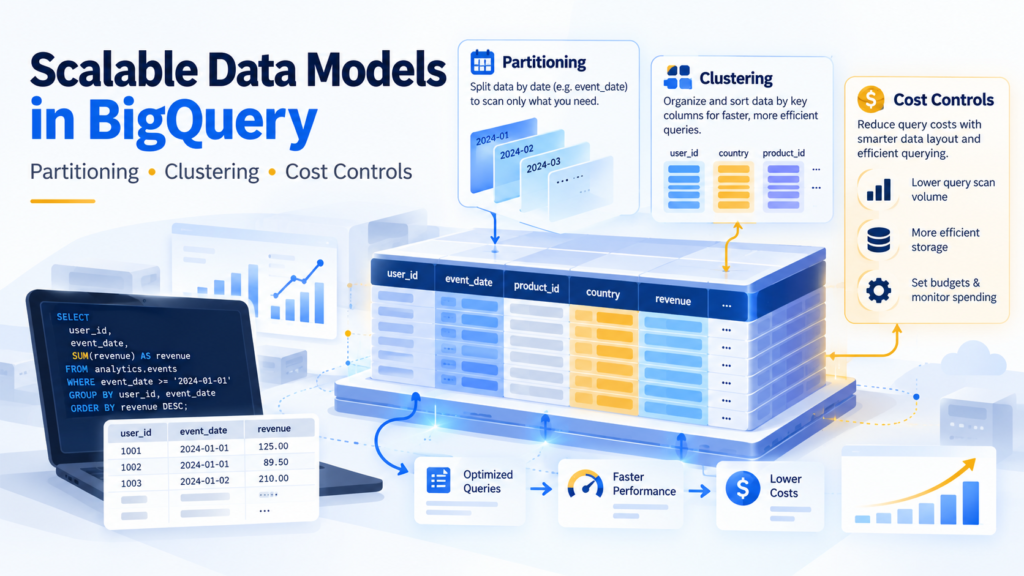
Google BigQuery’s serverless architecture delivers near-instant scalability across petabyte-scale datasets. However, because BigQuery operates on a decoupled compute-and-storage model with an on-demand pricing scheme based on bytes processed, naive data modeling can result in exorbitant cloud bills.
A query written as SELECT * FROM analytics_events WHERE user_id = 91283 on an unpartitioned 10 TB table processes all 10 TB of columnar storage—costing approximately $62.50 for a single point lookup.
To build high-performance data platforms without runaway cloud expenditure, data engineers and architects must leverage BigQuery’s physical layout primitives: Table Partitioning, Clustering, and Execution Guardrails.
Table of Contents
1. Problem Statement: Columnar Storage & The On-Demand Billing Trap
Traditional relational databases (such as PostgreSQL or MySQL) use row-oriented storage pages paired with B-Tree indexes. When querying a specific record, the database traverses an index tree and fetches only matching row tuples.
BigQuery stores data in a proprietary columnar format called Capacitor.
Row-Oriented Engine:
[Row 1: ID, Date, Amount, User] ──► Reads entire row blocks into buffer

Columnar Engine (BigQuery Capacitor):
[Column: ID]     ──► File Block A
[Column: Date]   ──► File Block B
[Column: Amount] ──► File Block C
[Column: User]   ──► File Block D
The Mechanism of Bytes Billed
- Column Elimination: BigQuery reads only the columns declared in your
SELECTstatement. Selecting 3 columns out of 50 saves significant scan volume. - Row Scanning Hazard: Without physical boundary segmentation, Capacitor cannot skip rows within an active column. Every block of that column across the entire dataset must be read from Colossus storage into Dremel compute workers.
- Slot Starvation: Massive full-table scans consume dynamic execution slots, queuing concurrent queries across the organization and exhausting reservation capacities.
Physical data pruning requires segregating data files before workers execute scan phases.
2. Partitioning vs. Clustering: Architectural Trade-Offs
BigQuery provides two distinct tools for controlling physical data placement:
┌────────────────────────────────────────────────────────┐
│                   TABLE PARTITIONING                   │
│  • Structure: Divides table into discrete segments     │
│  • Up to 4,000 partitions per table                    │
│  • Supports: Ingestion time, DATE/TIMESTAMP, Integer   │
│  • Primary Benefit: Exact, predictable scan pruning    │
└────────────────────────────────────────────────────────┘
                           │
                           ▼
┌────────────────────────────────────────────────────────┐
│                    TABLE CLUSTERING                    │
│  • Structure: Colocates & sorts rows within partitions │
│  • Supports up to 4 columns (Order matters)            │
│  • Works on strings, numerics, and high cardinality    │
│  • Primary Benefit: Block-level skipping (O-cost opt)  │
└────────────────────────────────────────────────────────┘
Partitioning Mechanics
Partitioning divides a table into discrete physical slices based on a single column (or ingestion time). When a query filters by the partition column:
- BigQuery reads metadata headers.
- Non-matching partitions are skipped completely prior to execution.
- The query validator in the Google Cloud Console immediately updates the “This query will process X GB” estimate.
Clustering Mechanics
Clustering sorts and co-locates data within storage blocks based on the contents of up to four specified columns. Capacitor tracks minimum and maximum column values for each block.
- When a query filters on clustered columns, BigQuery uses block metadata to skip irrelevant data blocks.
- Unlike partitioning, clustering does not have a strict 4,000-segment limit.
- Clustering is adaptive: as background re-clustering runs automatically, BigQuery optimizes block boundaries at zero additional charge.
While partitioning in relational engines like PostgreSQL manages physical child tables on disk (see our guide on SQL Indexing vs. Table Partitioning), BigQuery partitions segment the proprietary Capacitor columnar storage format.
3. Comparison Matrix
| Architectural Dimension | Table Partitioning | Table Clustering |
| Max Segments | Strict limit of 4,000 partitions per table. | Unlimited block-level sorting segments. |
| Supported Data Types | TIMESTAMP, DATE, DATETIME, or integer range. | Any primitive type (STRING, INT64, BOOL, NUMERIC, etc.). |
| Scan Cost Pre-Calculation | Deterministic: Exact bytes scanned known before running. | Estimated: Actual bytes scanned determined at runtime. |
| Best Analytical Filtering | Low-cardinality time boundaries (Day, Month, Year). | High-cardinality attributes (user_id, country, order_status). |
| Configuration Limit | Exactly one column (or ingestion time). | Up to four ordered columns. |
| Maintenance Cost | Zero maintenance required. | Background auto-re为其 clustered by BigQuery at no charge. |
4. Hands-On Implementation: Creating an Optimized Table
Let us design an analytics logging table tracking mobile app interactions across global enterprise deployments.
Anti-Pattern: Unpartitioned & Flat
SQL
-- POOR ARCHITECTURE: No partitioning, no clustering
CREATE OR REPLACE TABLE `production_analytics.events_raw_unpartitioned` (
    event_id STRING NOT NULL,
    user_id INT64 NOT NULL,
    event_name STRING NOT NULL,
    country_code STRING NOT NULL,
    event_timestamp TIMESTAMP NOT NULL,
    payload_json JSON
);
Every query filtering by date or country scans all historical logs since the inception of the service.
Production Standard: Date Partitioned & Multi-Column Clustered
SQL
-- PRODUCTION PATTERN: Partitioned by Day, Clustered by User and Region
CREATE OR REPLACE TABLE `production_analytics.events_optimized` (
    event_id STRING NOT NULL,
    user_id INT64 NOT NULL,
    event_name STRING NOT NULL,
    country_code STRING NOT NULL,
    event_timestamp TIMESTAMP NOT NULL,
    payload_json JSON
)
PARTITION BY DATE(event_timestamp)
CLUSTER BY country_code, event_name, user_id
OPTIONS (
    partition_expiration_days = 730, -- Automatically drops data after 2 years
    require_partition_filter = TRUE   -- Blocks accidental full-table scans
);
Key Elements of This Schema:
PARTITION BY DATE(event_timestamp): Chunks data by calendar day. A query looking at a 7-day range touches only 7 physical partitions instead of years of historical records.CLUSTER BY country_code, event_name, user_id: Establishes hierarchical sorting inside each day’s partition. Column order matters: filters oncountry_codeprune data blocks first, followed byevent_name.require_partition_filter = TRUE: Queries that omit a partition filter fail instantly before running, preventing inadvertent petabyte scans.partition_expiration_days = 730: Enforces lifecycle storage governance automatically without manual CRON cleanups.
5. Benchmarking Cost & Slot Utilization
Consider a dataset of 1.2 billion rows (~350 GB raw columnar storage) spanning two years.
Query Benchmark: Daily Active User Metrics by Country
SQL
SELECT
    country_code,
    COUNT(DISTINCT user_id) AS active_users,
    COUNT(*) AS total_interactions
FROM `production_analytics.events_optimized`
WHERE event_timestamp BETWEEN '2026-10-01' AND '2026-10-07'
  AND country_code = 'IN'
GROUP BY 1;
Execution Metrics Comparison
| Optimization Layer | Data Scanned (Bytes Billed) | Query Latency | Approximate Cost (On-Demand) |
| Unpartitioned Table | 350.0 GB | 14.8 seconds | ~$2.18 |
| Partitioned Only (By Date) | 3.35 GB | 2.1 seconds | ~$0.02 |
Partitioned + Clustered (country_code) | 0.42 GB | 0.8 seconds | <$0.003 |
By combining daily partitions with column clustering on country_code, 99.88% of data blocks were skipped, reducing operational cost from $2.18 to fractions of a cent per run.
6. BigQuery Cost Control Guardrails
Beyond table modeling, configure systemic guardrails in Google Cloud Platform to prevent resource exhaustion:
1. Enforce Per-Query Bytes Billed Caps
In client libraries (Python, Node.js, Go) or scheduled jobs, configure maximum_bytes_billed:
Python
from google.cloud import bigquery

client = bigquery.Client()
job_config = bigquery.QueryJobConfig(
    maximum_bytes_billed=10 * 1024 * 1024 * 1024 # 10 GB Limit
)

query = """
    SELECT user_id, COUNT(*)
    FROM `production_analytics.events_optimized`
    WHERE DATE(event_timestamp) = '2026-10-23'
    GROUP BY 1
"""

# Fails instantly if estimated scan exceeds 10 GB
query_job = client.query(query, job_config=job_config)
results = query_job.result()
2. Configure Cloud Monitoring & Custom Quotas
- In GCP IAM & Admin, configure Query Usage Quotas per User and Project (e.g., limit developer accounts to 1 TB of processed data per day).
- Build Looker Studio dashboards backed by
INFORMATION_SCHEMA.JOBS_BY_PROJECTto audit top query spenders:
SQL
-- Audit top 10 most expensive queries in the last 7 days
SELECT
    job_id,
    user_email,
    total_bytes_billed / (1024 * 1024 * 1024) AS gigabytes_billed,
    (total_bytes_billed / (1024 * 1024 * 1024 * 1024)) * 6.25 AS estimated_cost_usd,
    query
FROM `region-us`.INFORMATION_SCHEMA.JOBS_BY_PROJECT
WHERE creation_time >= TIMESTAMP_SUB(CURRENT_TIMESTAMP(), INTERVAL 7 DAY)
  AND job_type = 'QUERY'
ORDER BY total_bytes_billed DESC
LIMIT 10;
7. Architectural Decision Matrix
Designing a BigQuery Table:
├── Are you filtering by a continuous date, timestamp, or integer range?
│    └── YES ──► Use PARTITION BY (Target day or month boundaries).
│
├── Do you frequently filter or aggregate on specific low-to-high cardinality columns?
│    └── YES ──► Add CLUSTER BY (Up to 4 columns ordered by query frequency).
│
├── Does the table hold over 100 GB of production logs?
│    └── YES ──► Set require_partition_filter = TRUE to enforce guardrails.
│
└── Will data exceed retention policies?
     └── YES ──► Set partition_expiration_days for automated data lifecycles.
By decoupling storage placement with partitioning and leveraging block-level clustering, BigQuery workloads remain fast, deterministic, and cost-efficient at any scale.