
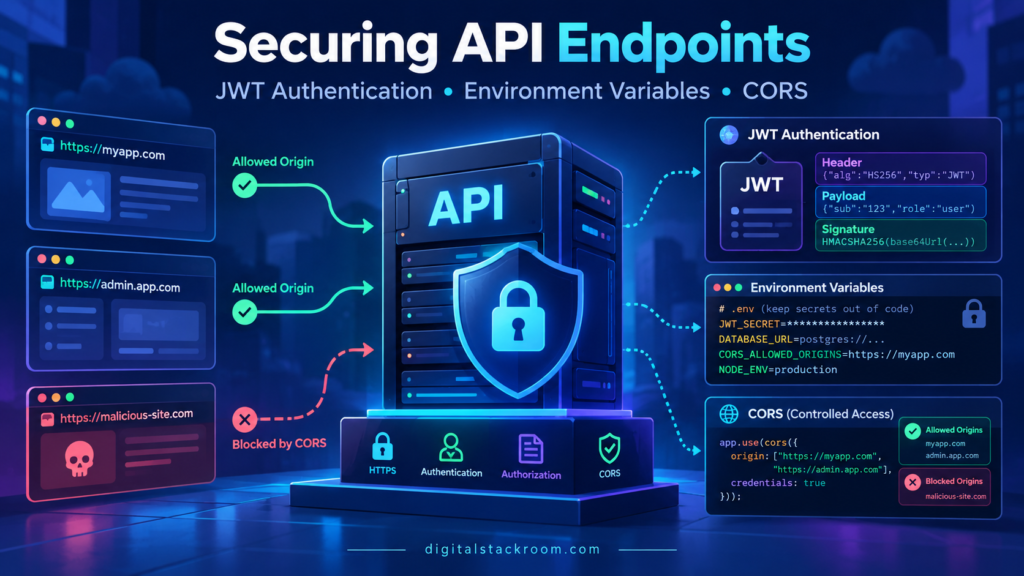
An API can work perfectly and still be insecure.
The routes return the correct JSON. Authentication appears to work. The frontend connects without errors. Secrets are stored in environment variables. CORS has been enabled.
Everything looks reasonable.
Then one small assumption creates a much larger problem.
Maybe the API accepts a JWT without checking who issued it. Maybe the token never expires. Maybe the application trusts the algorithm declared inside the token itself. Maybe Access-Control-Allow-Origin: * was enabled to fix a frontend error and was never revisited. Or perhaps the production signing secret is sitting inside a .env file that eventually gets copied into a container image.
API security rarely fails because one security mechanism does not exist.
More often, it fails because several mechanisms are misunderstood.
A useful way to think about a protected API is:
Client
  ↓
HTTPS
  ↓
CORS Policy
  ↓
Authentication
  ↓
Authorization
  ↓
Input Validation
  ↓
Business Logic
  ↓
Database / Services
Each layer answers a different question.
HTTPS
→ Can someone read or alter traffic in transit?

CORS
→ Which browser origins may read this API response?

Authentication
→ Who is making this request?

Authorization
→ Is that identity allowed to perform this action?

Input validation
→ Is the supplied data acceptable?

Secret management
→ How does the application securely obtain credentials?
Confusing these responsibilities is where many API vulnerabilities begin.
This guide focuses on three areas that frequently appear together in Node.js and Express APIs:
JWT authentication, environment-variable and secret handling, and CORS configuration.
Table of Contents
Start with the Most Important Distinction: Authentication Is Not Authorization
Authentication establishes identity.
For example:
User ID: usr_1842Authorization decides what that identity is permitted to do.
For example:
usr_1842
can read report 17

usr_1842
cannot delete user accounts
A valid JWT therefore does not automatically mean:
Allow everything.It only gives the application trusted information that can be used to make authorization decisions.
A protected request should conceptually follow:
Request
   ↓
Validate token
   ↓
Identify subject
   ↓
Check permission
   ↓
Validate requested resource
   ↓
Execute operation
That final resource check is particularly important.
If a user calls:
GET /api/orders/ORD-1002the application must verify that the authenticated user is actually allowed to access ORD-1002.
A valid login session does not prevent an insecure direct object reference by itself.
What a JWT Actually Is
JWT stands for JSON Web Token.
A common signed JWT contains three Base64URL-encoded sections separated by periods:
header.payload.signatureConceptually:
{
  "alg": "HS256",
  "typ": "JWT"
}
followed by claims such as:
{
  "sub": "usr_1842",
  "iss": "https://auth.example.com",
  "aud": "https://api.example.com",
  "exp": 1792846200
}
and a cryptographic signature.
A critical point is:
A signed JWT is not encrypted.
Anyone who obtains the token can usually decode its header and payload.
The signature protects integrity and authenticity.
It does not automatically provide confidentiality.
Therefore, do not put information such as:
Passwords
Database credentials
API keys
Private secrets
Sensitive internal notes
inside a normal signed JWT.
If confidentiality is required, that is a different problem involving encrypted tokens or another protected storage mechanism.
Signing and Verifying Are Different Operations
Suppose the authentication service creates:
header
+
payload
+
signature
The API receives the token and verifies that the signature is valid.
For an HMAC-based JWT:
Issuer

payload
  +
shared secret
  ↓
signature
The API knows the same secret and independently verifies the signature.
With asymmetric signing:
Issuer
   ↓
Private key
   ↓
Signs token

API
   ↓
Public key
   ↓
Verifies token
The API can validate tokens without possessing the private signing key.
That distinction can be valuable in larger architectures.
Symmetric vs. Asymmetric JWT Signing
Two common approaches are:
| Approach | Example | Signing | Verification |
|---|---|---|---|
| Symmetric | HS256 | Shared secret | Same shared secret |
| Asymmetric | RS256 / ES256 | Private key | Public key |
HS256
HMAC-SHA256 can work well when:
one trusted issuer
+
a small number of tightly controlled consumers
The secret must be cryptographically strong.
A human password such as:
company-secret-123is not an appropriate HMAC signing key.
RFC 8725 specifically warns about weak symmetric JWT keys because a captured token can allow offline attempts to guess the key.
Asymmetric Signing
With an asymmetric design:
Authentication service
→ owns private key

API services
→ receive public key
Compromising a verification-only service does not automatically give the attacker the ability to mint new tokens.
That makes asymmetric signing attractive when many services independently validate access tokens.
Neither architecture is universally correct.
The important part is choosing one deliberately and protecting the signing material appropriately.
Never Trust the JWT’s alg Header by Itself
A JWT contains an algorithm field:
{
  "alg": "HS256"
}
That does not mean the API should simply accept whatever algorithm the token requests.
The application must define the algorithms it accepts.
RFC 8725 explicitly recommends algorithm verification rather than allowing an attacker-controlled token header to determine the verification algorithm.
For jsonwebtoken:
const payload = jwt.verify(
  token,
  secret,
  {
    algorithms: ["HS256"]
  }
);
is preferable to relying on implicit algorithm selection.
For an RS256-based API:
const payload = jwt.verify(
  token,
  publicKey,
  {
    algorithms: ["RS256"]
  }
);
The server configuration determines what is acceptable.
Not the incoming token.
Do Not Use jwt.decode() for Authentication
A very dangerous implementation looks like:
const payload =
  jwt.decode(token);

if (payload.role === "admin") {
  allowRequest();
}
decode() reads the token.
It does not prove that the signature is valid.
An attacker can create their own payload:
{
  "sub": "attacker",
  "role": "admin"
}
and encode it.
The API should authenticate with:
jwt.verify()using the expected key and validation rules.
Decoding can be useful for inspection.
Verification is required for trust.
JWT Claims You Should Understand
Several standard JWT claims are especially important for APIs.
| Claim | Meaning |
|---|---|
iss | Issuer |
sub | Subject |
aud | Audience |
exp | Expiration |
nbf | Not valid before |
iat | Issued at |
jti | Unique token identifier |
Not every generic JWT must contain every claim.
Your token profile determines which claims are required.
For an API access-token design, however, issuer, audience and expiration are normally important validation controls.
Validate the Issuer
Imagine two systems both issue valid JWTs:
auth.company-a.com

auth.company-b.com
Your API trusts only Company A.
If the API checks only:
signature validwithout validating:
issit may accept a valid token from the wrong issuer under a poorly designed key configuration.
Your expected issuer should be configuration:
JWT_ISSUER=https://auth.example.comand verification should enforce it.
Validate the Audience
Audience answers:
Which service was this token created for?
For example:
{
  "aud": "https://api.digitalstackroom.example"
}
An access token created for:
billing-apishould not automatically work against:
admin-apieven when the same identity provider issued both.
RFC 8725 recommends validating audience when tokens can target different recipients.
Require an Expiration
Access tokens should not normally live forever.
A token with no useful expiration creates a serious problem:
Token stolen today
      ↓
Still valid next year
A short-lived access token limits the useful lifetime of a stolen credential.
For example:
jwt.sign(
  {},
  secret,
  {
    subject: user.id,
    issuer: JWT_ISSUER,
    audience: JWT_AUDIENCE,
    algorithm: "HS256",
    expiresIn: "15m"
  }
);
The exact lifetime is an application decision.
There is no universally correct:
15 minutesfor every system.
Risk, user experience, refresh-token strategy and identity-provider behavior all matter.
Access Tokens and Refresh Tokens Are Different Credentials
A common architecture is:
Login
  ↓
Short-lived access token
  +
Longer-lived refresh credential
The access token is presented to APIs.
When it expires:
refresh credential
      ↓
authentication service
      ↓
new access token
Do not simply make access tokens valid for weeks because refresh-token handling seems inconvenient.
Long-lived bearer credentials increase the damage if stolen.
Refresh tokens themselves require strong protection, revocation and preferably rotation strategies.
A Secure Express JWT Example
Install:
npm install express jsonwebtoken cors helmetCreate configuration from the process environment.
function requiredEnv(name) {
  const value = process.env[name];

  if (!value) {
    throw new Error(
      `Missing required environment variable: ${name}`
    );
  }

  return value;
}

const JWT_SECRET_BASE64 =
  requiredEnv(
    "JWT_SECRET_BASE64"
  );

const JWT_SECRET =
  Buffer.from(
    JWT_SECRET_BASE64,
    "base64"
  );

if (JWT_SECRET.length < 32) {
  throw new Error(
    "JWT HMAC key must contain at least 32 random bytes"
  );
}

const JWT_ISSUER =
  requiredEnv("JWT_ISSUER");

const JWT_AUDIENCE =
  requiredEnv("JWT_AUDIENCE");
For HS256, generate a random secret rather than inventing one manually.
For example:
openssl rand -base64 32The resulting value can be stored through your deployment platform’s secret-management mechanism.
Issuing the Access Token
import crypto from "node:crypto";
import jwt from "jsonwebtoken";

function createAccessToken(user) {

  return jwt.sign(
    {
      permissions:
        user.permissions
    },

    JWT_SECRET,

    {
      algorithm:
        "HS256",

      subject:
        user.id,

      issuer:
        JWT_ISSUER,

      audience:
        JWT_AUDIENCE,

      jwtid:
        crypto.randomUUID(),

      expiresIn:
        "15m"
    }
  );
}
Notice what is not added:
password
password hash
JWT secret
database credentials
private user data unrelated to authorization
Keep access-token claims minimal.
Build Authentication Middleware
A typical bearer token arrives as:
Authorization: Bearer eyJhbGciOi...Middleware:
function authenticateJwt(
  req,
  res,
  next
) {

  const authorization =
    req.get("Authorization");


  if (
    !authorization ||
    !authorization.startsWith(
      "Bearer "
    )
  ) {

    return res.status(401).json({
      error:
        "Authentication required"
    });
  }


  const token =
    authorization.slice(
      "Bearer ".length
    );


  try {

    const payload =
      jwt.verify(
        token,
        JWT_SECRET,
        {
          algorithms:
            ["HS256"],

          issuer:
            JWT_ISSUER,

          audience:
            JWT_AUDIENCE,

          clockTolerance:
            5
        }
      );


    if (
      typeof payload !==
      "object"
    ) {

      return res
        .status(401)
        .json({
          error:
            "Invalid access token"
        });
    }


    if (
      typeof payload.sub !==
      "string" ||
      typeof payload.exp !==
      "number"
    ) {

      return res
        .status(401)
        .json({
          error:
            "Invalid access token"
        });
    }


    req.auth = {
      subject:
        payload.sub,

      permissions:
        Array.isArray(
          payload.permissions
        )
          ? payload.permissions
          : []
    };


    next();

  } catch {

    return res
      .status(401)
      .json({
        error:
          "Invalid or expired access token"
      });
  }
}
This verifies:
signature
allowed algorithm
issuer
audience
expiration, when exp is present
and then explicitly requires:
sub
exp
for this application’s token profile.
That final step matters because a JWT library cannot guess every claim that your particular application requires.
Authentication Middleware Should Not Trust Arbitrary Claims
Even after signature verification, use only claims expected by your token contract.
Do not automatically spread the entire payload into application state:
req.user = payload;and then allow arbitrary properties to influence security decisions.
A better pattern maps only expected claims:
req.auth = {
  subject: payload.sub,
  permissions:
    payload.permissions
};
RFC 8725 explicitly warns that claims originating from tokens should still be treated carefully.
A signed claim is trustworthy only within the context of:
trusted issuer
correct audience
expected token type
correct key
correct validation rules
Authorization Should Be Separate Middleware
Authentication:
authenticateJwtAuthorization:
requirePermissionFor example:
function requirePermission(
  permission
) {

  return function (
    req,
    res,
    next
  ) {

    if (
      !req.auth?.permissions
        ?.includes(permission)
    ) {

      return res
        .status(403)
        .json({
          error:
            "Forbidden"
        });
    }


    next();
  };
}
Then:
app.get(
  "/api/reports",

  authenticateJwt,

  requirePermission(
    "reports:read"
  ),

  async (
    req,
    res
  ) => {

    // Retrieve reports the
    // authenticated subject
    // is actually allowed to see.

  }
);
This keeps identity validation separate from permission decisions.
401 and 403 Are Not the Same
A useful API distinction is:
401 Unauthorized
Despite the historical name, this generally represents an authentication problem.
Examples:
missing token
expired token
invalid signature
wrong issuer
wrong audience
403 Forbidden
The identity is known, but the operation is not allowed.
Example:
Authenticated ordinary user
tries to access admin endpoint.
Using these consistently also makes monitoring easier.
JWTs Do Not Eliminate the Need for HTTPS
A signed JWT cannot prevent someone from stealing it while it travels over an insecure network.
Bearer tokens operate roughly like:
Whoever possesses this token
can present it.
Use HTTPS for production API traffic.
OWASP’s REST guidance recommends HTTPS for protected APIs because authentication credentials, API keys and JWTs must be protected in transit.
Never Put Access Tokens in URLs
Avoid:
GET /report?token=eyJhbGci...URLs can appear in:
browser history
reverse-proxy logs
analytics
monitoring tools
referrer information
server logs
Use:
Authorization: Bearer TOKENor an appropriately secured cookie-based architecture.
Where Should a Browser Store the Token?
This question has no one-line universal answer.
Two common approaches are:
| Approach | Main Benefit | Main Risk |
|---|---|---|
| JavaScript-accessible storage | Easy Authorization header use | XSS can steal token |
HttpOnly cookie | JavaScript cannot directly read token | CSRF requires careful handling |
Local Storage
Storing an access token in:
localStoragemakes it easy for frontend JavaScript to retrieve.
It also means malicious JavaScript executing through an XSS vulnerability can potentially retrieve it.
HttpOnly Cookie
A cookie configured with:
HttpOnly
Secure
appropriate SameSite policy
cannot normally be read directly from frontend JavaScript.
But the browser may automatically attach the cookie to requests, which means CSRF becomes part of the threat model.
The correct design depends on the authentication architecture.
Do not choose token storage based only on which implementation requires fewer lines of code.
Environment Variables Solve Configuration, Not Secret Management by Themselves
Node.js exposes environment variables through:
process.envFor example:
const databaseUrl =
  process.env.DATABASE_URL;
This is useful because configuration does not have to be hardcoded into application source.
However:
environment variabledoes not automatically mean:
secure secret vaultOWASP notes that environment variables may be visible to other processes and can leak through logs or system dumps depending on the environment.
Environment variables are a transport mechanism for configuration.
A secret manager is a lifecycle-management system.
Those are different responsibilities.
Never Hardcode Production Secrets
Avoid:
const JWT_SECRET =
  "my-super-secret-key";
Also avoid:
ENV JWT_SECRET=my-secretor:
ARG JWT_SECRET=my-secretfor production credentials.
Secrets baked into an image can persist in image layers, build metadata, registries and deployment history.
.env Files Are Useful for Local Development
A local file may contain:
PORT=3000
JWT_ISSUER=http://localhost:3000
JWT_AUDIENCE=http://localhost:3000/api
JWT_SECRET_BASE64=...
Node.js has native support for environment variables and .env-style files.
For development, this is convenient.
But ensure:
.env
.env.local
.env.production
or whatever files contain actual credentials are excluded from source control.
For example:
.env
.env.*
!.env.example
in:
.gitignoreThen keep a safe example:
JWT_ISSUER=
JWT_AUDIENCE=
JWT_SECRET_BASE64=
in:
.env.examplewith no real secrets.
Do Not Add an Insecure Production Fallback
This looks convenient:
const JWT_SECRET =
  process.env.JWT_SECRET ||
  "development-secret";
It is dangerous.
If production deployment configuration is missing, the application silently starts using:
development-secretinstead of refusing to start.
For sensitive configuration, fail immediately.
const JWT_SECRET =
  process.env.JWT_SECRET;

if (!JWT_SECRET) {
  throw new Error(
    "JWT_SECRET is required"
  );
}
A failed deployment is safer than a production service running with an accidental default security key.
Validate Configuration During Startup
Create one configuration module.
function requireEnv(name) {

  const value =
    process.env[name];

  if (!value) {

    throw new Error(
      `Missing ${name}`
    );
  }

  return value;
}


export const config = {

  port:
    Number(
      process.env.PORT ||
      "8080"
    ),

  jwtIssuer:
    requireEnv(
      "JWT_ISSUER"
    ),

  jwtAudience:
    requireEnv(
      "JWT_AUDIENCE"
    ),

  jwtSecretBase64:
    requireEnv(
      "JWT_SECRET_BASE64"
    )
};
Then other modules import validated configuration.
This is preferable to scattering:
process.env.Xthrough dozens of files.
Use a Secret Manager in Production
For containerized cloud deployments, a better architecture is:
Secret Manager
      ↓
Authorized runtime identity
      ↓
Application
rather than:
Git repository
      ↓
.env file
      ↓
Docker image
Examples include:
Google Secret Manager
AWS Secrets Manager
Azure Key Vault
HashiCorp Vault
For a practical Google Cloud deployment example, see:
Deploying Containerized Python & Express Apps to Google Cloud Run
That walkthrough shows how application configuration, Cloud Run runtime identity and Secret Manager can remain separate from the container image.
Secret Rotation Should Be Designed Before an Incident
Ask:
If this signing key leaks tomorrow,
how do we replace it?
For HMAC JWT signing:
new secret
↓
issuer starts signing with new secret
↓
verification transitions safely
↓
old token lifetime expires
↓
old secret removed
For asymmetric signing, a key identifier and trusted key set can allow a smoother transition between signing keys.
The exact rotation mechanism depends on your authentication architecture.
The important point is that rotation should not require editing application source code.
What CORS Actually Does
CORS stands for:
Cross-Origin Resource Sharing.
Browsers enforce the same-origin policy.
For example:
Frontend:
https://app.example.com

API:
https://api.example.com
These are different origins.
The browser therefore checks whether the API grants the frontend permission to read the response.
The API may respond with:
Access-Control-Allow-Origin: https://app.example.comThat tells a compliant browser:
JavaScript running on app.example.com
may read this response.
CORS Is Not API Authentication
This is one of the most important points in the entire article.
CORS does not mean:
Only this website can call my API.A client such as:
curl
Postman
Python requests
another backend server
malicious custom software
does not rely on the browser’s CORS enforcement.
The Express cors middleware documentation states this explicitly: the middleware sets response headers, and browsers decide whether frontend JavaScript may read the response.
Your API still needs:
authentication
authorization
input validation
rate limiting
regardless of CORS.
The Dangerous origin: "*" Habit
Many development problems are “fixed” with:
app.use(
  cors({
    origin: "*"
  })
);
For a genuinely public non-credentialed API, wildcard CORS can be intentional.
For a private browser application, it is normally too broad.
A better architecture uses an explicit allowlist.
const allowedOrigins =
  new Set([
    "https://app.example.com",
    "https://admin.example.com"
  ]);
Then:
const corsOptions = {

  origin(
    origin,
    callback
  ) {

    if (!origin) {

      return callback(
        null,
        true
      );
    }


    const allowed =
      allowedOrigins.has(
        origin
      );


    callback(
      null,
      allowed
    );
  },

  methods: [
    "GET",
    "POST",
    "PUT",
    "PATCH",
    "DELETE"
  ],

  allowedHeaders: [
    "Content-Type",
    "Authorization"
  ]
};
Then:
app.use(
  cors(corsOptions)
);
Requests from non-browser clients may have no Origin header, which is why the example handles that case separately.
Remember: allowing such a request through CORS middleware does not authenticate it.
Authentication still happens later.
Credentialed CORS Requires an Explicit Origin
Suppose the frontend needs cookies.
You configure:
credentials: trueThen this combination is not valid for browser credentialed CORS:
Access-Control-Allow-Origin: *
Access-Control-Allow-Credentials: true
MDN documents that credentialed responses require a specific allowed origin rather than the wildcard.
For example:
app.use(
  cors({
    origin:
      "https://app.example.com",

    credentials:
      true
  })
);
The browser-side request may use:
fetch(
  "https://api.example.com/account",
  {
    credentials:
      "include"
  }
);
If authentication is cookie-based, CSRF protections and cookie attributes must also be designed appropriately.
CORS alone is not the CSRF defense.
What Is a CORS Preflight?
Some cross-origin requests trigger an:
OPTIONSrequest before the actual API request.
This is called a preflight.
For example, the browser may send:
OPTIONS /api/users
Origin: https://app.example.com
Access-Control-Request-Method: DELETE
Access-Control-Request-Headers: authorization
The API responds with policy information.
For example:
Access-Control-Allow-Origin: https://app.example.com
Access-Control-Allow-Methods: GET,POST,DELETE
Access-Control-Allow-Headers: Authorization,Content-Type
If you use:
app.use(
  cors(corsOptions)
);
the Express CORS middleware can handle preflight behavior globally.
You normally do not need to manually create OPTIONS handlers for every endpoint.
Restrict Origins, Methods and Headers Deliberately
A production CORS policy should answer:
Which frontend origins actually need access?

Which HTTP methods are needed?

Which custom headers are required?

Are cookies or other credentials required?
Do not configure:
everythingmerely to avoid browser-console errors.
Start with the minimum required policy.
A Complete Express Security Foundation
A small production-oriented Express setup could look like this:
import express from "express";
import cors from "cors";
import helmet from "helmet";

import {
  authenticateJwt
} from "./auth.js";


const app =
  express();


app.disable(
  "x-powered-by"
);


app.use(
  helmet()
);


const allowedOrigins =
  new Set([
    "https://app.example.com"
  ]);


app.use(
  cors({

    origin(
      origin,
      callback
    ) {

      if (!origin) {
        return callback(
          null,
          true
        );
      }

      callback(
        null,
        allowedOrigins.has(
          origin
        )
      );
    },

    methods: [
      "GET",
      "POST",
      "PUT",
      "PATCH",
      "DELETE"
    ],

    allowedHeaders: [
      "Authorization",
      "Content-Type"
    ]
  })
);


app.use(
  express.json({
    limit: "256kb"
  })
);


app.get(
  "/healthz",

  (
    req,
    res
  ) => {

    res.status(200).json({
      status: "ok"
    });
  }
);


app.get(
  "/api/profile",

  authenticateJwt,

  async (
    req,
    res
  ) => {

    res.status(200).json({
      userId:
        req.auth.subject
    });
  }
);


app.use(
  (
    err,
    req,
    res,
    next
  ) => {

    console.error(
      "Unhandled request error"
    );

    res.status(500).json({
      error:
        "Internal server error"
    });
  }
);


const port =
  Number(
    process.env.PORT ||
    8080
  );


app.listen(
  port,
  "0.0.0.0",
  () => {

    console.log(
      `API listening on port ${port}`
    );
  }
);
This is still only a foundation.
Production systems will normally add:
rate limiting
schema validation
audit logging
observability
database controls
authorization rules
secret management
depending on the application.
Limit Request Body Size
This line matters:
express.json({
  limit: "256kb"
})
Without a sensible body-size limit, an endpoint may attempt to parse unexpectedly large requests.
The correct limit depends on the API.
A JSON metadata API might reasonably accept a relatively small body.
An image-upload endpoint obviously requires a different architecture.
Do not copy:
256 KBinto every application.
Choose a limit based on the endpoint contract.
Validate Input After Authentication
Authentication does not make request data trustworthy.
This is still unsafe:
app.post(
  "/api/users",

  authenticateJwt,

  async (
    req,
    res
  ) => {

    await database.insert(
      req.body
    );
  }
);
The authenticated client can still supply malformed or malicious values.
Validate:
type
length
range
format
allowed values
unexpected properties
before business logic.
For example:
function validateDisplayName(
  value
) {

  return (
    typeof value ===
      "string" &&

    value.length >= 1 &&

    value.length <= 100
  );
}
For larger APIs, use a schema-validation library instead of writing every validation manually.
Parameterize Database Queries
Do not construct SQL from authenticated user input.
Bad:
const sql =
  `SELECT * FROM users
   WHERE id = '${req.params.id}'`;
Authentication does not stop SQL injection.
Use parameterized queries:
const result =
  await pool.query(
    `
    SELECT
      id,
      email
    FROM users
    WHERE id = $1
    `,
[req.params.id]
);
If PostgreSQL backs the API, connection management matters too.
See:
PostgreSQL Connection Pooling in Node.js & Python
That guide covers bounded pools, connection leaks and autoscaling connection budgets.
Rate-Limit Authentication Endpoints
Login and token endpoints are attractive targets for:
credential stuffing
password guessing
automated abuse
Express’s production security guidance recommends protecting authorization endpoints against repeated failed attempts.
A production design can consider signals such as:
account identifier
source IP
failure count
time window
device/session context
The exact policy depends on the threat model.
Rate limiting should not be the only authentication defense, but an unbounded login endpoint is unnecessary exposure.
API Rate Limits and Client Retries Need to Agree
If your API returns:
429 Too Many Requestsclients should not immediately retry in an aggressive loop.
For resilient API clients, bounded exponential backoff and server-provided retry information can help.
See:
REST API Rate Limiting and Exponential Backoff in Python
The API’s protection strategy and the client’s retry strategy should complement each other.
Webhooks Often Need Different Authentication
Do not force JWT authentication onto every machine-to-machine callback just because your normal API uses JWTs.
Third-party webhooks commonly authenticate requests using:
HMAC signatures
provider-specific signatures
mTLS
service credentials
For example:
GitHub
Stripe
other event providers
may sign the exact request payload.
For that architecture, see:
Setting Up Webhook Listeners in Express.js: Handling Real-Time Payloads Securely
The authentication mechanism should match the integration.
Do Not Log Tokens or Secrets
This is dangerous:
console.log(
  req.headers.authorization
);
So is:
console.log(
  process.env
);
Production logs may be accessible by:
developers
support engineers
monitoring systems
log exporters
security tooling
Logging a bearer token effectively copies a credential into another system.
Prefer metadata:
console.log({
  event:
    "authentication_failed",

  requestId,

  path:
    req.path
});
If you need to correlate a token operationally, use a non-secret identifier designed for that purpose rather than logging the raw credential.
Avoid Returning Internal Authentication Errors
Do not return:
{
  "error": "HS256 signature mismatch using secret key version 4"
}
or:
{
  "error": "User exists but password hash failed"
}
A client normally needs only:
{
  "error": "Invalid credentials"
}
or:
{
  "error": "Invalid or expired access token"
}
Detailed diagnostics belong in controlled internal monitoring when appropriate.
Security Headers Still Matter for Browser-Facing APIs
The Express security guide recommends using secure HTTP headers, and middleware such as Helmet can configure many relevant headers.
For example:
import helmet
  from "helmet";

app.use(
  helmet()
);
Not every browser-security header provides equal value for every pure JSON API, but a sensible baseline is still useful—especially when the same service also returns web content.
CORS and Authentication Solve Different Threats
This table is worth keeping in mind:
| Mechanism | Protects Against | Does Not Replace |
|---|---|---|
| HTTPS | Network interception/tampering | Authentication |
| JWT verification | Forged/invalid authentication token | Authorization |
| Authorization | Unauthorized actions by authenticated identities | Authentication |
| CORS | Unauthorized browser JavaScript reading cross-origin responses | Authentication |
| CSRF protection | Unwanted credentialed browser requests | CORS |
| Input validation | Malformed/unexpected input | Authentication |
| Rate limiting | Excessive request frequency | Authorization |
| Secret manager | Secret storage/lifecycle risk | JWT validation |
Security becomes easier to reason about when each mechanism has one clear responsibility.
A Common CORS Misconfiguration
Suppose an API uses cookies and has:
app.use(
  cors({
    origin:
      req =>
        req.headers.origin,

    credentials:
      true
  })
);
Conceptually, that is equivalent to saying:
Whatever origin asks,
reflect it back as trusted.
That destroys the value of having an origin allowlist.
If origins are dynamic, validate them against trusted configuration first.
For example:
const allowedOrigins =
  new Set(
    process.env
      .CORS_ALLOWED_ORIGINS
      .split(",")
      .map(
        value =>
          value.trim()
      )
      .filter(Boolean)
  );
Then compare the incoming origin against that set.
Keep CORS Configuration in Environment-Specific Configuration
Development may require:
http://localhost:5173Production may require:
https://app.example.comDo not permanently add both plus:
*to make configuration easier.
Use environment-specific configuration:
CORS_ALLOWED_ORIGINS=
https://app.example.com,
https://admin.example.com
and validate it at startup.
Separate Public and Private Routes
Not every endpoint has the same exposure.
Example:
GET /healthz
→ infrastructure health check

POST /auth/login
→ public authentication entry point

GET /api/profile
→ authenticated

DELETE /api/users/:id
→ authenticated + privileged authorization

POST /webhooks/provider
→ provider signature authentication
Do not apply one security assumption blindly to every route.
A route inventory makes security review much easier.
Private Infrastructure Can Reduce the Attack Surface
Some endpoints do not need to be internet-facing at all.
For example:
administration endpoint
internal batch trigger
backend service API
database maintenance action
If the platform supports identity-aware private service invocation, use it instead of inventing another public endpoint plus a long-lived secret.
For Google Cloud Run architectures, see:
Deploying Containerized Python & Express Apps to Google Cloud Run
Cloud IAM can protect internal Cloud Run services independently of your application’s end-user JWT authentication.
JWT Authentication vs. Cloud Service Identity
These solve different identity problems.
User JWT
Answers:
Which user/application client is making this API request?Cloud Runtime Identity
Answers:
Which deployed service is accessing another cloud resource?For example:
User
  ↓ JWT
Cloud Run API
  ↓ Runtime service account
Secret Manager / BigQuery / Storage
Do not place a Google Cloud service-account key inside a user JWT.
Do not use your user JWT signing key as a cloud-service credential.
Keep identity domains separate.
Use Short-Lived Credentials Where Practical
Long-lived credentials create long-lived exposure.
This applies to:
JWT access tokens
API keys
service credentials
database passwords
signing keys
Whenever the platform supports:
short-lived identity tokens
workload identity
automatic rotation
temporary credentials
they can reduce the blast radius of credential theft.
Plan for Revocation
JWT access tokens are often described as:
statelessBut real systems still sometimes need:
logout
account suspension
credential compromise
session termination
permission revocation
A short token lifetime reduces the problem.
Higher-security systems may also maintain:
session state
token version
revocation list
jti denylist
depending on the threat model.
Do not promise instant revocation from a completely self-contained token architecture unless you have actually implemented it.
Permission Changes Can Outlive a Token
Suppose a token contains:
{
  "permissions": [
    "admin:delete"
  ],
  "exp": 1792846200
}
The administrator removes that permission from the user’s account.
The already-issued JWT still contains:
admin:deleteuntil the token expires or your server performs another revocation/state check.
This is another reason high-privilege access tokens should normally be relatively short-lived.
JWTs represent claims at issuance time.
They do not magically update when your database changes.
Don’t Put Too Much Authorization State in the Token
Putting every application permission inside a JWT can create:
large tokens
stale permission state
complex revocation behavior
tight coupling
Sometimes the right approach is:
JWT
→ identity + coarse claims

Database/cache
→ current fine-grained authorization
The right balance depends on performance requirements and how frequently permissions change.
Secure API Deployment Checklist
| Area | Production Check |
|---|---|
| Transport | HTTPS only |
| JWT signature | Verified |
| JWT algorithms | Explicit allowlist |
| Issuer | Validated |
| Audience | Validated |
| Expiration | Required for access-token profile |
| Subject | Required and validated |
| Token data | No secrets in normal signed JWT payload |
| Authorization | Separate from authentication |
| Object access | Resource ownership/permission checked |
| Secrets | Not hardcoded |
.env | Not committed with credentials |
| Production secrets | Managed through secret platform where possible |
| Secret rotation | Defined |
| CORS origins | Explicitly allowlisted |
| Credentialed CORS | No wildcard origin |
| CORS understanding | Not treated as authentication |
| Body size | Bounded |
| Input validation | Applied |
| SQL | Parameterized |
| Login endpoints | Rate-limited appropriately |
| Logs | No raw tokens/secrets |
| Errors | No unnecessary internal details |
| Dependencies | Kept patched |
| HTTPS headers | Appropriate baseline configured |
| Internal endpoints | Private where possible |
Common Mistake: “JWT Means Stateless and Therefore Secure”
JWT is a token format.
It does not automatically provide:
secure login
secure password handling
authorization
revocation
CORS
CSRF protection
rate limiting
session security
transport encryption
A badly implemented JWT system can be less secure than a well-designed traditional session system.
Choose JWT because its properties fit your architecture, not because the acronym sounds more modern.
Common Mistake: “The Token Has a Valid Signature, So I Trust It”
A valid signature is only one validation step.
You also need to ask:
Was it signed with an allowed algorithm?

Was it signed by a trusted issuer?

Was it intended for this API?

Has it expired?

Is it valid yet?

Is it the correct kind of token?

Does its subject make sense?

Is the requested action authorized?
RFC 8725 exists largely because incomplete JWT validation created real vulnerabilities.
Common Mistake: “My Secrets Are in Environment Variables, So They’re Safe”
Environment variables remove secrets from source code.
That is useful.
They do not automatically provide:
rotation
auditing
access policy
versioning
revocation
centralized management
For important production credentials, use proper secret-management infrastructure where available.
Common Mistake: “CORS Blocks Attackers”
CORS restricts browser JavaScript.
It does not stop:
curl
Postman
bots
scripts
backend servers
attack tools
from sending HTTP requests.
CORS is a browser response-sharing policy.
Authentication and authorization are your API security controls.
Common Mistake: “Allowing All Origins Is Fine Because JWT Is Enabled”
Even when bearer JWT authentication exists, overly broad CORS can still expose authenticated browser data in configurations where tokens or credentials are available to the browser context.
Configure only the cross-origin access actually required.
Defense in depth means not relying on one mechanism simply because another mechanism exists.
A Practical Production Architecture
A browser-based application may look like:
React Frontend
      │
      │ HTTPS
      │ Authorization: Bearer JWT
      ▼
API Gateway / Load Balancer
      │
      ▼
Express API
      │
      ├── CORS policy
      ├── JWT authentication
      ├── Authorization
      ├── Input validation
      ├── Rate limiting
      └── Audit logging
      │
      ▼
Application Logic
      │
      ├─────────────┐
      ▼             ▼
PostgreSQL      External APIs
Production configuration:
Secret Manager
      │
      ├── JWT signing key
      ├── database credential
      └── API credentials
      │
      ▼
Runtime Identity
      │
      ▼
Express API
These flows deliberately separate:
browser trust
user identity
service identity
application configuration
secret storage
database access
That separation makes security much easier to reason about.
Final Thoughts
Secure API design is not about finding one mechanism that protects everything.
JWT, environment variables and CORS each solve different problems.
JWT should answer:
Who issued this credential?

Who does it represent?

Was it intended for this API?

Is it still valid?

Has it been modified?
Environment-specific configuration should answer:
What configuration does this deployment need?A secret-management system should answer:
How are sensitive credentials stored,
accessed, rotated and audited?
CORS should answer:
Which browser origins are permitted
to read this API from JavaScript?
Authorization should answer:
What is this authenticated identity
actually permitted to do?
When those responsibilities are kept separate, the security model becomes much clearer.
A solid production sequence is:
HTTPS
  ↓
CORS policy where browser access requires it
  ↓
Authenticate
  ↓
Validate token claims
  ↓
Authorize action
  ↓
Validate request data
  ↓
Execute business logic
  ↓
Return minimum necessary response
  ↓
Audit important security events
The strongest API is not the one with the most security middleware.
It is the one where every security control has a clearly understood responsibility, is configured deliberately, and fails safely when something is missing.
Official Documentation and Security References
The technical recommendations in this guide are based on current standards and first-party security guidance.
JSON Web Tokens
RFC 7519 — JSON Web Token (JWT)
RFC 8725 — JSON Web Token Best Current Practices
node-jsonwebtoken Documentation
OWASP
OWASP REST Security Cheat Sheet
OWASP JSON Web Token Cheat Sheet
OWASP Secrets Management Cheat Sheet
Express.js
Express — Production Security Best Practices
Browser CORS
MDN — Cross-Origin Resource Sharing (CORS)
MDN — CORS Configuration Security Guidance
Node.js
Node.js — Environment Variables