
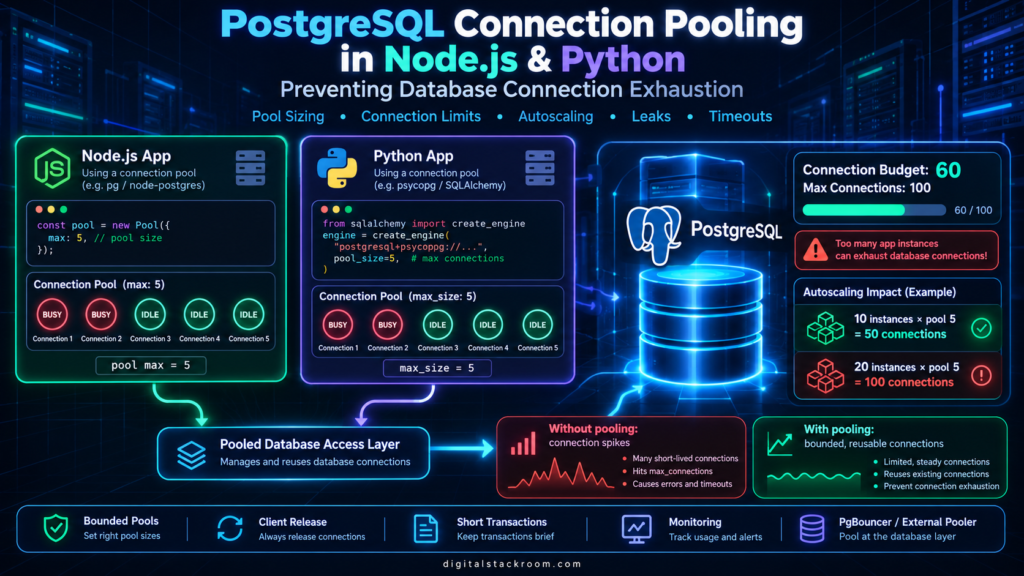
A PostgreSQL connection problem rarely starts with an error.
It usually starts with an application that works perfectly.
One API instance connects to PostgreSQL. Requests are fast. CPU usage is low. Nothing looks unusual.
Then traffic grows.
The application scales from one instance to five.
A background worker is added.
Someone increases the connection pool because requests occasionally wait for a database connection.
Another service starts using the same PostgreSQL instance.
Eventually the database begins returning errors such as:
FATAL: remaining connection slots are reserved
for roles with privileges of the
"pg_use_reserved_connections" role
or:
FATAL: sorry, too many clients alreadyMeanwhile the application may show:
Connection timeoutor requests may simply start waiting because every connection in the local pool is busy.
The surprising part is that the application itself may not be receiving much traffic.
The real problem is often this multiplication:
Application Instances
        ×
Pool Size Per Instance
        =
Potential Database Connections
For example:
20 Cloud Run instances
×
10 connections per instance
=
up to 200 application connections
A PostgreSQL server cannot accept an unlimited number of client connections.
And increasing max_connections indefinitely is not a free solution either.
This guide explains how PostgreSQL connection pooling works, how to implement it correctly in Node.js with node-postgres and Python with Psycopg 3, how connection leaks happen, how to size pools across autoscaling infrastructure, how to monitor saturation, and when an external pooler such as PgBouncer becomes useful.
What Happens When an Application Connects to PostgreSQL?
A database connection is not simply a string pointing at a database.
When an application establishes a PostgreSQL connection, work happens on both sides.
Conceptually:
Application
    ↓
TCP connection
    ↓
TLS negotiation, if configured
    ↓
PostgreSQL authentication
    ↓
Session established
    ↓
Database queries
PostgreSQL maintains a backend process for client connections.
That connection consumes resources while it exists.
If an application repeatedly does this:
Open connection
↓
Execute query
↓
Close connection
for every individual request, it repeatedly pays the cost of establishing database sessions.
At the other extreme, if every application instance opens too many persistent connections, PostgreSQL may eventually run out of available connection slots.
Connection pooling exists between those two extremes.
What Is a Database Connection Pool?
A connection pool maintains a limited collection of reusable database connections.
Instead of creating a completely new PostgreSQL connection for every query:
HTTP Request
    ↓
Open PostgreSQL Connection
    ↓
Query
    ↓
Close Connection
the application does:
HTTP Request
    ↓
Borrow Connection
    ↓
Query
    ↓
Return Connection
    ↓
Connection remains available in pool
Several requests can therefore reuse the same set of connections.
A simplified pool might look like:
Application Instance

┌──────────────────────────┐
│ Connection Pool          │
│                          │
│ Connection 1  → BUSY     │
│ Connection 2  → IDLE     │
│ Connection 3  → BUSY     │
│ Connection 4  → IDLE     │
│ Connection 5  → IDLE     │
└──────────────┬───────────┘
               │
               ▼
          PostgreSQL
When another request arrives, the pool can give it an idle connection rather than performing another full database connection setup.
That improves efficiency while also placing a boundary around the number of connections one application process can create.
Why PostgreSQL Connections Need a Limit
PostgreSQL exposes:
max_connectionswhich defines the maximum number of concurrent connections the server accepts.
In PostgreSQL 18, the default is typically:
100although actual values vary by installation and managed database service.
PostgreSQL also reserves connection capacity for privileged access.
The important point is not the exact default.
The important point is:
Database connections are finite.PostgreSQL also sizes some resources based on max_connections, including shared-memory requirements. Increasing the setting therefore has a resource cost and should not be treated as an unlimited scaling mechanism.
What Connection Exhaustion Looks Like
Assume PostgreSQL can safely allocate 80 connections to your application workloads.
You deploy:
API Service
Maximum instances: 10
Pool max: 10
Potential connections:
10 × 10 = 100You have already exceeded your intended 80-connection application budget.
Now add:
Worker Service
5 instances
Pool max: 5
Additional connections:
5 × 5 = 25Potential total:
100 + 25 = 125And we have not yet counted:
administrative connections
database migrations
monitoring systems
BI tools
scheduled jobs
developer sessions
other applications
This is why pool sizing must happen at the system level, not one application at a time.
A Simple Connection Budget Formula
A useful starting point is:
Per-Instance Pool Maximum
=
Application Connection Budget
÷
Maximum Application Instances
Suppose:
PostgreSQL connection capacity: 100

Operational/admin/other-service reserve: 25

Connection budget for API: 60

Maximum API instances: 10
Then:
60 ÷ 10 = 6A sensible starting maximum for that application’s pool might therefore be:
6 connections per instancerather than:
20just because 20 sounds faster.
The numbers need to reflect your actual infrastructure and workload.
Bigger Pools Do Not Automatically Make Applications Faster
Consider an API receiving 100 simultaneous requests.
If every request needs a database query, it might seem logical to configure:
pool max = 100But PostgreSQL does not become faster merely because 100 queries execute simultaneously.
Eventually the database may become limited by:
CPU
memory
disk I/O
locks
buffer contention
query complexity
indexes
network
At that point, allowing additional concurrent queries may make overall latency worse.
A connection pool therefore performs another useful function:
backpressureInstead of allowing unlimited concurrent database work:
500 requests
   ↓
500 PostgreSQL connections
you can allow:
500 requests
   ↓
Application queue
   ↓
20 pooled connections
   ↓
PostgreSQL
That protects the database.
Of course, if requests wait too long for the pool, application latency increases.
Pool sizing is therefore a balance between:
too small
→ unnecessary waiting

too large
→ database saturation
There is no universal number that solves every workload.
Node.js Connection Pooling with node-postgres
One of the most common PostgreSQL libraries for Node.js is:
pgalso known as:
node-postgresInstall it:
npm install pgThen create a pool.
import { Pool } from "pg";

const pool = new Pool({
  connectionString: process.env.DATABASE_URL,

  max: 10,

  connectionTimeoutMillis: 5000,

  idleTimeoutMillis: 30000,

  maxLifetimeSeconds: 1800
});

export default pool;
The important configuration values are:
| Setting | Purpose |
|---|---|
max | Maximum clients the pool can contain |
connectionTimeoutMillis | Maximum wait when creating/acquiring a connection before timing out |
idleTimeoutMillis | How long an unused pooled connection can remain idle before being closed |
maxLifetimeSeconds | Maximum lifetime of a pooled connection |
These values should be selected based on the application and database architecture rather than copied blindly.
Create One Pool Per Application Process
This is important.
A common mistake is creating a pool inside every request handler.
Bad:
app.get("/users", async (req, res) => {

  const pool = new Pool({
    connectionString:
      process.env.DATABASE_URL
  });

  const result =
    await pool.query(
      "SELECT id, name FROM users"
    );

  res.json(result.rows);
});
Every request can now create another pool.
That defeats the purpose of pooling.
Instead, create the pool once.
For example:
src/
├── db.js
├── server.js
└── routes/
└── users.jsdb.js:
import { Pool } from "pg";

export const pool = new Pool({
  connectionString:
    process.env.DATABASE_URL,

  max: Number(
    process.env.DB_POOL_MAX || 10
  ),

  connectionTimeoutMillis: 5000,

  idleTimeoutMillis: 30000,

  maxLifetimeSeconds: 1800
});

pool.on("error", (error) => {
  console.error(
    "Unexpected PostgreSQL pool error",
    error
  );
});
Now application modules reuse:
one poolfor that Node.js process.
node-postgres specifically recommends having only a limited number of pools and typically one pool for a normal application process.
Use pool.query() for Simple Queries
If the operation is only one query:
const result = await pool.query(
  `
  SELECT
    id,
    email,
    created_at
  FROM users
  WHERE id = $1
  `,
  [userId]
);
pool.query() automatically:
acquires connection
        ↓
executes query
        ↓
returns connection to pool
You do not manually release anything.
This reduces the chance of connection leaks.
For simple one-query operations, this is usually the preferred node-postgres pattern.
Transactions Need One Checked-Out Client
Transactions are different.
A PostgreSQL transaction belongs to one database connection.
This is incorrect:
await pool.query("BEGIN");

await pool.query(
  "UPDATE accounts SET balance = balance - 100 WHERE id = $1",
  [fromAccount]
);

await pool.query(
  "UPDATE accounts SET balance = balance + 100 WHERE id = $1",
  [toAccount]
);

await pool.query("COMMIT");
Why?
Because each pool.query() can use a different connection.
The correct pattern is:
const client =
  await pool.connect();

try {

  await client.query("BEGIN");

  await client.query(
    `
    UPDATE accounts
    SET balance = balance - $1
    WHERE id = $2
    `,
    [100, fromAccount]
  );

  await client.query(
    `
    UPDATE accounts
    SET balance = balance + $1
    WHERE id = $2
    `,
    [100, toAccount]
  );

  await client.query("COMMIT");

} catch (error) {

  await client.query("ROLLBACK");

  throw error;

} finally {

  client.release();

}
The most important line is:
client.release();inside:
finallyThat guarantees the connection is returned to the pool whether the transaction succeeds or fails.
How a Node.js Connection Leak Happens
Consider:
app.get("/report", async (req, res) => {

  const client =
    await pool.connect();

  const result =
    await client.query(
      "SELECT * FROM reports"
    );

  res.json(result.rows);
});
What is missing?
client.release();The request finishes.
The connection does not return to the pool.
After enough requests:
Connection 1 → leaked
Connection 2 → leaked
Connection 3 → leaked
...
Connection 10 → leaked
Then:
pool is full
+
every client is checked out
Future calls to:
pool.connect()must wait.
Eventually the application appears to have a database outage even though PostgreSQL itself may be perfectly healthy.
This is one of the most common connection-pool failures.
Always Use try...finally When Manually Acquiring a Client
The safe pattern is:
const client =
  await pool.connect();

try {

  // use client

} finally {

  client.release();

}
Not:
const client =
  await pool.connect();

await doSomething();

client.release();
because if:
doSomething()throws an exception, execution may never reach:
client.release()and the connection leaks.
Monitor the Node.js Pool
node-postgres exposes useful pool counters.
For example:
console.log({
  total: pool.totalCount,
  idle: pool.idleCount,
  waiting: pool.waitingCount
});
These represent:
| Metric | Meaning |
|---|---|
totalCount | Total clients currently managed by the pool |
idleCount | Clients currently available |
waitingCount | Requests queued waiting for a connection |
One particularly useful warning signal is:
waitingCount > 0for sustained periods.
That means application work is waiting because no pooled connection is currently available.
It does not automatically mean the pool should be increased.
The database may already be overloaded.
Investigate both sides.
Gracefully Close the Node.js Pool
For long-running APIs, create the pool once and keep it for the process lifetime.
Do not run:
await pool.end();after every HTTP request.
But when the application itself is shutting down, draining the pool is appropriate.
For example:
async function shutdown(signal) {

  console.log(
    `Received ${signal}`
  );

  try {

    await pool.end();

  } finally {

    process.exit(0);

  }
}

process.on(
  "SIGTERM",
  () => shutdown("SIGTERM")
);

process.on(
  "SIGINT",
  () => shutdown("SIGINT")
);
In a production server, graceful shutdown may also include stopping new HTTP requests before closing the database pool.
Python PostgreSQL Pooling with Psycopg 3
Modern Psycopg provides connection pooling through:
psycopg_poolInstall Psycopg and the pool package:
pip install "psycopg[binary]" psycopg_poolThen create the pool once for the application process.
import os

from psycopg_pool import ConnectionPool


pool = ConnectionPool(
    conninfo=os.environ["DATABASE_URL"],

    min_size=0,
    max_size=10,

    timeout=5,

    max_waiting=50,

    max_idle=60,

    max_lifetime=1800,

    open=True,
)
The important settings include:
| Setting | Purpose |
|---|---|
min_size | Minimum connections maintained by the pool |
max_size | Maximum connections the pool can hold |
timeout | Maximum wait for a connection |
max_waiting | Maximum number of clients allowed to queue |
max_idle | How long excess idle connections remain |
max_lifetime | Maximum lifetime of a pooled connection |
For serverless applications, a low:
min_sizecan be useful because every application instance maintaining several idle minimum connections can create a surprisingly large database baseline.
Borrowing a Psycopg Connection Safely
Use the pool’s context manager.
def get_user(user_id: int):

    with pool.connection() as conn:

        result = conn.execute(
            """
            SELECT
                id,
                email,
                created_at
            FROM users
            WHERE id = %s
            """,
            (user_id,),
        )

        return result.fetchone()
When execution leaves:
with pool.connection() as conn:the connection is returned to the pool.
This is considerably safer than manually acquiring connections and relying on every code path to return them correctly.
Python Transactions with Psycopg Pool
The same pattern works for transactions.
def transfer_balance(
    from_account: int,
    to_account: int,
    amount: int,
):

    with pool.connection() as conn:

        conn.execute(
            """
            UPDATE accounts
            SET balance = balance - %s
            WHERE id = %s
            """,
            (
                amount,
                from_account,
            ),
        )

        conn.execute(
            """
            UPDATE accounts
            SET balance = balance + %s
            WHERE id = %s
            """,
            (
                amount,
                to_account,
            ),
        )
With the normal Psycopg connection context behavior used by the pool, successful exit commits the transaction while an exception causes rollback before the connection is returned.
This avoids leaving connections stuck in an unfinished transaction.
Why idle in transaction Is Dangerous
One particularly harmful state in PostgreSQL is:
idle in transactionThis means:
Transaction started
      ↓
Some SQL executed
      ↓
Application stopped doing database work
      ↓
Transaction remains open
The connection may appear idle, but the transaction is still alive.
Long-running idle transactions can interfere with:
vacuum cleanup
locking
schema changes
row-version cleanup
and can retain database resources much longer than intended.
Your pool implementation should therefore ensure transactions always reach:
COMMITor:
ROLLBACKbefore the connection is returned for reuse.
Inspect Connections with pg_stat_activity
PostgreSQL provides:
pg_stat_activityfor monitoring database sessions.
A simple connection count:
SELECT
    COUNT(*) AS connections
FROM pg_stat_activity
WHERE datname = current_database();
Break it down by state:
SELECT
    state,
    COUNT(*) AS connection_count
FROM pg_stat_activity
WHERE datname = current_database()
GROUP BY state
ORDER BY connection_count DESC;
You may see states such as:
active
idle
idle in transaction
idle in transaction (aborted)
depending on current activity.
Find Long-Lived Idle Transactions
A useful diagnostic query is:
SELECT
    pid,
    usename,
    application_name,
    client_addr,
    xact_start,
    state_change,
    state,
    query
FROM pg_stat_activity
WHERE state IN (
    'idle in transaction',
    'idle in transaction (aborted)'
)
ORDER BY xact_start;
Long-lived results deserve investigation.
The problem may be:
missing commit
missing rollback
exception handling
forgotten connection cleanup
slow application code inside transaction
Access to activity details can vary according to PostgreSQL permissions, so monitoring roles should be configured appropriately.
Set application_name
When several services share the same database, connection monitoring becomes much easier if sessions identify themselves.
For Node.js:
const pool = new Pool({
  connectionString:
    process.env.DATABASE_URL,

  application_name:
    "orders-api",

  max: 8
});
For Psycopg, the PostgreSQL connection string can include:
application_name=orders-workerThen:
SELECT
    application_name,
    state,
    COUNT(*) AS connections
FROM pg_stat_activity
WHERE datname = current_database()
GROUP BY
    application_name,
    state
ORDER BY
    application_name,
    state;
Now you can distinguish:
orders-api
orders-worker
report-service
migration-tool
rather than seeing an unexplained wall of PostgreSQL sessions.
Connection Pooling in Autoscaling Environments
This is where pool sizing becomes particularly important.
Suppose your API runs on Google Cloud Run.
One instance contains:
pool max = 10At one instance:
10 possible database connectionsAt five:
50At 20:
200At 50:
500Cloud Run itself may be perfectly capable of creating those instances.
Your PostgreSQL database may not be capable of accepting that many connections.
Autoscaling compute and database connection capacity are separate things.
For the container deployment side of this architecture, see:
Deploying Containerized Python & Express Apps to Google Cloud Run
Cloud Run Concurrency Changes the Calculation
Assume:
Cloud Run concurrency = 40

pool max = 5
One application instance could theoretically serve many simultaneous HTTP requests while allowing only five requests to interact with PostgreSQL concurrently.
Other requests may:
execute application code
wait for external APIs
serve cached responses
wait for pooled database connections
That can be completely reasonable.
You do not need:
40 HTTP requests
=
40 PostgreSQL connections
A database pool is partly a mechanism for decoupling HTTP concurrency from database concurrency.
Cap Application Instances When the Database Is the Bottleneck
If your database can safely give one service:
60 connectionsand each application instance has:
pool max = 6then:
60 ÷ 6 = 10application instances could theoretically consume that entire connection budget.
Allowing:
maximum instances = 100while keeping:
pool max = 6still allows the potential application demand to vastly exceed the intended database capacity.
Connection-pool limits and autoscaling limits should therefore be designed together.
Cloud SQL Adds Another Connection Boundary
When using Cloud Run with Cloud SQL for PostgreSQL, Google also documents a per-instance Cloud SQL connection limit for Cloud Run.
But application pool limits should normally be much smaller than simply trying to consume the platform maximum.
The more important architecture question remains:
How many database connections can the entire database
safely support across every application?
not:
How many connections can this individual container open?Google’s Cloud SQL documentation recommends connection pooling specifically to control connection counts and reuse database sessions.
Scheduled Jobs Can Also Exhaust Connections
Imagine a scheduled data-processing job that runs every hour.
The application configuration is:
pool max = 20Normally there is one job.
Then a slow run overlaps with the next scheduled execution.
Now:
Job A → up to 20 connections
Job B → up to 20 connections
A third retry begins:
Job C → up to 20 connectionsPotential total:
60from one logical workflow.
This is one reason scheduled tasks need:
overlap control
idempotency
retry limits
connection limits
in addition to a cron expression.
For the scheduling layer, see:
CRON vs GitHub Actions vs Google Cloud Scheduler
Webhook Traffic Can Create Connection Spikes
Webhook receivers can have the same issue.
Imagine:
10,000 eventsarrive in a short period.
If the application creates a database connection for every event without pooling:
Webhook burst
    ↓
Connection burst
    ↓
PostgreSQL exhaustion
A better architecture is:
Webhook
   ↓
Application
   ↓
Bounded Connection Pool
   ↓
PostgreSQL
or, for larger bursts:
Webhook
   ↓
Queue
   ↓
Workers
   ↓
Bounded Pools
   ↓
PostgreSQL
For secure webhook ingestion and asynchronous processing patterns, see:
Setting Up Webhook Listeners in Express.js: Handling Real-Time Payloads Securely
Connection Timeouts Are Important
Imagine a pool with:
max = 10All ten connections are busy.
Request 11 arrives.
What should happen?
One option is:
wait foreverThat is usually a poor production strategy.
A bounded acquisition timeout is safer.
Node example:
const pool = new Pool({

  connectionString:
    process.env.DATABASE_URL,

  max: 10,

  connectionTimeoutMillis: 5000

});
Psycopg:
pool = ConnectionPool(

    conninfo=
        os.environ["DATABASE_URL"],

    min_size=0,

    max_size=10,

    timeout=5,

    open=True,
)
Now pool exhaustion becomes an observable application failure instead of an unlimited wait.
That gives you something you can:
measure
alert on
fail gracefully
investigate
A Timeout Is Not Automatically a Reason to Increase the Pool
Suppose connection acquisition repeatedly takes longer than five seconds.
Increasing:
max_sizemight help.
Or it might make everything worse.
The actual problem could be:
slow SQL
missing indexes
database CPU saturation
lock contention
long transactions
connection leaks
external services holding transactions open
Before increasing the pool, investigate why existing connections remain occupied.
Idle Connections Are Not the Same as Leaked Connections
These two states are easy to confuse.
Idle pooled connection
Connected
+
available for reuse
This is normal.
Leaked connection
Checked out by application
+
never returned to pool
This is a bug.
A healthy pool normally contains some idle connections.
The objective is not:
zero idle connections at all timesIt is:
controlled connection count
+
connections returned correctly
+
reasonable utilization
Pool Minimums Can Multiply Too
Suppose a Python pool uses:
min_size = 5and the platform starts:
30 application instancesThe application may eventually maintain a baseline approaching:
30 × 5 = 150minimum pooled connections, depending on process lifetime and pool behavior.
That is why I normally treat:
min_sizewith caution in serverless and aggressively autoscaling environments.
A low or zero minimum can be more appropriate when idle capacity changes rapidly.
Long-lived, predictable servers may benefit from keeping a small warm connection baseline.
Again, workload matters.
Connection Lifetime Helps Refresh Long-Lived Sessions
Database infrastructure changes.
Connections may pass through:
load balancers
proxies
managed database infrastructure
network devices
A connection that lives forever is not necessarily desirable.
Both modern node-postgres and Psycopg pooling provide ways to retire older pooled connections.
Node:
maxLifetimeSeconds: 1800Psycopg:
max_lifetime=1800The exact lifetime should reflect your environment.
This is not a replacement for proper error handling; network connections can still fail unexpectedly at any age.
Handle Broken Connections
A pool is not permission to assume every connection will remain healthy forever.
PostgreSQL may restart.
The network may fail.
Managed database infrastructure may terminate a connection.
For Node.js, node-postgres recommends handling pool errors because even idle clients remain connected to a live backend and can receive errors.
pool.on(
  "error",
  (error) => {

    console.error(
      "Unexpected PostgreSQL error",
      error
    );

  }
);
Psycopg pools can also perform connection health checks and replace unusable connections.
Application logic should therefore assume that database operations can fail even with a correctly configured pool.
Do Not Blindly Retry Transactions
Suppose:
transaction begins
      ↓
first UPDATE succeeds
      ↓
connection disappears
The application does not necessarily know enough to simply repeat the last SQL statement.
Transaction retries need to restart the logical transaction safely.
Google’s Cloud SQL documentation makes the same distinction: retrying connection acquisition can make sense, but failures in the middle of a transaction require application-level transaction retry logic.
This is similar to other transient-failure handling.
For broader retry design, see:
REST API Rate Limiting and Exponential Backoff in Python
Application Pooling vs. PgBouncer
Eventually, application-side pools may not be enough.
Imagine:
100 application instances

× pool max 5

=
500 possible PostgreSQL client connections
Reducing each application pool further may help.
Another option is placing a dedicated PostgreSQL connection pooler between applications and the database.
One widely used option is:
PgBouncerArchitecture:
Node / Python Apps
        ↓
Application Pools
        ↓
PgBouncer
        ↓
Smaller Number of PostgreSQL Sessions
        ↓
PostgreSQL
PgBouncer presents itself to applications like PostgreSQL while reusing backend database connections.
PgBouncer Pooling Modes
PgBouncer provides three main pooling modes.
| Mode | Backend Connection Released |
|---|---|
| Session | When the client disconnects |
| Transaction | When the transaction ends |
| Statement | When each statement ends |
Session Pooling
A PostgreSQL server connection remains assigned for the entire client session.
This preserves normal PostgreSQL session behavior most closely.
Transaction Pooling
The backend connection returns to PgBouncer after each transaction.
This can dramatically increase connection reuse.
But session-level PostgreSQL behavior can no longer be assumed between transactions.
Features that depend on persistent session state need careful review.
Statement Pooling
A backend connection becomes available immediately after each statement.
Multi-statement transactions are therefore not supported in this mode.
This is much more restrictive and is not the normal choice for typical transactional applications.
Don’t Follow Outdated PgBouncer Advice Blindly
You may encounter old articles claiming:
Prepared statements never work with
PgBouncer transaction pooling.
That statement is now too broad.
Modern PgBouncer can support protocol-level prepared statements in transaction pooling when:
max_prepared_statementsis configured appropriately.
However, transaction pooling still changes session semantics, and several PostgreSQL features that depend on session-level state remain incompatible or require special handling.
Always check the PgBouncer documentation for the specific features your application uses.
When an External Pooler Makes Sense
Consider PgBouncer or managed pooling when you have:
large numbers of application instances
serverless applications
many microservices
short-lived clients
frequent connection spikes
multiple worker fleets
and PostgreSQL’s connection count is becoming a scaling constraint.
It is not automatically required for every application.
For:
two API instances
+
pool max 5
adding another infrastructure layer may provide little value.
Architecture should solve a real problem, not merely look sophisticated.
Cloud SQL Managed Connection Pooling
Google Cloud SQL for PostgreSQL also provides a Managed Connection Pooling capability.
Instead of every application connection directly mapping to a PostgreSQL backend connection, clients can connect through a managed intermediary pool.
Google specifically identifies serverless and microservice architectures as workloads where frequent or large numbers of connections can create overhead.
That can be particularly relevant when combining:
Cloud Run
+
Cloud SQL
+
autoscaling application instances
Application-side pooling is still useful because it provides local concurrency control and prevents an individual process from generating unlimited connection demand.
Managed/external pooling and application pooling therefore solve different layers of the problem.
SQLAlchemy Users Need the Same Discipline
Many Python applications use SQLAlchemy rather than calling Psycopg directly.
A typical engine might look like:
from sqlalchemy import create_engine

engine = create_engine(
    database_url,

    pool_size=5,

    max_overflow=2,

    pool_timeout=5,

    pool_recycle=1800,

    pool_pre_ping=True,
)
Potential simultaneous connections from that process can reach:
pool_size + max_overflowIn this example:
5 + 2 = 7If that application scales to 20 instances:
20 × 7 = 140potential connections.
Changing libraries does not change the underlying capacity problem.
Don’t Hold a Database Connection While Doing Unrelated Work
Consider:
Acquire DB connection
      ↓
Query database
      ↓
Call external API for 8 seconds
      ↓
Process file
      ↓
Query database
      ↓
Release connection
The database connection remains occupied while the application waits for unrelated work.
A better design may be:
Acquire
↓
Query
↓
Release

Call external API

Acquire
↓
Update
↓
Release
subject to the transaction semantics required by the operation.
The shorter the connection checkout time, the more work a small pool can handle.
Keep Transactions Short
A similar principle applies to transactions.
Avoid:
BEGIN
↓
Query
↓
Call external service
↓
Wait 20 seconds
↓
More application logic
↓
UPDATE
↓
COMMIT
unless the transaction genuinely requires that behavior.
Long transactions consume pooled connections and may hold database locks or row versions.
A better pattern is to perform non-database work outside the transaction whenever correctness permits.
Pool Size and Query Performance Are Connected
Suppose every query takes:
50 millisecondsA five-connection pool can process far more database operations per second than if every query takes:
8 secondsBefore increasing pool capacity, optimize:
slow queries
missing indexes
N+1 queries
unnecessary round trips
large scans
lock contention
Sometimes the best connection-pool optimization is simply:
make each query release its connection soonerUseful Production Metrics
A connection-pooling dashboard should ideally monitor both the application and PostgreSQL.
Application-side metrics
Track:
pool total connections
pool idle connections
pool busy connections
pool waiting requests
connection acquisition latency
connection timeouts
query latency
transaction duration
PostgreSQL metrics
Track:
total connections
active connections
idle connections
idle-in-transaction connections
long-running queries
lock waits
database CPU
memory
I/O
Looking at only one side can produce misleading conclusions.
A Useful PostgreSQL Connection Dashboard Query
For a quick breakdown:
SELECT
    application_name,
    state,
    COUNT(*) AS connections
FROM pg_stat_activity
WHERE datname = current_database()
GROUP BY
    application_name,
    state
ORDER BY
    connections DESC;
That can immediately reveal situations such as:
orders-api      idle      45
orders-worker   active    20
reporting       active    10
which is much easier to reason about than simply knowing:
75 connections existFind Long-Running Active Queries
You can also inspect long-running work:
SELECT
    pid,
    application_name,
    usename,
    now() - query_start AS runtime,
    wait_event_type,
    wait_event,
    query
FROM pg_stat_activity
WHERE
    state = 'active'
    AND query_start IS NOT NULL
ORDER BY query_start;
A pool may appear saturated simply because a few expensive queries are holding connections for a long time.
Connection count is therefore only one part of the investigation.
A Practical Pool-Sizing Process
Rather than choosing a number from a blog post, use a repeatable process.
Step 1: Determine the Database Connection Budget
Start with the database’s actual capacity.
Then reserve capacity for:
administration
monitoring
migrations
other applications
emergency access
Suppose the API receives:
60 connectionsof the total budget.
Step 2: Determine Maximum Application Instances
Suppose:
maximum instances = 12Step 3: Calculate a Safe Starting Pool Maximum
60 ÷ 12 = 5Start around:
max pool size = 5Step 4: Load Test
Measure:
request latency
pool waiting time
database CPU
query duration
connection utilization
Step 5: Adjust
If:
pool queue high
+
database lightly loaded
a modest pool increase may help.
If:
pool queue high
+
database CPU saturated
increasing the pool may worsen the problem.
Production Example: Node.js API
A practical starting configuration could look like:
import { Pool } from "pg";

const pool = new Pool({

  connectionString:
    process.env.DATABASE_URL,

  application_name:
    process.env.APP_NAME ||
    "orders-api",

  max: Number(
    process.env.DB_POOL_MAX || 5
  ),

  connectionTimeoutMillis:
    Number(
      process.env
        .DB_CONNECTION_TIMEOUT_MS ||
      5000
    ),

  idleTimeoutMillis:
    Number(
      process.env
        .DB_IDLE_TIMEOUT_MS ||
      30000
    ),

  maxLifetimeSeconds:
    Number(
      process.env
        .DB_MAX_LIFETIME_SECONDS ||
      1800
    )
});


pool.on(
  "error",
  (error) => {

    console.error(
      "Unexpected database pool error",
      error
    );

  }
);


export { pool };
The values are intentionally configurable.
Production limits should be deployment configuration, not unexplained magic numbers buried throughout application code.
Production Example: Python API
A comparable Psycopg configuration:
import os

from psycopg_pool import ConnectionPool


pool = ConnectionPool(

    conninfo=
        os.environ["DATABASE_URL"],

    min_size=
        int(
            os.getenv(
                "DB_POOL_MIN",
                "0",
            )
        ),

    max_size=
        int(
            os.getenv(
                "DB_POOL_MAX",
                "5",
            )
        ),

    timeout=
        float(
            os.getenv(
                "DB_POOL_TIMEOUT",
                "5",
            )
        ),

    max_waiting=
        int(
            os.getenv(
                "DB_POOL_MAX_WAITING",
                "50",
            )
        ),

    max_idle=
        float(
            os.getenv(
                "DB_POOL_MAX_IDLE",
                "60",
            )
        ),

    max_lifetime=
        float(
            os.getenv(
                "DB_POOL_MAX_LIFETIME",
                "1800",
            )
        ),

    open=True,
)
Again:
5is not being presented as a universal optimum.
It is simply a conservative example from which real load testing can begin.
Production Checklist
Before deploying a PostgreSQL-backed Node.js or Python service, I would review at least these items:
| Area | Check |
|---|---|
| Pool creation | One pool per application process |
| Pool maximum | Explicitly bounded |
| Global budget | Accounts for all app instances |
| Autoscaling | Maximum instance count considered |
| Connection timeout | Bounded |
| Idle timeout | Configured appropriately |
| Connection lifetime | Considered |
| Node clients | Always released in finally |
| Python connections | Context manager used |
| Transactions | Always commit or rollback |
| Transaction duration | Kept short |
| Queries | Parameterized |
| Monitoring | Pool waiting visible |
| PostgreSQL | pg_stat_activity monitored |
| Application name | Set for identification |
| Shutdown | Pools closed gracefully |
| External pooler | Considered only when needed |
| Secrets | Credentials stored securely |
| TLS/authentication | Provider-recommended configuration used |
Common Mistakes
Creating a new database connection for every request
This repeatedly pays connection setup cost and can cause sudden connection spikes.
Use a bounded pool.
Creating a new pool for every request
This is even worse.
Create the pool once per application process.
Forgetting to release Node.js clients
Eventually:
pool = completely checked outand requests stop making progress.
Use:
try / finallyUsing pool.query() for multi-statement transactions
Individual calls may run on different clients.
Acquire one client for the transaction.
Increasing pool size whenever requests wait
The database may already be saturated.
Measure first.
Setting a high minimum pool size in serverless systems
Minimum connections multiply across instances.
Ignoring application autoscaling
A pool limit applies to one application process.
It is not a global limit.
Increasing PostgreSQL max_connections indefinitely
Every connection consumes resources.
A larger limit can move the bottleneck rather than fix it.
Leaving transactions idle
idle in transaction should not become a normal application state.
Holding connections during slow external API calls
Return database connections as soon as they are no longer needed.
The Architecture I Prefer
For a normal API:
HTTP Requests
      ↓
Application Instance
      ↓
Small Bounded Pool
      ↓
PostgreSQL
For an autoscaling application:
Load Balancer
      ↓
┌─────────────┐
│ App Instance │ → pool max 5
├─────────────┤
│ App Instance │ → pool max 5
├─────────────┤
│ App Instance │ → pool max 5
└─────────────┘
      ↓
PostgreSQL
For much larger serverless environments:
Many Application Instances
        ↓
Small Application Pools
        ↓
Managed Pooler / PgBouncer
        ↓
Controlled PostgreSQL Sessions
        ↓
PostgreSQL
Each layer has a different responsibility.
The application pool controls concurrency inside one application process.
An external pooler controls how many application-side client connections ultimately become PostgreSQL backend sessions.
PostgreSQL still defines the final database capacity.
Final Thoughts
Connection pooling is not primarily about making database connections look cleaner in code.
It is a capacity-management mechanism.
A production PostgreSQL architecture has to reconcile three different numbers:
HTTP concurrency
database query concurrency
database connection capacity
Those numbers do not need to be equal.
A well-designed system might have:
Thousands of HTTP requests
        ↓
Hundreds of application workers
        ↓
Tens of active database connections
and perform better than a design where every request creates its own PostgreSQL connection.
For Node.js, the safe default pattern is:
one pg.Pool per process
+
pool.query() for simple operations
+
pool.connect() for transactions
+
client.release() in finally
For Python with Psycopg:
one ConnectionPool per process
+
with pool.connection()
+
bounded max_size
+
bounded waiting
For autoscaling infrastructure:
maximum instances
×
pool maximum
must be included in the database capacity calculation.
And when application fleets become large enough that even small per-instance pools create too many backend sessions, an external or managed connection pooler becomes the next architectural layer to consider.
The goal is not to maximize the number of PostgreSQL connections.
The goal is to maintain just enough database concurrency to keep the application responsive without allowing the application tier to overwhelm the database.
That is what connection pooling is really for.
Official Documentation and Technical References
The technical behavior described in this article was checked against current PostgreSQL, node-postgres, Psycopg, PgBouncer, and Google Cloud documentation.
PostgreSQL
PostgreSQL 18 Documentation — Connections and Authentication
PostgreSQL 18 — Monitoring Database Activity and pg_stat_activity
Node.js / node-postgres
node-postgres — Connection Pooling
Python / Psycopg
Psycopg 3 — Connection Pool API
PgBouncer
PgBouncer — Features and Pooling Modes
PgBouncer — Frequently Asked Questions
Google Cloud SQL
Cloud SQL for PostgreSQL — Manage Database Connections