
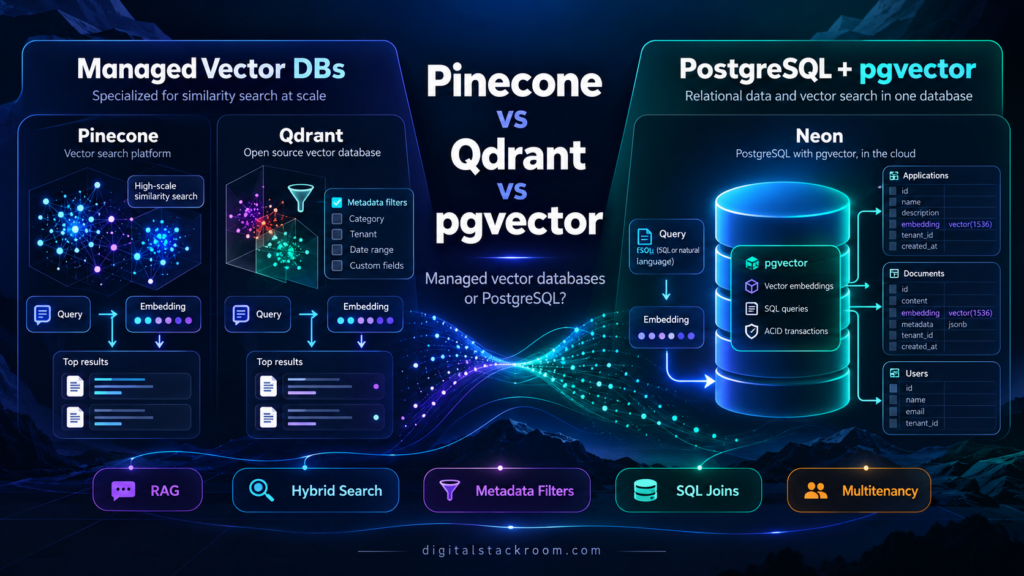
Choosing a vector database used to sound like a specialized infrastructure decision.
Today, almost every SaaS product adding AI eventually runs into the same question:
Should we use a dedicated vector database, or keep embeddings inside PostgreSQL with
pgvector?
The obvious answer is often:
Use a vector database because it is built for vectors.
That answer is incomplete.
Most AI-powered SaaS applications do not contain only vectors.
They also contain:
users
organizations
subscriptions
documents
permissions
projects
files
messages
audit records
workflow state
and somewhere inside that relational data:
embeddingsA customer-support assistant, for example, may need to retrieve semantically similar document chunks.
But the query may also need to enforce:
tenant = ACME

document_status = published

user has permission to read document

language = English

document has not been deleted
That changes the architecture question.
The choice is no longer simply:
Which database performs vector search fastest?It becomes:
Should vector search be a separate retrieval system?

or

Should vector search remain inside the application's
primary relational database?
That is the real difference between products such as Pinecone and Qdrant Cloud and a managed PostgreSQL platform such as Neon running pgvector.
All three can perform similarity search.
They do not solve the surrounding application problem in the same way.
Table of Contents
What a Vector Database Actually Stores
Embedding models convert content into numerical vectors.
A text chunk might become:
[0.021, -0.182, 0.054, 0.771, ...]A modern embedding can contain hundreds or thousands of dimensions.
The database stores those vectors and answers questions such as:
Which stored vectors are closest to this query vector?
For example:
User question
      ↓
Embedding model
      ↓
Query vector
      ↓
Vector search
      ↓
Nearest document chunks
      ↓
LLM context
This is one of the standard building blocks of Retrieval-Augmented Generation, or RAG.
But the vector is rarely useful by itself.
A vector record typically needs associated information.
{
  "document_id": "doc_1842",
  "chunk": 7,
  "tenant_id": "tenant_acme",
  "language": "en",
  "status": "published"
}
Dedicated vector databases generally call this:
metadataor, in Qdrant terminology:
payloadPostgreSQL simply stores it as normal relational columns.
That difference becomes increasingly important as the application becomes more complex.
What Is pgvector?
pgvector is an open-source PostgreSQL extension that adds vector data types and vector similarity operations to Postgres.
Once enabled:
CREATE EXTENSION vector;you can create:
CREATE TABLE document_chunks (
    id BIGSERIAL PRIMARY KEY,
    content TEXT NOT NULL,
    embedding VECTOR(1536) NOT NULL
);
and perform similarity search using SQL.
For cosine distance:
SELECT
    id,
    content
FROM document_chunks
ORDER BY embedding <=> '[0.12, -0.42, ...]'
LIMIT 10;
The <=> operator calculates cosine distance.
If you want cosine similarity:
SELECT
    id,
    1 - (
        embedding <=>
        '[0.12, -0.42, ...]'
    ) AS cosine_similarity
FROM document_chunks
ORDER BY
    embedding <=>
    '[0.12, -0.42, ...]'
LIMIT 10;
By default, pgvector can perform exact nearest-neighbor search.
For larger datasets, it supports approximate nearest-neighbor indexes including:
HNSW
IVFFlat
The current pgvector implementation supports vector, halfvec, sparse vectors and bit vectors, with different dimensionality limits depending on the type.
Neon Is Not a Dedicated Vector Database
This distinction is important.
Neon is PostgreSQL.
Its vector capabilities come from PostgreSQL plus the pgvector extension.
The architecture is:
Application
    ↓
Neon PostgreSQL
    │
    ├── users
    ├── documents
    ├── permissions
    ├── subscriptions
    ├── audit records
    └── embeddings
That is very different from:
Application
    ├────────────► PostgreSQL
    │
    └────────────► Vector Database
Neither design is inherently better.
They optimize for different things.
Pinecone vs. Qdrant vs. Neon: Quick Comparison
| Area | Pinecone | Qdrant Cloud | Neon + pgvector |
|---|---|---|---|
| Product type | Managed vector database | Managed vector database | Managed PostgreSQL |
| Primary interface | Vector/search API | REST/gRPC + SDKs | SQL/PostgreSQL protocol |
| Relational SQL | No | No | Yes |
| Vector search | Native | Native | pgvector |
| Exact search | Platform-dependent abstraction | Supported | Yes |
| Approximate search | Managed internally | HNSW | HNSW / IVFFlat |
| Metadata filtering | Yes | Yes, payload filtering | SQL WHERE |
| Joins | No relational joins | No relational joins | Full SQL joins |
| Transactions across relational + vectors | No | No | Yes |
| Dense vectors | Yes | Yes | Yes |
| Sparse retrieval | Yes | Yes | sparsevec + PostgreSQL options |
| Hybrid search | Supported | Strong native support | Build with Postgres FTS + pgvector |
| Multivector | Product-specific | Strong native support | Model in relational schema |
| Quantization | Managed internally | Extensive control | halfvec/custom strategies |
| Multitenancy | Namespaces | Payload partitioning / shards | SQL/RLS/partitioning/databases |
| Infrastructure management | Very low | Low | Low |
| Vector tuning control | Low | High | High |
| Open-source portability | Proprietary service | Strong — OSS engine | Strong — PostgreSQL + OSS pgvector |
| Best fit | Managed vector retrieval | Advanced vector retrieval | Relational apps adding AI |
This table already reveals the core trade-off.
Pinecone tries to hide vector infrastructure.
Qdrant exposes more vector-search controls.
Neon gives you PostgreSQL and lets vector search become part of your relational architecture.
The Architecture Difference Matters More Than the API
Imagine a SaaS knowledge platform.
Each document belongs to:
organization
project
user
access policy
A dedicated vector database architecture might look like:
                       ┌──────────────┐
                       │ PostgreSQL   │
                       │              │
                       │ users        │
                       │ projects     │
                       │ permissions  │
                       │ documents    │
                       └──────┬───────┘
                              │
                              │ document IDs
                              ▼
                       ┌──────────────┐
                       │ Pinecone /   │
                       │ Qdrant       │
                       │              │
                       │ embeddings   │
                       │ metadata     │
                       └──────────────┘
With pgvector:
                       ┌────────────────────┐
                       │ PostgreSQL / Neon  │
                       │                    │
                       │ users              │
                       │ projects           │
                       │ permissions        │
                       │ documents          │
                       │ chunks             │
                       │ embeddings         │
                       └────────────────────┘
The first architecture gives vector search its own optimized service.
The second eliminates a distributed-data boundary.
That is the fundamental design choice.
Pinecone: The Managed-First Option
Pinecone is designed specifically around search and retrieval workloads.
You create an index, insert records, and query that index.
You do not manage:
PostgreSQL parameters
HNSW memory
autovacuum
index pages
connection pools
database replicas
Pinecone’s current serverless architecture separates storage from the infrastructure serving queries and automatically manages scaling.
For teams that want:
Give me vector retrieval without making me operate vector-search infrastructure.
that is a very compelling model.
Basic Pinecone Architecture
Application
    ↓
Pinecone SDK/API
    ↓
Pinecone Index
    │
    ├── namespace A
    ├── namespace B
    └── namespace C
Each record typically contains:
ID
vector
metadata
For example:
{
  "id": "doc-17#chunk-4",
  "values": [0.18, -0.12, 0.42],
  "metadata": {
    "document_id": "doc-17",
    "status": "published",
    "language": "en"
  }
}
Creating a Pinecone Serverless Index
A typical Python setup looks like:
import os

from pinecone import (
    Pinecone,
    ServerlessSpec,
)


pc = Pinecone(
    api_key=os.environ[
        "PINECONE_API_KEY"
    ]
)


pc.create_index(
    name="knowledge-base",
    dimension=1536,
    metric="cosine",
    spec=ServerlessSpec(
        cloud="aws",
        region="us-east-1",
    ),
)
Once the index is ready:
description = pc.describe_index(
    "knowledge-base"
)


index = pc.Index(
    host=description.host
)
The exact cloud and region should be selected according to your workload.
Place retrieval infrastructure reasonably close to the application issuing queries.
Writing Records to Pinecone
index.upsert(
    namespace="tenant-acme",
    vectors=[
        {
            "id":
                "doc-17#chunk-4",

            "values":
                embedding,

            "metadata": {
                "document_id":
                    "doc-17",

                "status":
                    "published",

                "language":
                    "en",
            },
        }
    ],
)
Pinecone recommends namespaces as a primary mechanism for partitioning tenant data rather than creating a separate index for every tenant.
Querying Pinecone
results = index.query(
    namespace="tenant-acme",

    vector=query_embedding,

    top_k=5,

    filter={
        "status": {
            "$eq":
                "published"
        }
    },

    include_metadata=True,
)
This gives you:
vector similarity
+
metadata filtering
+
tenant namespace
without writing SQL.
That simplicity is one of Pinecone’s strongest advantages.
Where Pinecone Is Strong
Pinecone is particularly attractive when:
retrieval itself is the product's main database workload

you do not want to tune ANN indexes

traffic is unpredictable

you want serverless vector infrastructure

your team wants a narrow retrieval API
Pinecone’s serverless offering manages the vector infrastructure and scales automatically based on usage.
You do not choose how many HNSW graph nodes should be cached or how Postgres should allocate memory.
That operational simplicity has real value.
Pinecone Also Supports More Than Dense Vector Search
Modern retrieval rarely uses semantic vectors alone.
Exact identifiers, product codes and unusual keywords can be missed by purely dense retrieval.
Pinecone now offers retrieval options across:
dense search
sparse search
full-text search
hybrid retrieval patterns
reranking
The service also offers hosted inference options for generating embeddings and reranking results.
This means Pinecone is increasingly a retrieval platform rather than merely a place to store embedding arrays.
Pinecone’s Main Architectural Cost: A Second Data System
Suppose your source-of-truth database says:
document 17
status = deleted
but Pinecone still contains:
doc-17#chunk-1
doc-17#chunk-2
doc-17#chunk-3
You now have synchronization work.
Your architecture needs to handle:
create document
→ insert relational data
→ generate embeddings
→ update Pinecone

update document
→ update relational data
→ regenerate embeddings
→ update Pinecone

delete document
→ delete relational data
→ remove vectors
Failures can leave the two systems temporarily inconsistent.
That is not a Pinecone flaw.
It is the normal cost of having two independent systems of record.
Qdrant Cloud: More Vector Search Control
Qdrant takes a different approach.
Qdrant is an open-source vector search engine, and Qdrant Cloud runs the same engine as a managed service.
That means you can use:
Qdrant Cloudtoday and potentially move to:
self-hosted Qdrantlater without redesigning your application’s retrieval API.
That portability is one of Qdrant’s strongest architectural advantages.
Qdrant’s Data Model
Qdrant organizes data into:
collectionswhich contain:
pointsA point can contain:
ID
vector or vectors
payload
Payload is structured JSON metadata.
For example:
{
  "tenant_id": "acme",
  "document_id": "doc-17",
  "status": "published",
  "language": "en"
}
Qdrant supports:
dense vectors
sparse vectors
named vectors
multivectors
within its retrieval model.
Creating a Qdrant Collection
import os

from qdrant_client import (
    QdrantClient,
    models,
)


client = QdrantClient(
    url=os.environ[
        "QDRANT_URL"
    ],
    api_key=os.environ[
        "QDRANT_API_KEY"
    ],
)


client.create_collection(
    collection_name=
        "knowledge-base",

    vectors_config=
        models.VectorParams(
            size=1536,
            distance=
                models.Distance.COSINE,
        ),
)
Add a Payload Index
If you frequently filter by:
tenant_idcreate a payload index.
client.create_payload_index(
    collection_name=
        "knowledge-base",

    field_name=
        "tenant_id",

    field_schema=
        models.PayloadSchemaType.KEYWORD,
)
Qdrant recommends creating payload indexes for fields used frequently in filters.
Insert a Qdrant Point
client.upsert(
    collection_name=
        "knowledge-base",

    points=[
        models.PointStruct(
            id=1,

            vector=
                embedding,

            payload={
                "tenant_id":
                    "acme",

                "document_id":
                    "doc-17",

                "status":
                    "published",
            },
        )
    ],
)
Qdrant point IDs can use unsigned integers or UUIDs.
Query Qdrant with a Tenant Filter
response = client.query_points(
    collection_name=
        "knowledge-base",

    query=
        query_embedding,

    query_filter=
        models.Filter(
            must=[
                models.FieldCondition(
                    key=
                        "tenant_id",

                    match=
                        models.MatchValue(
                            value=
                                "acme"
                        ),
                ),

                models.FieldCondition(
                    key=
                        "status",

                    match=
                        models.MatchValue(
                            value=
                                "published"
                        ),
                ),
            ]
        ),

    limit=5,

    with_payload=True,
)
Qdrant’s filtering system is one of its strongest features.
Filters can be combined with:
AND
OR
NOT
nested conditions
geo filters
full-text conditions
depending on the payload and indexes you create.
Qdrant’s Hybrid Search Is More Explicit
Qdrant has invested heavily in combining retrieval methods.
Its current Query API supports:
dense retrieval

sparse retrieval

BM25

multivector retrieval

multi-stage queries

reciprocal-rank fusion

reranking
For example, you can retrieve candidates using:
dense semantic vector
+
sparse lexical vector
and fuse the result sets.
That makes Qdrant appealing to teams building:
search engines
RAG platforms
recommendation systems
multimodal retrieval
where retrieval quality itself is an important engineering problem.
Qdrant Gives You More ANN Controls
Qdrant uses HNSW for approximate nearest-neighbor search.
It also exposes concepts such as:
HNSW configuration
payload indexes
quantization
memory tiers
sharding
replication
That provides more control than a highly abstracted service.
But the trade-off is obvious:
more control
=
more things to understand
Qdrant Cloud manages the infrastructure, but you still make more vector-search architecture decisions than you typically would with Pinecone.
Quantization Is a Major Qdrant Feature
Large vector datasets consume significant memory.
Qdrant supports several quantization strategies, including:
scalar quantization
binary quantization
product quantization
TurboQuant
These reduce memory requirements by storing compressed representations for search.
The trade-off is generally:
less memory
+
potentially faster candidate search

vs.

some approximation error
Qdrant can re-score candidates using the original vectors to recover accuracy.
This gives teams a fairly sophisticated way to trade:
RAM
latency
recall
cost
against one another.
Qdrant Cloud Still Uses Resource-Based Capacity
Pinecone serverless largely hides infrastructure sizing.
Qdrant Cloud exposes the cluster more directly.
Pricing is currently based primarily on resources such as:
vCPU
RAM
disk storage
backups
with additional inference usage where applicable.
That means capacity planning still matters.
The advantage is predictable control.
The disadvantage is that you need to understand what the workload needs.
Neon + pgvector: Keep Vectors with the Application Data
The Neon approach starts from a different assumption:
What if embeddings are simply another column in the application’s PostgreSQL database?
For many SaaS products, that is surprisingly powerful.
Consider this schema:
CREATE EXTENSION IF NOT EXISTS vector;


CREATE TABLE documents (

    id UUID PRIMARY KEY,

    tenant_id UUID NOT NULL,

    title TEXT NOT NULL,

    status TEXT NOT NULL,

    created_at TIMESTAMPTZ
        NOT NULL
        DEFAULT now()
);


CREATE TABLE document_chunks (

    id BIGSERIAL
        PRIMARY KEY,

    document_id UUID
        NOT NULL
        REFERENCES documents(id)
        ON DELETE CASCADE,

    tenant_id UUID
        NOT NULL,

    chunk_index INTEGER
        NOT NULL,

    content TEXT
        NOT NULL,

    embedding VECTOR(1536)
        NOT NULL,

    UNIQUE (
        document_id,
        chunk_index
    )
);
Everything is relational.
The vector is simply:
embedding VECTOR(1536)Create an HNSW Index
For cosine distance:
CREATE INDEX
    document_chunks_embedding_hnsw_idx

ON document_chunks

USING hnsw (
    embedding vector_cosine_ops
);
You will normally also index common relational filters.
CREATE INDEX
    document_chunks_tenant_idx

ON document_chunks (
    tenant_id
);
Now PostgreSQL can use both relational and vector-search capabilities.
Query Vectors and Relational Data Together
Suppose we only want vectors belonging to:
tenant ACMEand documents that are currently:
publishedThe query can join the tables directly.
SELECT
    c.id,
    c.document_id,
    c.content,

    1 - (
        c.embedding <=>
        $1::vector
    ) AS cosine_similarity

FROM document_chunks AS c

JOIN documents AS d
    ON d.id =
       c.document_id

WHERE
    c.tenant_id = $2

    AND
    d.status =
        'published'

ORDER BY
    c.embedding <=>
    $1::vector

LIMIT 5;
That is the central advantage of pgvector.
You are not trying to reproduce your relational access model inside vector metadata.
You are querying the actual relational model.
Transactions Are a Big Difference
Suppose a user deletes a document.
With PostgreSQL:
BEGIN;

DELETE FROM documents
WHERE id = $1;

COMMIT;
If:
document_chunks.document_iduses:
ON DELETE CASCADEthe document and its vector chunks are removed within the same database transaction.
There is no second vector database that needs a follow-up delete.
That can dramatically simplify application consistency.
The Advantage Is Bigger Than Fewer Services
Suppose a document must only be visible if:
tenant matches

subscription active

document published

user belongs to project

user's role allows viewing
In PostgreSQL, that can be expressed through:
joins
WHERE clauses
views
Row-Level Security
The vector search can remain inside the same query.
A dedicated vector database normally requires those authorization constraints to be represented through:
metadata
namespaces
application-side filtering
or resolved before/after vector retrieval.
Again, neither is inherently wrong.
But the data model is different.
pgvector Exact vs. Approximate Search
By default, pgvector supports exact nearest-neighbor search.
Exact search gives perfect recall because all relevant candidate vectors are evaluated.
The downside is cost as the dataset grows.
Approximate indexes trade some recall for speed.
pgvector currently supports:
HNSW
IVFFlat
HNSW in pgvector
HNSW builds a multilayer graph.
Its major advantages are generally:
strong speed/recall trade-off

no training step

index can be created
before the table contains data
Its main costs are:
higher memory use

slower index construction

more expensive inserts
than simpler indexing approaches
Example:
CREATE INDEX
    chunks_embedding_idx

ON document_chunks

USING hnsw (
    embedding vector_cosine_ops
)

WITH (
    m = 16,
    ef_construction = 64
);
Search behavior can be tuned using:
SET hnsw.ef_search = 100;Higher values generally improve recall while requiring additional search work.
IVFFlat in pgvector
IVFFlat groups vectors into lists and searches a subset of them.
Example:
CREATE INDEX
    chunks_embedding_ivf_idx

ON document_chunks

USING ivfflat (
    embedding vector_cosine_ops
)

WITH (
    lists = 100
);
Query-time probes control how many lists are searched.
SET ivfflat.probes = 10;Higher probe counts usually improve recall at the expense of more work.
Unlike HNSW, IVFFlat requires training from existing data, so the index should normally be built after representative rows exist.
The Filtering Problem with pgvector
There is an important detail many tutorials miss.
With approximate pgvector indexes, relational filtering can occur after candidates have been retrieved from the ANN index.
Suppose:
only 2% of rows
belong to tenant ACME
and your HNSW search examines only a limited candidate set.
Many candidates may be discarded by:
WHERE tenant_id = ...leaving fewer matches than expected.
pgvector provides several strategies for this.
They include:
normal indexes on filter columns

partial vector indexes

table partitioning

iterative index scans
For example:
SET hnsw.iterative_scan =
    strict_order;
lets HNSW continue scanning until enough filtered results are found or configured limits are reached.
This is an area where understanding the PostgreSQL query plan matters.
Partial Vector Indexes Can Help
If your application has a small number of important categories:
CREATE INDEX
    chunks_category_42_hnsw

ON document_chunks

USING hnsw (
    embedding vector_cosine_ops
)

WHERE category_id = 42;
can provide an ANN index tailored to that subset.
This does not scale gracefully to thousands of dynamic tenants.
For those workloads, partitioning or a dedicated vector engine may make more sense.
Qdrant Handles Filtered Retrieval Differently
Qdrant treats metadata/payload filtering as a first-class vector-search capability.
Fields used for filtering can have payload indexes.
Its search engine is designed specifically around:
vector similarity
+
payload constraints
This is particularly attractive when retrieval frequently includes complex metadata filters.
For example:
tenant
AND category
AND price range
AND language
AND availability
can remain part of the vector-search request.
Pinecone Filtering Is Intentionally Higher Level
Pinecone similarly supports metadata filters, but the platform hides most index internals.
That makes it simpler operationally.
You do not need to decide:
Should this tenant get
a partial HNSW index?
The trade-off is that you have fewer database-engine-level tuning controls.
For many SaaS teams, that is a good trade.
Multitenancy: Pinecone
Pinecone recommends using:
namespacesfor tenant partitioning.
Architecture:
index: knowledge-base

namespace:
tenant-a

namespace:
tenant-b

namespace:
tenant-c
Queries specify the namespace:
index.query(
    namespace=
        "tenant-a",

    vector=
        query_embedding,

    top_k=10,
)
This is simple and naturally prevents searches from crossing namespace boundaries when the application selects the correct tenant namespace.
Application authorization still needs to ensure a user cannot request another tenant’s namespace.
Multitenancy: Qdrant
Qdrant offers several patterns.
Payload-Based Tenancy
Store:
{
  "tenant_id": "tenant-a"
}
and filter every request.
Qdrant allows a payload index to be marked as:
is_tenantwhich helps the engine organize tenant data efficiently.
This works well when there are many relatively small tenants.
User-Defined Sharding
Larger tenants can receive dedicated shards.
This gives stronger workload isolation but consumes more resources.
Tiered Multitenancy
Qdrant can combine shared tenant groups with dedicated shards for larger tenants.
This makes Qdrant one of the more flexible options for vector-heavy multi-tenant platforms.
Multitenancy: Neon + pgvector
PostgreSQL gives you conventional SaaS patterns.
For example:
tenant_id column

Row-Level Security

table partitioning

schema per tenant

database per tenant
For vector search specifically, pgvector notes that sharing one approximate index across many tenants can affect recall and performance.
For large or highly isolated tenants, you might use:
list partitioningor separate tables/databases.
The key distinction is that PostgreSQL can enforce tenant security independently of the vector index through normal relational security mechanisms.
Row-Level Security Can Be Valuable
Example:
ALTER TABLE document_chunks
ENABLE ROW LEVEL SECURITY;
Then a policy might restrict rows based on the authenticated tenant context.
This is very different from relying only on metadata filters constructed in application code.
Whether you need RLS depends on your application’s security model, but the option is available because this is still PostgreSQL.
Hybrid Search: Pinecone
Dense vector search is good at semantic similarity.
It may be weaker on exact values such as:
SKU-1948-X

RFC8725

ERROR_CONNECTION_1042
Pinecone supports retrieval approaches across:
dense
sparse
full-text
hybrid
reranking
which can improve relevance where semantic and lexical signals need to work together.
For teams that want a managed search pipeline, this increasingly reduces the amount of retrieval infrastructure they must build themselves.
Hybrid Search: Qdrant
Qdrant exposes hybrid retrieval more directly.
It supports:
dense vectors
sparse vectors
BM25 text queries
RRF fusion
multi-stage search
reranking
through its Query API.
For retrieval engineers who want to experiment with candidate generation and ranking, this is a significant advantage.
Hybrid Search: Neon + pgvector
PostgreSQL already has full-text search.
A table can contain both:
embedding VECTOR(...)and:
tsvectorFor example:
ALTER TABLE document_chunks
ADD COLUMN search_vector
TSVECTOR
GENERATED ALWAYS AS (
    to_tsvector(
        'english',
        content
    )
) STORED;
Then:
CREATE INDEX
    document_chunks_fts_idx

ON document_chunks

USING GIN (
    search_vector
);
You can retrieve:
semantic candidates
+
lexical candidates
and combine the rankings using SQL or application logic.
PostgreSQL does not automatically design the hybrid ranking strategy for you.
That flexibility is useful.
It also means more engineering work.
Relational Joins Are Where pgvector Becomes Hard to Ignore
Imagine a marketplace recommendation query:
Find products similar to this description

BUT ONLY IF:

inventory > 0

seller is active

region = India

price < ₹5,000

user has not blocked seller
In PostgreSQL, that can be expressed in one relational query.
With a dedicated vector database, you must decide which of those properties should be:
duplicated as vector metadataand which should be:
validated in the primary databaseafter retrieval.
If business rules change frequently, data duplication becomes an architectural burden.
Dedicated Vector Databases Avoid Relational Complexity for a Reason
The opposite argument is equally important.
If your workload is:
500 million document chunks

high QPS similarity search

heavy metadata filtering

hybrid retrieval

constant re-ranking experiments
you may not want your transactional PostgreSQL database responsible for that workload.
Separating retrieval can protect the application database.
Architecture:
Transactional Database
        ↓
Change/Embedding Pipeline
        ↓
Dedicated Vector Store
        ↓
Retrieval API
This can be the right design when search itself becomes a major subsystem.
When PostgreSQL Becomes the Bottleneck
pgvector does not magically remove PostgreSQL’s resource constraints.
HNSW indexes can consume substantial:
memory
CPU
storage
Index creation can also be resource intensive.
Neon can autoscale compute upward for heavier workloads, but the working set and cache still matter.
If every user request performs:
large HNSW search
+
several joins
+
heavy aggregation
on the same database handling transactional writes, you need to watch contention carefully.
Separate Read Workloads Where Necessary
PostgreSQL architectures can evolve.
For example:
Primary Postgres
      ↓
Read replica
      ↓
Vector-heavy search
or:
Primary relational system
      ↓
dedicated vector service
Choosing pgvector initially does not mean you can never migrate search elsewhere.
Many applications sensibly begin with one database and separate retrieval only when the workload proves it is necessary.
Starting with One Database Can Reduce Premature Complexity
An early SaaS product may have:
50,000 chunksand:
20 searches per minuteAdding:
primary Postgres

vector database

replication pipeline

retry logic

consistency monitoring
may be unnecessary.
A pgvector table might handle the workload comfortably.
Architecture should reflect current requirements plus realistic growth—not a hypothetical billion-vector future.
The Opposite Mistake Is Also Common
Do not keep everything in PostgreSQL simply because:
We already use Postgres.
If vector retrieval becomes:
the highest-QPS feature

the largest dataset

the largest memory consumer

the main source of latency
then specialized infrastructure deserves consideration.
The right architecture can change over time.
Connection Management Matters with Neon
Because Neon is PostgreSQL, normal database connection rules still apply.
A serverless API with:
20 application instances
×
10 PostgreSQL connections
can potentially create:
200 database connectionsregardless of how efficient vector search is.
For that architecture, see:
PostgreSQL Connection Pooling in Node.js & Python
Neon also provides pooled connection endpoints, but your application should still use bounded connection pools and understand its database concurrency.
Pinecone and Qdrant Use HTTP/gRPC-Style Service APIs
Dedicated vector services do not behave like PostgreSQL connections.
Your application typically maintains:
HTTP
or
gRPC
connections through an SDK.
That reduces traditional SQL connection-pool concerns.
You still need to handle:
timeouts
rate limits
retries
service errors
network latency
For retry design, see:
REST API Rate Limiting and Exponential Backoff in Python
Never Put Vector Database API Keys in the Browser
A React frontend should not directly contain:
PINECONE_API_KEY

QDRANT_API_KEY

database credentials
The normal architecture is:
Browser
   ↓
Authenticated API
   ↓
Vector Database
not:
Browser
   ↓
Vector Database using embedded secret
For API authentication and secret-handling patterns, see:
Securing API Endpoints: Best Practices for JWT Authentication, Environment Variables, and CORS
Data Ingestion Architecture Matters
Most vector search systems need an ingestion pipeline.
For example:
PDF uploaded
      ↓
Extract text
      ↓
Split into chunks
      ↓
Generate embeddings
      ↓
Store vectors
For large document collections, the source files may live in object storage.
Architecture:
Cloud Storage
      ↓
Processing Worker
      ↓
Embedding API
      ↓
Pinecone / Qdrant / pgvector
For secure storage architecture, see:
Cloud Storage Architecture: Managing File Uploads and Signed URLs via Cloud Buckets
Pinecone Supports Large Bulk Imports
Pinecone currently supports importing large datasets from object storage into serverless indexes.
Its production guidance recommends object-storage imports for very large ingestion workloads rather than pushing every record individually through ordinary upserts.
This is attractive when rebuilding an index from a large corpus.
Qdrant Supports Bulk and Streaming Ingestion
Qdrant supports:
upserts
batching
bulk loading
live updates
and continues to optimize collection segments in the background.
Because Qdrant exposes more of the underlying storage/search architecture, ingestion tuning can matter more than it does with Pinecone’s more managed abstraction.
PostgreSQL Ingestion Can Stay Transactional
With pgvector, embedding ingestion can happen inside normal SQL transactions.
For example:
BEGIN;


INSERT INTO documents (
    id,
    tenant_id,
    title,
    status
)
VALUES (
    $1,
    $2,
    $3,
    'processing'
);


INSERT INTO document_chunks (
    document_id,
    tenant_id,
    chunk_index,
    content,
    embedding
)
VALUES (
    $1,
    $2,
    $3,
    $4,
    $5
);


UPDATE documents
SET status =
    'ready'
WHERE id = $1;


COMMIT;
That gives you normal transactional integrity across the application’s relational and vector state.
Observability Is Different Across the Three Options
Pinecone
You primarily monitor:
API latency
usage
read/write units
errors
rate limits
retrieval quality
Most low-level vector infrastructure is hidden.
Qdrant Cloud
You have more infrastructure-level concepts:
RAM
CPU
disk
nodes
replicas
shards
index state
Qdrant Cloud includes monitoring, logging and alerting around managed clusters.
Neon
You monitor:
PostgreSQL query latency
CPU
memory
connections
index behavior
cache behavior
SQL plans
plus the vector retrieval itself.
For production observability patterns, see:
Structured Logging and Monitoring: How to Debug Production Services in Cloud Environments
Cost Models Are Fundamentally Different
Comparing only the monthly price displayed on each vendor’s pricing page can be misleading because the billing units are different.
Pinecone
Pinecone’s on-demand model primarily reflects:
vector storage
reads
writes
and additional platform/inference capabilities depending on the plan.
That can work well for unpredictable workloads because you are not simply paying for a permanently provisioned vector cluster.
Qdrant Cloud
Qdrant Cloud is primarily resource-based.
You pay around the cluster resources being provisioned:
vCPU
RAM
storage
backups
and inference where used.
If the workload needs large amounts of memory for vector indexes, that will directly affect the cluster requirement.
Neon
Neon primarily bills around PostgreSQL resources such as:
compute usage
storage
branch usage
restore history
depending on the plan.
Your vector workload is simply part of the PostgreSQL compute workload.
This Makes Cost Comparisons Workload-Specific
Consider two applications.
Application A
10 million vectors

very few relational rows

high query volume

vector retrieval dominates workload
A dedicated vector service may be economically and operationally attractive.
Application B
300,000 embeddings

millions of relational records

complex permission joins

moderate vector QPS
Running a separate vector database may mean paying for another service mainly to avoid storing one extra PostgreSQL column.
There is no universal cheapest option.
Benchmark your workload.
Do Not Compare Vector Databases Using QPS Alone
A benchmark claiming:
Database X:
10,000 QPS

Database Y:
3,000 QPS
tells you almost nothing unless you know:
number of vectors

vector dimensions

top_k

filter selectivity

recall target

index configuration

hardware

concurrency

metadata returned

warm vs cold cache

update rate
The fastest system at:
90% recallis not necessarily better than a slower system at:
99.9% recallif your application needs high retrieval quality.
Benchmark Recall and Latency Together
A useful vector benchmark should measure at least:
p50 latency

p95 latency

p99 latency

recall@k

queries per second

index build time

ingestion throughput

memory/storage

filter performance
You should also test real filters.
For example:
tenant = acme
AND language = en
AND status = published
because an unfiltered benchmark may tell you very little about production behavior.
Retrieval Quality Matters More Than Database Marketing
For RAG, the final question is:
Did the right information reach the model?
That depends on:
embedding model

chunking strategy

metadata filters

hybrid retrieval

top_k

reranking

database recall
A faster database cannot compensate for a bad chunking strategy.
A perfect ANN index cannot fix embeddings that fail to represent your domain.
Pinecone vs. Qdrant vs. Neon for RAG
A practical RAG architecture comparison looks like this.
Pinecone
Documents
   ↓
Chunking
   ↓
Embeddings
   ↓
Pinecone
   ↓
Metadata filtering
   ↓
Optional reranking
   ↓
LLM
Best when retrieval is a clearly separated service.
Qdrant
Documents
   ↓
Dense + sparse representations
   ↓
Qdrant
   ↓
Filtering
   ↓
Hybrid / multi-stage retrieval
   ↓
Reranking
   ↓
LLM
Best when retrieval experimentation and control matter.
Neon
Documents + permissions + metadata
               ↓
          PostgreSQL
               ↓
        pgvector + SQL
               ↓
     relational constraints
               ↓
              LLM
Best when vector retrieval is deeply connected to relational application data.
Backup and Recovery
Pinecone
Pinecone provides backup/restore capabilities on applicable offerings and recommends backing up production indexes where long-term retention or deployment recovery is required.
Qdrant Cloud
Qdrant Cloud supports automatic and on-demand backups.
Snapshots can also be used for migration and self-hosted recovery workflows.
Neon
Neon provides Postgres recovery and branching capabilities.
Because vectors live inside PostgreSQL, recovering the relational database also recovers:
documents
relationships
embeddings
as one data system.
That can substantially simplify disaster recovery for smaller architectures.
Vendor Lock-In
This is an important SaaS consideration.
Pinecone
Pinecone exposes a proprietary retrieval service.
Migrating away means exporting vectors and metadata and adapting the retrieval integration.
The abstraction is convenient, but the API is platform-specific.
Qdrant
Qdrant’s engine is open source.
Qdrant Cloud and self-hosted Qdrant use the same general API and engine.
That creates a clearer escape path if infrastructure requirements change.
pgvector
pgvector is open source and runs with PostgreSQL.
A schema such as:
embedding VECTOR(1536)can move between PostgreSQL environments that support the extension.
That offers strong database portability.
But Portability Does Not Mean Zero Migration Cost
Even when two providers support pgvector, moving a large HNSW-indexed dataset still involves:
data transfer

index rebuilds

capacity planning

downtime or replication strategy

performance retesting
Open standards reduce lock-in.
They do not eliminate migration engineering.
Which One Has the Simplest Developer Experience?
For pure vector retrieval:
Pineconeis arguably the most abstracted.
You work with:
indexes
namespaces
records
queries
and the service handles most vector infrastructure.
For advanced search engineering:
Qdrantprovides more retrieval primitives directly.
For application development:
Neon + pgvectormay feel simplest if your team already knows PostgreSQL because:
SQL
ORM
migrations
transactions
joins
remain unchanged.
“Developer experience” therefore depends heavily on the team’s existing stack.
When Pinecone Is the Best Fit
I would seriously consider Pinecone when:
vector search is a major subsystem

you want minimal database tuning

traffic can be highly variable

you want managed serverless retrieval

your relational source of truth already
exists elsewhere

you are comfortable with a dedicated
retrieval service
A typical architecture:
PostgreSQL
     ↓
Embedding pipeline
     ↓
Pinecone
     ↓
Retrieval API
When Qdrant Cloud Is the Best Fit
Qdrant is especially attractive when:
retrieval quality is a core feature

you need dense + sparse hybrid retrieval

metadata filtering is important

you want quantization control

you need multi-stage retrieval

you value open-source portability

your team understands vector infrastructure
A search-focused SaaS product may benefit enormously from that flexibility.
When Neon + pgvector Is the Best Fit
I would start with pgvector when:
you already use PostgreSQL

the vector data belongs directly
to relational entities

permissions require relational joins

your dataset is still manageable
inside Postgres

you want one transactional system

you want SQL flexibility

you want to avoid syncing two databases
This covers a surprisingly large percentage of early and mid-stage AI SaaS applications.
A Sensible Startup Architecture
For a new SaaS RAG application:
React
   ↓
API
   ↓
Neon PostgreSQL
   │
   ├── users
   ├── organizations
   ├── documents
   ├── permissions
   └── pgvector embeddings
may be all you need initially.
The backend itself can be deployed using a container platform such as Cloud Run.
See:
Deploying Containerized Python & Express Apps to Google Cloud Run
A Sensible Scale-Out Architecture
If search grows into its own high-volume subsystem:
                         ┌──────────────┐
                         │ PostgreSQL   │
                         │ Source Truth │
                         └──────┬───────┘
                                │
                         change pipeline
                                │
                                ▼
                     ┌─────────────────┐
                     │ Pinecone/Qdrant │
                     │ Retrieval Store │
                     └────────┬────────┘
                              │
                              ▼
                         Search API
At that point, the additional system has a clear reason to exist.
That is very different from adding a vector database on day one simply because the application uses embeddings.
Migration from pgvector to a Dedicated Vector Database
If you start with PostgreSQL, moving later is manageable when you maintain a clean canonical schema.
For example:
document ID
chunk ID
tenant ID
content
embedding
metadata
can be exported and loaded into the dedicated vector system.
Keep PostgreSQL as the source of truth.
Then:
PostgreSQL
     ↓
embedding/index pipeline
     ↓
Pinecone or Qdrant
becomes a derived search index.
This is similar to how applications treat:
Elasticsearchas a search projection rather than the transactional source of truth.
Migration from a Dedicated Vector Database Back to PostgreSQL
The reverse migration is also possible.
Create:
CREATE EXTENSION vector;then:
CREATE TABLE embeddings (

    id TEXT PRIMARY KEY,

    tenant_id TEXT,

    document_id TEXT,

    content TEXT,

    embedding VECTOR(1536)
);
Bulk-load the source data.
Then build the vector index after ingestion.
For HNSW:
CREATE INDEX
    embeddings_hnsw_idx

ON embeddings

USING hnsw (
    embedding vector_cosine_ops
);
For large migrations, index build time and memory should be planned explicitly.
Keep Raw Documents Outside the Vector Database When Appropriate
A vector database is not necessarily the best place for:
100 MB PDFs

video files

images

original datasets
A common architecture is:
Cloud Storage
      ↓
Document metadata
      ↓
PostgreSQL
      ↓
Chunks / embeddings
      ↓
Vector system
The original file remains in object storage.
The database stores references and searchable representations.
For that storage layer, see:
Cloud Storage Architecture: Managing File Uploads and Signed URLs via Cloud Buckets
The Decision Matrix
| Requirement | Pinecone | Qdrant Cloud | Neon + pgvector |
|---|---|---|---|
| Minimal vector operations work | Excellent | Very good | Good |
| SQL joins | Poor fit | Poor fit | Excellent |
| Transactions with app data | No | No | Excellent |
| Advanced vector tuning | Limited | Excellent | Excellent |
| Hybrid retrieval | Very good | Excellent | Good, build yourself |
| Complex metadata filters | Very good | Excellent | Excellent |
| Huge vector-first workload | Excellent | Excellent | Requires careful sizing |
| Small/medium SaaS + RAG | Good | Good | Excellent |
| Existing Postgres application | Adds another system | Adds another system | Natural fit |
| Open-source portability | Low | Excellent | Excellent |
| Operational abstraction | Highest | High | High |
| Retrieval experimentation | Good | Excellent | Very flexible |
| Relational authorization | App-managed | App-managed | Native SQL/RLS |
| Multi-tenant SaaS | Namespaces | Payload/shards | SQL/RLS/partitioning |
| One source of truth | No | No | Yes |
My Practical Rule
The decision can usually be reduced to one question:
Is retrieval itself a major subsystem?
If the answer is:
Yesevaluate:
Pinecone
or
Qdrant
seriously.
If the answer is:
No, we primarily have a SaaS application
that also needs semantic search
start by evaluating:
PostgreSQL + pgvectorbefore introducing another database.
Choose Pinecone When You Want the Database to Disappear
Pinecone is strongest when your expectation is:
I want a managed retrieval API. I do not want to think much about vector infrastructure.
That abstraction can let a small team ship quickly.
The trade-off is less low-level control and a more proprietary data-service boundary.
Choose Qdrant When Search Engineering Matters
Qdrant is strongest when you think in terms of:
dense retrieval
sparse retrieval
payload indexes
quantization
shards
multivectors
reranking
and those concepts are central to your product.
It gives you more control without requiring you to self-host if you choose Qdrant Cloud.
Choose Neon + pgvector When Application Data Matters as Much as Search
Neon and pgvector are strongest when the query looks like:
Find semantically similar chunks

AND join them to documents

AND enforce tenant access

AND check business state

AND return relational metadata
That is where PostgreSQL’s general-purpose nature becomes a feature rather than a limitation.
Don’t Make the Decision Based on “Millions of Vectors”
You will often see rules such as:
Below X vectors:
use Postgres.

Above X:
use vector database.
That is too simplistic.
A workload with:
50 million vectors
10 searches per hour
is very different from:
2 million vectors
10,000 searches per second
Likewise:
95% recalland:
99.9% recallcan produce very different resource requirements.
The correct inputs are:
vector count
dimensions
query rate
update rate
filter selectivity
recall requirement
top_k
metadata size
latency target
not vector count alone.
Production Evaluation Checklist
Before choosing a platform, test the same real workload on each candidate.
| Area | Measure |
|---|---|
| Dataset | Actual representative embeddings |
| Search quality | Recall@k |
| Median latency | p50 |
| Tail latency | p95 / p99 |
| Filters | Real production filters |
| Concurrency | Expected peak |
| Writes | Real ingestion/update rate |
| Deletes | Deletion/update behavior |
| Tenancy | Real tenant distribution |
| Hybrid | Keyword + semantic relevance |
| Cost | Actual projected workload |
| Recovery | Backup/restore workflow |
| Security | Private connectivity/IAM/API keys |
| Operations | Alerts, metrics, incident response |
| Migration | Export/import feasibility |
Do not benchmark only:
SELECT nearest vectorswith no filters and call the decision finished.
Final Verdict
There is no single “best vector database.”
There are three different architectural philosophies here.
Pinecone
Vector retrieval as a managed service.Best when you want:
minimal infrastructure decisions
serverless vector search
managed scale
simple tenant namespaces
Qdrant Cloud
Vector retrieval as an engineered search system.Best when you want:
deep retrieval control
hybrid search
filtering
quantization
multivectors
open-source portability
Neon + pgvector
Vector retrieval as part of PostgreSQL.Best when you want:
one source of truth
SQL joins
transactions
relational authorization
simple architecture
existing Postgres compatibility
For many SaaS applications, I would not automatically introduce a dedicated vector database on day one.
If your application already depends heavily on PostgreSQL, start by testing pgvector.
It may remove:
an additional database

a synchronization pipeline

another authentication boundary

another monitoring system

another bill
while still providing HNSW-based approximate vector search.
But if retrieval becomes one of the dominant workloads in the product, especially when you need sophisticated hybrid retrieval, large-scale filtered search, quantization, or independent search scaling, a purpose-built system such as Pinecone or Qdrant becomes much easier to justify.
The most useful decision rule is therefore not:
Which vector database is fastest?It is:
Is vector search the center of my architecture,

or

is it one capability inside my application's data model?
Answer that correctly, and the database choice becomes much easier.
Official Documentation and Technical References
Pinecone
Qdrant
PostgreSQL pgvector
pgvector Official GitHub Repository
pgvector README and Indexing Documentation
Neon
Neon Compute Management and Autoscaling