
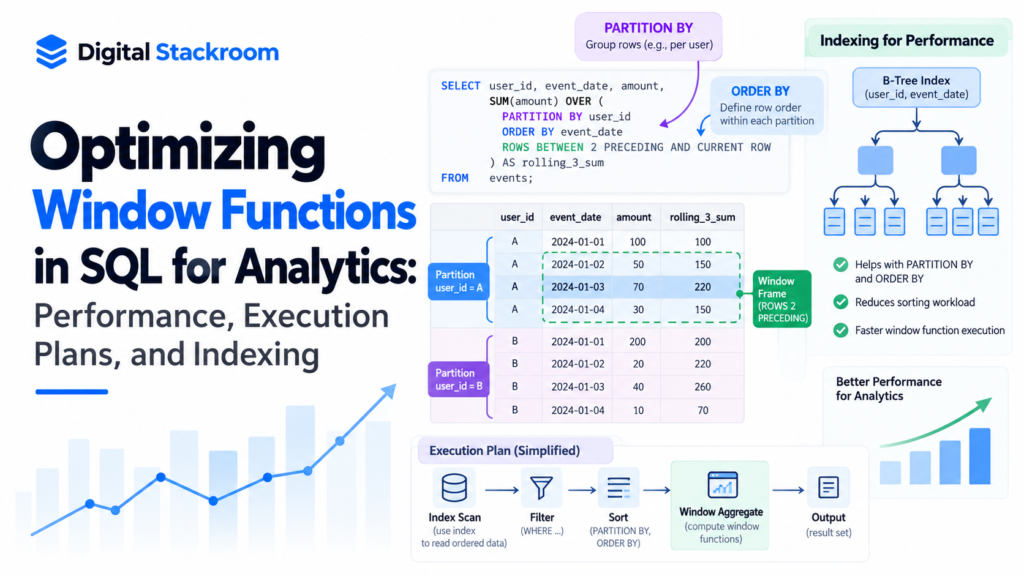
Window functions are indispensable in modern analytics. From running balances and cohort retentions to top-N row filtering, they replace convoluted self-joins and temporary tables with clean, declarative syntax.
However, moving from thousands to hundreds of millions of records exposes their computational cost. Unlike standard scalar functions, window functions require grouping, in-memory sorting, and frame boundary tracking. A poorly framed OVER () clause can silently force massive disk spills (external sort), exhaust work_mem, and degrade pipeline throughput.
Before tuning in-memory window sorting, ensure your physical storage is partitioned correctly so partitions fit into working memory—see our deep dive on SQL Indexing vs. Table Partitioning.
Understanding how the SQL optimizer executes window functions allows you to tune frame boundaries, select the correct ranking algorithm, and build indexes that bypass expensive sorting operations entirely.
Table of Contents
1. Problem Statement & The Cost of Analytical Sorting
Consider an event tracking table containing 50 million product interaction logs:
SQL
-- Schema representation
CREATE TABLE event_logs (
    event_id BIGINT GENERATED ALWAYS AS IDENTITY,
    user_id INT NOT NULL,
    session_id INT NOT NULL,
    event_timestamp TIMESTAMP NOT NULL,
    event_type VARCHAR(50) NOT NULL,
    revenue NUMERIC(10, 2) DEFAULT 0.00
);
When computing cumulative session revenue or finding each user’s most recent event, queries often rely on constructs like:
SQL
SELECT
    user_id,
    event_timestamp,
    SUM(revenue) OVER (
        PARTITION BY user_id
        ORDER BY event_timestamp
    ) AS running_user_spend
FROM event_logs;
What Happens Under the Hood?
- Partitioning: The database distributes rows matching the same
user_idinto continuous memory blocks. - Sorting: Within each partition, records are sorted chronologically by
event_timestamp. If the memory required exceeds PostgreSQL’swork_memor MySQL’ssort_buffer_size, the engine spills data to disk via multi-pass disk merges. - Framing & Aggregation: The engine evaluates the window frame (by default,
RANGE BETWEEN UNBOUNDED PRECEDING AND CURRENT ROW), aggregating running values row by row.
When applied across tens of millions of rows, sorting becomes the primary bottleneck, frequently consuming over 80% of total query execution time.
2. Choosing the Right Ranking Function: ROW_NUMBER(), RANK(), and DENSE_RANK()
Choosing between ranking functions is not merely a syntactic preference; each handles ties differently and impacts downstream filtering performance.
Sample Dataset:
Score: [100, 100, 95, 90]

ROW_NUMBER():  [ 1,   2,  3,  4 ]  --> Deterministic sequential integers; breaks ties arbitrarily
RANK():        [ 1,   1,  3,  4 ]  --> Skips ranks after duplicate ties (leaves gaps)
DENSE_RANK():  [ 1,   1,  2,  3 ]  --> Sequential ranks with ties; never skips numbers
Performance Comparison Matrix
| Function | Tie Handling | Gaps in Sequence | Algorithmic Complexity | Best Analytical Use Case |
ROW_NUMBER() | Assigns arbitrary sequential order | No | Lowest memory tracking | Deduplication, pagination, and strict “top 1” lookups. |
RANK() | Identical values share rank | Yes (skips next) | Moderate (maintains running counter + tie tracker) | Leaderboards with true Olympic ranking positions. |
DENSE_RANK() | Identical values share rank | No gaps | Moderate (increments counter only on distinct change) | Top-N category cutoffs (e.g., top 3 unique discount tiers). |
Performance Rule: When deduplicating data or extracting the latest record per customer, always default to
ROW_NUMBER(). It requires tracking fewer state variables per frame thanRANK()orDENSE_RANK().
3. The Hidden Cost of Window Framing: ROWS vs. RANGE
The most common performance pitfall in analytical SQL is omitting the explicit frame specification in moving aggregates (SUM(), AVG(), COUNT()).
When you specify an ORDER BY clause inside OVER () without an explicit frame clause, standard ANSI SQL sets the default frame to:
SQL
RANGE BETWEEN UNBOUNDED PRECEDING AND CURRENT ROW
Why RANGE Degrades Performance
- Value Evaluation: Under
RANGE, the database does not evaluate rows individually. It checks whether the current row has duplicate peer values in theORDER BYcolumn. - Buffering Overhead: The engine must read ahead to verify where the group of peer rows ends, keeping previous rows in a dynamic buffer.
- Deterministic Row Indexing with
ROWS: Switching toROWS BETWEEN UNBOUNDED PRECEDING AND CURRENT ROWinstructs the engine to process the current physical row without scanning ahead for duplicate ties.
SQL
-- POOR PERFORMANCE: Default RANGE requires looking ahead for ties
SELECT
    user_id,
    event_timestamp,
    SUM(revenue) OVER (
        PARTITION BY user_id
        ORDER BY event_timestamp
    ) AS cumulative_revenue
FROM event_logs;

-- OPTIMIZED: ROWS processes sequentially without peer lookahead
SELECT
    user_id,
    event_timestamp,
    SUM(revenue) OVER (
        PARTITION BY user_id
        ORDER BY event_timestamp
        ROWS BETWEEN UNBOUNDED PRECEDING AND CURRENT ROW
    ) AS cumulative_revenue
FROM event_logs;
In high-volume queries with continuous timestamps or high duplicate counts, switching from RANGE to ROWS can reduce CPU overhead by 20% to 40%.
4. Hands-On Benchmarking: Execution Plans in PostgreSQL
Let’s measure the performance difference between an unindexed window query and an index-optimized setup on a 5-million row dataset.
Step 1: Benchmark Unindexed Execution
SQL
-- 1. Create benchmarking table
CREATE TABLE customer_orders (
    order_id BIGINT GENERATED ALWAYS AS IDENTITY,
    customer_id INT NOT NULL,
    order_date TIMESTAMP NOT NULL,
    order_total NUMERIC(10, 2) NOT NULL
);

-- 2. Populate 5 million test rows
INSERT INTO customer_orders (customer_id, order_date, order_total)
SELECT
    (random() * 200000)::INT,
    NOW() - (random() * interval '365 days'),
    (random() * 500)::NUMERIC(10, 2)
FROM generate_series(1, 5000000);

ANALYZE customer_orders;
Run an analytical top-1 deduplication query to find each customer’s latest order:
SQL
EXPLAIN ANALYZE
WITH ranked_orders AS (
    SELECT
        customer_id,
        order_date,
        order_total,
        ROW_NUMBER() OVER (
            PARTITION BY customer_id
            ORDER BY order_date DESC
        ) AS rn
    FROM customer_orders
)
SELECT customer_id, order_date, order_total
FROM ranked_orders
WHERE rn = 1;
Unoptimized Execution Plan Analysis:
Plaintext
Subquery Scan on ranked_orders  (cost=654320.10..745890.35 rows=25000 width=32) (actual time=4210.12..4892.40 rows=199980 loops=1)
  Filter: (ranked_orders.rn = 1)
  ->  WindowAgg  (cost=654320.10..695420.20 rows=5000000 width=36) (actual time=3890.41..4620.15 rows=5000000 loops=1)
        ->  Sort  (cost=654320.10..666820.10 rows=5000000 width=28) (actual time=3890.35..4150.80 rows=5000000 loops=1)
              Sort Key: customer_orders.customer_id, customer_orders.order_date DESC
              Sort Method: external merge  Disk: 184520kB
              ->  Seq Scan on customer_orders  (cost=0.00..82500.00 rows=5000000 width=28) (actual time=0.04..410.22 rows=5000000 loops=1)
Bottlenecks Identified:
- Sequential Scan: The engine scans all 5 million raw rows off the disk heap.
- External Merge Disk Spill: Sorting by
(customer_id, order_date DESC)exceededwork_mem, spilling ~180 MB to disk. - High Latency: Total execution time hovered near 4.8 seconds.
Step 2: Index-Optimized Windowing (Eliminating the Sort)
To optimize window functions, the index must match the structure of the OVER () clause.
An index structured with PARTITION BY columns first, followed immediately by ORDER BY columns allows the storage engine to read pre-ordered data directly:
SQL
-- Create composite index matching partition and order keys
CREATE INDEX idx_orders_cust_date
ON customer_orders (customer_id ASC, order_date DESC)
INCLUDE (order_total);

ANALYZE customer_orders;
Re-run the exact same deduplication query:
SQL
EXPLAIN ANALYZE
WITH ranked_orders AS (
    SELECT
        customer_id,
        order_date,
        order_total,
        ROW_NUMBER() OVER (
            PARTITION BY customer_id
            ORDER BY order_date DESC
        ) AS rn
    FROM customer_orders
)
SELECT customer_id, order_date, order_total
FROM ranked_orders
WHERE rn = 1;
Optimized Execution Plan Analysis:
Plaintext
Subquery Scan on ranked_orders  (cost=0.43..245100.80 rows=25000 width=32) (actual time=0.06..1210.45 rows=199980 loops=1)
  Filter: (ranked_orders.rn = 1)
  ->  WindowAgg  (cost=0.43..195100.80 rows=5000000 width=36) (actual time=0.05..1080.12 rows=5000000 loops=1)
        ->  Index Only Scan using idx_orders_cust_date on customer_orders  (cost=0.43..145100.80 rows=5000000 width=28) (actual time=0.04..620.30 rows=5000000 loops=1)
What changed?
- Sort Step Completely Removed: The explicit
Sortnode is absent from the execution plan. Because the B-Tree index already stores entries sorted bycustomer_idand thenorder_date DESC, the query engine streams records straight intoWindowAgg. - Zero Disk Spills: No temporary files were written to disk.
- Index-Only Scan: By using the
INCLUDE (order_total)clause, the query engine satisfied all projections without visiting table heap pages. - Latency Reduction: Execution time dropped from 4,892 ms to 1,210 ms (a ~75% speed improvement).
5. Advanced Optimization Patterns
Pattern A: Reusing Window Specifications with WINDOW Clauses
When calculating multiple aggregations across the same window boundary, declaring a named WINDOW clause improves query maintainability and prevents redundant internal sorting plans:
SQL
-- Avoid declaring separate redundant OVER clauses
SELECT
    user_id,
    order_date,
    SUM(order_total) OVER w AS cumulative_spend,
    AVG(order_total) OVER w AS moving_average_spend,
    COUNT(order_id)  OVER w AS transaction_count
FROM customer_orders
WINDOW w AS (
    PARTITION BY user_id
    ORDER BY order_date
    ROWS BETWEEN UNBOUNDED PRECEDING AND CURRENT ROW
);
Pattern B: Pushing Down Filters via QUALIFY (Snowflake, BigQuery, Databricks)
In enterprise data warehouses like Snowflake, Google BigQuery, or DuckDB, using common table expressions (CTEs) solely to filter window rankings adds unnecessary boilerplate. The QUALIFY clause filters window functions directly at the base query level:
SQL
-- Directly filters window calculation without a nested CTE or subquery
SELECT
    customer_id,
    order_date,
    order_total
FROM customer_orders
QUALIFY ROW_NUMBER() OVER (
    PARTITION BY customer_id
    ORDER BY order_date DESC
) = 1;
6. Architecture Checklist for Window Function Performance
- Match Indexes to the Window Clause: Create composite B-Tree indexes matching
(PARTITION_COLUMNS, ORDER_COLUMNS). Include payload columns viaINCLUDEfor index-only scans. - Explicitly Define Frames as
ROWS: Replace defaultRANGEbehavior withROWS BETWEEN UNBOUNDED PRECEDING AND CURRENT ROWon aggregations where peer lookaheads are unnecessary. - Size
work_memAppropriately: In analytical databases like PostgreSQL, monitorSort Method: external mergeinEXPLAIN ANALYZE. If sorting spills to disk during heavy window operations, increase session memory viaSET work_mem = '256MB';. - Default to
ROW_NUMBER()for Top-N Deduplication: AvoidRANK()orDENSE_RANK()unless your analytical requirements specifically demand duplicate tie retention.
By aligning index layouts with the partitioning and sorting rules of your OVER () clauses, window functions scale efficiently across tens of millions of analytical records without stalling database pipelines.