
Simple prompt-and-response LLM wrappers have hit an operational ceiling in enterprise environments. While a standard completion model can summarize text or draft copy, it cannot autonomously query live customer databases, execute multi-step business logic across internal APIs, or verify its own answers against verified enterprise documents.
Bridging the gap between static text generation and autonomous business execution requires AI Agents.
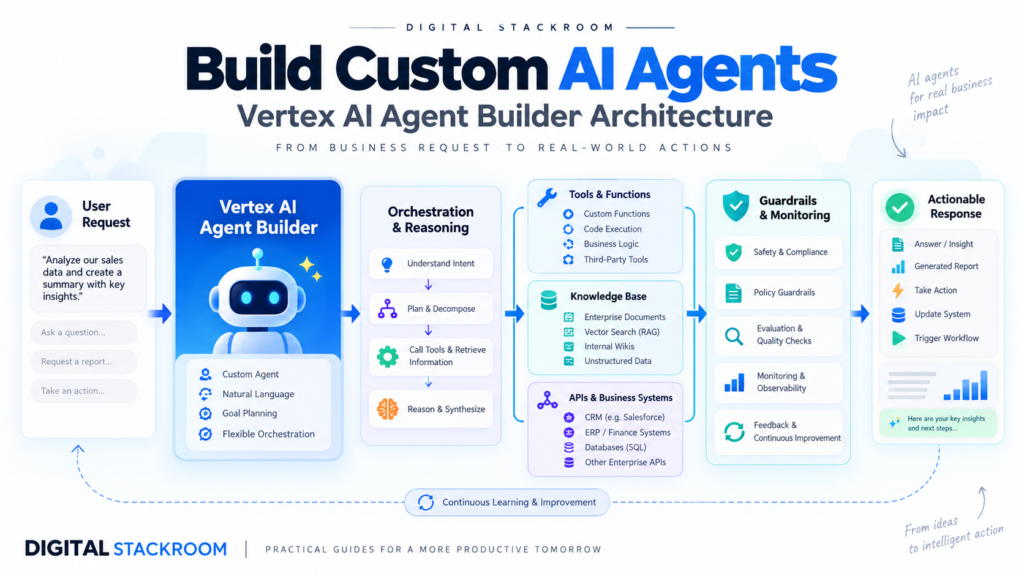
Google Cloud’s Vertex AI Agent Builder provides a managed orchestration framework to build, ground, and deploy production-grade AI agents. Instead of writing brittle manual loops for prompt chaining and regex tool calling, Agent Builder pairs foundational models (such as Gemini) with enterprise data stores, OpenAPI tool extensions, and stateful multi-turn session handling.
Table of Contents
1. Problem Statement: Why Prompt Engineering Fails at Autonomous Execution
When developers attempt to build agentic workflows using raw LLM API calls, they inevitably run into the orchestration breakdown:
[User Query] ──► [Prompt + Instructions] ──► [LLM Generation]
                                                   │
               Can hallucinate parameters ◄────────┴────────► No verified system integration
               No native retry loop                           No stateful memory across sessions
Core Failure Modes of Custom Agent Scripts:
- Unconstrained Hallucination: A model instructed to call an API may hallucinate required parameters or invent query fields that do not exist in your schema.
- Brittle Tool Parsing: Parsing model outputs via regular expressions or JSON schemas frequently breaks when conversational tone drifts or when tokens truncate mid-generation.
- Absence of Grounding Citations: Without enterprise grounding, the agent generates fluent but unverified claims, creating massive compliance risks.
- State Loss: Managing multi-turn context windows manually requires caching tokens, pruning old turns, and re-injecting context, which balloons inference latency and token costs.
Vertex AI Agent Builder solves this by treating agents as a cohesive control plane consisting of Goals, Instructions, Tools, and Data Stores.
2. Agent Architecture: The Four Core Pillars
┌────────────────────────────────────────────────────────┐
│                   VERTEX AI AGENT                      │
│  Orchestration Core (Gemini 1.5 Pro / Flash Engine)    │
│  • Natural Language Instruction Loop                   │
│  • Multi-turn Memory & State Management                │
└───────────┬────────────────────────────────┬───────────┘
            │                                │
            ▼                                ▼
┌────────────────────────┐      ┌────────────────────────┐
│      DATA STORES       │      │         TOOLS          │
│   (RAG Grounding)      │      │  (Autonomous Actions)  │
│  • Cloud Storage (PDF) │      │  • OpenAPI Extensions  │
│  • BigQuery Schemas    │      │  • Cloud Functions     │
│  • Confluence / Drive  │      │  • Cloud Run Services  │
└────────────────────────┘      └────────────────────────┘
1. The Core Agent (Cognitive Engine)
The agent acts as the decision-making brain. Powered by Gemini, it evaluates user inputs against defined system instructions, decides whether it possesses sufficient context, and routes execution to available tools or grounding stores.
2. Data Stores (Retrieval-Augmented Grounding)
Data stores provide factual domain knowledge. When connected to Google Cloud Storage buckets, optimized BigQuery tables, or enterprise documentation, the agent retrieves semantic chunks and grounds its responses with verifiable inline citations.
3. Tools & Extensions (Deterministic Execution)
Tools grant the agent the ability to take action. Defined via the OpenAPI 3.0 specification, tools allow the agent to issue authenticated GET, POST, PUT, or DELETE requests directly to internal microservices, transactional databases, or third-party APIs.
4. Playbooks & Flows
Playbooks structure multi-step tasks into clear deterministic stages. Rather than hoping the model follows a 10-step prompt, playbooks enforce state machines (e.g., Authenticate User $\rightarrow$ Query Invoice $\rightarrow$ Issue Refund $\rightarrow$ Dispatch Email Notification).
3. Comparison: Agent Builder vs. LangChain vs. Raw API
| Architectural Vector | Vertex AI Agent Builder | LangChain / LangGraph | Raw Model API + Function Calling |
| Hosting & Infrastructure | Fully Managed (Serverless GCP) | Self-hosted (Containers / VMs) | Serverless API (Per-call) |
| Grounding / Vector DB | Native Turnkey Data Stores | Manual Vector DB Setup (Pinecone/Chroma) | Fully Manual Pipeline |
| Tool Execution | Native OpenAPI Spec integration | Python function wrappers | Manual JSON schema parsing |
| Enterprise Security | IAM, VPC-SC, CMEK Compliant | Custom implementation required | Dependent on wrapper security |
| Maintenance Overhead | Low (No pipeline patching) | High (Library breaking changes) | High (Manual retry loops) |
4. Hands-On Implementation: Building an Enterprise Support & Ops Agent
Let’s build an autonomous Enterprise Cloud Operations Agent that can:
- Query operational policies from a grounded documentation store.
- Check database transaction status via an OpenAPI-defined Cloud Function tool.
Step 1: Initialize the GCP Environment & Enable APIs
Ensure your GCP project is active and enable the required orchestration services via the Google Cloud CLI:
Bash
# Set your active GCP project
gcloud config set project your-project-id

# Enable Vertex AI, Discovery Engine, and Cloud Functions APIs
gcloud services enable \
    aiplatform.googleapis.com \
    discoveryengine.googleapis.com \
    cloudfunctions.googleapis.com \
    run.googleapis.com
Step 2: Define the OpenAPI Tool Specification
Agents require a structured interface to interact with external code. We define an OpenAPI 3.0 specification in JSON or YAML detailing a transaction status lookup endpoint:
YAML
# transaction_service_spec.yaml
openapi: 3.0.0
info:
  title: Transaction Management Service
  description: API for retrieving transaction health and operational status.
  version: 1.0.0
servers:
  - url: https://us-central1-your-project-id.cloudfunctions.net
paths:
  /checkTransactionStatus:
    get:
      summary: Retrieve the current state of a database transaction
      description: Returns status, amount, and customer ID for a transaction reference.
      operationId: checkTransactionStatus
      parameters:
        - name: transaction_id
          in: query
          required: true
          description: The alphanumeric ID of the transaction (e.g., TXN-98210).
          schema:
            type: string
      responses:
        '200':
          description: Successful retrieval
          content:
            application/json:
              schema:
                type: object
                properties:
                  transaction_id:
                    type: string
                  status:
                    type: string
                    enum: [COMPLETED, PENDING, FAILED]
                  amount:
                    type: number
                  last_updated:
                    type: string
Step 3: Implement the Cloud Function Backend
Deploy a lightweight Python microservice to handle the tool’s execution:
Python
# main.py
import functions_framework
from flask import jsonify

DATABASE_MOCK = {
    "TXN-98210": {"status": "FAILED", "amount": 420.50, "last_updated": "2026-10-23T10:14:00Z"},
    "TXN-10492": {"status": "COMPLETED", "amount": 1250.00, "last_updated": "2026-10-24T08:30:00Z"}
}

@functions_framework.http
def checkTransactionStatus(request):
    txn_id = request.args.get("transaction_id")

    if not txn_id:
        return jsonify({"error": "Missing transaction_id query parameter"}), 400

    record = DATABASE_MOCK.get(txn_id)
    if not record:
        return jsonify({"error": "Transaction not found", "transaction_id": txn_id}), 404

    return jsonify({
        "transaction_id": txn_id,
        "status": record["status"],
        "amount": record["amount"],
        "last_updated": record["last_updated"]
    }), 200
Deploy the Cloud Function:
Bash
gcloud functions deploy checkTransactionStatus \
    --runtime python311 \
    --trigger-http \
    --allow-unauthenticated \
    --region us-central1
Step 4: Configure the Agent Programmatically via Python SDK
Using the google-cloud-discoveryengine library, configure the agent, register the tool extension, and define its primary operational goal:
Python
from google.cloud import discoveryengine_v1 as discoveryengine

PROJECT_ID = "your-project-id"
LOCATION = "global"

def create_enterprise_agent():
    client = discoveryengine.EngineServiceClient()
    parent = f"projects/{PROJECT_ID}/locations/{LOCATION}/collections/default_collection"

    # Define Agent Engine Config
    engine = discoveryengine.Engine(
        display_name="Cloud-Ops-Autonomous-Agent",
        solution_type=discoveryengine.SolutionType.SOLUTION_TYPE_CHAT,
        chat_engine_config=discoveryengine.Engine.ChatEngineConfig(
            agent_creation_config=discoveryengine.Engine.ChatEngineConfig.AgentCreationConfig(
                business="Digital Stackroom Cloud Infrastructure",
                default_language_code="en",
                time_zone="UTC"
            )
        )
    )

    request = discoveryengine.CreateEngineRequest(
        parent=parent,
        engine=engine,
        engine_id="cloud-ops-agent"
    )

    operation = client.create_engine(request=request)
    print("Initializing Agent Engine...")
    response = operation.result()
    print(f"Agent successfully deployed: {response.name}")

if __name__ == "__main__":
    create_enterprise_agent()
Step 5: Defining the Agent Instruction Playbook
In the Vertex AI Agent Builder Console, provide the agent with a rigorous system instruction prompt. Avoid loose conversational prompts; structure instructions with clear boundaries and fallbacks:
Plaintext
# ROLE
You are the Autonomous Cloud Operations Agent for Digital Stackroom.
Your responsibility is to diagnose transaction failures and explain remediation steps to engineers.

# AVAILABLE TOOLS
1. checkTransactionStatus: Queries the production database for current transaction health.
2. knowledgeStore: Grounded documentation on company incident response protocols.

# OPERATIONAL PROTOCOL
1. When a user asks about a transaction, verify if they provided an alphanumeric ID matching 'TXN-XXXXX'.
2. If the ID is missing, politely prompt the user for the specific Transaction ID before proceeding.
3. Call the `checkTransactionStatus` tool using the validated ID.
4. If the status returns 'FAILED':
   - State the failure clearly, including timestamp and transaction value.
   - Query the grounded documentation for 'Remediation protocols for failed billing batches'.
   - Present the recommended next steps to the user with citations.
5. Never invent or assume transaction states not explicitly returned by tools.
5. Testing the Agent Execution Loop
When a user submits:
“Why did TXN-98210 fail, and what should I do?”
The agent executes the following autonomous trace:
Plaintext
[Step 1: Input Analysis]
  • Input matches entity: transaction_id = "TXN-98210"
  • Required tool: checkTransactionStatus

[Step 2: Tool Execution]
  • Request: GET https://.../checkTransactionStatus?transaction_id=TXN-98210
  • Response: {"status": "FAILED", "amount": 420.50, "last_updated": "2026-10-23T10:14:00Z"}

[Step 3: Grounding Lookup]
  • Querying Data Store: "Remediation protocols for failed billing batches"
  • Retrieved Snippet: "Failed billing transactions require manual ledger reconciliation within 24 hours."

[Step 4: Synthesized Output]
  "Transaction TXN-98210 failed on October 23, 2026 at 10:14 UTC for an amount of $420.50.
   According to the Incident Protocols, this failure requires
   triggering a manual ledger reconciliation within 24 hours. Would you like me to open
   an incident ticket?"
6. Enterprise Guardrails & Production Checklist
- Enforce Strict Schema Grounding: Toggle Grounding Thresholds inside Agent Builder to high (e.g.,
0.7+similarity). This ensures the model refrains from answering if the retrieved document similarity score is weak. - API Authentication via Secret Manager: Never hardcode credentials into OpenAPI specs. Use OAuth 2.0 or GCP Service Account OpenID Connect (OIDC) tokens managed via Google Secret Manager.
- Set Max Tool Loops: Cap the agent’s autonomous execution loop to 5 turns per user prompt to prevent runaway recursive tool execution costs.
- Isolate Sandbox Environments: Always deploy agents with read-only database connections during initial user testing before granting access to mutating (
POST/DELETE) APIs.
Google Vertex AI Agent Builder transforms LLMs from passive text engines into reliable operational workers. By combining strict OpenAPI tool contracts, grounded document retrieval, and structured execution playbooks, engineering teams can safely deploy autonomous AI agents into core enterprise workflows.