
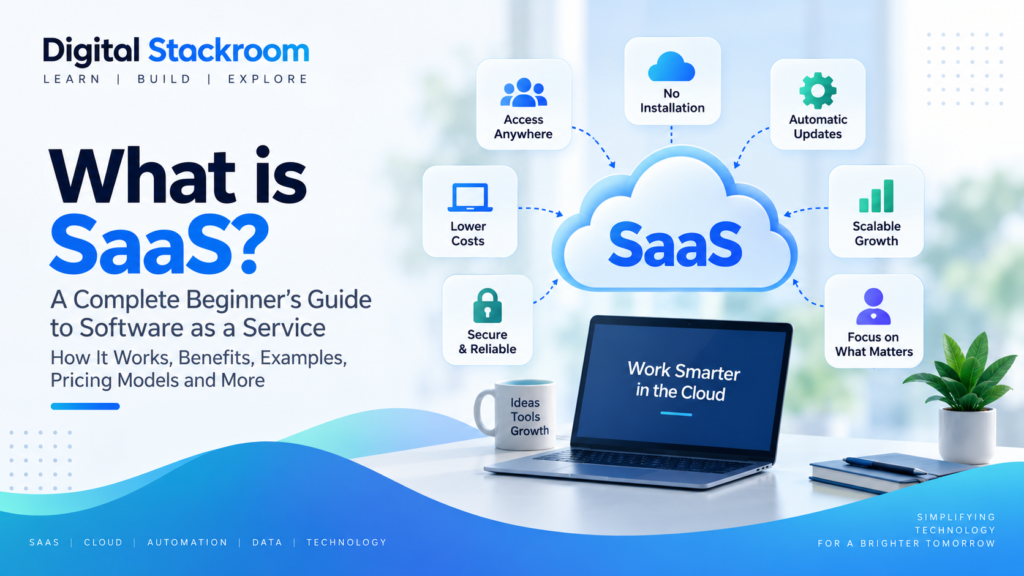
Software as a Service, commonly called SaaS, is a way of using software through the internet instead of installing and maintaining it directly on your own computer or company servers.
If you are wondering what is SaaS, how it works, why so many businesses use it, and how it differs from traditional software, this guide explains everything in simple terms.
Today, SaaS is used for everything from email and collaboration to accounting, customer relationship management, analytics, project management, design, cybersecurity, and artificial intelligence.
Table of Contents
What Is SaaS?
SaaS stands for Software as a Service.
It is a software delivery model where an application is hosted by a provider and made available to users over the internet.
Instead of purchasing software once, installing it locally, and managing upgrades yourself, SaaS users typically access the application through a web browser or mobile app and pay through a subscription or usage-based pricing model.
Understanding what is SaaS becomes easier with a simple example.
Instead of installing an email server inside your company, you might use a cloud-based email service. The provider manages the servers, software updates, security patches, storage, and infrastructure while users simply sign in and use the service.
NIST defines Software as a Service as a model where users access a provider’s applications running on cloud infrastructure without managing the underlying servers, storage, or operating systems.
How Does SaaS Work?
SaaS applications are usually hosted on cloud infrastructure managed by the software provider or a cloud platform.
To understand what is SaaS in practice, it helps to see how the provider hosts the application while users access it online.
When a user signs in, the application is delivered over the internet.
The basic process looks like this:
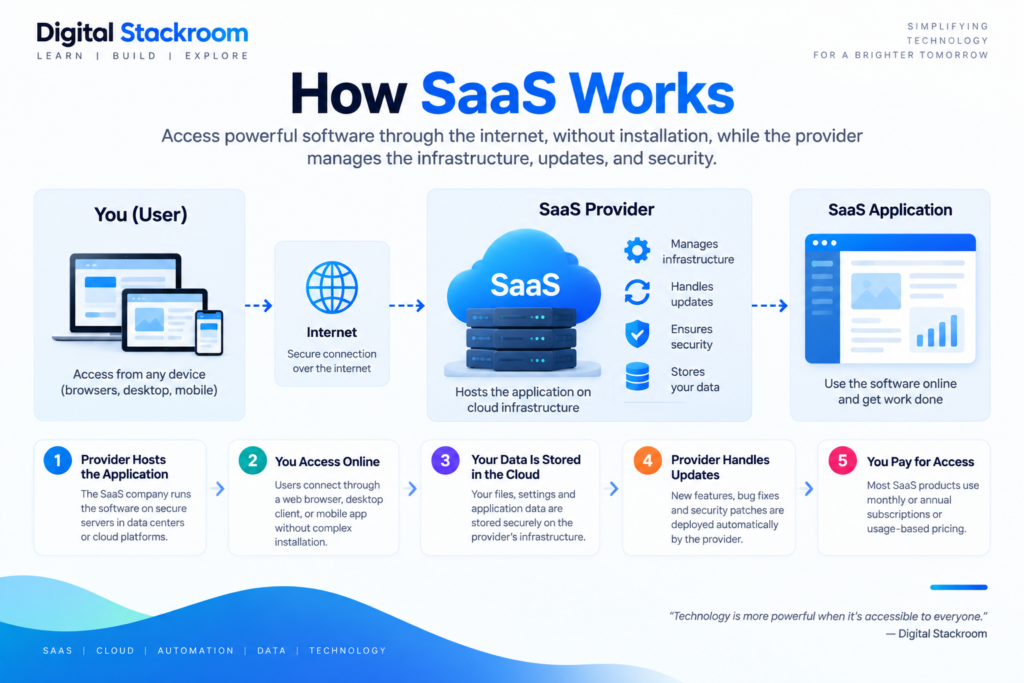
1. The Provider Hosts the Application
The SaaS company runs the software on servers located in data centers or cloud platforms.
The provider is responsible for maintaining the application and underlying infrastructure.
2. Users Access the Software Online
Customers typically use a browser, desktop client, or mobile application to access the service.
There is usually no need to install and maintain a complex application locally.
3. Customer Data Is Stored in the Cloud
User settings, documents, records, and other application data are usually stored in cloud infrastructure associated with the SaaS platform.
4. The Provider Handles Updates
New features, bug fixes, security patches, and performance improvements can be deployed centrally by the provider.
Users do not normally need to download major upgrade packages manually.
5. Customers Pay for Access
Many SaaS products use monthly or annual subscriptions, although some use consumption-based pricing or a combination of pricing models.
Common Examples of SaaS
SaaS applications are used across almost every modern business function.
Communication and Collaboration
Businesses use SaaS tools for email, messaging, video meetings, document collaboration, and team communication.
Examples include services such as Microsoft 365, Google Workspace, Slack, and Zoom.
Customer Relationship Management
CRM platforms help businesses manage customer information, sales pipelines, support activities, and marketing interactions.
Salesforce is one of the best-known examples of a SaaS CRM platform.
Project Management
SaaS project-management tools help teams organize tasks, timelines, responsibilities, documentation, and workflows.
Examples include Asana, Monday.com, ClickUp, and Trello.
Design and Creative Work
Design platforms allow users to create graphics, presentations, videos, prototypes, and other creative assets directly through online applications.
Accounting and Finance
Cloud-based accounting software can help organizations manage invoices, expenses, bookkeeping, payroll, and financial reporting.
Data and Analytics
Businesses increasingly use SaaS platforms for dashboards, reporting, data visualization, analytics, and business intelligence.
Artificial Intelligence
Many AI platforms are also delivered using a SaaS model. Users access AI assistants, image-generation tools, analytics platforms, and automation capabilities through online subscriptions.
If you are also exploring AI tools delivered through cloud platforms, read our beginner’s guide to generative AI.
SaaS vs Traditional Software
Traditional software is often installed directly on a user’s computer or on company-managed servers.
SaaS changes that model by making software available as an online service.
| Aspect | Traditional Software | SaaS |
|---|---|---|
| Installation | Installed locally | Accessed online |
| Hosting | User or company manages infrastructure | Provider manages infrastructure |
| Updates | Often installed manually | Usually deployed automatically |
| Pricing | Often upfront license | Usually subscription or usage based |
| Access | Often tied to specific devices | Commonly accessible from multiple devices |
| Maintenance | Customer responsibility | Provider handles much of the maintenance |
SaaS can reduce infrastructure and maintenance work, but customers also depend more heavily on the provider for availability, data handling, and product changes.
What Are the Benefits of SaaS?
Lower Initial Costs
Traditional enterprise software can require large upfront investments in licenses, servers, implementation, and IT resources.
SaaS products often allow businesses to start with a monthly or annual subscription instead.
Faster Deployment
Because the application is already hosted online, customers can often begin using SaaS software much faster than software that requires complex infrastructure deployment.
Automatic Updates
The provider can roll out new versions, bug fixes, and security improvements centrally.
This reduces the need for every customer to perform separate upgrade projects.
Accessibility
Users can often access SaaS applications from different devices and locations as long as they have an internet connection and appropriate permissions.
Scalability
Many SaaS platforms allow businesses to increase or decrease the number of users, storage capacity, features, or usage as requirements change.
Reduced Infrastructure Management
Organizations may not need to purchase and maintain as much dedicated hardware for every SaaS application they use.
Easier Collaboration
Cloud-based software can make it easier for teams to work on shared information, documents, tasks, and workflows.
What Are the Disadvantages of SaaS?
SaaS also has limitations that should be considered before adopting a platform.
Dependence on Internet Connectivity
Most SaaS applications require reliable internet access.
If connectivity is unavailable, users may have limited or no access to the application.
Subscription Costs Can Accumulate
A monthly subscription may look inexpensive initially, but long-term costs can become significant as user counts and feature requirements grow.
Vendor Dependence
Customers depend on the provider for application availability, product direction, pricing, support, and infrastructure.
If the provider changes pricing or removes a feature, customers may need to adapt.
Data Privacy Concerns
Organizations should understand where their data is stored, how it is protected, who can access it, and how long it is retained.
Limited Customization
Some SaaS applications offer less flexibility than software that is completely controlled and customized by the customer.
Service Outages
Because the software is hosted remotely, outages at the provider can temporarily affect many customers at once.
SaaS Pricing Models
SaaS businesses use several different pricing approaches.
Per-User Pricing
Customers pay according to the number of users or seats.
This is common for collaboration and business software.
Tiered Pricing
The provider offers multiple plans such as Free, Basic, Pro, Business, or Enterprise.
Each tier includes different features, limits, or service levels.
Usage-Based Pricing
Customers pay according to actual usage.
Examples might include API calls, storage, data processed, emails sent, or computing resources consumed.
Freemium
A basic version is available for free while advanced features require a paid subscription.
Flat-Rate Pricing
A fixed subscription price provides access to a defined set of features.
Some platforms combine several of these pricing methods.
SaaS vs IaaS vs PaaS
SaaS is part of a broader group of cloud service models.
SaaS — Software as a Service
The customer uses a complete application provided by another company.
The provider manages most of the software and infrastructure.
PaaS — Platform as a Service
PaaS provides a platform where developers can build and deploy applications without managing all of the underlying infrastructure.
IaaS — Infrastructure as a Service
IaaS provides computing resources such as virtual machines, storage, and networking.
Customers have greater control but also manage more of the software stack.
A simple way to understand the difference is:
SaaS: Use the application
PaaS: Build applications on a managed platform
IaaS: Rent computing infrastructure
How Businesses Use SaaS
Sales
Sales teams use SaaS applications to manage leads, customer information, pipelines, forecasting, and communication.
Marketing
Marketing teams use cloud software for email campaigns, content management, SEO, advertising, analytics, and social media.
Human Resources
HR platforms can manage recruiting, employee records, onboarding, payroll, performance, and benefits.
Finance
Finance teams use SaaS tools for accounting, billing, expenses, forecasting, and financial reporting.
Software Development
Development teams rely on SaaS tools for source control, project management, monitoring, documentation, testing, and collaboration.
Customer Support
Support organizations use SaaS platforms for ticket management, live chat, knowledge bases, contact centers, and customer communication.
Data and Analytics
Cloud analytics platforms allow organizations to create reports, dashboards, models, and business insights without maintaining every component themselves.
How to Choose the Right SaaS Product
Choosing SaaS software should involve more than comparing feature lists.
Define the Problem First
Identify the business problem you need to solve before evaluating software.
A product with hundreds of features is not useful if it does not address the actual requirement.
Evaluate Essential Features
Separate must-have capabilities from optional features.
This helps prevent teams from paying for functionality they do not need.
Review Pricing Carefully
Look beyond the advertised starting price.
Consider:
- number of users
- premium features
- storage
- usage limits
- implementation costs
- support fees
- integrations
- future growth
Check Integrations
A SaaS product should work well with the tools your organization already uses.
Poor integrations can create additional manual work.
Understand Security and Privacy
Review access controls, encryption, authentication, compliance, data location, backup policies, and incident-response practices.
Evaluate Ease of Use
Software that is difficult to use may have low adoption even if it has excellent technical features.
Review Support Options
Understand what support is included and whether higher support levels require an additional fee.
Consider Vendor Stability
For business-critical software, evaluate the provider’s reputation, reliability, product roadmap, and ability to support customers over time.
SaaS Security: What Should You Consider?
Using SaaS does not eliminate security responsibility.
The provider may secure the infrastructure and application, while customers remain responsible for how their own users access and use the platform.
Important areas include:
Strong Authentication
Enable multi-factor authentication where possible.
User Permissions
Give users only the access they require for their role.
Account Management
Remove access when employees leave or no longer need the application.
Data Protection
Understand what information is stored in the SaaS platform and whether sensitive data is appropriate for the service.
Backup and Recovery
Review how data is backed up and what recovery options are available.
Vendor Risk
Organizations should evaluate the security practices of important SaaS providers instead of assuming every cloud application is equally secure.
What Is a SaaS Company?
A SaaS company develops and operates software that customers access as an ongoing service.
Instead of mainly selling individual software licenses, SaaS companies generally focus on recurring customer relationships.
Common SaaS business metrics include:
- Monthly Recurring Revenue
- Annual Recurring Revenue
- Customer Acquisition Cost
- Customer Lifetime Value
- Churn
- Retention
- Expansion revenue
Because customers can often cancel subscriptions, successful SaaS businesses usually place significant importance on product quality, customer satisfaction, retention, and continuous improvement.
What Is Multi-Tenant SaaS?
Many SaaS platforms use a multi-tenant architecture.
In a multi-tenant system, a common software platform serves multiple customers while keeping each customer’s data and configuration logically separated.
This can make infrastructure more efficient and allow providers to roll out improvements across the service.
Some enterprise SaaS products may also offer dedicated or isolated environments for customers with specific technical, security, or regulatory requirements.
Is SaaS the Same as Cloud Computing?
SaaS and cloud computing are closely related, but they are not exactly the same.
Cloud computing is a broad term describing computing resources and services delivered over networks.
SaaS is one specific cloud service model where users access complete software applications.
Cloud computing also includes services such as infrastructure, databases, storage, developer platforms, networking, and serverless computing.
When Should a Business Use SaaS?
SaaS can be a strong choice when a business wants:
- faster software deployment
- predictable recurring pricing
- reduced infrastructure maintenance
- easier remote access
- automatic updates
- scalable user access
- easier collaboration
- integrations with other cloud applications
However, organizations with extremely specialized technical, regulatory, customization, or data-control requirements may need to evaluate SaaS products more carefully.
Frequently Asked Questions About SaaS
What is SaaS in simple terms?
SaaS is software that you access over the internet instead of installing and managing the complete application yourself.
What does SaaS stand for?
SaaS stands for Software as a Service.
Is Netflix a SaaS company?
Netflix is primarily a subscription-based streaming service rather than the type of business software typically discussed when people refer to SaaS.
The term SaaS is more commonly used for online software applications used for productivity, collaboration, business operations, development, analytics, and similar tasks.
Is Google Workspace SaaS?
Yes. Google Workspace is an example of SaaS because applications such as Gmail, Docs, Sheets, and Drive are delivered as online services.
Is Microsoft 365 SaaS?
Many Microsoft 365 services are delivered using a SaaS model, providing cloud-based productivity, communication, collaboration, and business applications.
Is SaaS only for businesses?
No.
Consumers also use many applications delivered through SaaS-like subscription models, although the term is especially common in business software.
Do SaaS applications need to be installed?
Many SaaS applications can be used entirely through a web browser.
Some also provide desktop or mobile applications for convenience, performance, offline functionality, or deeper operating-system integration.
Is SaaS secure?
SaaS can be secure when both the provider and customer use appropriate security controls.
Security depends on factors such as authentication, encryption, permissions, configuration, vendor practices, user behavior, and data handling.
Can SaaS work without the internet?
Some SaaS products provide limited offline functionality, but most rely heavily on internet connectivity because the application and data are primarily hosted remotely.
What are some examples of SaaS?
Common categories include customer relationship management, project management, collaboration, accounting, analytics, design, marketing, customer support, and productivity software.
Final Thoughts
SaaS has changed how individuals and businesses purchase and use software.
Instead of installing every application on local infrastructure and managing upgrades independently, users can access applications online while the provider manages much of the underlying technology.
The model offers important advantages including faster deployment, easier collaboration, automatic updates, accessibility, and scalability.
However, SaaS is not automatically the right solution for every situation. Organizations should still evaluate pricing, security, privacy, reliability, customization, integrations, and vendor dependence before adopting a platform.
If you are asking what is SaaS, the simplest explanation is:
SaaS is software delivered as an online service that users access without managing the entire underlying application infrastructure themselves.
If you are still asking what is SaaS, the simplest explanation is software delivered online while the provider manages most of the underlying application infrastructure.
As cloud computing continues to evolve, SaaS will remain one of the most important ways software is delivered to businesses and consumers.
Continue exploring Digital Stackroom for practical guides on SaaS, AI, automation, data, cloud computing, and modern technology.