
Updated October 2026
The easiest way to understand generative AI is not to start with neural networks, foundation models, tokens, or machine learning terminology.
Start with an ordinary piece of work.
Imagine you finish a project meeting with a page of messy notes:
Launch delayed by one week.
API dependency still unresolved.
Priya will confirm vendor timeline Tuesday.
Customer demo stays Friday.
Need management update today.
Normally, someone has to turn those notes into something useful.
They might write an email, prepare a project update, organize action items, rewrite the language for management, and check that nothing important was missed.
Now imagine giving those notes to an AI system and asking:
“Turn this into a short executive project update. Separate status, risks, decisions, and next actions. Don’t invent any details that aren’t in my notes.”
A few seconds later, you receive a structured draft.
That simple interaction explains generative AI surprisingly well.
You provided:
information + instructions
The model produced:
new content based on both
It did not merely search for an existing project update.
It created one.
That is the central idea behind generative AI.
But the interesting part starts after the first draft.
Because the AI-generated answer may look polished while still being wrong.
Understanding that tension—generation is easy, trust is harder—is the key to using generative AI well.
Let’s Follow One Task From Beginning to End
Suppose our fictional project is called Atlas.
Here are the rough notes:
Atlas launch is moving from October 18 to October 25.
Main blocker is the payment API integration.
Engineering expects another build Wednesday.
Customer demo remains scheduled for Friday.
Priya needs to confirm the vendor certificate timeline.
No budget change currently expected.
Now we ask the AI:
“Write an executive update for the Atlas project. Keep it under 180 words. Use four sections: Status, Main Risk, Next Actions, and Business Impact. Use only the information provided.”
The model might return something like:
Status
The Atlas launch is now planned for October 25, one week later than the original October 18 target.
Main Risk
The primary blocker remains the payment API integration. Engineering expects another build on Wednesday.
Next Actions
Priya will confirm the vendor certificate timeline, while the team continues preparing for Friday’s customer demo.
Business Impact
No budget impact is currently expected.
Nothing especially magical happened here.
The model transformed unstructured information into a useful new artifact.
But now change the prompt:
“Rewrite this for an engineering stand-up.”
The output changes.
Ask:
“Turn it into three Slack bullets.”
It changes again.
Ask:
“Create a risk table.”
It generates another representation of the same information.
That flexibility is what made generative AI so useful so quickly.
The model is not limited to answering one predefined question.
It can transform information into many different forms.
Table of Contents
So What Is Generative AI, Really?
Generative AI is a category of artificial intelligence designed to produce new content based on patterns learned during training and the context provided at runtime.
That content can include text, images, software code, audio, video, diagrams, summaries, structured data, and other digital outputs.
Google’s technical documentation distinguishes generative AI from traditional AI systems primarily focused on classification and prediction. Generative systems use foundation models to produce new outputs based on patterns learned from training data.
That distinction is easier to understand with examples.
A traditional machine-learning model might answer:
“Is this transaction likely to be fraudulent?”
A generative model might answer:
“Explain why this transaction was flagged and draft a message for the fraud-review team.”
The first predicts or classifies.
The second creates.
Modern AI applications increasingly combine both.
Predictive AI, Generative AI, and Agentic AI Are Not the Same Thing
These terms are often mixed together, but they describe different capabilities.
| Type | Main question | Example |
|---|---|---|
| Predictive AI | What is likely to happen or which category does this belong to? | Predict whether a customer may churn |
| Generative AI | What new output should be created? | Draft a retention email for that customer |
| Agentic AI | What steps should be taken to achieve a goal? | Analyze the account, choose a retention strategy, create a draft, and prepare the next actions |
Think about a support ticket.
A predictive system might classify it as:
Billing issue
A generative system might write:
a proposed response
An agentic system might:
read the ticket → inspect the customer account → retrieve the relevant policy → prepare a response → create a follow-up task
Generative AI is therefore important, but it is only one layer of the broader AI systems now being built.
What Actually Happens After You Press Enter?
A common explanation says that generative AI “thinks like a human.”
That description is convenient but misleading.
A language model does not need to experience a sentence the way a person does in order to generate useful language.
At a simplified level, the process looks more like this:
Your prompt
↓
The system represents the input mathematically
↓
The model evaluates patterns and context
↓
It predicts an appropriate continuation
↓
Tokens are generated
↓
Those tokens become the response you see
For a language model, a token is roughly a piece of text—a word, part of a word, punctuation, or another text unit.
The model generates these pieces sequentially while considering the context available to it.
The mathematics underneath this process is enormously complicated.
But the practical consequence is simple:
The model generates what fits the context.
That is both its strength and one of its biggest weaknesses.
Why Can the Same Model Write Code, Emails, and Poetry?
Because many modern models are trained across extremely broad collections of information.
They learn patterns associated with:
software code,
natural language,
technical documentation,
conversation,
reasoning structures,
mathematical notation,
different writing styles,
and many other forms of information.
A model therefore does not need a separate hard-coded rule saying:
“If the user requests an email, switch into email-writing software.”
The instruction itself provides context.
For example:
“Explain Kubernetes networking to a beginner.”
and:
“Write a Python function that validates email addresses.”
require very different outputs.
The same underlying model can respond differently because the instructions and context are different.
Multimodal models extend this further by processing combinations of text, images, audio, video, and other formats.
The Most Useful Mental Model: AI Produces a Draft, Not Truth
This is the principle I wish more beginner guides emphasized.
When the AI produces a beautifully written paragraph, the polished language creates a powerful psychological effect.
It looks finished.
That does not mean it is correct.
Return to our Atlas project example.
Suppose the AI writes:
“The customer has accepted the revised October 25 launch date.”
That sentence sounds completely reasonable.
But our notes never said that.
The model has produced something plausible rather than something supported.
This type of failure is often called a hallucination or confabulation.
The important lesson is not the terminology.
It is the workflow.
Don’t use:
Prompt → AI output → Publish
Use:
Prompt → Context → AI draft → Verification → Human judgment → Final output
That one change makes generative AI dramatically safer and more useful.
A Good Generative AI Workflow Has Five Parts
Let’s return to the project-update example.
1. Give the model a clear task
Weak:
“Write something about Atlas.”
Better:
“Write an executive project update under 180 words.”
The second instruction defines what success looks like.
2. Give it useful context
The model needs the project notes.
Without them, it either has to ask for more information or risk producing generic material.
3. Add constraints
For example:
“Use only the information provided. Separate facts from assumptions.”
Constraints reduce ambiguity.
4. Generate the first version
The model produces the draft.
This is where many people stop.
They shouldn’t.
5. Verify and improve it
Check:
Did it add unsupported information?
Did it misunderstand anything?
Is anything important missing?
Is the tone appropriate?
Does the final version still reflect what I actually know?
Generative AI becomes much more useful when generation and verification are treated as separate stages.
Where Generative AI Is Genuinely Useful
The technology is strongest when the job involves transforming, reorganizing, explaining, drafting, or exploring information.
For example, imagine you have a 20-page technical document and need a two-minute briefing.
AI can produce a first summary quickly.
Or you have rough meeting notes and need structured action items.
Or a SQL query you don’t understand and want a plain-English explanation.
Or a customer email that sounds too technical and needs to be rewritten for a non-technical audience.
Or ten possible names for a product and you want alternatives before deciding yourself.
These are good uses because the AI reduces the work required to reach a first useful version.
Notice the wording.
Not necessarily the final version.
The first useful version.
That is often where the productivity gain comes from.
Where Generative AI Can Waste Your Time
There is another side to the story.
Sometimes using AI adds more work than doing the task yourself.
Imagine asking AI to prepare a two-sentence reply to an email you already understand perfectly.
You write a prompt.
Read the generated response.
Notice that it sounds unnatural.
Ask for another version.
Edit it.
Remove unnecessary wording.
At some point, you realize you could have written the two sentences yourself in 30 seconds.
Using AI does not automatically mean working faster.
The right question is:
Does this task contain enough cognitive or repetitive work that AI meaningfully reduces effort?
This is why I would not try to “use AI everywhere.”
The goal is not AI adoption.
The goal is better work.
A Simple Rule: Drafting Is Safer Than Deciding
Generative AI is relatively easy to supervise when it creates something reversible.
Draft an email?
You can edit it.
Summarize a meeting?
You can compare it with the notes.
Create an image concept?
You can reject it.
Generate sample code?
You can review and test it.
The risk rises when the system’s output directly determines consequential actions.
Consider the difference between:
“Draft a response to this customer complaint.”
and:
“Decide whether this customer receives a refund.”
The first creates material for a human.
The second influences a business decision.
The more consequential the outcome becomes, the stronger the review should become.
NIST’s Generative AI risk-management guidance similarly treats generative AI as something organizations should manage across its lifecycle rather than assuming model outputs are inherently trustworthy.
Generative AI Is Strong at Form and Weaker at Ground Truth
This explains a behavior that initially surprises many users.
AI can sometimes produce an excellent explanation of a complicated subject while getting one small factual detail completely wrong.
Why?
Because creating a coherent response and establishing factual truth are not exactly the same task.
A model is extremely good at producing patterns of language that resemble a useful answer.
But some questions require access to external evidence.
For example:
“What is SQL?”
can often be answered from broad model knowledge.
But:
“What was our company’s revenue yesterday?”
requires access to your company data.
And:
“What did OpenAI release this morning?”
requires current information.
This is where grounding becomes important.
Grounding connects the model with information it can use as evidence—such as current web sources, company documentation, databases, or retrieved files.
Google describes grounding as connecting model output to verifiable sources or relevant external data to improve accuracy and usefulness.
This is one reason modern AI systems increasingly combine models with search, retrieval, tools, and databases.
Try This 15-Minute Experiment
If you are new to generative AI, you do not need to take a course before understanding its strengths.
Try one controlled experiment.
Take a piece of information you know extremely well.
It could be:
a meeting you attended,
a project you manage,
a technical concept you understand,
or a document you wrote.
Give the AI the source material and ask it to transform it.
For example:
“Turn these meeting notes into a project update. Separate decisions, risks, and action items. Do not add anything that isn’t supported by the notes.”
Then compare the result with the source.
Look for three things:
What did the AI do better than expected?
What did it misunderstand?
What did it invent or omit?
That small experiment teaches more about generative AI than memorizing 20 definitions.
You see both the power and the limitation at the same time.
Prompting Matters, but Context Matters More
There is a lot of advice online about “perfect prompts.”
Some of it is useful.
But beginners sometimes come away believing they need complicated prompt formulas to use AI effectively.
Usually they don’t.
A clear request with useful context beats a clever prompt with missing information.
Compare:
“Act as a world-class senior executive communication strategist and use advanced reasoning to produce the perfect project update.”
with:
“Write a 150-word project update for senior management using the notes below. Include status, risk, and next steps. Do not add information that isn’t in the notes.”
The second prompt is better because it defines:
the task
the audience
the format
the source
the boundary
Good prompting is mostly good communication.
What About Sensitive Information?
This is where workplace use requires more discipline than casual experimentation.
If you’re using an AI system for business work, do not automatically paste in:
customer records,
confidential contracts,
passwords,
API keys,
unreleased financial information,
private employee data,
proprietary source code,
or internal strategy documents.
Whether particular information can be used depends on the organization’s approved tools, account configuration, contracts, data controls, and security policy.
The safe default is simple:
If you would not upload the information to an unapproved external service, don’t paste it into an unapproved AI system.
Generative AI may feel like a private conversation.
Technically and organizationally, it is still software processing data.
The Difference Between “Generate” and “Understand”
Another mistake is assuming that if a model can produce something convincing, it must understand the subject exactly as an expert does.
That is not a safe assumption.
Consider code generation.
A model might produce 100 lines of clean-looking Python.
That does not prove the code:
handles edge cases,
uses secure libraries,
matches your architecture,
performs efficiently,
or even runs.
The same principle applies to business writing, research, calculations, and analysis.
Fluency is not proof.
Formatting is not proof.
Confidence is not proof.
Verification remains part of the job.
What Changes When Generative AI Gets Tools?
This is where generative AI starts becoming something more powerful.
A standalone model can generate an answer.
Give the system access to tools and it can potentially:
search current information,
retrieve company documents,
query a database,
run code,
inspect files,
use business applications,
or call APIs.
Now the workflow changes.
Instead of:
Prompt → Generate
you get:
Goal → Retrieve → Reason → Generate → Use Tool → Observe Result → Continue
At that point, we are moving toward agentic AI.
The generative model is still important because it interprets information and produces outputs.
But the larger system can now interact with the world outside the model.
That distinction helps explain why today’s AI assistants are becoming more capable than the early chatbots people first encountered.
Generative AI vs Search
People sometimes ask whether AI will replace search engines.
The better answer is that they solve somewhat different problems.
Search is excellent when the goal is:
“Find the original information.”
Generative AI is excellent when the goal is:
“Help me transform or work with information.”
Suppose you want Google’s official documentation for a software feature.
Search is often the right starting point.
Suppose you have already read the documentation and want:
“Explain this to a project manager with no engineering background.”
Generation becomes useful.
Strong modern systems combine both.
Find reliable information first.
Then use generative AI to help interpret, compare, summarize, or transform it.
Generative AI vs Automation
Automation follows predefined rules extremely well.
For example:
When a customer submits this form → create a CRM record → send confirmation email.
There is little ambiguity.
Generative AI is more useful when part of the workflow requires interpretation.
For example:
Read the customer’s message → understand the issue → summarize it → suggest the appropriate response category.
A useful modern workflow may therefore combine:
rules for predictable actions
with:
AI for ambiguous information
That is often better than forcing generative AI to control every step.
Where Businesses Often Get It Wrong
Many organizations start with:
“How can we add AI?”
I think the better question is:
“Where are people spending time turning information into another form?”
Look for work such as:
reading long documents and producing summaries,
turning meeting notes into updates,
creating repetitive first drafts,
explaining technical material to different audiences,
reviewing large amounts of text,
classifying ambiguous information,
or converting unstructured content into structured data.
Then evaluate whether AI reduces the total work.
That last part matters.
If the output requires so much correction that the employee spends longer reviewing it than producing the result manually, the automation has not succeeded.
Measure the Work, Not the Number of Prompts
A company can proudly report:
“Employees sent 500,000 prompts this month.”
That tells us almost nothing about business value.
A more useful evaluation asks:
| Question | Why it matters |
|---|---|
| Did the task become faster? | Measures actual productivity |
| Did output quality improve? | Prevents speed from hiding lower quality |
| How much human correction remained? | Reveals hidden work |
| How often was the result wrong? | Measures reliability |
| Did users actually reuse the output? | Shows whether it was valuable |
| What did each completed workflow cost? | Tests economic value |
Generative AI should be evaluated like any other technology investment.
By results.
A Practical Human + AI Working Model
The pattern I find most useful is:
Human defines the goal
↓
AI creates or transforms
↓
Human verifies
↓
AI helps revise
↓
Human owns the decision
This is not because humans are always better at every task.
They aren’t.
It is because responsibility still needs an owner.
AI can accelerate the work without automatically becoming the authority.
What Generative AI Is Becoming
The first wave of generative AI was mostly about creating things.
Text.
Images.
Code.
Audio.
Video.
The next wave increasingly combines generation with:
retrieval
tools
memory
multimodal input
reasoning
automation
This changes the interface.
Instead of asking:
“Write an email.”
you can increasingly ask:
“Read the latest project notes, identify the unresolved risks, prepare an update, and create a draft email for my review.”
The first request is content generation.
The second is a workflow.
Generative AI becomes one component inside a larger intelligent system.
That is why understanding the basics still matters even as the industry moves toward agents.
The One Diagram I Would Remember
If you remember only one idea from this article, use this:
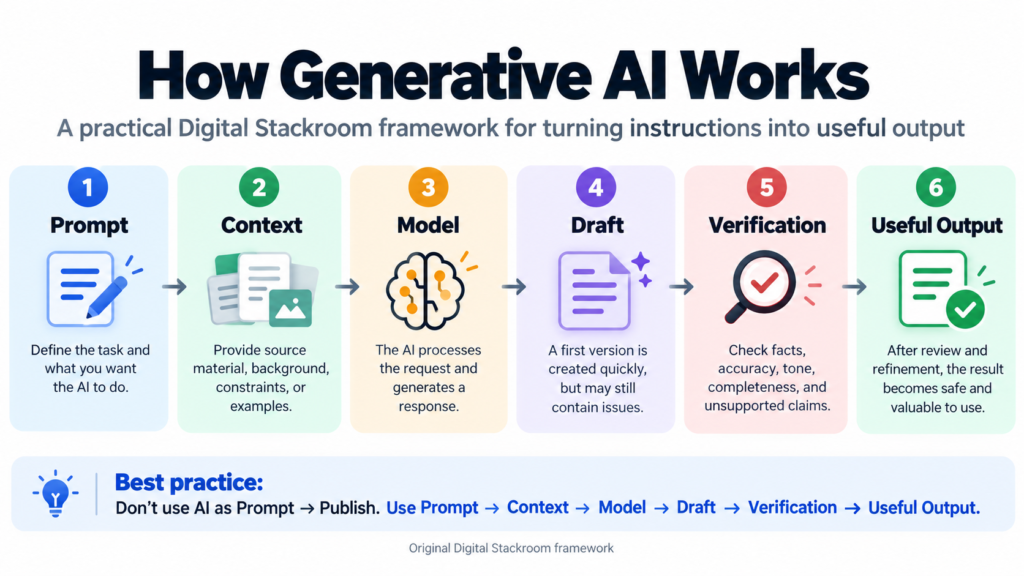
The model is in the middle.
Not at the beginning.
Not at the end.
The quality of the result depends on what comes before and after it.
Poor context can produce poor output.
No verification can turn a good-looking draft into a bad decision.
The model matters.
The workflow matters more.
Frequently Asked Questions
What is generative AI in simple terms?
Generative AI is artificial intelligence that can create new content or transform existing information based on instructions and context. Outputs can include text, images, code, audio, video, summaries, and structured information.
Is ChatGPT an example of generative AI?
Yes. ChatGPT uses generative AI models to produce and transform content in response to user instructions and context.
What is the difference between AI and generative AI?
Artificial intelligence is the broader field. Generative AI is one category focused on creating new outputs. Other AI systems may predict outcomes, classify information, detect objects, rank results, or optimize decisions.
Is generative AI the same as an AI agent?
No. Generative AI primarily creates or transforms content. An AI agent uses models together with tools, orchestration, state, and actions to work toward a goal across multiple steps.
Can generative AI be wrong?
Yes. A model can generate inaccurate, unsupported, outdated, or misleading information. Important outputs should be checked against reliable evidence.
Do I need to learn prompt engineering?
You should learn how to communicate goals, context, constraints, and expected outputs clearly. You do not need complicated prompt formulas for most everyday uses.
Is generative AI useful for work?
It can be highly useful for tasks involving drafting, summarization, transformation, explanation, brainstorming, coding assistance, and working with unstructured information. Whether it saves time depends on the task and the amount of review required.
Should I put confidential information into generative AI tools?
Only when the tool and account configuration have been approved for that information by your organization and its security policies. Sensitive data should not automatically be pasted into public or unapproved AI services.
Will generative AI replace employees?
It is more useful to think in terms of tasks than entire jobs. Generative AI can automate or accelerate parts of many roles, while other tasks continue to require human knowledge, accountability, context, physical work, or judgment.
Final Thoughts
Generative AI is powerful because it lowers the effort required to turn an idea or piece of information into something useful.
A blank page can become a draft.
Meeting notes can become a project update.
A technical document can become a beginner-friendly explanation.
A rough concept can become an image.
A description can become code.
That is the exciting part.
But the polished output can make it easy to forget what the technology is actually doing.
It is generating.
Not guaranteeing.
The safest and most productive approach is therefore not:
“Ask AI and trust the answer.”
It is:
Give it good context, let it accelerate the work, verify what matters, and keep human judgment where consequences matter.
If you understand that workflow, you understand much more about generative AI than someone who has simply memorized the definition.
And as these models become connected to search, company data, software tools, and automated workflows, that distinction will matter even more.
The future is not just about AI generating more content.
It is about humans designing better systems around what AI can generate—and knowing when not to trust it.
Official Sources & Further Reading
Google Cloud — Generative AI Glossary
Technical definitions covering generative AI, foundation models, grounding, multimodal models, and AI agents.
Google Cloud — Generative AI Documentation
Documentation covering generative AI, prompting, grounding, retrieval, and enterprise AI development.
NIST — Artificial Intelligence Risk Management Framework: Generative Artificial Intelligence Profile
A cross-sector resource for understanding and managing risks associated with generative AI systems.
NIST — AI Risk Management Framework
Broader guidance for managing trustworthiness and risk throughout the AI lifecycle.