
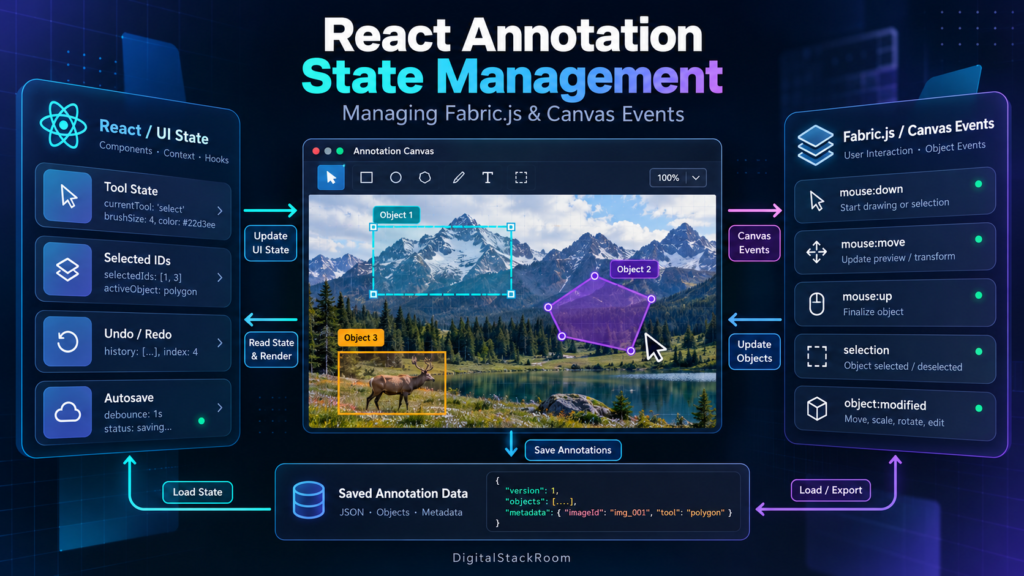
Building an annotation tool in React looks straightforward until the canvas becomes interactive.
At first, the application may only need to:
- load an image;
- draw a rectangle;
- select an annotation;
- change a label;
- save the result.
Then the requirements grow.
Users need to drag and resize boxes. They want polygon annotations, zoom, pan, keyboard shortcuts, undo and redo, multi-selection, autosave, task navigation, QC status, annotation metadata, and eventually hundreds or thousands of objects on the same canvas.
This is where state management becomes more important than drawing.
The difficult question is not:
How do I create a rectangle with Fabric.js?
It is:
Who owns the rectangle’s state after it exists?
React has state.
Fabric.js has its own mutable object model.
The browser canvas has pointer events.
Your backend has persisted annotation data.
And all four can describe the same annotation differently if the architecture is not carefully designed.
A production annotation tool therefore needs a clear boundary:
React
│
├── UI state
├── task state
├── annotation domain state
└── workflow state
       │
       ▼
Integration Layer
       │
       ▼
Fabric.js
│
├── Canvas instance
├── Fabric objects
├── selection
├── live transforms
└── viewport
       │
       ▼
HTML Canvas
The most important rule is simple:
Do not make React and Fabric.js compete to be the owner of every live canvas property.
This guide explains how to structure state, initialize Fabric.js correctly inside React, manage canvas events, prevent duplicate listeners, handle selection and object modifications, build undo/redo, serialize annotations safely, manage zoom coordinates, implement autosave, and keep large annotation tools responsive.
Table of Contents
Why React and Fabric.js Need Different State Responsibilities
React is declarative.
You describe what the UI should represent:
selected label = "vehicle"
active tool = "bounding-box"
task status = "in_progress"
selected annotation IDs = ["ann-42"]
React then renders the appropriate UI.
Fabric.js is primarily imperative.
You create an object:
const rect = new Rect({
  left: 100,
  top: 80,
  width: 200,
  height: 120
});

canvas.add(rect);
The user can then drag that rectangle.
Fabric modifies the object’s coordinates directly while the interaction occurs.
That difference matters.
If you try to force React to update the complete Fabric object model on every mouse movement, you create unnecessary renders and synchronization problems.
If you put everything inside Fabric objects instead, the surrounding React UI becomes difficult to keep consistent.
A better division is:
| State | Recommended Owner |
|---|---|
| Active annotation tool | React |
| Selected label/category | React |
| Current task ID | React |
| QC status | React |
| Dirty/saved status | React |
| Selected annotation IDs | React |
| Persisted annotation records | React/store/domain layer |
Fabric Canvas instance | useRef |
| Live Fabric objects | Fabric.js |
| Dragging/resizing in progress | Fabric.js/ref |
| Viewport transform | Fabric.js, optionally mirrored when UI needs it |
| Current pointer position | Usually Fabric/ref |
| Undo/redo history | Domain/history layer |
| Saved annotation document | Backend |
The distinction between React state and refs is particularly relevant here. React recommends refs for mutable values that do not need to trigger rendering and describes refs as useful when communicating with external systems. Changing a ref does not trigger a component render.
Fabric.js is exactly this kind of external imperative system.
Fabric.js Is an External System from React’s Perspective
Fabric.js maintains an interactive object model on top of the HTML Canvas API.
It manages:
- objects;
- selections;
- transforms;
- hit detection;
- drawing;
- event handling;
- viewport transforms;
- serialization;
- rendering.
The current Fabric.js documentation describes Canvas as the interactive canvas implementation capable of selection, dragging, scaling, rotation, drawing and object serialization.
React should therefore integrate with Fabric similarly to how it integrates with:
maps
video players
chart libraries
WebSocket connections
third-party widgets
React’s useEffect documentation specifically recommends Effects when synchronizing components with systems outside React, with corresponding cleanup when the component unmounts or dependencies change.
That gives us the foundation for the canvas component.
Installing Fabric.js
For a modern React application:
npm install fabricModern Fabric.js uses named imports.
For example:
import {
  Canvas,
  Rect,
  FabricObject
} from "fabric";
Older tutorials often use:
import { fabric } from "fabric";That pattern belongs to older Fabric versions.
Fabric 6 moved to named ES module imports, and the current Fabric.js release line is 7.x.
This article uses the modern API style.
The Wrong Way: Put the Fabric Canvas in React State
Avoid:
const [canvas, setCanvas] =
  useState(null);
The Fabric canvas instance is a mutable class instance.
React does not need to re-render every time something inside that object changes.
Use a ref instead:
const fabricCanvasRef =
  useRef(null);
Changing:
fabricCanvasRef.currentdoes not trigger React rendering.
That is exactly what we want.
The Basic React + Fabric.js Canvas Component
A clean starting point is:
import {
  useEffect,
  useRef
} from "react";

import {
  Canvas
} from "fabric";


export function AnnotationCanvas() {

  const elementRef =
    useRef<HTMLCanvasElement | null>(
      null
    );

  const fabricRef =
    useRef<Canvas | null>(
      null
    );


  useEffect(() => {

    const element =
      elementRef.current;

    if (!element) {
      return;
    }


    const canvas =
      new Canvas(
        element,
        {
          selection: true,
          preserveObjectStacking: true
        }
      );


    fabricRef.current =
      canvas;


    return () => {

      if (
        fabricRef.current === canvas
      ) {
        fabricRef.current = null;
      }

      void canvas
        .dispose()
        .catch((error) => {
          console.error(
            "Fabric canvas cleanup failed",
            error
          );
        });
    };

  }, []);


  return (
    <canvas ref={elementRef} />
  );
}
The important design is:
React renders <canvas>
      ↓
useEffect creates Fabric Canvas
      ↓
useRef stores Fabric instance
      ↓
cleanup disposes Canvas
Current Fabric.js Canvas.dispose() is asynchronous and returns a Promise<boolean> while it waits for pending rendering to settle before destroying the canvas.
Why Cleanup Matters in React Strict Mode
React development builds may run an additional setup-and-cleanup cycle when Strict Mode is enabled.
This is intentional.
React uses that extra cycle to reveal Effects whose setup is not correctly reversed by cleanup.
Without proper Fabric cleanup, you can accidentally create:
Canvas instance 1
Canvas instance 2
duplicate event listeners
duplicate pointer handlers
strange selection behavior
and then spend hours debugging what appears to be a Fabric problem.
The Effect should conceptually always be:
Create
↓
Subscribe
↓
Use
↓
Unsubscribe
↓
Dispose
The Second Major Rule: Don’t Duplicate Every Fabric Property in React
Consider this React state:
const [object, setObject] =
  useState({
    left: 10,
    top: 20,
    width: 300,
    height: 100,
    scaleX: 1,
    scaleY: 1,
    angle: 0
  });
Then suppose Fabric stores the same values internally.
When a user drags the object, which copy is authoritative?
React copy?

or

Fabric copy?
If React updates slightly later:
Fabric object → x = 150

React state → x = 142
and an Effect subsequently pushes React state back to Fabric, the annotation may jump backwards.
That is a synchronization loop.
For interactive canvas applications, I prefer this rule:
During a gesture
Fabric owns live geometry.
When the gesture finishes
Commit the final geometry into the application/domain state.
That produces:
mouse down
    ↓
Fabric interaction
    ↓
mouse move
    ↓
Fabric interaction
    ↓
mouse up / object:modified
    ↓
commit final annotation state
    ↓
React/store/backend
You avoid forcing React through dozens or hundreds of updates during one drag.
Use React State for Semantic State
React state is ideal for information that affects surrounding UI.
For example:
type Tool =
  | "select"
  | "box"
  | "polygon"
  | "pan";


type AnnotationUIState = {

  tool: Tool;

  selectedIds: string[];

  selectedLabel:
    string | null;

  dirty: boolean;

  revision: number;
};
This state directly affects components such as:
Toolbar
Properties panel
Label selector
Save status
Undo button
QC controls
Changing these values should re-render React components.
Use useReducer Once Annotation State Becomes Complex
An annotation tool often starts with several independent useState() calls:
const [tool, setTool] = useState("select");
const [selectedIds, setSelectedIds] = useState([]);
const [annotations, setAnnotations] = useState([]);
const [dirty, setDirty] = useState(false);
const [revision, setRevision] = useState(0);
This is fine initially.
But annotation changes tend to become actions:
annotation added
annotation moved
annotation deleted
label changed
selection changed
task loaded
undo
redo
save completed
At that point, a reducer can make state transitions easier to reason about.
React recommends reducers when state update logic becomes distributed across many event handlers and emphasizes that reducers should remain pure.
For example:
type Annotation = {

  id: string;

  type: "box";

  label: string;

  left: number;

  top: number;

  width: number;

  height: number;

  scaleX: number;

  scaleY: number;

  angle: number;
};


type State = {

  annotations:
    Record<string, Annotation>;

  selectedIds:
    string[];

  tool:
    "select" | "box" | "pan";

  dirty:
    boolean;

  revision:
    number;
};
Actions:
type Action =

  | {
      type: "annotationAdded";
      annotation: Annotation;
    }

  | {
      type: "annotationUpdated";
      annotation: Annotation;
    }

  | {
      type: "annotationRemoved";
      id: string;
    }

  | {
      type: "selectionChanged";
      ids: string[];
    }

  | {
      type: "toolChanged";
      tool: State["tool"];
    };
Reducer:
function annotationReducer(
  state: State,
  action: Action
): State {

  switch (action.type) {

    case "annotationAdded":

      return {
        ...state,

        annotations: {
          ...state.annotations,

          [action.annotation.id]:
            action.annotation
        },

        dirty: true,

        revision:
          state.revision + 1
      };


    case "annotationUpdated":

      return {
        ...state,

        annotations: {
          ...state.annotations,

          [action.annotation.id]:
            action.annotation
        },

        dirty: true,

        revision:
          state.revision + 1
      };


    case "annotationRemoved": {

      const annotations = {
        ...state.annotations
      };

      delete annotations[action.id];

      return {
        ...state,
        annotations,
        dirty: true,
        revision:
          state.revision + 1
      };
    }


    case "selectionChanged":

      return {
        ...state,
        selectedIds:
          action.ids
      };


    case "toolChanged":

      return {
        ...state,
        tool:
          action.tool
      };


    default:

      return state;
  }
}
Notice what the reducer does not contain:
canvas.add()
canvas.remove()
HTTP request
localStorage write
Fabric object mutation
A reducer should remain pure.
Store the Current Tool in State and a Ref
There is one subtle problem with canvas event handlers.
Suppose:
const [tool, setTool] =
  useState("select");
A Fabric event listener created once may close over an old value of tool.
One practical approach is to keep the UI value in state:
const [tool, setTool] =
  useState("select");
and mirror the latest value into a ref for imperative event handlers:
const toolRef =
  useRef(tool);


useEffect(() => {

  toolRef.current = tool;

}, [tool]);
Then a Fabric pointer handler can read:
toolRef.currentwithout re-registering every listener whenever the toolbar changes.
This is a good example of state and refs serving different purposes.
Fabric Events You Actually Need in Annotation Tools
Fabric exposes many events.
A common mistake is subscribing to almost all of them.
Typical useful annotation events include:
| Event | Typical Purpose |
|---|---|
selection:created | Update selected annotation UI |
selection:updated | Update multi-selection |
selection:cleared | Clear properties panel |
object:modified | Commit completed transform |
object:added | Observe externally created objects if necessary |
object:removed | Observe removal if necessary |
path:created | Capture completed freehand annotation |
mouse:down | Start custom drawing |
mouse:move | Live custom interaction |
mouse:up | Finish custom interaction |
mouse:wheel | Zoom behavior |
Fabric currently exposes both low-level pointer events and higher-level selection/object events.
Fabric’s own event guide also makes an important recommendation: do not use Fabric’s event system as the internal message bus for your entire application. If your own code causes an action, it is usually clearer to call the required application logic directly.
That advice is particularly valuable in React applications.
Register Fabric Events Once
A good pattern is:
useEffect(() => {

  const canvas =
    fabricRef.current;

  if (!canvas) {
    return;
  }


  const syncSelection = () => {

    const ids =
      canvas
        .getActiveObjects()
        .map(
          object =>
            object.annotationId
        )
        .filter(
          (
            id
          ): id is string =>
            Boolean(id)
        );


    dispatch({
      type: "selectionChanged",
      ids
    });
  };


  const disposeCreated =
    canvas.on(
      "selection:created",
      syncSelection
    );


  const disposeUpdated =
    canvas.on(
      "selection:updated",
      syncSelection
    );


  const disposeCleared =
    canvas.on(
      "selection:cleared",
      () => {

        dispatch({
          type: "selectionChanged",
          ids: []
        });
      }
    );


  return () => {

    disposeCreated();

    disposeUpdated();

    disposeCleared();
  };

}, []);
Current Fabric event subscriptions return disposer functions, which is convenient for React Effect cleanup. Fabric warns against indiscriminately calling off() without the original listener because doing so can remove other listeners, including listeners Fabric itself relies on.
Don’t Call off("event") as a Blanket Cleanup Strategy
Avoid:
canvas.off("mouse:down");
canvas.off("object:modified");
That can remove listeners you did not create.
Prefer:
const dispose =
  canvas.on(
    "object:modified",
    handler
  );


return () => {
  dispose();
};
This scales much better as your annotation tool gains more behavior.
Selection State Should Be IDs, Not Fabric Objects
Avoid putting Fabric instances into React state:
setSelectedObjects(
  canvas.getActiveObjects()
);
Those are mutable external objects.
Instead:
setSelectedIds(
  canvas
    .getActiveObjects()
    .map(
      object =>
        object.annotationId
    )
);
Then React operates on:
["annotation-1", "annotation-8"]rather than mutable class instances.
This keeps React state serializable and easier to debug.
Give Every Annotation a Stable ID
Canvas objects need a stable connection to your application model.
Never depend on:
canvas object indexas the annotation identity.
Objects can be reordered.
Instead:
annotation-2c781e...should exist independently of stacking order.
Fabric supports custom properties, and its documentation specifically gives IDs and names as typical examples.
For TypeScript:
import {
  FabricObject
} from "fabric";


declare module "fabric" {

  interface FabricObject {

    annotationId?: string;

    annotationLabel?: string;
  }


  interface SerializedObjectProps {

    annotationId?: string;

    annotationLabel?: string;
  }
}


FabricObject.customProperties = [
  "annotationId",
  "annotationLabel"
];
Now:
rect.annotationId =
  crypto.randomUUID();

rect.annotationLabel =
  "vehicle";
and the custom fields can participate in Fabric serialization.
Don’t Turn Fabric Objects into Your Entire Application Database
This is an important architectural boundary.
It is tempting to attach everything to a Fabric object:
taskId
raterEmail
QC status
review comments
createdBy
workflow stage
backend revision
model confidence
audit log
Don’t.
Fabric itself recommends that custom canvas properties remain relevant to rendering or canvas behavior and warns against using Fabric objects as the application’s general data store.
A Fabric object may reasonably contain:
annotationId
label
geometry-related metadata
visual style
canvas behavior flags
Your application model can contain:
annotationId
taskId
label
review status
annotator
confidence
comments
timestamps
workflow state
The shared key is:
annotationIdConvert Fabric Objects into Domain Records
Create an adapter function.
For example:
import {
  FabricObject
} from "fabric";


function toAnnotation(
  object: FabricObject
): Annotation {

  if (!object.annotationId) {

    throw new Error(
      "Annotation is missing ID"
    );
  }


  return {

    id:
      object.annotationId,

    type:
      "box",

    label:
      object.annotationLabel ??
      "unlabeled",

    left:
      object.left,

    top:
      object.top,

    width:
      object.width,

    height:
      object.height,

    scaleX:
      object.scaleX,

    scaleY:
      object.scaleY,

    angle:
      object.angle
  };
}
Now Fabric does not leak through every layer of your application.
Commit Geometry on object:modified
Fabric generates high-frequency transform events while an object is moving, rotating or scaling.
For example:
object:moving
object:scaling
object:rotating
can fire repeatedly during a single gesture.
object:modified represents the completion of the transform.
Fabric’s documentation distinguishes these continuous events from end-of-action events.
For application state:
const disposeModified =
  canvas.on(
    "object:modified",
    ({ target }) => {

      if (!target) {
        return;
      }


      dispatch({

        type:
          "annotationUpdated",

        annotation:
          toAnnotation(target)
      });
    }
  );
This gives you approximately:
dragging for 2 seconds

object:moving:
perhaps dozens/hundreds of events

React/domain update:
1
rather than re-rendering the annotation UI on every pixel movement.
When object:moving Is Appropriate
High-frequency events are still useful when you genuinely need live feedback.
Examples:
coordinate display
snap guides
alignment rulers
collision feedback
live measurement
But that does not mean every event should call:
setState(...)A better approach is often:
high-frequency temporary value
→ ref / Fabric rendering

committed value
→ React state
If React must render live information, throttle or coalesce the updates.
Building a Bounding Box Tool
A box tool can use Fabric’s pointer events.
In Fabric 7, pointer events expose both:
scenePoint
viewportPoint
The old getPointer() API has been removed; Fabric now recommends scene and viewport coordinates explicitly.
For annotations, scene coordinates are normally what you want.
They represent positions in the canvas scene rather than the transformed viewport.
A simplified box tool:
import {
  Rect
} from "fabric";


const drawingRef =
  useRef<{
    startX: number;
    startY: number;
    rect: Rect;
  } | null>(null);
Mouse down:
const disposeDown =
  canvas.on(
    "mouse:down",
    (event) => {

      if (
        toolRef.current !==
        "box"
      ) {
        return;
      }


      const point =
        event.scenePoint;


      const rect =
        new Rect({

          left:
            point.x,

          top:
            point.y,

          width:
            0,

          height:
            0,

          fill:
            "rgba(0,0,0,0)",

          stroke:
            "#00aaff",

          strokeWidth:
            2
        });


      rect.annotationId =
        crypto.randomUUID();


      canvas.add(rect);


      drawingRef.current = {

        startX:
          point.x,

        startY:
          point.y,

        rect
      };
    }
  );
Mouse move:
const disposeMove =
  canvas.on(
    "mouse:move",
    (event) => {

      const drawing =
        drawingRef.current;

      if (!drawing) {
        return;
      }


      const point =
        event.scenePoint;


      const left =
        Math.min(
          drawing.startX,
          point.x
        );

      const top =
        Math.min(
          drawing.startY,
          point.y
        );

      const width =
        Math.abs(
          point.x -
          drawing.startX
        );

      const height =
        Math.abs(
          point.y -
          drawing.startY
        );


      drawing.rect.set({
        left,
        top,
        width,
        height
      });


      canvas.requestRenderAll();
    }
  );
Mouse up:
const disposeUp =
  canvas.on(
    "mouse:up",
    () => {

      const drawing =
        drawingRef.current;

      if (!drawing) {
        return;
      }


      drawing.rect.setCoords();


      dispatch({

        type:
          "annotationAdded",

        annotation:
          toAnnotation(
            drawing.rect
          )
      });


      drawingRef.current =
        null;
    }
  );
Fabric’s current object API notes that changing geometry through set() does not automatically update control coordinates; call setCoords() when needed after programmatic geometric changes.
Scene Coordinates vs. Viewport Coordinates
This becomes critical once zoom and pan are added.
Imagine an annotation stored at:
x = 100
y = 100
The user zooms to:
200%The rectangle may appear on-screen around:
x = 200
y = 200
but its annotation coordinates should still remain:
100, 100This is why Fabric 7’s distinction is useful.
scenePoint
Position in the logical canvas scene.
Use it for:
annotation geometry
object creation
measurement
stored coordinates
viewportPoint
Position relative to the current viewport.
Use it for:
screen overlays
tooltips
context menus
cursor-aligned UI
Mixing these coordinate systems is a common source of annotation drift after zooming.
Zoom and Pan Are View State, Not Annotation Data
Do not permanently modify annotation geometry merely because the user zoomed in.
Conceptually:
Annotation:

x = 100
y = 200
width = 80
height = 60
and:
Viewport:

zoom = 2.0
panX = -300
panY = -100
are different things.
Keep them separate.
Fabric’s viewport transform exists specifically for this purpose.
Avoid React State Updates on Every Pointer Movement
This is one of the biggest performance mistakes in React canvas tools.
Avoid:
canvas.on(
  "mouse:move",
  (event) => {

    setMousePosition({
      x: event.scenePoint.x,
      y: event.scenePoint.y
    });
  }
);
This may cause a React component tree update for every pointer movement.
Instead, ask:
Does React actually need this value?
If not:
mousePositionRef.current = {
  x: event.scenePoint.x,
  y: event.scenePoint.y
};
If the UI does need it, consider throttling updates using:
requestAnimationFrameor a reasonable interval.
The canvas should not turn React into a pointer-event rendering engine.
Do Not Rebuild the Canvas After Every State Change
Another problematic pattern is:
useEffect(() => {

  canvas.clear();

  annotations.forEach(
    annotation => {
      canvas.add(
        createFabricObject(
          annotation
        )
      );
    }
  );

}, [annotations]);
Every annotation update now causes:
clear canvas
↓
destroy visual object state
↓
recreate all objects
↓
re-render
For a canvas with 1,000 annotations, that becomes expensive very quickly.
Instead, update the specific object:
annotation-73 changed
        ↓
find Fabric object ann-73
        ↓
update ann-73
not:
annotation-73 changed
        ↓
recreate 1,000 objects
Maintain an Object Lookup Map
For larger tools, maintain an index.
const objectMapRef =
  useRef<
    Map<string, FabricObject>
  >(
    new Map()
  );
When creating an object:
objectMapRef.current.set(
  annotation.id,
  object
);
When deleting:
objectMapRef.current.delete(
  annotation.id
);
Now an external update can find an object directly:
const object =
  objectMapRef.current.get(
    annotation.id
  );
instead of repeatedly scanning every canvas object.
Prevent State Synchronization Loops
Suppose:
Fabric object changes
      ↓
React updates model
      ↓
Effect sees model update
      ↓
Fabric object updated
      ↓
Fabric event fires
      ↓
React updates model again
You have created a loop.
One useful guard is:
const applyingExternalStateRef =
  useRef(false);
When synchronizing external/backend state into Fabric:
applyingExternalStateRef.current =
  true;

try {

  object.set({
    left:
      annotation.left,

    top:
      annotation.top
  });

  object.setCoords();

  canvas.requestRenderAll();

} finally {

  applyingExternalStateRef.current =
    false;
}
Then:
canvas.on(
  "object:modified",
  ({ target }) => {

    if (
      applyingExternalStateRef.current
    ) {
      return;
    }

    // commit user-originated change
  }
);
Even better, wherever possible, distinguish between:
commands your application explicitly performsand:
interactions Fabric performs for the userFabric’s own documentation recommends direct functions for behavior your application controls instead of routing everything through generic events.
Use Command Functions for Application-Initiated Changes
For example:
function deleteAnnotation(
  id: string
) {

  const canvas =
    fabricRef.current;

  const object =
    objectMapRef.current.get(id);


  if (
    !canvas ||
    !object
  ) {
    return;
  }


  canvas.remove(object);

  objectMapRef.current.delete(id);


  dispatch({
    type:
      "annotationRemoved",

    id
  });


  pushHistory({
    type:
      "annotationRemoved",

    id
  });
}
Now the deletion logic is explicit.
You don’t need:
canvas.remove()
→ object:removed
→ event handler
→ reducer
→ history
→ autosave
for actions your own code initiated.
Programmatic Selection Should Update React Explicitly
Fabric exposes:
canvas.setActiveObject()
canvas.getActiveObject()
canvas.getActiveObjects()
canvas.discardActiveObject()
The current API provides both single- and multi-selection accessors.
If your side panel selects an annotation:
function selectAnnotation(
  id
) {

  const canvas =
    fabricRef.current;

  const object =
    objectMapRef.current.get(id);


  if (
    !canvas ||
    !object
  ) {
    return;
  }


  canvas.setActiveObject(
    object
  );

  canvas.requestRenderAll();


  dispatch({
    type:
      "selectionChanged",

    ids: [id]
  });
}
Again, don’t force your own application command through an unnecessarily complicated event chain.
Saving Canvas State: Fabric JSON vs. Annotation Data
Fabric supports:
const json =
  canvas.toJSON();
and asynchronous restoration with:
await canvas.loadFromJSON(
  savedJson
);

canvas.requestRenderAll();
Current Fabric documentation defines loadFromJSON() as Promise-based.
Fabric JSON is useful.
But it is important to understand what it represents.
Fabric describes its JSON serialization primarily as a way to restore visual canvas state.
That is not necessarily identical to your annotation business model.
Prefer a Separate Annotation Schema
For example:
{
  "taskId": "task-10023",
  "imageId": "img-849",
  "version": 17,
  "annotations": [
    {
      "id": "ann-1",
      "type": "box",
      "label": "car",
      "left": 421.3,
      "top": 182.8,
      "width": 227.4,
      "height": 118.7,
      "scaleX": 1,
      "scaleY": 1,
      "angle": 0
    }
  ]
}
This data can be:
validated
versioned
queried
audited
converted
used by ML pipelines
without requiring Fabric.js.
Fabric then becomes:
annotation model
        ↓
rendering adapter
        ↓
Fabric objects
rather than your database schema being dictated by your canvas library.
Fabric JSON Can Still Be Useful
You may choose to save both:
canonical annotation data

and

optional Fabric visual snapshot
For example:
{
  "annotations": [...],
  "fabricSnapshot": {...}
}
The domain annotation data remains authoritative.
The Fabric snapshot can speed up restoration of complex visual state.
This gives you flexibility if the rendering library changes later.
Loading a Task Without Triggering Fake User Changes
When loading existing annotations:
Fetch task
    ↓
Populate domain store
    ↓
Create Fabric objects
    ↓
Render
you generally do not want to create:
history entries
autosave requests
dirty flags
for every object being restored.
Use an explicit hydration phase.
For example:
const hydratingRef =
  useRef(false);
Then:
async function hydrateTask(
  annotations
) {

  const canvas =
    fabricRef.current;

  if (!canvas) {
    return;
  }


  hydratingRef.current =
    true;


  try {

    canvas.clear();

    objectMapRef.current.clear();


    for (
      const annotation
      of annotations
    ) {

      const object =
        createFabricObject(
          annotation
        );


      canvas.add(object);


      objectMapRef.current.set(
        annotation.id,
        object
      );
    }


    canvas.requestRenderAll();

  } finally {

    hydratingRef.current =
      false;
  }
}
Event handlers can ignore initialization events while:
hydratingRef.current === trueUndo and Redo Need Semantic Boundaries
Undo should not record:
mouse moved 1 pixel
mouse moved 1 pixel
mouse moved 1 pixel
mouse moved 1 pixel
It should record:
Moved annotation ann-14
from position A
to position B
That means the right history boundary is usually:
object:modifiedrather than:
object:movingTwo Common Undo/Redo Designs
Snapshot History
Store annotation document snapshots.
State 1
State 2
State 3
State 4
Undo:
State 4 → State 3Advantages:
simple
reliable
easy to reason about
Disadvantages:
memory usage
large annotation documents
expensive restoration
Command History
Store operations.
ADD ann-14
MOVE ann-14
CHANGE_LABEL ann-14
DELETE ann-9
Each command has:
do
undo
Advantages:
efficient
clear audit trail
scales better
Disadvantages:
more engineering complexityFor a professional annotation platform, command-based history often becomes preferable once the application grows.
Don’t Serialize the Entire Canvas on Every Mouse Move
Avoid:
canvas.on(
  "mouse:move",
  () => {

    history.push(
      canvas.toJSON()
    );
  }
);
One two-second drag could create hundreds of snapshots.
Instead:
start transform
      ↓
Fabric manages intermediate state
      ↓
object:modified
      ↓
save one history entry
This is a much cleaner interaction model.
Autosave Should Operate on Committed State
Autosave should generally not run for every canvas event.
A good flow is:
User modifies object
        ↓
object:modified
        ↓
domain state updated
        ↓
revision increments
        ↓
debounce
        ↓
save annotation document
For example:
useEffect(() => {

  if (!state.dirty) {
    return;
  }


  const revision =
    state.revision;


  const timer =
    window.setTimeout(
      async () => {

        try {

          await saveAnnotations({
            taskId,
            annotations:
              Object.values(
                state.annotations
              ),
            revision
          });


          dispatch({
            type:
              "saveSucceeded",
            revision
          });

        } catch (error) {

          console.error(
            "Autosave failed",
            error
          );
        }

      },
      800
    );


  return () => {

    window.clearTimeout(
      timer
    );
  };

}, [
  state.revision,
  state.dirty,
  taskId
]);
Your reducer should only clear the dirty flag if the save corresponds to the current revision.
Otherwise:
revision 20 saving
↓
user creates revision 21
↓
revision 20 response arrives
↓
application incorrectly says "saved"
even though revision 21 is still unsaved.
Version Annotation Documents on the Backend
For multi-user annotation or QC workflows, autosave needs concurrency protection.
Suppose:
Annotator A loads version 14
QC user loads version 14

Annotator A saves → version 15
QC user later saves version 14
Without version checking, the QC user’s older document may overwrite newer work.
A safer backend contract is:
task ID
+
expected version
+
new annotation document
The backend can reject stale updates:
409 Conflictrather than silently performing last-write-wins.
Persist Annotation Data Outside the Canvas
A serious annotation platform should eventually persist annotation records through an API and database.
If the backend uses PostgreSQL, database connections also need proper pooling—especially when autosave and multiple raters generate concurrent requests.
See:
PostgreSQL Connection Pooling in Node.js & Python
For deploying a containerized React backend or annotation API to a managed environment, see:
Deploying Containerized Python & Express Apps to Google Cloud Run
Canvas Resize Should Not Recreate Annotation State
Annotation tools often need responsive layouts.
Use a ResizeObserver to resize the Fabric canvas when its container changes.
For example:
useEffect(() => {

  const container =
    containerRef.current;

  const canvas =
    fabricRef.current;


  if (
    !container ||
    !canvas
  ) {
    return;
  }


  const observer =
    new ResizeObserver(
      entries => {

        const entry =
          entries[0];

        if (!entry) {
          return;
        }


        const {
          width,
          height
        } =
          entry.contentRect;


        canvas.setDimensions({
          width,
          height
        });


        canvas.requestRenderAll();
      }
    );


  observer.observe(
    container
  );


  return () => {

    observer.disconnect();
  };

}, []);
Fabric 7 removed the older setWidth() and setHeight() methods in favor of setDimensions().
Annotation Coordinates Should Be Independent of Display Resolution
Suppose the original image is:
4000 × 3000but the browser displays it inside:
1000 × 750If you store screen coordinates directly, the annotations may become wrong when:
window size changes
image opens on another monitor
canvas dimensions change
export happens at original resolution
Prefer coordinates in:
original image spaceor a normalized coordinate system.
For example:
normalizedX =
annotationX / imageWidth

normalizedY =
annotationY / imageHeight
Then:
stored annotationis independent of display size.
The Fabric scene is simply one projection of those coordinates.
Normalized Coordinates Can Simplify Model Integration
Example:
{
  "x": 0.31,
  "y": 0.22,
  "width": 0.18,
  "height": 0.14
}
For a:
4000 × 3000image:
x = 1240
y = 660
width = 720
height = 420
For a:
1000 × 750display:
x = 310
y = 165
width = 180
height = 105
The annotation remains logically identical.
This is particularly useful when annotations are later consumed by machine-learning pipelines.
Freehand and Polygon Tools Need Different Commit Rules
Bounding boxes have a natural:
mouse down → mouse upboundary.
Freehand drawing is different.
Fabric emits:
path:createdafter a brush creates a path.
That event is a much better place to commit freehand annotation state than every mouse:move.
Polygons may have another boundary:
click point
click point
click point
double-click / enter
↓
polygon completed
The broader principle remains:
Commit domain state when an annotation operation becomes meaningful, not whenever the pointer changes position.
Tool State Should Change Canvas Behavior
When the selected tool changes, configure Fabric accordingly.
For example:
Select tool
→ objects selectable
→ drawing disabled

Box tool
→ selection disabled
→ custom box drawing active

Pan tool
→ object selection disabled
→ viewport drag active
A central tool controller is much easier to reason about than scattering:
canvas.selection = ...
object.selectable = ...
canvas.isDrawingMode = ...
through unrelated React components.
Keep Fabric-Specific Logic in a Canvas Adapter
As annotation tools grow, avoid importing Fabric everywhere.
Instead:
React Components
       ↓
Annotation Commands
       ↓
Canvas Adapter
       ↓
Fabric.js
For example:
interface AnnotationCanvasAdapter {

  addAnnotation(
    annotation: Annotation
  ): void;

  updateAnnotation(
    annotation: Annotation
  ): void;

  deleteAnnotation(
    id: string
  ): void;

  selectAnnotations(
    ids: string[]
  ): void;

  fitImage(): void;

  setTool(
    tool: Tool
  ): void;
}
Now Fabric is an implementation detail.
If you later replace Fabric.js or move some rendering into WebGL, the rest of the application is less tightly coupled.
Avoid Global State for Everything
Tools such as:
Redux
Zustand
Jotai
Context
can be useful.
But they do not solve bad state ownership.
Do not put this into a global React store:
current mouse coordinates
current drag delta
Fabric canvas instance
every Fabric object
current render frame
Global state is more appropriate for:
task information
annotations
selected IDs
workflow state
user settings
labels
save state
undo history
High-frequency imperative state should remain close to the canvas.
A Practical State Architecture
For a larger annotation system, I prefer something like:
Backend
│
│ canonical persisted document
│
▼
Annotation Store
│
├── annotations
├── labels
├── version
├── dirty state
├── history
└── workflow status
│
├───────────────┐
│               │
▼               ▼
React UI        Canvas Adapter
│               │
│               ▼
Toolbar         Fabric.js
Sidebar         │
QC Panel        ▼
Task Nav        HTML Canvas
Fabric is the interactive rendering engine.
It is not the business workflow engine.
Testing Canvas-Based Annotation Tools
Canvas applications can be difficult to test if everything is verified through screenshots.
Instead, separate testing layers.
Reducer tests
Test:
add annotation
update annotation
delete annotation
undo
redo
save revision logic
as normal pure functions.
Canvas adapter tests
Test:
domain annotation
→ expected Fabric object

Fabric object
→ expected domain annotation
Browser tests
Use a real browser to verify:
draw box
select object
drag object
change label
delete
undo
redo
save
reload
For browser automation strategy, see:
Playwright vs Selenium for Headless Browser Automation
Avoid relying exclusively on pixel-perfect screenshots.
Canvas rendering can vary slightly because of:
browser versions
font rendering
GPU behavior
antialiasing
device pixel ratio
Prefer semantic assertions where possible.
Test the Saved Annotation Data
After drawing a box, an end-to-end test can verify:
UI interaction succeeded
+
annotation JSON is correct
+
backend persisted it
rather than merely:
screenshot looks approximately rightFor example:
{
  "id": "ann-200",
  "label": "pedestrian",
  "left": 631.5,
  "top": 202.1,
  "width": 94.8,
  "height": 231.3
}
is a stronger assertion than testing a few pixels.
Annotation Export Should Be a Data Pipeline
Many annotation projects eventually export:
JSON
CSV
COCO
YOLO
Pascal VOC
custom ML schemas
Do not make the browser canvas responsible for every output format.
Prefer:
Canonical Annotation Schema
        ↓
Export Layer
        ├── JSON
        ├── CSV
        ├── COCO
        └── YOLO
For larger JSON and CSV transformation workflows, see:
Automating File Processing with Python: Parsing Complex JSON and Nested CSVs at Scale
Canvas Tools Still Need Accessible UI
The visual annotation itself may be canvas-based, but the surrounding application should not require the canvas for every operation.
Expose important information through normal DOM controls:
annotation list
selected annotation
label
coordinates
delete button
QC status
keyboard shortcut help
That improves:
accessibility
keyboard workflows
testing
debugging
screen-reader compatibility
A canvas should be the interaction surface, not the only representation of application state.
Common Performance Problems
Updating React on every mouse:move
Result:
excessive re-renders
poor pointer responsiveness
Keep temporary movement in Fabric/ref state.
Rebuilding all Fabric objects after one annotation changes
Result:
unnecessary object creation
selection loss
render overhead
Update only the changed object.
Saving after every pointer event
Result:
hundreds of API requests
race conditions
backend pressure
Commit and debounce.
Keeping huge history snapshots
Result:
memory growth
slow undo
Use command history or bounded snapshots.
Using Fabric objects as React state
Result:
mutable state
difficult debugging
unpredictable renders
Store serializable domain records instead.
Registering listeners repeatedly
Result:
duplicate actions
multiple dispatches
memory leaks
Subscribe once and clean up correctly.
Common State Management Mistakes
Mistake 1: React controls every pixel
Fabric move
→ React state
→ Fabric update
→ React state
This creates unnecessary synchronization.
Mistake 2: Fabric controls everything
Then React does not reliably know:
what is selected
whether the document is dirty
what should be saved
what QC status is active
Mistake 3: Two independent sources of truth
React says:
ann-10 is at x=100Fabric says:
ann-10 is at x=112Sooner or later, one overwrites the other.
Mistake 4: Events become the application architecture
object:added
→ label assignment
→ history
→ API
→ analytics
→ workflow
→ navigation
Fabric explicitly advises against using its events as a general application message system.
Mistake 5: Saving display coordinates
Annotations break when viewport scale changes.
Store scene/original-image coordinates.
A Better Event Strategy
A production annotation tool can classify events into three groups.
| Event Type | Examples | Handling |
|---|---|---|
| Transient | moving, scaling, pointer move | Fabric/ref |
| Commit | modified, path created, draw completed | Domain state/history |
| UI | selection created/cleared | React state |
| Application command | delete, change label, duplicate | Explicit function |
| Persistence | autosave, submit, QC | Backend workflow |
This separation prevents a large amount of accidental complexity.
Recommended Component Structure
A mature React annotation tool might look like:
AnnotationWorkspace
│
├── AnnotationToolbar
│
├── AnnotationCanvas
│   ├── useFabricCanvas
│   ├── useCanvasEvents
│   └── canvasAdapter
│
├── AnnotationSidebar
│
├── AnnotationProperties
│
├── AnnotationHistory
│
└── AnnotationStatusBar
State layer:
annotationReducer
annotationStore
historyManager
persistenceService
Canvas layer:
fabricFactory
canvasAdapter
coordinateMapper
toolController
This structure scales much better than putting 2,000 lines into:
AnnotationCanvas.tsxProduction State Flow
A normal interaction should look like this:
User selects "Bounding Box"
        ↓
React tool state changes
        ↓
Canvas adapter changes interaction mode
        ↓
User drags rectangle
        ↓
Fabric manages live geometry
        ↓
Mouse up
        ↓
Annotation created
        ↓
Reducer receives annotationAdded
        ↓
History receives ADD command
        ↓
Document becomes dirty
        ↓
Autosave debounce
        ↓
Backend saves version
        ↓
UI shows "Saved"
Moving the box:
User drags annotation
        ↓
Fabric handles movement
        ↓
object:modified
        ↓
Convert Fabric → domain annotation
        ↓
Reducer update
        ↓
History entry
        ↓
Autosave
Selection:
User clicks annotation
        ↓
Fabric selection event
        ↓
Extract annotation ID
        ↓
React selectedIds
        ↓
Properties panel updates
Each layer has one clear responsibility.
Recommended Source-of-Truth Model
The architecture I recommend is:
React/domain store
Canonical for:
annotations that will be saved
labels
task state
workflow state
selection IDs
history
dirty state
Fabric.js
Canonical during:
active pointer gesture
temporary transform
live rendering
selection visualization
viewport movement
Refs
Canonical for:
Fabric Canvas instance
lookup maps
active drawing operation
latest tool value
high-frequency temporary values
hydration flags
Backend
Canonical for:
persisted task version
audit history
cross-session state
collaborative conflict detection
The boundaries are more valuable than whichever state library you choose.
Final Thoughts
React and Fabric.js work very well together.
Problems usually begin when both are asked to manage the same state at the same time.
React is excellent at:
application state
UI state
workflow state
business rules
Fabric.js is excellent at:
interactive geometry
hit testing
canvas rendering
selection
dragging
scaling
rotation
drawing
viewport transforms
Use each where it is strongest.
The architecture can be summarized as:
React owns meaning.

Fabric owns interaction.

Refs connect the two.

Events report user interactions.

Commands handle application actions.

The domain model owns persisted annotations.
And for high-frequency canvas interaction:
Don't synchronize every frame.

Synchronize meaningful changes.
That single principle makes annotation tools considerably easier to scale from a simple bounding-box prototype into a production platform with thousands of images, multiple annotation types, automated assistance, QC workflows, autosave, undo/redo, and collaborative task management.
Official Documentation and Technical References
The React and Fabric.js behavior described in this article was checked against the current official documentation.
React
React — Referencing Values with Refs
React — Synchronizing with Effects
React — Extracting State Logic into a Reducer
React — You Might Not Need an Effect
Fabric.js
Fabric.js — Official Documentation
Fabric.js — Working with Events