
Voice assistants have existed for years.
We have been able to say:
“Set a timer.”
“Play this song.”
“What is the weather?”
“Call John.”
But these systems rarely feel like real conversations.
You speak.
You wait.
The system processes.
Then it speaks.
If you interrupt at the wrong moment, the interaction often becomes awkward.
If the assistant needs to perform a complicated task, you may sit in silence while it waits for another system.
And if the task requires several tools, the illusion of a natural conversation quickly disappears.
That architecture is beginning to change.
On September 10, 2026, OpenAI released GPT-Live-1 in the API, describing it as a full-duplex voice model capable of listening and speaking simultaneously while delegating deeper reasoning and actions to backend models and tools.
Five days later, Google introduced Gemini 3.8 Live and Gemini 3.8 Live Extended Thinking for real-time voice applications. Gemini 3.8 Live focuses on low-latency conversation and asynchronous tool use, while Extended Thinking is intended for more complex requests that require deeper background reasoning.
This is more than another improvement in speech synthesis.
The interaction model itself is changing.
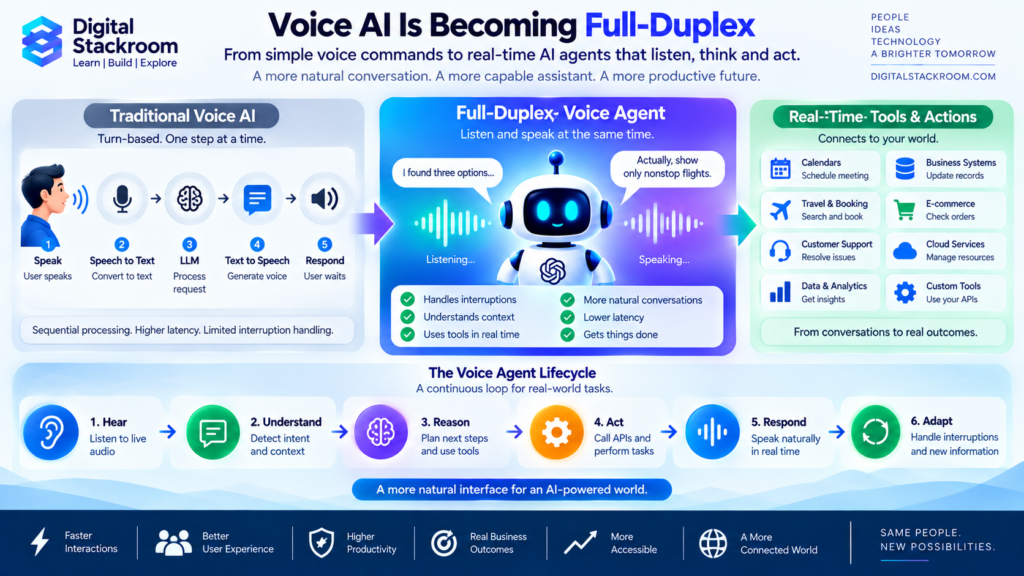
Traditional voice AI works approximately like:
Listen
↓
Transcribe
↓
Think
↓
Generate text
↓
Speak
↓
Wait for user
The emerging model is closer to:
Listen ↔ Speak
while simultaneously:
Understand → Reason → Use Tools → Observe Results → Adapt
That turns voice AI from a spoken chatbot into something much closer to a live software agent.
Table of Contents
The Short Answer
Full-duplex voice AI means the system does not have to treat conversation as a strict sequence where one person finishes completely before the other begins.
It can continue processing incoming audio while generating outgoing speech.
That allows interactions such as:
AI:
“I found three flights leaving tomorrow—”
User:
“Only show nonstop flights.”
AI:
“Sure. There are two nonstop options…”
The user did not need to wait until the AI finished the original response.
The system adapts while the conversation is happening.
A capable voice agent can also perform work in parallel.
For example:
User
“Can you check my order and change the delivery to Friday?”
The voice layer can acknowledge the request.
↓
A backend agent retrieves the order.
↓
The conversation continues.
↓
The user adds:
“Actually, afternoon delivery if possible.”
↓
The backend workflow incorporates the new information.
↓
The voice agent returns the result.
This is a fundamentally different experience from the old:
speech → text → answer → speech
pipeline.
Why Voice AI Has Historically Felt Unnatural
Human conversation is messy.
People:
- interrupt
- hesitate
- restart sentences
- talk over each other
- say “uh-huh”
- pause while thinking
- change direction halfway through a sentence
- add information after the other person starts responding
Traditional computer interfaces prefer something much cleaner:
Input complete
↓
Process
↓
Output complete
↓
Next input
That mismatch is one reason voice assistants often feel robotic even when the generated speech itself sounds realistic.
The problem is not only voice quality.
It is conversation architecture.
Traditional Voice AI Architecture
A conventional voice system often looks like:
Step 1 — Speech-to-Text
The user speaks.
The system transcribes the audio.
Step 2 — Turn Detection
The system decides:
“The user has finished talking.”
Step 3 — Language Model
The transcript is sent to an LLM.
Step 4 — Response Generation
The LLM creates text.
Step 5 — Text-to-Speech
The text is converted into audio.
Step 6 — Playback
The user hears the answer.
This architecture works.
But every handoff introduces:
- latency
- state management
- buffering
- potential transcription errors
- interruption complexity
OpenAI specifically contrasts GPT-Live-1’s unified full-duplex approach with chained speech-to-text → language-model → text-to-speech systems, arguing that the unified model improves interruption handling and reduces brittle handoffs.
What Full Duplex Actually Means
The easiest analogy is a phone call.
Two humans can technically speak at the same time.
You can hear somebody while you are talking.
If they interrupt:
“Wait—stop.”
you can immediately react.
That is full duplex.
Many traditional AI voice systems behave more like walkie-talkies.
One side talks.
Then the other side talks.
That is closer to:
half-duplex interaction.
Full-duplex AI allows:
incoming audio
and
outgoing audio
to exist simultaneously.
That makes several behaviors possible:
- natural interruption
- backchannel responses
- adaptive pacing
- better pause handling
- immediate direction changes
- conversation while tools are working
These may sound like small usability improvements.
Together they can completely change how natural the interaction feels.
Digital Stackroom Framework: Hear → Understand → Reason → Act → Respond → Adapt
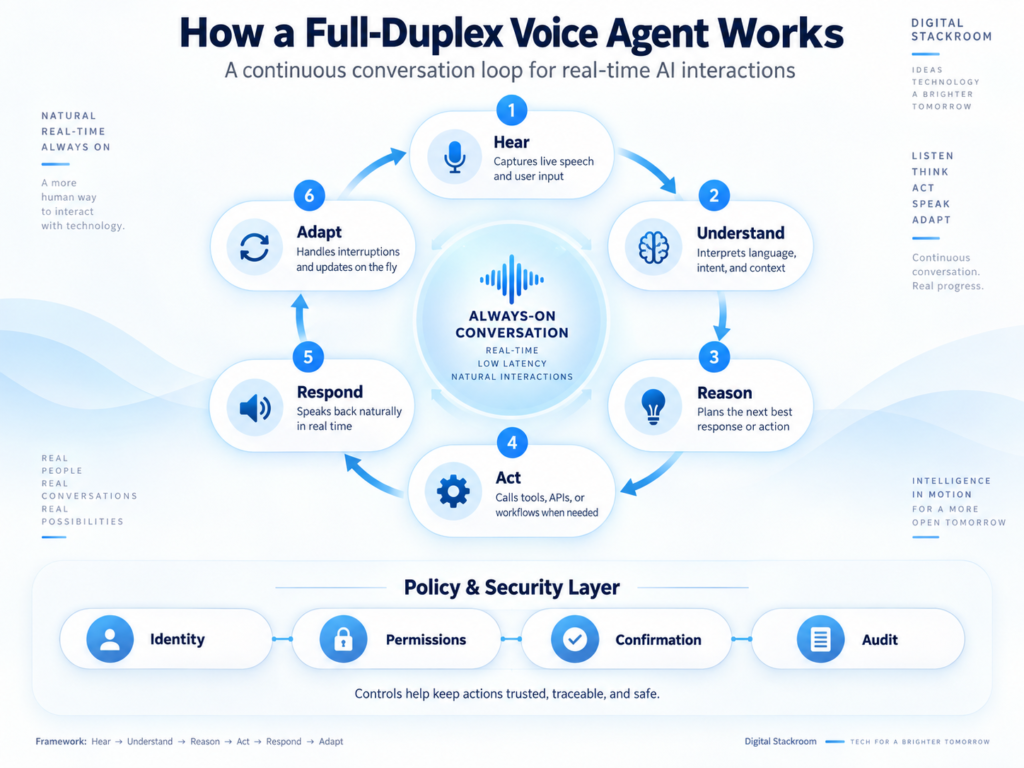
A useful way to understand modern voice agents is as six continuously connected capabilities.
1. Hear
The system receives live audio.
It must handle:
- speech
- silence
- background noise
- pauses
- interruptions
2. Understand
The model determines:
- what the user said
- intent
- relevant context
- whether the user is finished
- whether clarification is needed
3. Reason
The system decides:
- what information is missing
- which steps are required
- whether a backend model is needed
- whether tools must be called
4. Act
The agent may invoke:
- databases
- CRM
- calendars
- booking systems
- payment systems
- enterprise APIs
- search
- other agents
5. Respond
The voice model communicates:
- answer
- acknowledgement
- clarification
- progress update
- result
6. Adapt
The user may interrupt.
New information may arrive.
A tool may return an unexpected result.
The system changes direction.
The loop becomes:
Hear
→ Understand
→ Reason
→ Act
→ Respond
→ Adapt
↺
This continuous loop is what makes the next generation of voice AI fundamentally different from traditional voice assistants.
GPT-Live-1 Changes the Voice Architecture
OpenAI’s design separates two responsibilities.
GPT-Live Handles the Conversation
The voice model can:
- listen
- speak
- handle interruptions
- manage conversational timing
- decide when deeper help is required
Backend Agent Handles Complex Work
A separate backend model or agent can:
- reason more deeply
- retrieve information
- invoke tools
- execute workflows
OpenAI calls this mechanism delegation.
GPT-Live keeps the live conversation moving while the backend performs the delegated work.
Conceptually:
User
↕
GPT-Live
Conversation layer
↕
Backend Agent
Reasoning + tools
↓
Enterprise Systems
This separation is important.
A model optimized for smooth live conversation does not necessarily need to be the same model used for difficult analysis.
The Voice Model Does Not Need to Be the Smartest Model
This is a subtle architectural shift.
A common assumption is:
“The voice model needs to perform every part of the task.”
Not necessarily.
Imagine a customer asks:
“Compare my current mortgage with refinancing options and calculate whether switching makes financial sense over five years.”
The voice model needs to:
- understand the conversation
- respond naturally
- manage interruptions
But deeper analysis could be delegated to a more capable reasoning model.
The architecture becomes:
Fast conversational model
Handles:
interaction
Deep reasoning model
Handles:
analysis
Tools
Handle:
real-world actions
This allows each component to specialize.
Voice AI Is Becoming an Orchestration Interface
The most interesting part of voice AI may therefore not be the voice itself.
Voice becomes the interface to a larger agent system.
Imagine saying:
“Move my Monday meeting with Acme to later in the week, but don’t schedule anything after 4 PM. Check with everyone first.”
The voice agent may need to:
- identify the meeting
- inspect calendars
- find suitable times
- check constraints
- contact attendees or use scheduling APIs
- update the calendar
- confirm verbally
The conversation is simply the front door.
Behind it is an orchestration system.
This connects directly to the broader shift toward agentic automation.
Gemini 3.8 Live Takes a Similar Direction
Google released Gemini 3.8 Live as its default option for many low-latency real-time voice-agent experiences.
The model supports:
- audio input/output
- text input
- image input
- video input
- function calling
- asynchronous functions
- interleaved reasoning
Google also allows tool calls to run asynchronously so that interaction does not necessarily have to stop while a tool executes.
That is particularly important for live conversation.
A traditional blocking tool call looks like:
User asks question
↓
AI calls tool
↓
conversation freezes
↓
tool returns
↓
AI responds
An asynchronous model can look more like:
User asks question
↓
Tool begins working
↓
AI continues conversation
↓
Tool completes
↓
AI integrates result
This feels far more natural.
Gemini Extended Thinking Adds Another Layer
Some voice requests are simple.
“What time is my next meeting?”
Others are complex.
“Compare my three supplier proposals, evaluate cost and risk, then tell me which questions I should ask each vendor.”
Google’s Gemini 3.8 Live Extended Thinking is designed for these higher-complexity cases.
Google says it can perform background reasoning while maintaining a live interaction and can give conversational progress updates while tools or reasoning continue.
That solves an important interaction problem.
Humans do not like unexplained silence.
If a task takes 15 seconds, saying:
“I’m checking the available options now.”
is better than silence.
The model can keep the interaction alive while deeper work proceeds.
Voice AI Needs Two Speeds of Thinking
This suggests an important architecture principle.
Not every voice interaction deserves deep reasoning.
Fast Path
Use for:
- greetings
- confirmations
- simple questions
- navigation
- status updates
The priority is:
latency.
Deep Path
Use for:
- planning
- complex comparison
- multi-step analysis
- difficult tool workflows
The priority is:
quality.
A good voice system needs to decide which mode is appropriate.
That produces:
Instant Conversation
Background Intelligence
rather than forcing every request through the same pipeline.
Why Latency Matters More in Voice Than Text
Imagine ChatGPT takes three seconds to generate a text answer.
You probably tolerate it.
Now imagine somebody on the phone pauses for three seconds after every sentence.
It feels uncomfortable.
Humans expect conversation to happen on very short timescales.
Voice systems therefore need to manage several latency components:
Audio capture
network
model processing
tool calls
audio generation
Even small delays accumulate.
This is why voice-agent engineering is not simply:
“Add text-to-speech to our chatbot.”
The entire system must be designed for real-time behavior.
Interruption Handling May Matter More Than Perfect Speech
Voice generation has become remarkably realistic.
But realistic audio alone does not create a good voice assistant.
Imagine an agent with a perfect voice that keeps talking for 45 seconds while you repeatedly say:
“Stop.”
That is a bad experience.
A slightly less realistic voice that immediately reacts to:
“Wait, that’s not what I meant.”
may feel much more intelligent.
OpenAI highlights interruption handling as a core strength of GPT-Live-1, including evaluation results where language-learning company Speak saw fewer premature interruptions compared with earlier turn-based systems. Those figures are vendor-reported and should not be treated as universal performance guarantees.
Turn-Taking Is an Intelligence Problem
Humans constantly infer:
Is this person finished?
Consider:
“I was wondering if…”
Pause.
The user may still be thinking.
A system that immediately answers feels impatient.
Now:
“Stop, that’s enough.”
The system should respond instantly.
These situations can have almost identical silence duration but completely different meaning.
Turn-taking depends on:
- language
- intonation
- context
- pace
- conversational history
That means turn detection is not simply measuring silence.
It increasingly becomes part of model intelligence.
Backchannels Make Conversations Feel Human
Humans rarely remain perfectly silent while somebody speaks.
We say:
“Right.”
“Got it.”
“Mm-hmm.”
These are backchannels.
They communicate:
“I’m listening. Continue.”
A sophisticated full-duplex system can potentially use these signals without stealing the conversational turn.
That improves naturalness, especially for:
- tutoring
- interviews
- customer support
- coaching
- complex explanations
But overuse can become irritating.
The system needs to understand when a backchannel helps and when silence is better.
Voice Agents Can Now Act While Talking
This may be the biggest practical change.
Consider a hotel reservation.
Traditional bot:
“Please provide your city.”
User answers.
Bot:
“Please provide your date.”
User answers.
Bot:
“Please provide the number of guests.”
Rigid.
A modern agent can have a much more fluid interaction.
User:
“I need a hotel in Hyderabad next Wednesday, probably two nights, somewhere near HITEC City.”
The agent can immediately begin:
- searching hotels
- checking dates
- applying location constraints
while asking:
“Is this for one guest?”
The user answers while the search continues.
That is closer to how a human travel agent works.
From Voice Assistant to Voice Worker
This is where terminology starts changing.
Traditional voice assistant:
Answers questions.
Modern voice agent:
Performs tasks.
The progression becomes:
Voice Command
↓
Voice Assistant
↓
Conversational Agent
↓
Tool-Using Voice Agent
↓
Autonomous Voice Worker
The more authority the system receives, the more important governance becomes.
A Customer Support Example
Imagine calling an internet provider.
Traditional IVR
Press 1 for billing.
Press 2 for technical support.
Basic AI Voice Bot
Tell me what you’re calling about.
Then it routes you.
Full-Duplex Voice Agent
You say:
“My internet has been unstable since last night.”
The agent:
- identifies your account
- checks network status
- runs diagnostics
- notices a regional issue
- checks expected resolution
- credits your account if policy permits
- explains everything conversationally
You interrupt halfway:
“Actually, my neighbor’s service is working.”
The system adapts.
It investigates your specific connection rather than continuing down the outage path.
That ability to change plan mid-execution is a core agent capability.
A Healthcare Scheduling Example
Voice agents could be valuable for administrative workflows such as:
“I need to move my appointment to next week.”
The system can:
- identify the appointment
- check availability
- understand preferences
- reschedule
- confirm
But this is also where controls become important.
The voice agent should not independently make medical judgments simply because it can converse naturally.
A smooth voice interface can create more perceived authority than the underlying model deserves.
Natural Voice Can Increase Trust Faster Than Accuracy
This is an important risk.
Humans naturally respond to:
- tone
- confidence
- pacing
- emotion
A fluent voice can make an uncertain answer sound highly credible.
Text gives people some distance.
Voice can feel personal.
That means designers should not assume:
more human-like voice = better system.
The real target should be:
natural communication + calibrated confidence + safe behavior.
The Authority Illusion
Imagine a voice agent says confidently:
“Your insurance definitely covers this procedure.”
The user may trust it more strongly than if the same sentence appeared in small text on a screen.
The underlying answer may still be wrong.
Voice systems therefore need clear boundaries around:
- financial decisions
- healthcare
- legal advice
- security-sensitive actions
Voice quality must not be mistaken for factual certainty.
Voice Agents Need Explicit Confirmation for High-Risk Actions
Consider:
“Transfer ₹100.”
Low risk.
Now:
“Transfer ₹10 lakh.”
High risk.
A good system should not treat them identically.
For consequential actions:
Request
↓
Agent prepares action
↓
Explicit confirmation
↓
Authentication
↓
Execute
Examples requiring stronger confirmation might include:
- payments
- account deletion
- contract acceptance
- medical scheduling changes
- security changes
- production deployments
Conversation should not eliminate transaction controls.
Identity Verification Becomes Critical
A screen-based system can rely on:
- authenticated session
- password
- MFA
- device identity
Voice introduces another question:
Who is actually speaking?
Voice recognition alone should not automatically become a universal authorization mechanism.
For sensitive operations, systems may need:
- authenticated application session
- device verification
- OTP
- biometric checks
- explicit confirmation
The voice agent should know:
who the user is
and:
what authority the user has.
This connects directly to our earlier discussion of AI agent identity security.
The Agent Itself Also Needs an Identity
Consider a customer-service voice agent that can:
- access CRM
- update orders
- issue refunds
Those actions should not occur using a broad shared administrator credential.
The voice agent should have controlled identity and permissions.
Ideally:
Customer
↓
Voice Agent
↓
Agent Identity
↓
Scoped Permission
↓
Business System
Every consequential action should be attributable.
That is especially important when thousands of automated calls happen simultaneously.
Tool Calls Should Not Be Spoken Literally
Imagine the agent needs to call:
get_customer_account_status(customer_id=92831)
The user should not hear:
“I am invoking get_customer_account_status…”
Instead:
“I’ll check your account.”
Tool execution belongs behind the conversation.
OpenAI specifically supports delegated backend work so GPT-Live can continue handling dialogue while applications perform deeper reasoning and actions.
The voice layer should translate machine operations into natural communication.
The Conversation and the Workflow Should Be Separate
This architectural separation is useful.
Conversation Layer
Responsible for:
- tone
- pacing
- interruptions
- clarification
- acknowledgements
Workflow Layer
Responsible for:
- business logic
- APIs
- permissions
- state changes
- transactions
Mixing everything into one prompt can make systems harder to govern.
A better design is:
Voice model
↕
Agent orchestrator
↕
Policy layer
↕
Tools/APIs
This separation makes the system easier to audit.
OpenAI GPT-Live-1 vs Gemini 3.8 Live
These platforms are evolving quickly, so this table should be treated as a September 2026 snapshot.
| Capability | GPT-Live-1 | Gemini 3.8 Live |
|---|---|---|
| Primary design | Natural full-duplex voice | Low-latency native audio interaction |
| Listen while speaking | Yes | Real-time bidirectional interaction |
| Audio input/output | Yes | Yes |
| Tool/function use | Via delegation/backend | Native function calling |
| Async tool workflows | Backend delegation | Supported |
| Deeper reasoning | Delegate to backend model | Interleaved reasoning |
| Separate deep-thinking model | Backend model of choice | Gemini 3.8 Live Extended Thinking |
| Telephony | Explicitly supported | Can be integrated via Live API architecture |
| Video input | No for GPT-Live-1 | Yes |
| Image input | No | Yes |
| Text transcript | Supported | Output transcription can be enabled |
| Primary developer interface | Live API | Gemini Live API |
OpenAI documents GPT-Live-1 as audio/text input-output without image or video support, while Gemini 3.8 Live accepts text, images, audio, and video and produces text/audio.
Neither architecture is automatically better for every use case.
They emphasize somewhat different strengths.
Google’s Multimodal Input Creates Interesting Voice Experiences
Gemini 3.8 Live can accept:
- voice
- images
- video
That creates interactions such as:
User points phone camera at equipment:
“Which cable should I disconnect?”
The system can:
hear
see
respond verbally.
This makes voice much more useful for situations where typing is inconvenient:
- field maintenance
- manufacturing
- cooking
- training
- repair
- accessibility
Voice becomes part of a multimodal interface rather than an isolated modality.
Real-Time AI Could Replace Some Screens
Most software assumes users want a graphical interface.
But consider tasks such as:
“Add these five expenses to the report.”
“Check whether today’s shipments are delayed.”
“Schedule my next three interviews.”
If voice agents become reliable, users may not need to navigate the application’s interface at all.
The interaction becomes:
Intent
↓
Agent
↓
Software capability
That is similar to the shift we discussed in the Google Workspace agentic AI article.
Apps remain.
The user simply accesses them differently.
Voice May Become the Default Interface in Hands-Busy Environments
Voice is particularly attractive when users cannot easily operate a screen.
Examples include:
- driving
- warehouses
- manufacturing
- healthcare operations
- field service
- cooking
- maintenance
- accessibility scenarios
Imagine a technician:
“Show me the service history for this machine.”
Agent retrieves record.
“When was the belt replaced?”
Agent answers.
“Create a maintenance ticket for another replacement.”
Agent creates it.
No laptop navigation required.
Call Centers May Be the Largest Early Market
Voice agents fit naturally into contact-center workflows because the channel is already voice.
Potential use cases:
Tier-1 Support
Account questions.
Order Management
Shipping, returns, rescheduling.
Appointment Scheduling
Book or modify appointments.
Reservation Handling
Restaurants, hotels, travel.
Collections
Payment reminders and account arrangements.
Technical Troubleshooting
Structured diagnostics.
But companies should be careful not to optimize only for:
reducing human-agent cost.
Poorly designed automation can damage customer experience.
The real goal should be:
resolve simple problems automatically
while:
escalating complex or sensitive situations quickly.
Human Handoff Must Be Designed From the Beginning
Every serious voice-agent system needs an answer to:
“What happens when the agent cannot solve the problem?”
Bad design:
AI repeatedly says:
“I didn’t understand.”
Good design:
The system recognizes:
- low confidence
- user frustration
- repeated failure
- unsupported request
- sensitive scenario
and says:
“I’ll transfer you to a specialist and pass along what we’ve already covered.”
The human should receive:
- conversation summary
- user intent
- verified account context
- attempted actions
- unresolved problem
The customer should not need to repeat everything.
The Best Voice Agent May Know When to Stop Being an Agent
Autonomy is not always the goal.
A mature voice agent should know when:
automation is appropriate
and when:
human judgment is required.
This is especially important for:
- disputes
- emotional conversations
- exceptions
- high-value transactions
- safety issues
Automation quality includes knowing when not to automate.
Background Noise Is a Real Engineering Problem
Real conversations do not occur in quiet laboratories.
Users may be:
- outside
- in traffic
- in cafés
- near televisions
- around other speakers
A voice agent must distinguish:
user speech
from:
environmental audio.
OpenAI highlights GPT-Live-1’s handling of background noise and silence as part of its API design.
But application developers still need to test on realistic audio.
A system that works perfectly with studio microphones may fail badly on actual phone calls.
Long Conversations Create Context Problems
Voice generates a lot of data.
Google’s developer documentation notes that native audio accumulates context rapidly and recommends context-window compression for long-running sessions. Without compression, Google documents more limited session lengths for audio and audio-video interactions; session resumption is also provided for maintaining continuity across connection resets.
This creates an architectural question:
What does the agent really need to remember?
A one-hour call does not require every millisecond of audio to remain equally important.
Systems may need to summarize:
- user goals
- decisions
- confirmed details
- unresolved questions
- completed tool calls
Long-term conversation requires memory management, not simply infinite context.
Voice Agent Memory Should Be Structured
Poor approach:
Store the entire conversation forever.
Better approach:
Extract durable state such as:
Customer ID: 1234
Issue: Delivery delay
Requested resolution: Friday afternoon
Action completed: Delivery rescheduled
Confirmation: User approved
That structured state can be more useful than preserving every filler word.
Cost Changes the Architecture
OpenAI currently prices GPT-Live-1 voice sessions at $0.05 per minute, billed per second. Backend models and tool calls used through delegation are billed separately.
That means a real agent’s cost can include:
voice session
backend reasoning
tool/API calls
telephony
infrastructure
A 20-minute call may therefore have very different economics from a short text interaction.
Voice-agent ROI needs to be evaluated against the business workflow it replaces or improves.
Do Not Measure Voice Agents Only by Cost per Minute
A cheap voice call is not valuable if the user eventually needs a human anyway.
Better metrics include:
| Metric | Why it matters |
|---|---|
| Task completion rate | Did the user accomplish the goal? |
| First-contact resolution | Was the problem solved without another interaction? |
| Average response latency | Does conversation feel natural? |
| Interruption recovery | Can the agent handle direction changes? |
| Tool success rate | Are backend actions reliable? |
| Human handoff rate | How often does automation fail/escalate? |
| Repeat-contact rate | Did the solution actually work? |
| Cost per successful outcome | Is automation economically useful? |
| User satisfaction | Did customers prefer the experience? |
The best metric is often not:
How much did the call cost?
but:
What did the call accomplish?
A Cheap Agent That Fails Is Expensive
Consider:
Agent A
Costs $0.20 per interaction.
Solves 40% of requests.
Agent B
Costs $0.60.
Solves 90%.
Agent B may be dramatically better economically.
Organizations should optimize for:
cost per resolved outcome
rather than:
cost per model minute.
This mirrors the shift toward usage-based AI economics discussed in our Microsoft 365 Copilot pricing article.
Privacy Becomes More Sensitive With Voice
Audio can contain information that users never intended to enter into a text form.
Background conversation might reveal:
- names
- addresses
- health information
- financial details
- other people’s voices
Voice applications therefore need clear policies around:
- recording
- retention
- transcription
- access
- deletion
Developers should minimize unnecessary audio retention and clearly communicate when conversations are recorded or processed.
Do Not Confuse Transcription With Consent
A system may technically be capable of recording and transcribing every conversation.
That does not mean it should.
Voice-agent design needs to account for:
- local recording laws
- business compliance requirements
- user expectations
- data minimization
Especially in customer-support environments, companies should obtain appropriate legal/compliance guidance for their jurisdiction and industry.
Real-Time Tool Use Creates Real-Time Risk
Imagine an agent misunderstands:
“Don’t cancel my reservation.”
as:
“Cancel my reservation.”
If it only generates text, the error is annoying.
If it immediately calls:
cancel_booking()
the error changes the real world.
The more capable the agent becomes, the more important confirmation becomes.
Separate Conversation Confidence From Action Confidence
An agent may be confident it heard the sentence.
That does not mean it should be confident about executing the action.
For example:
Speech recognition confidence:
high
Intent:
transfer funds
Action risk:
very high
The system should therefore use separate controls:
Did we understand the user?
and:
Are we authorized to perform this action?
These are different questions.
Digital Stackroom Voice Action Risk Model
| Action | Example | Risk | Recommended behavior |
|---|---|---|---|
| Informational | Store hours | Low | Answer directly |
| Read-only personal | Order status | Low-medium | Verify identity |
| Reversible | Reschedule appointment | Medium | Confirm before execution |
| Financial | Issue refund | High | Policy + explicit approval |
| Contractual | Accept agreement | High | Strong confirmation |
| Destructive | Delete account | Very high | Multi-step verification |
| Safety-critical | Medical/industrial action | Very high | Human escalation/control |
The rule is:
As consequence increases, conversational convenience should give way to stronger controls.
Voice Agents Should Explain What They Are Doing
A good system keeps the user oriented.
Bad experience:
Ten seconds of silence.
Good experience:
“I’m checking the available appointments now.”
This is why Google’s Extended Thinking approach is interesting: the system can give progress-like conversational updates while deeper background work continues.
Transparency reduces confusion.
But the system should avoid narrating internal reasoning or technical details unnecessarily.
Users need:
status
not:
internal chain-of-thought.
Full Duplex Does Not Mean Constant Talking
A voice agent that continuously speaks is exhausting.
Good conversation includes silence.
The system should learn:
- when to respond
- when to acknowledge
- when to wait
- when to ask
- when to stop
The goal is not maximum audio output.
It is appropriate conversational timing.
The Best Interface May Sometimes Be Voice + Screen
Pure voice is not ideal for every task.
Imagine comparing:
- 12 flights
- 8 insurance plans
- 25 products
Listening to them sequentially is frustrating.
A better experience:
Voice:
“I found three good options.”
Screen:
Shows comparison.
Voice:
“The second option is cheapest, while the third has flexible cancellation.”
This is multimodal interaction.
Voice handles:
intent + explanation
while the screen handles:
dense information.
Voice Will Not Replace Graphical Interfaces
Voice is excellent for:
- quick requests
- hands-free use
- conversational clarification
- accessibility
Screens are better for:
- detailed comparison
- tables
- dashboards
- visual editing
- large information sets
The likely future is:
Voice + Screen + Agents
rather than:
Voice instead of everything.
The New Voice-Agent Architecture
A production architecture could look like this:
Microphone / Phone
↓
Real-Time Voice Model
Handles:
- speech
- interruptions
- pacing
- dialogue
↓
Agent Orchestrator
Handles:
- goals
- planning
- state
↓
Identity + Policy Layer
Checks:
- user
- agent
- permission
- action risk
↓
Tools / APIs
- CRM
- calendar
- payments
- search
- database
- support system
↓
Business Systems
↓
Audit + Monitoring
↓
Voice Response
This architecture separates conversational intelligence from business authority.
That separation is essential.
Voice-Agent Readiness Checklist
Before deploying a production voice agent, ask:
Conversation
- Can it handle interruptions?
- Can it recognize pauses?
- Can users change direction naturally?
- Does it respond quickly enough?
Understanding
- Can it reliably capture names and numbers?
- Does it clarify ambiguous requests?
- Can it handle accents and noise?
Tools
- Are backend APIs reliable?
- Are actions idempotent?
- Are tool errors handled gracefully?
Identity
- Is the user authenticated?
- Does the agent have its own controlled identity?
- Are permissions scoped?
Risk
- Which actions are irreversible?
- Which actions need explicit confirmation?
- What requires a human?
Privacy
- Is audio stored?
- Is transcription stored?
- Can users request deletion?
- Are recording rules satisfied?
Handoff
- Can the conversation move to a human?
- Does the human receive context?
- Can the user interrupt automation?
Cost
- What is cost per minute?
- What is cost per completed task?
- Are backend reasoning/tool costs monitored?
Observability
- Are conversations traceable?
- Are tool calls logged?
- Can failures be replayed safely?
If several answers are unclear, the voice agent probably is not ready for high-impact production use.
A Practical Adoption Roadmap
Organizations should start with narrow tasks.
Phase 1 — Information
Examples:
- business hours
- FAQs
- order status
Minimal action risk.
Phase 2 — Read-Only Personalization
Examples:
- account details
- reservation status
- appointment information
Identity becomes important.
Phase 3 — Reversible Actions
Examples:
- appointment rescheduling
- ticket creation
- delivery preference changes
Require confirmation.
Phase 4 — Controlled Transactions
Examples:
- refunds
- purchases
- account updates
Add strict policy enforcement.
Phase 5 — Complex Agentic Work
Examples:
- travel planning
- financial research
- enterprise workflows
- technical troubleshooting
Use specialized reasoning and human escalation.
This gradual approach gives teams time to evaluate reliability.
Start With Tasks That Are Easy to Verify
Good first voice-agent task:
“Create a support ticket.”
Success is clear.
Bad first task:
“Advise customers on complicated financial decisions.”
Success is difficult to measure and mistakes carry serious consequences.
The first deployments should favor:
high frequency
low ambiguity
low consequence
easy verification.
What Developers Need to Learn
Building voice agents requires more than prompt engineering.
Developers increasingly need expertise in:
- streaming audio
- WebSockets/WebRTC
- latency
- turn handling
- interruption recovery
- function calling
- backend orchestration
- session management
- authentication
- observability
Google’s Live API, for example, uses persistent real-time connections and recommends sending small audio chunks rather than heavily buffering input, because buffering directly increases conversational latency.
Voice is a systems-engineering problem.
What Product Teams Need to Learn
The key question should not be:
“Can we add voice?”
Ask:
“What task becomes easier because voice exists?”
Good examples:
- hands-free workflow
- faster customer support
- accessibility
- real-time coaching
Poor use case:
Adding a microphone button to a workflow that works better with a form.
Voice should solve interaction friction.
What Customer-Service Teams Need to Learn
Traditional call centers measure:
- average handle time
- call volume
- wait time
Voice agents require additional metrics:
- automation resolution
- handoff quality
- trust
- correction frequency
- tool success
- conversation recovery
An agent that shortens calls by rushing customers is not successful.
What This Means for SaaS Vendors
Every SaaS company with useful APIs may eventually need to ask:
Could users operate our software through a voice agent?
Examples:
CRM:
“Show me deals likely to slip this quarter.”
Project management:
“Move unfinished tasks into next sprint.”
Analytics:
“Why did conversion drop yesterday?”
Accounting:
“Create the invoice for Acme.”
Voice becomes another interface over APIs.
This also connects directly to the MCP and AI-agent tool transition discussed in Blog #12.
Voice Agents + MCP Could Be Particularly Powerful
MCP standardizes how agents discover and use tools.
Full-duplex voice standardizes nothing by itself—but provides a natural human interface.
Combine them:
Human Voice
↓
Full-Duplex Voice Agent
↓
Agent Orchestrator
↓
MCP Tools
↓
Enterprise APIs
That creates a general architecture where users can verbally interact with a large catalog of enterprise capabilities.
Voice is the interface.
MCP is the tool layer.
APIs are the execution layer.
Voice Agents + Data Agents Could Create Conversational BI
Imagine:
“Why did revenue decline yesterday?”
The voice layer handles conversation.
A data agent investigates.
The user interrupts:
“Actually, focus only on APAC.”
The investigation changes.
The backend returns findings.
Voice explains:
“Most of the decline came from two markets. I can show the breakdown if you’d like.”
That is where Blog #10’s agentic BI trend and real-time voice begin to converge.
Voice Agents + Workspace Agents Could Become Executive Assistants
Imagine asking:
“What do I need to know before my first meeting?”
The agent can:
- inspect calendar
- retrieve email
- review documents
- summarize relevant projects
then speak the briefing while you travel.
This combines:
Google Workspace agentic AI
with:
full-duplex voice.
The result starts looking less like a chatbot and more like a persistent executive assistant.
Voice Could Be the Interface for Agentic Computing
We have already seen several transitions:
Apps
Users navigate interfaces.
Chat
Users describe requests.
Agents
Systems perform workflows.
Voice Agents
Users describe and modify goals conversationally while the workflow runs.
That is significant because speech is one of the most natural interfaces humans have.
The bottleneck has historically been the computer’s ability to understand and participate naturally.
Full-duplex systems are reducing that gap.
But Natural Conversation Raises Expectations
The more human-like the system feels, the more users expect human-like competence.
If the agent:
- sounds natural
- handles interruptions
- remembers context
users may assume it can also:
- reason perfectly
- understand emotion
- make correct decisions
Those assumptions may be wrong.
Voice UX therefore needs careful expectation management.
The Voice Should Never Hide Uncertainty
If the agent is uncertain:
Bad:
“Your account was definitely updated.”
Better:
“I’m not able to confirm the update yet. Let me check again.”
Natural voice should communicate uncertainty naturally.
Confidence calibration becomes part of the product experience.
Frequently Asked Questions
What is full-duplex voice AI?
Full-duplex voice AI can receive and process incoming audio while producing outgoing audio, allowing more natural interruptions, overlaps, and conversational turn-taking than strict turn-by-turn voice systems.
What is GPT-Live-1?
GPT-Live-1 is OpenAI’s full-duplex voice model for the API. It handles natural real-time conversation and can delegate more complex reasoning and tool use to backend agents or models.
When was GPT-Live-1 released in the API?
OpenAI announced GPT-Live-1 API availability on September 10, 2026.
How much does GPT-Live-1 cost?
OpenAI currently lists GPT-Live-1 voice sessions at $0.05 per minute, billed per second. Backend reasoning models and tool usage are billed separately.
What is Gemini 3.8 Live?
Gemini 3.8 Live is Google’s native audio model for low-latency real-time voice-agent experiences. It supports multimodal input, function calling, interleaved reasoning and asynchronous workflows.
What is Gemini 3.8 Live Extended Thinking?
It is Google’s higher-reasoning Live model designed for complex voice tasks requiring multi-step background reasoning while maintaining an active conversation.
Can voice agents call APIs?
Yes. Modern voice systems can integrate with functions, backend agents and external tools. OpenAI supports delegated backend work with GPT-Live, while Gemini’s Live API supports function calling and asynchronous functions.
Can users interrupt a full-duplex AI agent?
That is one of the major benefits. Full-duplex models are designed to support more natural interruption and direction changes during live speech.
Can Gemini Live accept video?
Yes. Gemini 3.8 Live supports text, image, audio and video input, with text/audio output capabilities documented by Google.
Will voice AI replace call-center employees?
Voice agents can automate many routine interactions, but high-complexity, emotionally sensitive or consequential conversations still benefit from human involvement. A strong deployment should include clear human-handoff mechanisms.
Is voice AI secure enough for financial transactions?
It can be integrated into transactional systems, but high-risk actions should require strong identity verification, authorization, explicit confirmation and audit controls rather than relying only on conversational intent.
Will voice replace graphical software interfaces?
Unlikely. Voice is highly useful for natural interaction and hands-free tasks, while screens remain better for dense information, complex visual comparison and detailed editing. Hybrid voice-plus-visual interfaces are likely to be more practical.
Final Thoughts
The most important development in full-duplex voice AI is not that synthetic voices sound more human.
It is that the underlying interaction model is changing.
Traditional voice assistants follow:
Listen
↓
Wait
↓
Think
↓
Speak
The emerging generation can behave more like:
Listen ↔ Speak
while simultaneously:
Reasoning
Using Tools
Observing Results
Adapting
That changes what voice software can become.
A voice interface no longer needs to be limited to answering questions.
It can increasingly become the conversational front end to:
- productivity software
- enterprise data
- customer-service systems
- booking platforms
- analytics
- workflow automation
- AI agents
OpenAI’s GPT-Live-1 demonstrates one architecture:
fast full-duplex conversation
combined with:
delegated backend intelligence.
Google’s Gemini 3.8 Live demonstrates another:
native real-time multimodal interaction
combined with:
asynchronous tool execution
and, when needed:
Extended Thinking.
The deeper trend is the same.
The conversation no longer needs to stop while the software works.
That is a major shift.
The future voice agent may hear you change your mind while it is speaking, adjust the workflow, continue searching in the background, call an enterprise system, ask for confirmation before a sensitive action, and then explain what happened—all within one continuous conversation.
That moves voice AI much closer to how humans actually collaborate.
But greater naturalness also creates greater responsibility.
A smooth voice does not guarantee a correct answer.
A conversational request does not automatically authorize an action.
And an autonomous voice agent should never become an uncontrolled pathway into business systems.
The systems that succeed will therefore combine:
natural conversation
fast reasoning
tool use
strong identity
permission controls
human escalation.
That is when voice stops being merely another input method.
It becomes an interface to agentic computing itself.