
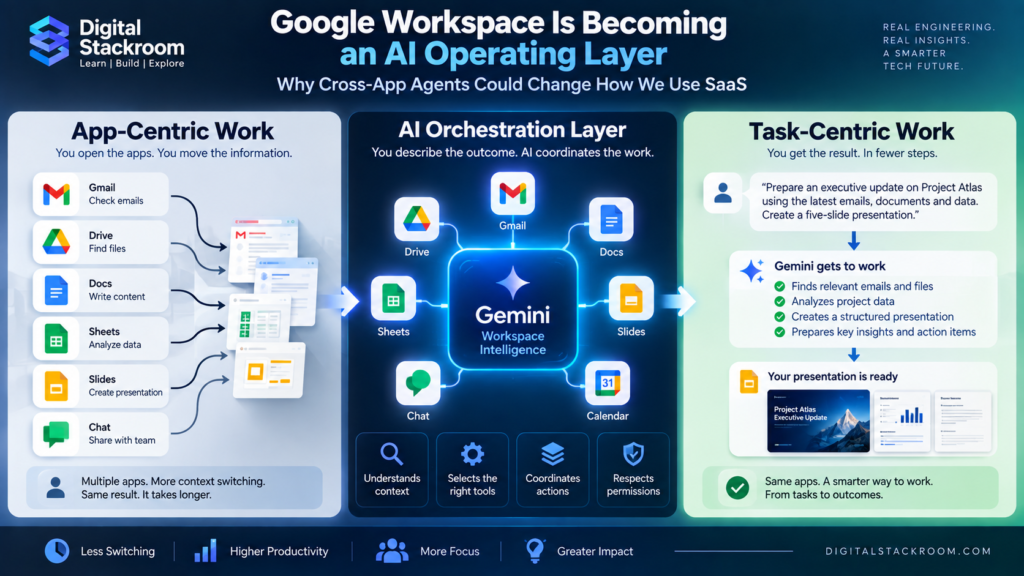
For decades, office software has been organized around applications.
You open Gmail to communicate.
You open Docs to write.
You open Sheets to analyze.
You open Slides to present.
You open Drive to find files.
Every application owns a different part of the job, and the employee becomes the integration layer connecting them.
That model is starting to change.
In September 2026, Google introduced new Google Workspace agentic AI capabilities that allow Gemini to coordinate work across Gmail, Drive, Docs, Sheets, Slides, and Chat.
Instead of forcing users to manually move information between applications, Gemini can gather relevant context, create a new deliverable, and return the result while the user remains inside the application they were already using. Google describes Gemini in this experience as an “intelligent orchestrator” across Workspace.
This sounds like another productivity update.
It may represent something much bigger.
The traditional model is:
User → Application → Another Application → Another Application → Result
The emerging model is:
User → Goal → AI orchestration layer → Applications → Result
If that model succeeds, the most important interface in enterprise software may eventually stop being the individual application.
It may become the AI layer coordinating all of them.
That is why Google Workspace agentic AI matters beyond Google Workspace itself.
It gives us an early view of how SaaS could evolve from app-centric work to task-centric work.
Table of Contents
The Short Answer
Google is not eliminating Gmail, Docs, Sheets, Slides, Drive, or Chat.
Those applications remain the systems where information is stored, edited, governed, and shared.
What is changing is how users move between them.
Google’s new Workspace capabilities let Gemini perform cross-application work such as:
- gathering project context from emails, chats, and files
- creating presentations while the user is in Chat
- creating spreadsheets from information in Drive
- drafting contextual email from a document
- turning long email threads into structured briefs
- converting documents into editable presentations
Google says these capabilities use Workspace Intelligence and deeper app integrations to understand relevant Workspace context and create new outputs under the user’s direction.
The applications still exist.
But the user increasingly expresses:
what outcome they want
rather than:
which application should perform the next step.
That distinction could reshape productivity software.
What Google Actually Announced in September 2026
Google announced five new cross-app workflows on September 9.
Here is the practical version.
| Starting point | User goal | Gemini can create/use |
|---|---|---|
| Google Chat | Build a project update | Context from Workspace → Slides presentation |
| Google Drive | Organize project information | Folder/source data → structured Sheet |
| Google Docs | Communicate document progress | Document context → Gmail message |
| Gmail | Turn conversations into a brief | Email + related Workspace context → Doc |
| Google Docs | Present written material | Document → editable Slides deck |
Google says these workflows can use selected or administrator-enabled context from Workspace sources rather than requiring users to repeatedly locate and copy information manually.
The feature rollout includes eligible Workspace Business and Enterprise editions as well as certain Google AI plans, although individual experiences and Chat availability can roll out at different times.
The important part is not any one workflow.
It is the architectural pattern connecting all five.
The Old Model: Apps Are the Workflow
Consider a common project-management task.
A manager asks:
“Prepare an executive update on Project Atlas.”
Today, an employee might:
Step 1
Search Gmail for status emails.
Step 2
Search Chat for recent decisions.
Step 3
Open Drive and find project documents.
Step 4
Open Sheets and check costs.
Step 5
Create a Doc summary.
Step 6
Open Slides.
Step 7
Copy the information into a presentation.
Step 8
Return to Gmail.
Step 9
Write a message sharing the deck.
The employee is manually coordinating:
information retrieval + transformation + application switching + formatting.
The applications may each work perfectly.
The friction exists between them.
The New Model: The Goal Becomes the Workflow
Now imagine telling Gemini:
“Prepare an executive update on Project Atlas using the latest project conversations, budget information, action items, and milestone status. Create a five-slide deck.”
The AI orchestration layer can potentially determine that completing the task requires:
Chat
Gmail
Drive
Sheets
↓
reason over context
↓
create Slides
The user does not necessarily need to specify every intermediate application.
This is what we call task-centric computing.
Digital Stackroom Framework: App-Centric Work vs Task-Centric Work
This distinction is central to understanding where productivity software may be heading.
App-Centric Work
The employee thinks:
“Which application do I open?”
The workflow looks like:
Need information
↓
Open Gmail
↓
Copy text
↓
Open Docs
↓
Create summary
↓
Open Sheets
↓
Add metrics
↓
Open Slides
↓
Build presentation
Task-Centric Work
The employee thinks:
“What do I need accomplished?”
The workflow becomes:
Define outcome
↓
AI determines required context
↓
AI interacts with permitted applications
↓
AI builds deliverable
↓
Human reviews
↓
Human approves/shares
The applications become capabilities beneath the orchestration layer.
That may sound subtle.
It is a very significant change in software interaction.
Why We Call This an “AI Operating Layer”
Google does not describe Workspace itself as an operating system in the conventional Windows, macOS, Android, or Linux sense.
“AI operating layer” is our analytical description.
An operating system traditionally coordinates underlying capabilities such as:
- storage
- processes
- permissions
- applications
- hardware resources
An AI productivity layer increasingly coordinates:
- applications
- enterprise data
- documents
- communication
- permissions
- workflows
- agents
- output generation
The user asks for an outcome.
The orchestration layer determines which capabilities are required.
Conceptually:
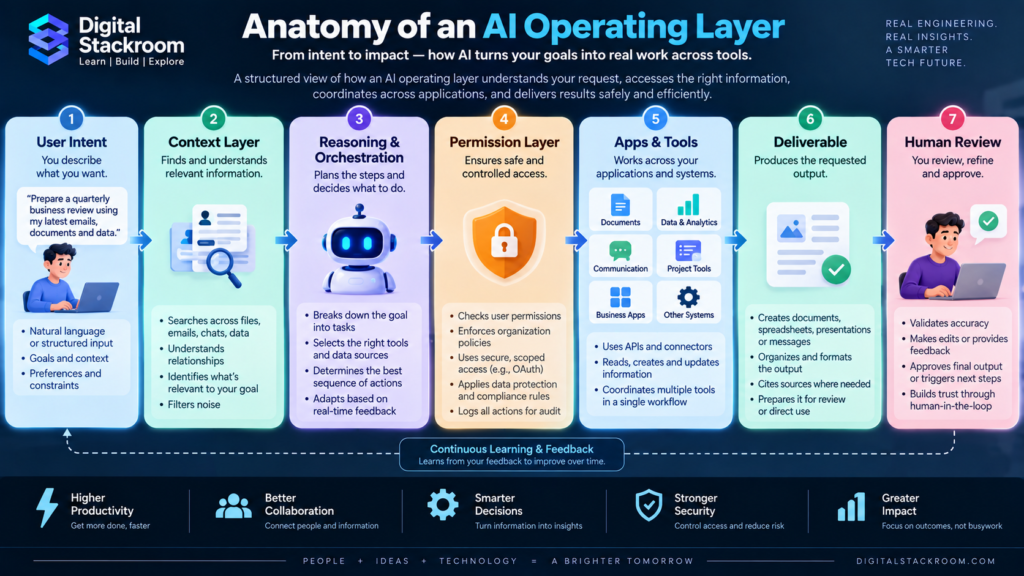
User Intent
↓
AI Orchestration Layer
- understands context
- plans actions
- selects sources
- chooses applications
- produces outputs
↓
Application Layer
- Gmail
- Drive
- Docs
- Sheets
- Slides
- Chat
- Calendar
↓
Enterprise Information
- files
- meetings
- conversations
- spreadsheets
- business knowledge
That is why Google Workspace agentic AI may be more important architecturally than another individual Gemini feature.
Workspace Intelligence Is the Context Layer
Cross-app automation is only useful if the AI knows what information matters.
Google introduced Workspace Intelligence earlier in 2026 as a unified context layer designed to understand relationships across Workspace information, including applications, projects, collaborators, and organizational knowledge.
That means the system is not limited to:
“Search this one document.”
It can increasingly reason about:
“Which information belongs to this project?”
That might include:
- people involved
- recent discussions
- related files
- deadlines
- decisions
- previous presentations
- meeting information
This is an important evolution.
Traditional search asks:
Where is the information?
AI orchestration asks:
Which information matters for the goal?
Three Layers of the New Workspace Architecture
A useful way to understand the direction is as three layers.
Layer 1 — Systems of Record
The familiar applications remain.
Examples:
Gmail
communications
Drive
files
Docs
documents
Sheets
structured information
Slides
presentations
Chat
team conversations
These systems contain the actual enterprise content.
Layer 2 — Workspace Intelligence
This provides contextual understanding.
It can connect information across:
- people
- projects
- files
- conversations
- activities
This becomes the context layer.
Layer 3 — Gemini / Agents
The agentic layer interprets user intent and performs work.
It can:
- research
- synthesize
- organize
- transform
- create
- trigger workflows
Put together:
Enterprise data
↓
Context
↓
Reasoning + orchestration
↓
Deliverable
That is a very different architecture from opening six applications manually.
Google Workspace Studio Makes the Change Even More Interesting
One-off AI assistance is only part of the story.
Google Workspace Studio lets organizations create reusable AI-powered workflows across Workspace.
Google says users can describe what they want automated in natural language, and Gemini can construct a flow using preconfigured steps. Workspace Studio can also connect to business applications through supported connectors and extensions.
For example:
“Whenever an important customer sends an escalation email, summarize the issue, save attachments to the account folder, alert the customer team in Chat, and create a follow-up task.”
That is no longer simply:
AI assistance.
It is:
AI-powered business-process execution.
Assistant vs Agent vs Automation
These concepts are often mixed together.
They are easier to understand separately.
AI Assistant
You ask:
“Summarize this email.”
The AI responds.
AI Agent
You ask:
“Investigate this project and create an executive update.”
The AI decides which information and actions are needed.
Automated Agentic Workflow
You configure:
“Every Friday, gather this week’s project information, create a status report, and notify the team.”
The system performs the process repeatedly.
These represent increasing levels of delegation.
Does This Replace Zapier, Make, or Traditional Automation?
Not necessarily.
Traditional automation and agentic automation solve overlapping but different problems.
Traditional automation works extremely well when the process is deterministic.
For example:
New form submission → create CRM record → send confirmation email
The rules are known in advance.
Traditional tools excel here.
Agentic systems become more useful when interpretation is required.
For example:
Read an incoming customer message → determine urgency → identify relevant account → decide which team should handle it → prepare context → create the appropriate response workflow
The process contains ambiguity.
AI can reason about that ambiguity.
Deterministic Automation vs Agentic Automation
| Characteristic | Traditional Automation | Agentic Automation |
|---|---|---|
| Logic | Explicit rules | Reasoning + rules |
| Best for | Predictable processes | Variable/contextual processes |
| Trigger | Known | Known or conversational |
| Steps | Predefined | May be dynamically chosen |
| Interpretation | Limited | Core capability |
| Failure behavior | Usually predictable | Less predictable |
| Governance need | High | Even higher |
| Human review | Optional | Often valuable |
The future will probably use both.
A strong architecture may look like:
Agent decides what should happen
↓
Deterministic workflow safely executes it
That combination could be more reliable than allowing AI to freely execute everything itself.
A Real Example: Customer Renewal Preparation
Consider a sales representative preparing for a renewal.
Traditional process
They manually:
- open CRM
- inspect account data
- open Gmail
- search communications
- check Drive
- find contract
- review support tickets
- open Sheets
- inspect usage
- create meeting brief
Agentic process
The employee asks:
“Prepare me for tomorrow’s Acme renewal meeting.”
The AI might:
retrieve permitted account context
↓
identify open issues
↓
summarize recent communication
↓
surface contract deadlines
↓
compile product usage
↓
create meeting brief
The user’s unit of interaction changes.
From:
application
to:
business outcome.
What This Means for SaaS Interfaces
This may become one of the biggest long-term changes.
Traditional SaaS competes heavily on user interface.
Companies invest enormously in:
- dashboards
- navigation
- search
- menus
- forms
- workflows
But imagine users increasingly asking an orchestration layer:
“Show me customers likely to churn and prepare retention plans.”
The user might never manually navigate the underlying CRM screens.
The SaaS application still matters.
It provides:
- trusted data
- APIs
- workflows
- permissions
- business logic
- transaction execution
But the interface becomes less central.
The application may increasingly become a capability provider underneath an AI layer.
From SaaS Applications to SaaS Capabilities
Traditional:
User
↓
Salesforce UI
↓
Salesforce capabilities
Future:
User
↓
AI layer
↓
Salesforce capabilities
Google Workspace capabilities
ERP capabilities
Support capabilities
Analytics capabilities
That could significantly alter software competition.
A product may eventually be judged not only by:
“How good is the UI?”
but also:
“How usable is this software by AI agents?”
The Agent-Ready SaaS Checklist
Software vendors may increasingly need:
- strong APIs
- structured metadata
- granular permissions
- agent-friendly authentication
- machine-readable capabilities
- event systems
- reliable actions
- audit trails
- reversible operations
- clear usage policies
A beautiful UI alone may not be enough.
Could Per-Seat SaaS Pricing Change?
Potentially.
This is analysis rather than a confirmed industry outcome.
Traditional SaaS pricing often assumes:
one employee = one software seat
But consider a future employee interacting primarily with an AI layer.
That AI may use:
- CRM
- project management
- accounting
- analytics
- support systems
on the employee’s behalf.
Software vendors could increasingly experiment with:
- usage pricing
- transaction pricing
- agent consumption pricing
- API pricing
- hybrid seat + consumption models
The commercial model may start changing along with the interface model.
This is a subject we should explore in a separate Digital Stackroom article.
Google Workspace Agentic AI vs ChatGPT Work
Google is not the only platform moving toward outcome-oriented computing.
OpenAI introduced ChatGPT Work in July 2026 for longer, multi-step tasks. Work can research and analyze information, operate across connected apps/files, and produce finished documents, spreadsheets, presentations, reports, and other outputs.
ChatGPT Work can also create or edit native Google Docs, Sheets, and Slides when the appropriate Workspace apps are connected and authorized.
The architectures overlap conceptually but begin from different places.
| Area | Google Workspace Agentic AI | ChatGPT Work |
|---|---|---|
| Native home | Workspace apps | ChatGPT |
| Primary context | Google Workspace | Connected apps, files, ChatGPT context |
| Interaction model | Gemini inside Workspace | Agentic workspace inside ChatGPT |
| Google Docs/Sheets/Slides | Native | Can create/edit when apps are connected |
| Cross-app work | Deep Workspace integration | Connected-app orchestration |
| Reusable automation | Workspace Studio | Work + scheduled/connected workflows |
| Main advantage | Native Workspace context | Cross-tool agent workspace |
| Admin dependency | Workspace admin controls | ChatGPT workspace/plugin controls |
Neither architecture necessarily replaces the other.
They represent two approaches.
Workspace-first model
AI embedded inside the productivity suite
Agent-first model
Productivity applications connected to the AI workspace
Which approach works better may depend on where an organization already works.
The Battle May Be Over the “Default Work Interface”
This is where the competition becomes strategically interesting.
Historically, the default work interface might have been:
- Microsoft Office
- browser tabs
- Salesforce
- Slack
- Gmail
Agentic systems introduce another candidate:
the AI conversation/task interface.
The platform that becomes the employee’s default place to say:
“Do this.”
could become enormously influential.
It sits between:
the user
and
every underlying application.
That creates leverage over discovery, workflow execution, and potentially software purchasing.
But Cross-App Agents Create New Security Problems
The same capability that makes agentic AI powerful also increases security risk.
If Gemini can work across:
- Gmail
- Drive
- Docs
- Chat
- external systems
then organizations need strict control over what information the agent may access.
Google’s current Workspace documentation says Gemini’s access is still constrained by administrator settings and the user’s existing data permissions. Content restrictions can also prevent Gemini from accessing certain files even where the user can otherwise see them.
Workspace Studio also documents least-privilege OAuth scopes for automated steps rather than granting flows unrestricted account access.
That is essential.
An orchestration layer must not become:
one AI with unrestricted access to everything.
Existing Permissions Still Matter
Imagine an employee asks:
“Summarize our acquisition strategy.”
If that employee cannot access:
Confidential_Acquisition_Strategy.docx
the agent should not magically bypass the restriction.
Google says Workspace Gemini generally operates within the user’s existing access boundaries, while admins can further restrict Workspace data use.
That means AI does not eliminate IAM.
It makes IAM even more important.
Poorly designed permissions become much easier for agents to exercise at scale.
Agentic AI Makes Data Hygiene More Important
Another issue is information quality.
Imagine Workspace contains:
- outdated strategy document
- current strategy document
- duplicated spreadsheet
- abandoned proposal
- incorrect draft
A human may recognize which one is current.
An AI orchestration layer may need stronger signals.
Organizations will need better:
- document ownership
- version management
- metadata
- naming conventions
- retention policies
- access controls
The quality of agent output depends partly on the quality of enterprise information.
AI can expose information disorder that employees previously worked around manually.
Where Cross-App AI Still Fails
Agentic productivity is promising, but organizations should not assume every multi-step task should be delegated.
There are several areas where human review remains important.
Ambiguous Requirements
“Prepare the best strategy.”
The definition of “best” may not be obvious.
Conflicting Sources
Two documents may contain different numbers.
The AI needs a way to determine which source is authoritative.
High-Stakes Decisions
Examples:
- employment decisions
- financial approvals
- legal actions
- security changes
Human judgment may remain mandatory.
Irreversible Actions
Deleting data or sending sensitive information requires stronger controls than drafting a document.
Poorly Structured Systems
An agent cannot reliably orchestrate systems it cannot securely understand or interact with.
The Delegation Risk Matrix
Digital Stackroom’s practical framework is to classify tasks by:
reversibility
and
business impact.
| Task | Reversible? | Impact | Delegation approach |
|---|---|---|---|
| Summarize email | Yes | Low | Fully delegate |
| Create draft Doc | Yes | Low | Fully delegate |
| Build first-draft presentation | Yes | Low | Delegate + review |
| Send internal update | Mostly | Medium | Review before send |
| Update CRM | Usually | Medium | Controlled agent action |
| Send customer contract | Difficult | High | Human approval |
| Approve payment | Difficult | High | Strong human control |
| Delete production data | No | Very high | Do not freely delegate |
The principle is straightforward:
The harder an action is to reverse, the stronger the approval requirement should be.
Which Work Should You Delegate to Workspace Agents?
Use this five-question framework.
1. Is the task repetitive?
If yes, automation potential is high.
2. Is the source information available digitally?
If information lives across Workspace, AI can potentially gather it.
3. Can the output be reviewed?
Draft reports and presentations are good candidates because humans can inspect them.
4. Is the action reversible?
The easier it is to undo, the safer agent delegation becomes.
5. Can success be measured?
Examples:
- correct fields populated
- report created
- email drafted
- action items extracted
Measurable results make automation easier to evaluate.
Best Early Use Cases
Organizations beginning with Google Workspace agentic AI should start with tasks like:
Meeting Follow-Up
Meeting notes
↓
identify action items
↓
create task list
↓
draft follow-up email
Executive Updates
Gather status from:
- emails
- Docs
- project files
↓
create summary
↓
build presentation
Research Briefs
Gather permitted Workspace information
↓
organize evidence
↓
create structured Doc
Inbox Triage
Analyze email context
↓
identify priority
↓
label or route
Document Transformation
Proposal
↓
executive summary
↓
presentation
↓
email draft
These tasks produce measurable outputs without immediately giving AI control over high-risk systems.
What Changes for Employees?
The biggest skill shift may be from:
application navigation
toward:
task specification.
Employees may increasingly need to communicate:
- desired outcome
- audience
- constraints
- data sources
- expected format
- approval boundaries
For example, instead of:
“Open Sheets and calculate…”
the skill becomes:
“Create a comparison of our three vendor proposals using cost, implementation time, security, and support. Highlight assumptions and place anything uncertain in a separate section.”
The employee becomes more like the manager of the workflow.
The New Productivity Skill: Delegation
Prompt engineering may eventually be too narrow a description.
The deeper skill is delegation engineering.
Good delegation includes:
Objective
What should happen?
Context
What information matters?
Constraints
What must not change?
Authority
What may the agent do?
Output
What does completion look like?
Verification
How will we know it is correct?
That skill applies regardless of whether the tool is Gemini, ChatGPT, Copilot, or another agent platform.
What Changes for IT Administrators?
Admins move from managing only:
users + applications
toward:
users + applications + agents + workflows.
New responsibilities include:
- which agents are allowed
- which connectors agents may use
- which OAuth scopes flows receive
- what data agents can access
- which actions require review
- monitoring agent activity
- suspending risky flows
Google has already added controls around agent access management and DLP for Workspace Studio workflows.
That indicates that AI orchestration is becoming an administrative discipline, not simply an end-user feature.
What Changes for SaaS Buyers?
Procurement may eventually ask different questions.
Traditional questions:
- How many seats?
- What integrations exist?
- Is SSO supported?
- What does the UI look like?
Emerging questions:
- Can our agents use this product?
- Are actions exposed through APIs?
- How granular are permissions?
- Can AI use the product without sharing admin credentials?
- Can activity be audited?
- Are actions reversible?
- Does the application support our orchestration platform?
Agent-readiness may become a procurement criterion.
What Changes for SaaS Vendors?
Software companies should increasingly think beyond:
“How do humans use our product?”
and ask:
“How will agents use our product safely?”
That means exposing:
- structured actions
- authentication
- granular permission scopes
- event interfaces
- audit logs
- clear error states
- machine-readable documentation
The next generation of SaaS may have two interfaces:
human interface
and
agent interface.
Why This Matters for Digital Stackroom’s Monetization Strategy
This topic also creates a strong future commercial-content cluster.
From this article we can naturally build articles such as:
- Best AI Productivity Platforms for Teams
- Google Workspace Gemini vs Microsoft 365 Copilot
- ChatGPT Work vs Gemini Workspace
- Zapier vs Make vs Workspace Studio
- Best Agentic Automation Platforms
- Best AI Tools for Small Businesses
- Google Workspace Plans Compared
- Best Workflow Automation Tools
Those comparison pages can eventually contain legitimate affiliate relationships where available, while this article remains the informational traffic/authority page.
The model becomes:
Current analysis article
↓
Evergreen educational content
↓
Tool comparison
↓
Detailed review
↓
Affiliate conversion
That gives Digital Stackroom a healthier monetization model than stuffing affiliate links into every news story.
A Practical Adoption Plan
Organizations interested in cross-app agents should avoid enabling everything immediately.
Phase 1 — Drafting
Use agents for:
- summaries
- email drafts
- documents
- presentations
No consequential automated actions.
Phase 2 — Information Gathering
Allow approved Workspace search across:
- Drive
- Gmail
- Chat
Measure accuracy.
Phase 3 — Low-Risk Automation
Examples:
- labeling
- task creation
- internal notifications
- file organization
Phase 4 — Agentic Workflows
Introduce Workspace Studio flows.
Add:
- monitoring
- access controls
- owners
- error handling
Phase 5 — External Applications
Connect agents to:
- CRM
- ticketing
- analytics
- project management
Only after governance is mature.
Metrics That Actually Matter
Don’t evaluate the rollout simply by:
number of employees using Gemini.
Measure outcomes.
| Metric | Why it matters |
|---|---|
| App switches avoided | Measures workflow simplification |
| Time to deliverable | Measures productivity |
| Human edits required | Measures output quality |
| Agent success rate | Measures reliability |
| Errors requiring correction | Measures risk |
| Automated workflows | Measures adoption |
| Approval frequency | Shows risk profile |
| Time saved per workflow | Measures business value |
| User satisfaction | Measures actual usefulness |
The objective is not:
“Use more AI.”
It is:
Complete useful work with less friction while maintaining quality and control.
The Larger SaaS Shift
The most interesting interpretation of Google Workspace agentic AI is not that Gemini can create a slide deck from Chat.
It is that software interaction may be moving toward a new abstraction.
Computing evolved from:
command lines
↓
graphical user interfaces
↓
web applications
↓
mobile apps
Now we may be entering:
intent-driven interfaces
Instead of telling software:
“Click this, open that, copy this.”
we increasingly tell it:
“Here is the outcome I want.”
The orchestration system handles the intermediate steps.
If that becomes reliable enough, it will change how enterprise software is designed.
Applications Will Not Disappear
It is tempting to predict that agents will replace apps.
That is unlikely in the near term.
Humans still need:
- visual exploration
- detailed editing
- review
- collaboration
- auditing
- exception handling
Apps remain valuable.
What may disappear is the need to manually visit every app involved in every workflow.
That is a much more realistic shift.
The Winning SaaS Products May Become Invisible
There is an interesting paradox.
A highly valuable software product may increasingly be used without the employee directly seeing its interface.
An AI agent may call it in the background.
The product still provides enormous value.
But its value comes from:
data + capabilities + reliability + trust
rather than screen time.
That could fundamentally change SaaS marketing and product metrics.
“Daily active users” may eventually need a companion metric:
daily active agents.
Frequently Asked Questions
What is Google Workspace agentic AI?
Google Workspace agentic AI refers to Gemini-powered capabilities that can reason across Workspace context and perform multi-step work using applications such as Gmail, Drive, Docs, Sheets, Slides, and Chat.
Can Gemini work across multiple Workspace applications?
Yes.
Google’s September 2026 announcement describes workflows where Gemini uses context across Workspace applications to create documents, spreadsheets, presentations, and messages.
What is Workspace Intelligence?
Workspace Intelligence is Google’s context layer designed to create a unified understanding of relevant Workspace information, projects, collaborators, and organizational knowledge.
What is Google Workspace Studio?
Workspace Studio is Google’s platform for creating, managing, and sharing AI-powered automated workflows within Workspace using natural-language instructions and predefined workflow steps.
Is Workspace Studio available now?
Google currently describes Workspace Studio as generally available with Business and Enterprise Workspace plans.
Does Gemini automatically have access to everything in Workspace?
No.
Google says Gemini’s Workspace access is constrained by the user’s existing access and administrator controls. Content owners and admins can further restrict access in certain cases.
Is ChatGPT Work similar?
There is conceptual overlap.
ChatGPT Work can perform longer multi-step tasks across connected apps and files and create finished artifacts such as documents, spreadsheets, presentations, and reports. It can also work with Google Workspace files when the relevant apps are connected.
Will agents replace workflow automation tools?
Not necessarily.
Deterministic automation remains highly effective for predictable processes. Agents are particularly useful where interpretation, reasoning, or variable context is involved.
Will agents replace SaaS applications?
Probably not soon.
More likely, agents will become another interface through which users access SaaS capabilities.
Final Thoughts
The biggest change in productivity software may not be a better email generator or a smarter spreadsheet.
It may be the disappearance of the application boundary from the user’s mental workflow.
Today we think:
Gmail → Docs → Sheets → Slides
Tomorrow we may increasingly think:
“Prepare the quarterly business review.”
The agent determines which systems are required.
That is why Google Workspace agentic AI is worth watching.
Google is gradually turning Gemini from an assistant inside individual applications into an orchestration layer across the productivity suite.
Workspace Intelligence provides context.
Workspace applications provide data and capabilities.
Gemini provides reasoning.
Workspace Studio makes workflows reusable.
Together, they point toward a different way of working:
App-Centric Work
↓
AI-Orchestrated Work
↓
Task-Centric Work
This does not mean applications disappear.
It means applications may increasingly become infrastructure beneath an intelligent interface.
And if users eventually spend less time choosing applications and more time describing outcomes, the next major competition in enterprise software may not be:
Which SaaS application has the best interface?
It may be:
Which AI layer can most reliably coordinate all the software underneath it?
That could reshape productivity, automation, SaaS design, pricing, procurement, and the way knowledge workers interact with computers.
And we may already be watching that transition begin.