
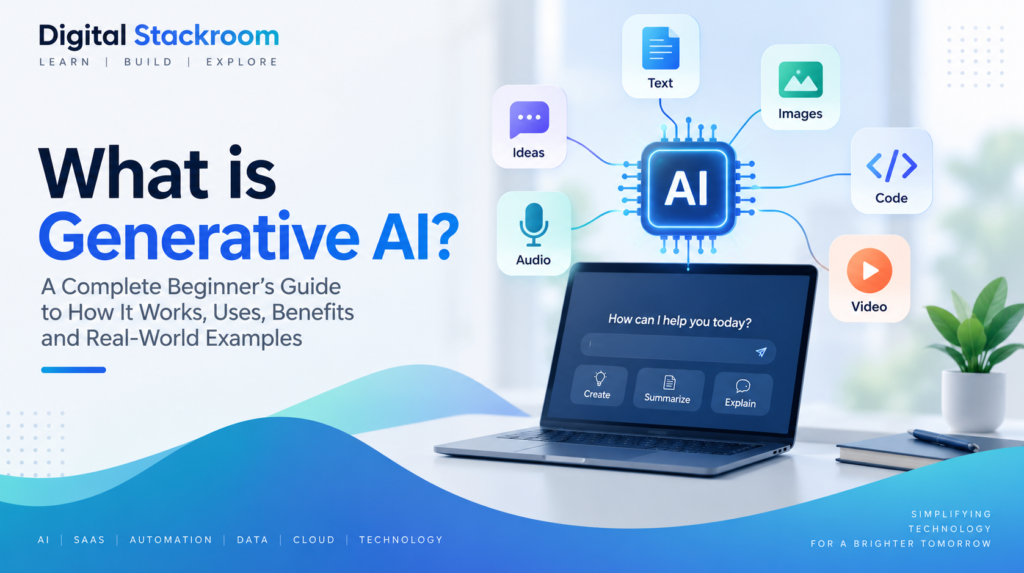
Generative AI is a type of artificial intelligence that can create new content such as text, images, audio, video, code, and other digital information. Instead of only analyzing existing data, generative AI learns patterns from large datasets and uses those patterns to produce new outputs based on instructions from a user.
If you are wondering what is generative AI, how it works, and why tools such as ChatGPT, Gemini, Claude, and image generators have become so widely used, this guide explains the technology in simple terms. We will also look at common applications, benefits, limitations, and real-world examples.
Table of Contents
What Is Generative AI?
Generative AI is a branch of artificial intelligence designed to create new content rather than simply classify, search, or analyze existing information. It can generate text, images, software code, music, video, summaries, designs, and many other types of digital output.
Understanding what is generative AI starts with recognizing that these systems are designed to create new outputs rather than only analyze existing information.
The system does not usually copy a single piece of information from its training data. Instead, it learns statistical patterns, relationships, structures, and styles from large collections of examples. When a user provides a prompt, the model uses what it has learned to generate a new response that matches the request.
For example, a generative AI system can write an email from a short instruction, create an image from a description, explain a complex technical concept, generate computer code, summarize a long document, or help brainstorm ideas.
For a deeper technical overview, IBM explains how generative AI models learn patterns from large datasets and use those patterns to generate new content.
How Does Generative AI Work?
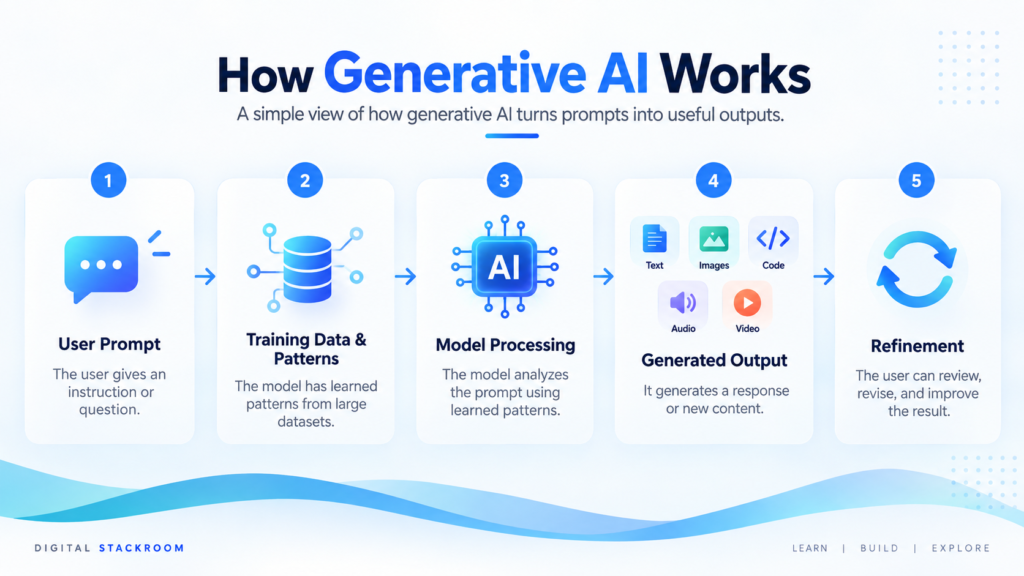
Generative AI models are trained on large amounts of data so they can learn patterns and relationships within that information. Depending on the model, the training data may include text, images, code, audio, video, or a combination of different formats.
To understand what is generative AI in practice, it helps to look at how models learn patterns from training data and use those patterns to generate new responses.
During training, the model learns how different pieces of information relate to each other. For example, a language model learns which words and phrases commonly appear together, while an image model learns visual patterns such as shapes, colors, textures, and object relationships.
1. Training on Large Datasets
The first step is training. A model is exposed to a very large dataset and learns statistical patterns from that data. It does not memorize every example in the same way a person might memorize a document. Instead, it develops a mathematical representation of patterns that helps it generate new outputs.
2. Understanding the Prompt
When a user enters a prompt, the model analyzes the instruction and the context around it. The quality and clarity of the prompt can influence how useful, accurate, or relevant the response is.
3. Generating the Output
The model then predicts and generates an output based on the patterns it learned during training. In text generation, this often involves predicting the next likely token or word sequence. In image generation, the model constructs visual content that matches the description provided by the user.
4. Refining the Response
Many modern generative AI systems can improve their responses through additional training, feedback, safety techniques, and alignment methods. Users can also refine the result by providing more detailed prompts, examples, constraints, or follow-up instructions.
Common Types of Generative AI
Text Generation
Text-generation models can create written content based on natural-language instructions. They are commonly used for drafting emails, writing articles, summarizing documents, answering questions, brainstorming ideas, translating text, and assisting with research.
Image Generation
Image-generation models create visuals from text prompts or other images. They can be used for illustrations, marketing creatives, concept art, product mockups, social media graphics, and design experimentation.
Code Generation
Code-generation models help developers write, explain, debug, and improve software code. They can also generate SQL queries, documentation, test cases, and example implementations from natural-language instructions.
Audio and Music Generation
Generative AI can also create speech, music, sound effects, and other forms of audio. These systems are increasingly used for voiceovers, content production, accessibility, entertainment, and audio prototyping.
Video Generation
Video-generation models can create or modify video content using text prompts, images, or existing footage. They can support tasks such as concept videos, marketing content, visual storytelling, animation, and creative experimentation.
Multimodal AI
Multimodal AI systems can work with more than one type of input or output, such as text, images, audio, and video. For example, a multimodal system may be able to analyze an uploaded image, answer questions about it, generate text, and produce related visual content within the same workflow.
Real-World Examples of Generative AI
AI Writing Assistants
Generative AI writing assistants can help users draft emails, create summaries, rewrite text, brainstorm ideas, prepare presentations, and explain complex topics. Tools such as ChatGPT, Claude, and Gemini are commonly used for these types of tasks.
AI Image Generators
Image-generation tools can turn text descriptions into original visuals. They are useful for creating illustrations, design concepts, social media graphics, marketing assets, and creative prototypes.
AI Coding Assistants
Developers can use generative AI to write code, explain unfamiliar functions, generate test cases, create SQL queries, and troubleshoot programming errors. These tools are often used as assistants rather than complete replacements for software development expertise.
AI for Business Productivity
Businesses can use generative AI to summarize meetings, draft reports, create customer-response templates, generate internal documentation, analyze written feedback, and support knowledge-management workflows.
AI in Education
Generative AI can help explain difficult topics, create practice questions, provide examples, summarize learning materials, and support personalized learning. Its output should still be reviewed carefully, especially when accuracy is important.
AI for Marketing and Content Creation
Marketing teams can use generative AI to develop campaign ideas, draft social media posts, create ad variations, prepare product descriptions, and generate visual concepts. Human review remains important for brand accuracy, factual correctness, and originality.
Benefits of Generative AI
Faster Content Creation
Generative AI can significantly reduce the time required to produce first drafts of emails, reports, presentations, articles, code, images, and other digital content. Instead of starting from a blank page, users can begin with an AI-generated draft and refine it.
Improved Productivity
AI assistants can handle repetitive or time-consuming tasks such as summarizing documents, formatting information, generating templates, and drafting routine communications. This can free up more time for analysis, decision-making, and creative work.
Easier Access to Information
Generative AI can explain complex topics in simpler language, summarize large amounts of information, and answer follow-up questions in a conversational format. This can make technical or specialized information easier to understand.
Personalization
Generative AI can adapt content to different audiences, tones, languages, formats, and levels of detail. Businesses can use this capability to create more personalized communications, learning materials, support responses, and user experiences.
Support for Creativity
AI can help users generate ideas, explore alternatives, create variations, and overcome creative blocks. Designers, writers, marketers, developers, and other professionals can use it as a brainstorming and experimentation tool.
Faster Prototyping
Generative AI can help teams create early versions of software, designs, marketing concepts, workflows, and content more quickly. These prototypes can then be reviewed, tested, and improved before investing more time or resources.
Limitations and Risks of Generative AI
Inaccurate or Fabricated Information
Generative AI can sometimes produce information that sounds confident but is incorrect, incomplete, or entirely fabricated. This is often referred to as a hallucination. For important decisions, users should verify facts using reliable sources instead of assuming every AI-generated response is accurate.
Bias in AI Outputs
AI models learn from large datasets, which may contain social, cultural, or historical biases. As a result, generated content can sometimes reflect or amplify those biases. Careful review and responsible model design are important when AI is used in sensitive or high-impact situations.
Privacy and Data Security
Users should avoid entering confidential, personal, or sensitive information into AI tools unless they understand how that data is stored, processed, and protected. Businesses should also establish clear policies for how employees use generative AI with company information.
Copyright and Ownership Questions
Generative AI can raise questions about copyright, training data, and ownership of generated content. Rules can vary by country, platform, and use case, so businesses and creators should review the terms of the tools they use and seek legal guidance when necessary.
Over-Reliance on AI
Generative AI is most effective when used as an assistant rather than as a replacement for human judgment. Relying on AI without reviewing its output can lead to errors, poor decisions, and lower-quality work.
Security and Misuse
Like many technologies, generative AI can be misused for activities such as creating misleading content, impersonation, phishing, or automated misinformation. AI providers and organizations continue to develop safeguards to reduce these risks, but responsible use remains important.
Generative AI vs Traditional AI
Traditional AI systems are generally designed to analyze data, recognize patterns, make predictions, or support decisions. Generative AI goes a step further by creating new content based on the patterns it has learned.
| Aspect | Traditional AI | Generative AI |
| Primary purpose | Analyze, classify, or predict | Create new content |
| Typical output | Scores, labels, recommendations | Text, images, code, audio, video |
| Example use | Fraud detection | Writing an email |
| User interaction | Often task-specific | Often conversational or prompt-based |
| Creativity | Limited | Can generate new variations |
The two approaches are not mutually exclusive. Many modern AI systems combine predictive capabilities with generative features to create more useful applications and workflows.
How Businesses Are Using Generative AI
Customer Support
Businesses can use generative AI to draft support responses, summarize customer conversations, classify requests, and help support teams find relevant information more quickly. AI-generated responses should still be reviewed when accuracy or customer impact is important.
Marketing and Sales
Marketing and sales teams can use generative AI to draft campaign copy, create personalized outreach, generate product descriptions, summarize customer research, and develop content ideas for different audiences.
Data and Analytics
Analysts can use generative AI to explain data, generate SQL queries, summarize findings, prepare reports, and translate technical results into clearer business language. Human validation remains important, especially for calculations and business-critical decisions.
Software Development
Development teams can use generative AI to generate code, explain unfamiliar codebases, write documentation, create tests, debug errors, and accelerate prototyping. Developers still need to review generated code for correctness, security, and performance.
Internal Knowledge Management
Organizations can use generative AI to summarize documents, answer questions from internal knowledge bases, prepare onboarding materials, and make large collections of company information easier to search and understand.
Workflow Automation
Generative AI can be combined with automation platforms to create workflows that classify information, generate responses, summarize inputs, and trigger actions across different business systems.
How to Start Using Generative AI
Start With One Clear Use Case
You do not need to transform your entire workflow at once. Start with one repetitive or time-consuming task where AI could provide immediate value.
For example, you might use generative AI to summarize meeting notes, draft an email, explain a technical concept, brainstorm ideas, create an outline, or generate a first version of a report.
Starting small makes it easier to understand what the technology does well and where human review is still required.
Choose the Right AI Tool
Different generative AI tools are designed for different types of work. Some focus primarily on text and research, while others specialize in images, software development, audio, video, or automation.
Before selecting a tool, consider what you actually want to accomplish rather than choosing a platform simply because it is popular.
For example, a developer may prioritize coding assistance, while a marketing team may care more about writing, research, and creative generation.
Write Clear Prompts
The instructions you give an AI system are commonly called prompts. Clear prompts usually produce better results than vague requests.
Instead of writing:
Write something about cloud computing.
A more useful prompt might be:
Explain cloud computing to a beginner in approximately 500 words. Include simple examples of IaaS, PaaS, and SaaS and avoid overly technical language.
Providing the audience, goal, format, context, and constraints helps the model understand what you expect.
Add Context
Generative AI works better when it understands the context surrounding a task.
For example, if you want help drafting an email, explain who the recipient is, what the message should accomplish, what tone you want, and any important details that must be included.
Similarly, when asking AI to analyze information, provide enough background for it to understand the problem rather than expecting it to infer everything automatically.
Review and Verify the Output
AI-generated content should not automatically be treated as correct.
Check important facts, calculations, citations, technical instructions, and recommendations before using them. This is especially important for financial, legal, medical, security, and business-critical information.
Think of generative AI as an assistant that helps accelerate work rather than an unquestionable source of truth.
Protect Sensitive Information
Avoid entering confidential business information, passwords, personal data, customer information, proprietary source code, or other sensitive material unless your organization has approved the AI system for that purpose.
Before using generative AI at work, understand your company’s security policies and the data-handling practices of the AI platform.
Improve Through Iteration
You do not need to create the perfect prompt on your first attempt.
If the result is too long, ask the AI to shorten it. If it is too technical, ask for a simpler explanation. If important information is missing, provide additional context.
Working iteratively is one of the most effective ways to use generative AI.
Best Practices for Using Generative AI
Generative AI becomes more useful when it is incorporated into a thoughtful workflow rather than used without oversight.
Be Specific About the Desired Result
Tell the model what you want, who the output is intended for, and how you want the information structured.
Specific instructions reduce ambiguity and usually improve the quality of the response.
Use AI for Drafting, Not Blind Publishing
AI-generated content is often most valuable as a starting point.
Review the output, add your own expertise, verify factual claims, improve examples, and adjust the tone before publishing or sharing important material.
Ask for Structured Outputs
When appropriate, ask the model to return information as a table, checklist, step-by-step process, comparison, JSON structure, or another useful format.
Structured outputs can make AI-generated information easier to understand and integrate into existing workflows.
Keep Humans in the Decision Process
Important business, hiring, financial, legal, safety, or operational decisions should not rely solely on automatically generated AI recommendations.
Human judgment remains important for understanding context, evaluating consequences, and handling situations the model may not fully understand.
Measure Whether AI Actually Helps
Using AI does not automatically improve productivity.
For repeatable workflows, evaluate whether AI saves time, improves quality, reduces manual effort, or creates measurable value. If it introduces additional review work without a meaningful benefit, the workflow may need to be redesigned.
The Future of Generative AI
Generative AI is evolving from simple text-generation tools into broader systems capable of understanding and producing multiple types of information.
Modern AI systems increasingly work across text, images, code, audio, video, documents, and structured data. This enables users to interact with technology in more natural ways and allows AI to participate in increasingly complex workflows.
Another major development is the integration of generative AI with business applications and automation systems. Instead of simply answering a question, AI systems can help analyze information, prepare content, interact with software, and support multi-step tasks.
Organizations are also developing smaller and more specialized AI models for particular industries, workflows, and datasets. In many cases, specialized systems may be more practical than relying on one general-purpose model for every task.
At the same time, issues involving accuracy, privacy, security, copyright, transparency, and responsible AI use will continue to be important as adoption increases.
Generative AI is unlikely to eliminate the need for human expertise. Instead, many roles are likely to evolve around people working alongside AI systems to complete tasks more efficiently.
Frequently Asked Questions About Generative AI
What is generative AI in simple terms?
Generative AI is artificial intelligence that can create new content based on instructions from a user. That content can include text, images, software code, audio, video, and other digital information.
Is ChatGPT generative AI?
Yes. ChatGPT is an example of a generative AI application designed primarily around language-based interactions. It can generate and transform text, answer questions, summarize information, help with coding, and assist with many other tasks.
Is generative AI the same as artificial intelligence?
No. Artificial intelligence is a broad field that includes many different technologies.
Generative AI is one category within AI that focuses on generating new content. Other AI systems may instead classify information, detect patterns, make predictions, optimize decisions, or recognize objects.
What can generative AI be used for?
Common uses include writing, summarization, research assistance, brainstorming, software development, image creation, customer support, data analysis, documentation, workflow automation, education, marketing, and content production.
Can generative AI make mistakes?
Yes.
Generative AI can produce inaccurate, outdated, misleading, or fabricated information. Important outputs should therefore be reviewed and verified before they are used.
Will generative AI replace jobs?
Generative AI is likely to automate parts of many jobs rather than simply replacing every role that uses it.
Some repetitive tasks may become increasingly automated, while other jobs may change as employees use AI to work faster or focus on higher-value activities. The effect will differ across industries and occupations.
Do I need technical skills to use generative AI?
Not necessarily.
Many generative AI applications are designed for people to interact with them using normal language. However, understanding how to provide good instructions, verify results, protect sensitive information, and use the output appropriately can significantly improve the experience.
Is generative AI free to use?
Some generative AI services offer free access, while others provide paid subscriptions, usage-based pricing, or enterprise plans.
Pricing and available features vary significantly between tools and may change over time.
Final Thoughts
Generative AI represents an important shift in how people interact with technology.
Instead of requiring users to manually create every piece of content or perform every step of a digital task, generative AI can provide drafts, suggestions, explanations, designs, code, summaries, and other useful outputs within seconds.
The technology can improve productivity, accelerate learning, support creativity, and automate parts of existing workflows. However, its outputs still require thoughtful human review.
The most effective approach is not to treat generative AI as a replacement for human knowledge. It is better viewed as a powerful assistant that can help people move faster while humans remain responsible for accuracy, judgment, and final decisions.
If you are still asking what is generative AI, the simplest answer is that it is AI designed to generate new content from patterns learned during training.
As generative AI continues to evolve, learning how to use it effectively will become an increasingly valuable digital skill for individuals and businesses alike.
Continue exploring Digital Stackroom for more practical AI guides, SaaS reviews, automation tutorials, data insights, cloud computing, and modern technology.